

Credential Plans
The FortiEdge Cloud Credential Plan page lets you create credential plans to configure device account credentials and apply them to profiles and individual devices. This allows to you add additional users and allow admin access to the CLI and GUI of the FortiExtender if it is reachable on the internet or across the network. You can use credential plans to assign a username, password, and account profile types. You can create credential plans to set a device account profile with username and password permissions. After creating a credential plan, you can apply it to a profile or individual device.
Note: To synchronize the FortiExtender username and password from the cloud after a factory reset is initiated, You must create at least one credential plan associated with super_admin accprofile. Set the name of the plan to admin (login username) and then set the trusted hosts (or not, if they want to allow log ins over networks from any source address). Set an accProfile in the same credential plan. Once the profile is saved, the username/password is sent to the device every time a factory reset is initiated.
-
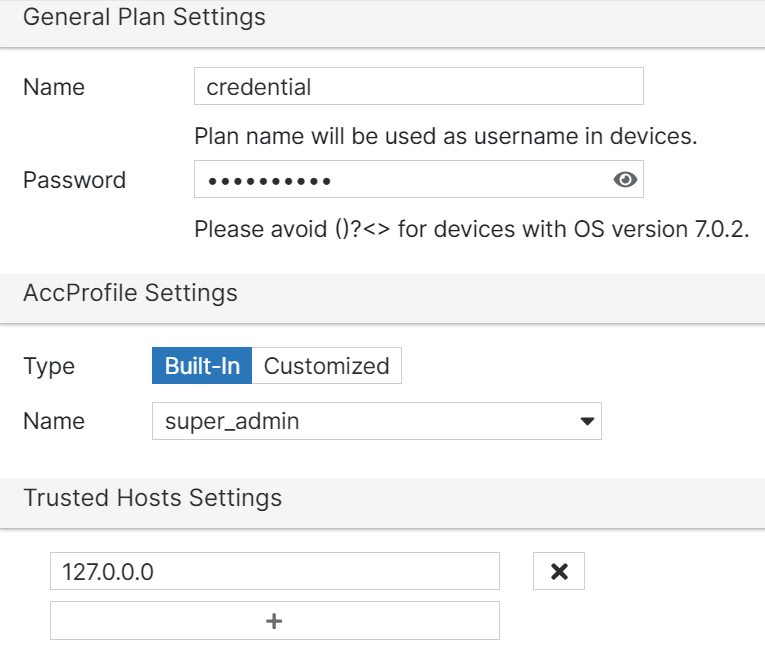
Navigate to Plans > Credential and click Add.
-
Configure the following settings.
Field Name
Description
Name
Enter a username for accessing FortiExtender devices associated with the credential plan. This allows you to access the device CLI console and local GUI.
Password
Enter a password for accessing FortiExtender devices associated with the credential plan. This allows you to access the device CLI console and local GUI.
AccProfile Settings
Type
Select the account profile type you want.
-
built-in — Use a pre-built Account Profile.
-
customized — Manually customize the account profile.
Name
Select the type of access you want to grant to the plan.
If you selected a built-in account profile type, you can select between:
-
no_access — No access is granted.
-
super_admin — Grant super administrator access.
If you selected a customized account profile type, you must select an existing account profile name.
Trusted Hosts Settings
Trusted Host
Edit the address of your Trusted Hosts. Administrators of the hosts can connect to the FortiExtender device via the IP/network. You can specify any IPv4 address or subnet address and netmask from which an administrator can connect to the FortiExtender.
Affected Devices and Profiles
Devices
Lists the devices associated with the credential plan.
Profiles
Lists all the profiles associated with the credential plan.
Carrier Plan
Lists all the carrier plans using the credential plan.
-
After you create a credential plan, you can view the plan's configurations, modify them as required, or delete them. Select a plan and click Edit or Delete for any of these operations.
Note:
-
You cannot delete credential plans that are associated with a device or a profile. You must first re-assign each device or profile to a new credential plan before you can delete the old plan.
-
If a credential plan is being used in any Carrier Plan configuration, then the credential plan cannot be deleted but can be renamed.