
Fortinet white logo
Fortinet white logo

New Features

Support fast failover for FortiExtender 7.4.4

Support fast failover for FortiExtender 7.4.4

Note

This information is also available in the FortiExtender 7.4.4 Managed Administration Guide:

This enhancement ensures that FortiGate can swiftly recover data sessions in the event of a failover. You can set a FortiExtender up with two sessions, Active and Standby, which are each associated with a primary and secondary FortiGate.

Upon receiving a failover notification, FortiExtender switches the Standby session associated with the now primary Access Controller (AC) to Active, and the Active session associated with the previous primary AC to Standby.

Example topology
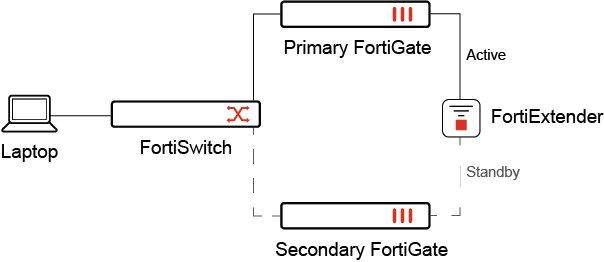
FGT-Primary: FG81EPTK19001876

FGT-Secondary: FG81EPTK18005653

Example FortiGate fast failover configuration for FortiExtender:
  1. On the FortiGate, the FortiExtender data port is set to the 25246 data channel when it sends traffic via FortiExtender in WAN-extension mode.

    FGT-Primary (global) (Interim)# sh full | grep 5246
        set fortiextender-data-port 25246
        set wireless-controller-port 5246
    
  2. When both primary and secondary FortiGates are connected, the FortiExtender sets up two sessions: Active and Standby.

  3. Upon successful connection, the FortiExtender status shows the connected FortiGates' names in the controller-name field.

    • The Active session uses data channel 25246, with the controller set to FGT-Primary (FG81EPTK19001876).

    • The Standby session uses data channel 25248, with the controller set to FGT-Secondary (FG81EPTK18005653).

    FVA22FTF23000004 # get extender status 
    Extender Status
        name                 : FVA22FTF23000004
        mode                 : CAPWAP
        session              : active
          fext-addr          : 192.168.200.99
          ingress-intf       : lan
          fext-wan1-addr     : 25.249.127.198
          fext-wan2-addr     : 0.0.0.0
          controller-addr    : 192.168.200.110:5246,25246
          controller-name    : FG81EPTK19001876
          uptime             : 0 days, 0 hours, 38 minutes, 12 seconds
          management-state   : CWWS_RUN
        session              : standby
          fext-addr          : 192.168.200.99
          ingress-intf       : lan
          fext-wan1-addr     : 25.249.127.198
          fext-wan2-addr     : 0.0.0.0
          controller-addr    : 192.168.200.110:5248,25248
          controller-name    : FG81EPTK18005653
          uptime             : 0 days, 0 hours, 20 minutes, 29 seconds
          management-state   : CWWS_RUN
        base-mac             : 74:78:A6:8B:52:F8
        network-mode         : ip-passthrough (capwap)
    
  4. The FortiGate with the data channel of 25246 connects to the FortiExtender active session for Primary (25246) if the Primary session is alive.

    FGT-Primary (Interim)# get extender datachannel-info 
    received 1 peer info
     indev=wan1, remote=192.168.200.99:25246, local=192.168.200.110:25246, last_rx=0
    
To verify that fast failover is configured correctly:

If the FGT-Primary is suddenly shut down, the following steps occur:

  1. The FortiExtender active session switches to using FGT-Secondary.

    FVA22FTF23000004 # get extender status 
    Extender Status
        name                 : FVA22FTF23000004
        mode                 : CAPWAP
        session              : standby
          fext-addr          : 192.168.200.99
          ingress-intf       : lan
          fext-wan1-addr     : 25.249.127.198
          fext-wan2-addr     : 0.0.0.0
          controller-addr    : 0.0.0.0:5248,25248
          controller-name    : FG81EPTK19001876
          management-state   : CWWS_SULKING
        session              : active
          fext-addr          : 192.168.200.99
          ingress-intf       : lan
          fext-wan1-addr     : 25.249.127.198
          fext-wan2-addr     : 0.0.0.0
          controller-addr    : 192.168.200.110:5246,25246
          controller-name    : FG81EPTK18005653
          uptime             : 0 days, 0 hours, 25 minutes, 13 seconds
          management-state   : CWWS_RUN
        base-mac             : 74:78:A6:8B:52:F8
        network-mode         : ip-passthrough (capwap)
    
  2. This means the acting FortiGate on data channel 25246 now connects to the FortiExtender active session for Secondary (25248).

    FGT-Secondary (Interim)# get extender datachannel-info 
    received 1 peer info
     indev=wan1, remote=192.168.200.99:25248, local=192.168.200.110:25246, last_rx=1
    

    There is minimum disruption to services and ping traffic is only interrupted for 8-24 seconds.

  3. When the FGT-Primary powers up again, the FGT-Secondary still remains as the active FortiGate.

If the FGT-Secondary is suddenly shut down, the following steps occur:

  1. The FortiExtender active session connects to FGT-Primary (FG81EPTK19001876).

    FVA22FTF23000004 # get extender status 
    Extender Status
        name                 : FVA22FTF23000004
        mode                 : CAPWAP
        session              : active
          fext-addr          : 192.168.200.99
          ingress-intf       : lan
          fext-wan1-addr     : 25.249.127.198
          fext-wan2-addr     : 0.0.0.0
          controller-addr    : 192.168.200.110:5246,25246
          controller-name    : FG81EPTK19001876
          uptime             : 0 days, 0 hours, 2 minutes, 52 seconds
          management-state   : CWWS_RUN
        session              : standby
          fext-addr          : 192.168.200.99
          ingress-intf       : lan
          fext-wan1-addr     : 25.249.127.198
          fext-wan2-addr     : 0.0.0.0
          controller-addr    : 192.168.200.110:5248,25248
          controller-name    : FG81EPTK18005653
          management-state   : CWWS_SULKING
        base-mac             : 74:78:A6:8B:52:F8
        network-mode         : ip-passthrough (capwap)
    
  2. This means the acting FortiGate on data channel 25246 connects to the FortiExtender active session for Primary (25246).

    FGT-Primary (Interim)# get extender datachannel-info 
    received 1 peer info
     indev=wan1, remote=192.168.200.99:25246, local=192.168.200.110:25246, last_rx=0
    

    There is minimum disruption to services and ping traffic is only interrupted for 0 seconds.

Support fast failover for FortiExtender 7.4.4

Support fast failover for FortiExtender 7.4.4

Note

This information is also available in the FortiExtender 7.4.4 Managed Administration Guide:

This enhancement ensures that FortiGate can swiftly recover data sessions in the event of a failover. You can set a FortiExtender up with two sessions, Active and Standby, which are each associated with a primary and secondary FortiGate.

Upon receiving a failover notification, FortiExtender switches the Standby session associated with the now primary Access Controller (AC) to Active, and the Active session associated with the previous primary AC to Standby.

Example topology

FGT-Primary: FG81EPTK19001876

FGT-Secondary: FG81EPTK18005653

Example FortiGate fast failover configuration for FortiExtender:
  1. On the FortiGate, the FortiExtender data port is set to the 25246 data channel when it sends traffic via FortiExtender in WAN-extension mode.

    FGT-Primary (global) (Interim)# sh full | grep 5246
        set fortiextender-data-port 25246
        set wireless-controller-port 5246
    
  2. When both primary and secondary FortiGates are connected, the FortiExtender sets up two sessions: Active and Standby.

  3. Upon successful connection, the FortiExtender status shows the connected FortiGates' names in the controller-name field.

    • The Active session uses data channel 25246, with the controller set to FGT-Primary (FG81EPTK19001876).

    • The Standby session uses data channel 25248, with the controller set to FGT-Secondary (FG81EPTK18005653).

    FVA22FTF23000004 # get extender status 
    Extender Status
        name                 : FVA22FTF23000004
        mode                 : CAPWAP
        session              : active
          fext-addr          : 192.168.200.99
          ingress-intf       : lan
          fext-wan1-addr     : 25.249.127.198
          fext-wan2-addr     : 0.0.0.0
          controller-addr    : 192.168.200.110:5246,25246
          controller-name    : FG81EPTK19001876
          uptime             : 0 days, 0 hours, 38 minutes, 12 seconds
          management-state   : CWWS_RUN
        session              : standby
          fext-addr          : 192.168.200.99
          ingress-intf       : lan
          fext-wan1-addr     : 25.249.127.198
          fext-wan2-addr     : 0.0.0.0
          controller-addr    : 192.168.200.110:5248,25248
          controller-name    : FG81EPTK18005653
          uptime             : 0 days, 0 hours, 20 minutes, 29 seconds
          management-state   : CWWS_RUN
        base-mac             : 74:78:A6:8B:52:F8
        network-mode         : ip-passthrough (capwap)
    
  4. The FortiGate with the data channel of 25246 connects to the FortiExtender active session for Primary (25246) if the Primary session is alive.

    FGT-Primary (Interim)# get extender datachannel-info 
    received 1 peer info
     indev=wan1, remote=192.168.200.99:25246, local=192.168.200.110:25246, last_rx=0
    
To verify that fast failover is configured correctly:

If the FGT-Primary is suddenly shut down, the following steps occur:

  1. The FortiExtender active session switches to using FGT-Secondary.

    FVA22FTF23000004 # get extender status 
    Extender Status
        name                 : FVA22FTF23000004
        mode                 : CAPWAP
        session              : standby
          fext-addr          : 192.168.200.99
          ingress-intf       : lan
          fext-wan1-addr     : 25.249.127.198
          fext-wan2-addr     : 0.0.0.0
          controller-addr    : 0.0.0.0:5248,25248
          controller-name    : FG81EPTK19001876
          management-state   : CWWS_SULKING
        session              : active
          fext-addr          : 192.168.200.99
          ingress-intf       : lan
          fext-wan1-addr     : 25.249.127.198
          fext-wan2-addr     : 0.0.0.0
          controller-addr    : 192.168.200.110:5246,25246
          controller-name    : FG81EPTK18005653
          uptime             : 0 days, 0 hours, 25 minutes, 13 seconds
          management-state   : CWWS_RUN
        base-mac             : 74:78:A6:8B:52:F8
        network-mode         : ip-passthrough (capwap)
    
  2. This means the acting FortiGate on data channel 25246 now connects to the FortiExtender active session for Secondary (25248).

    FGT-Secondary (Interim)# get extender datachannel-info 
    received 1 peer info
     indev=wan1, remote=192.168.200.99:25248, local=192.168.200.110:25246, last_rx=1
    

    There is minimum disruption to services and ping traffic is only interrupted for 8-24 seconds.

  3. When the FGT-Primary powers up again, the FGT-Secondary still remains as the active FortiGate.

If the FGT-Secondary is suddenly shut down, the following steps occur:

  1. The FortiExtender active session connects to FGT-Primary (FG81EPTK19001876).

    FVA22FTF23000004 # get extender status 
    Extender Status
        name                 : FVA22FTF23000004
        mode                 : CAPWAP
        session              : active
          fext-addr          : 192.168.200.99
          ingress-intf       : lan
          fext-wan1-addr     : 25.249.127.198
          fext-wan2-addr     : 0.0.0.0
          controller-addr    : 192.168.200.110:5246,25246
          controller-name    : FG81EPTK19001876
          uptime             : 0 days, 0 hours, 2 minutes, 52 seconds
          management-state   : CWWS_RUN
        session              : standby
          fext-addr          : 192.168.200.99
          ingress-intf       : lan
          fext-wan1-addr     : 25.249.127.198
          fext-wan2-addr     : 0.0.0.0
          controller-addr    : 192.168.200.110:5248,25248
          controller-name    : FG81EPTK18005653
          management-state   : CWWS_SULKING
        base-mac             : 74:78:A6:8B:52:F8
        network-mode         : ip-passthrough (capwap)
    
  2. This means the acting FortiGate on data channel 25246 connects to the FortiExtender active session for Primary (25246).

    FGT-Primary (Interim)# get extender datachannel-info 
    received 1 peer info
     indev=wan1, remote=192.168.200.99:25246, local=192.168.200.110:25246, last_rx=0
    

    There is minimum disruption to services and ping traffic is only interrupted for 0 seconds.