

Agentless VPN with local user password policy
This is a sample configuration of Agentless VPN for users with passwords that expire after two days. Users are warned after one day about the password expiring. The password policy can be applied to any local user password. The password policy cannot be applied to a user group or a local remote user such as LDAP/RADIUS/TACACS+.
In FortiOS 6.2, users are warned after one day about the password expiring and have one day to renew it. If the password expires, the user cannot renew the password and must contact the administrator for assistance.
In FortiOS 6.0/5.6, users are warned after one day about the password expiring and have to renew it. If the password expires, the user can still renew the password.
Sample topology
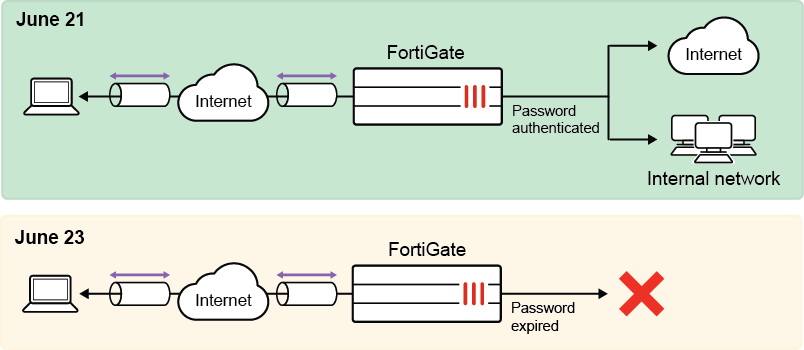
Sample configuration
WAN interface is the interface connected to ISP. This example shows static mode. You can also use DHCP or PPPoE mode. The Agentless VPN connection is established over the WAN interface.
To configure Agentless VPN using the GUI:
-
Configure the interface and firewall address. The port1 interface connects to the internal network.
-
Go to Network > Interfaces and edit the wan1 interface.
-
Set IP/Network Mask to 172.20.120.123/255.255.255.0.
-
Edit port1 interface and set IP/Network Mask to 192.168.1.99/255.255.255.0.
-
Click OK.
-
Go to Policy & Objects > Address and create an address for internet subnet 192.168.1.0.
-
-
Configure user and user group.
-
Go to User & Authentication > User Definition to create a local user named agentlessvpnuser1.
-
Go to User & Authentication > User Groups to create a user group named agentlessvpngroup, and add that local user to it.
-
-
Configure and assign the password policy using the CLI.
-
Configure a password policy that includes an expiry date and warning time. The default start time for the password is the time the user was created.
config user password-policy edit "pwpolicy1" set expire-days 2 set warn-days 1 next end -
Assign the password policy to the user you just created.
config user local
    edit "agentlessvpnuser1"
        set type password
        set passwd-policy "pwpolicy1"
    next
end
-
-
Configure Agentless VPN portals.
-
Go to VPN > Agentless VPN Portals, and click Create New.
-
Enter a name, such as agentless-portal.
-
Under Predefined Bookmarks, click Create New, and enter the following details:
Field
Value
Name
Windows Server
Type
RDP
Host
192.168.1.114
Port
3389
Single Sign-On
Disable
Username
Set the username to log in to Windows Server.
Password
Set the password to log in to Windows Server.
Port
3389
-
Click OK to save the predefined bookmark.
-
Click OK to save the portal settings.
-
Create another Agentless VPN portal and name it portal-access-disabled.
-
Click OK to save the portal settings.
-
Disable Agentless VPN for the newly created portal (that is, portal-access-disabled) using CLI:
config vpn ssl web portal
    edit "portal-access-disabled"
        set web-mode disable
    next
end
-
-
Configure Agentless VPN settings.
-
Set Agentless VPN to Enable.
-
Set the Listen on Interface(s) to wan1.
-
Set Listen on Port to 10443.
-
Choose a certificate for Server Certificate. The default is Fortinet_Factory.
-
In Authentication/Portal Mapping, select All Other Users/Groups, and click Edit.
-
Use Portal dropdown to select portal-access-disabled.
-
Click OK.
-
In Authentication/Portal Mapping, click Create New.
-
Set Users/Groups to agentlessvpngroup.
-
Set Portal to agentless-portal.
-
Click OK.
-
-
Click Apply to save the Agentless VPN settings.
-
-
Configure Agentless VPN firewall policy.
-
Go to Policy & Objects > Firewall Policy and click Create New.
-
Set Name as Agentless VPN firewall policy.
-
Set Schedule to always and Action to Accept.
-
Set Incoming Interface to Agentless VPN tunnel interface(ssl.root).
-
Choose an Outgoing Interface. This example uses port1.
-
Set Source to all and User/group to agentlessvpngroup.
-
In this example, the Destination is the internal, protected subnet 192.168.10.0.
-
Set Service to ALL.
-
Click OK.
-
To configure Agentless VPN using the CLI:
-
Configure the interface and firewall address.
config system interface edit "wan1" set vdom "root" set ip 172.20.120.123 255.255.255.0 next end -
Configure internal interface and protected subnet, then connect the port1 interface to the internal network.
config system interface
    edit "port1"
        set vdom "root"
        set ip 192.168.1.99 255.255.255.0
    next
end
config firewall address edit "192.168.1.0" set subnet 192.168.1.0 255.255.255.0 next end -
Configure user and user group.
config user local edit "agentlessvpnuser1" set type password set passwd your-password next end config user group edit "agentlessvpngroup" set member "agentlessvpnuser1" next end -
Configure and assign the password policy.
-
Configure a password policy that includes an expiry date and warning time. The default start time for the password is the time the user was created.
config user password-policy edit "pwpolicy1" set expire-days 2 set warn-days 1 next end -
Assign the password policy to the user you just created.
config user local
    edit "sslvpnuser1"
        set type password
        set passwd-policy "pwpolicy1"
    next
end
-
-
Configure Agentless VPN portal and predefine RDP bookmark for windows server.
config vpn ssl web portal edit "agentless-portal" set web-mode enable config bookmark-group edit "gui-bookmarks" config bookmarks edit "Windows Server" set apptype rdp set host "192.168.1.114" set port 3389 set logon-user "your-windows-server-user-name" set logon-password your-windows-server-password next end next end next end -
Configure another Agentless VPN portal and disable Agentless VPN on it.
config vpn ssl web portal edit "portal-access-disabled" set web-mode disable next end -
Apply the user group to the Agentless VPN portal.
config vpn ssl settings set servercert "Fortinet_Factory" set source-interface "wan1" set source-address "all" set default-portal "portal-access-disabled" config authentication-rule edit 1 set groups "agentlessvpngroup" set portal "agentless-portal" next end end -
Configure one Agentless VPN firewall policy to allow remote user to access the internal network. This policy does not allow traffic initiated from internal network to remote client.
config firewall policy
    edit 1
        set name "Agentless VPN firewall policy"
        set srcintf "ssl.root"
        set dstintf "port1"
        set action accept
        set srcaddr "all"
        set dstaddr "192.168.1.0"
        set schedule "always"
        set service "ALL"
        set nat enable
        set groups "LDAP-USERGRP"
    next
end
To see the results of web portal:
-
From a remote device, use a web browser to log into the Agentless VPN web portal http://172.20.120.123:10443.
-
Log in using the agentlessvpnuser1 credentials.
When the warning time is reached, the user is prompted to enter a new password.
In FortiOS 6.2, when the password expires, the user cannot renew the password and must contact the administrator.
In FortiOS 6.0/5.6, when the password expires, the user can still renew the password.
To check the Agentless VPN connection using the GUI:
-
On FortiGate, go to Dashboard > Agentless VPN Monitor to verify the list of Agentless VPN users.
If the Agentless VPN Monitor is hidden, click + under the Dashboard, search for Agentless VPN Monitor, and add it to the display.
-
Go to Log & Report > System Events, and use the dropdown to select VPN Events to view VPN logs.
To check that login failed due to password expired on GUI:
-
Go to Log & Report > System Events and select the VPN Events card to see the Agentless VPN alert labeled
ssl-login-fail. -
Click Details to see the log details about the Reason
sslvpn_login_password_expired.
To check the Agentless web portal login using the CLI:
get vpn ssl monitor
Agentless VPN Login Users:
 Index   User         Auth Type   Timeout    From           HTTP in/out   HTTPS in/out
 0       agentlessvpnuser1  1(1)        229        10.1.100.254   0/0           0/0

Agentless VPN sessions:
 Index   User    Source IP      Duration        I/O Bytes       Tunnel/Dest IP
To check the FortiOS login password expired event log:
FG201E4Q17901354 # execute log  filter category event

FG201E4Q17901354 # execute log  filter field subtype vpn

FG201E4Q17901354 # execute log  filter field action ssl-login-fail

FG201E4Q17901354 # execute log  display
1: date=2019-02-15 time=10:57:56 logid="0101039426" type="event" subtype="vpn" level="alert" vd="root" eventtime=1550257076 logdesc="SSL VPN login fail" action="ssl-login-fail" tunneltype="ssl-web" tunnelid=0 remip=10.1.100.254 user="u1" group="g1" dst_host="N/A" reason="sslvpn_login_password_expired" msg="SSL user failed to logged in"