

API Keys and Access Tokens
The Lacework FortiCNAPP API uses bearer authentication to authorize API requests. To use bearer tokens, create an API access key in the Lacework FortiCNAPP Console. You can then use the key ID and the generated secret to get temporary access tokens for API requests.
Create API Keys
To create API keys, you must have the account admin role or otherwise have write permissions for API keys in the Lacework FortiCNAPP Console. See Access Control Overview for more information.
API keys apply to the account level only; that is, keys do not apply at the org level, across multiple accounts. You need to create a key in each account in which you want to use the API.
An API key gives a user full access to the Lacework FortiCNAPP API. This level of permission allocation may not be desirable for all organizations, especially to those seeking to adhere to principles of least privilege. To more closely control API access, instead of granting keys to particular users, you can create a service user with read-only access, and assign user permissions for that user to the required API endpoints. For more information about service users, see Service Users.
Each user can have up to 20 API keys. An API key doesn't expire but it can be disabled or deleted.
Create an API key in the Lacework FortiCNAPP Console in the Settings > Configuration > API keys page. After creating a key, you should download it and store it securely.
For details on creating a key in the Lacework FortiCNAPP Console, see API Keys.
Temporary API Tokens
Once you have an API key, you can generate temporary API access (bearer) tokens to use to access the Lacework FortiCNAPP API. Use the Lacework FortiCNAPP API's POST api/v2/access/tokens operation to create temporary API access (bearer) tokens.
| Method | POST |
|---|---|
| URL | https://YourLacework.lacework.net/api/v2/access/tokens |
| Headers | X-LW-UAKS:YourSecretKey Content-Type:application/json |
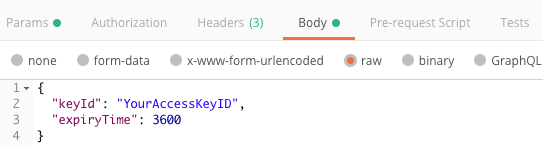
| Request Body | { "keyId": YourAccessKeyID", "expiryTime": 3600 } |
Replace YourSecretKey, YourAccessKeyID, and YourLacework with your values.
The expiryTime parameter is optional. If omitted from the request body, expiryTime defaults to 3600 seconds. The maximum expiryTime allowed is one day, 86400 seconds.
Generate Token Using Curl
To generate the API access token using curl, use a command in the following form:
curl -H "X-LW-UAKS:<YOUR_SECRET_KEY>" -H "Content-Type: application/json" -X POST -d '{"keyId": "<YOUR_ACCESS_KEY_ID>", "expiryTime":3600}' https://<YOUR_LACEWORK_URL>.lacework.net/api/v2/access/tokens
To set a expiry time (other than the default), specify the expiryTime value in the body of the request:
curl -H "X-LW-UAKS:<YOUR_SECRET_KEY>" -H "Content-Type: application/json" -X POST -d '{"keyId": "<YOUR_ACCESS_KEY_ID>", "expiryTime":3600}' https://<YOUR_LACEWORK_URL>.lacework.net/api/v2/access/tokens --data-raw '{ "keyId":"<YOUR_ACCESS_KEY_ID>", "expiryTime": 86400 }'
Replace YOUR_SECRET_KEY, YOUR_ACCESS_KEY_ID, and YOUR_LACEWORK_URL with your values.
Generate Token Using Postman
To generate the API access token using Postman, construct your request as shown in the following image:
Response Body
The response body returns the token and token expiration time in the following form:
{
  “token”: “string”,
  “expiresAt”: “datetime”
}