

Network Plans
FortiEdge Cloud enables you to define a network and apply it to a device profile. Through Network Plans, you can choose if you want to use a predefined plan to configure your network, or manually configure your own. FortiEdge Cloud lets you create network plans to configure your system interface. After creating a network plan, you can add it to a profile to push it onto a device.
From network plans, you can create a subnet pool by using network IP and subnet mask. Each device's interface automatically receives an IP from the subnet pool as long as there are enough subnets. When you define the source IP, source subnet, and destination IP, you are defining a network pool with subnets. Subnets are assigned to the device that joins the network. For each subnet, there will be a number of IPs that can be used for the device's hosts.
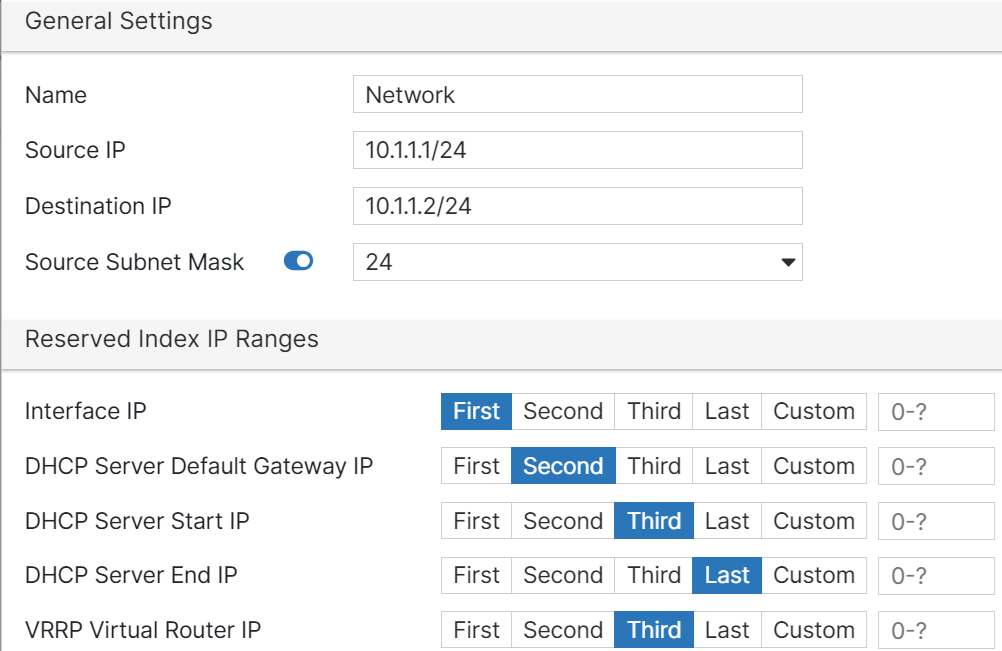
You must select an integer to define how each subnet device uses those IPs. Once you select an integer and save it, the reserved index graph updates to visually reflect your selection.
- Navigate to Plans > Network and click Add.
-
.Configure the following settings.
Field Name
Description
General Settings
Name
Change the network name if necessary.
Destination IP
Enter the Destination IP of your plan.
Source IP
Enter the Source IP of your plan.
Source Subnet Mask
Select if you want to subnet your plan. If you choose to subnet your plan, select how many.
Interface IP
DHCP Server Default Gateway IP
DHCP Server Start IP
DHCP Server End IP
VRRP Virtual Router IP
Select an integer for each IP to define how each subnet device uses those IPs. You can select a customized number from 0-4096.
For example, if a device is assigned a subnet from 192.168.2.1/24 to 192.168.2.35/24, choosing First means they get an IP of 192.168.2.1. Second means 192.168.2.2, and so on.
After you create a network plan, you can view the plan's configurations, modify them as required, delete, or clone them. Select a plan and click Edit, Clone, or Delete for any of these operations. If you clone a plan, specify a unique name for the new plan.
Notes:
-
Modifying a network plan causes the devices associated with it to reboot.
-
You cannot delete network plans that are associated with a device or profile. You must first re-assign each device or profile to a new network plan before you can delete the old plan.
-