

Overview
This document applies to FortiNAC virtual appliances (FNC-CA-VM) configured for High Availability.
Provides the steps for a customer to migrate their existing FortiNAC virtual appliances with the CentOS operating system to new FortiNAC-F virtual appliances with the FortiNAC-OS operating system (FNC-CAX-VM). It assumes the customer is using perpetual endpoint licenses.
Once migration is complete, the FortiNAC-F appliances will have the license, entitlements and configuration as the original FortiNAC appliances.
If not a CA server configured for High Availability, do not use this document. Select the link matching the environment under the Admin Guides section of the FortiNAC document library:
CentOS to FortiNAC-OS VM Migration: CA Servers
CentOS to FortiNAC-OS VM Migration: Separate C + A Servers
CentOS to FortiNAC-OS Hardware Migration: CA Servers

|
Review this document in its entirety. If assistance with the migration procedure is required, contact sales to discuss the use of Professional Services. |
Operating System and Open Ports
FortiNAC-F series appliances use the FortiNAC-OS operating system. Minimal TCP/UDP ports are open by default for security purposes. This was not the case for FortiNAC appliances using the CentOS operating system.
The configuration steps provided include opening ports for the applicable features and functions that are enabled post migration. For details, see Features Requiring Access Configuration in the Preparation Checklist.
As more features are configured, additional access must be enabled using the "set allowaccess" command via the appliance CLI. For details, see Open Ports in the FortiNAC Administration Guide.
The best practice is to keep the number of open ports to a minimum and block all other ports. If there is a need to provide users access to network resources through a static port (e.g., from outside a firewall), the best option is to allow users to connect by VPN.
Determine Endpoint License Support Type
The process to apply endpoint license entitlements to the new FortiNAC-F appliance acting as the primary server is dependent upon the endpoint license support type.
-
Perpetual licenses: During the migration process, Customer Service transfers the perpetual license entitlements from the current appliance’s serial number to the new appliance’s serial number.
-
Subscription Licenses or combined subscription + perpetual licenses: Customer Service cannot transfer entitlements. A new endpoint license must be obtained and applied to the new appliance serial number. Contact sales for consultation.
To confirm license support type, log in to the Customer Portal (https://support.fortinet.com) and review the Entitlements section for the primary server.
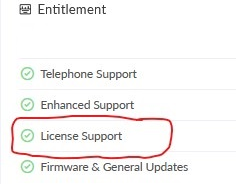
Perpetual License Support Type = License Support
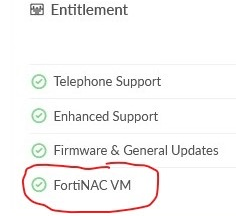
Subscription License Support Type = FortiNAC VM
Requirements
|
New FortiNAC-F Appliance Registration Codes |
Contact sales to obtain the new FortiNAC-F appliance (FNC-CAX-VM). Registration codes for the new product will then be sent via email. |
|
New Subscription Endpoint License Registration Codes |
If using subscription licenses or combined subscription + perpetual licenses, contact sales to obtain a new subscription to apply to the serial number of the FortiNAC-F appliance (FNC-CAX-VM). Registration codes for the new subscription will then be sent via email. |
|
FortiNAC Software Version Existing Appliances (FNC-CA-VM) |
Minimum Software version (See Considerations): v9.1.9 + v9.2.7 + v9.4.6 + vF7.2.6 + vF7.4.0 + |
|
FortiNAC Software Version New Appliances (FNC-CAX-VM) |
F7.2.6 + F7.4.0 +
|
|
Temporary IP address |
Temporary management IP address
|
|
CLI Access |
CLI access to both the CentOS and FortiNAC-OS appliances |
|
High Availability Specific |
See Requirements in the Overview section of the High Availability (FortiNAC-OS) reference manual. |
Considerations
-
The process outlined and the tools used for this migration is not supported for moving a FortiNAC-OS system to another FortiNAC-OS system.
-
If existing/CentOS appliances are not running F7.2.5, F7.4.0 or greater, it is necessary to import the migration tool from the FortiNAC-OS appliance.
-
The FortiNAC-OS performs a version check during cutover. If the migration tool used is not the same version, an error occurs. For details, see article 292261.
-
Instructions are provided during the step Collect & Transfer Migration Data.
-
-
Versions prior to F7.2.2, 9.2.8, 9.4.3 & 9.1.10: Later versions may require importing of key certificates prior to upgrade. See Importing License Key Certificates.
-
FortiNAC appliances running versions prior to 9.4.3 & F7.2.1 may require new license keys prior to upgrade. See article Upgrade fails with license requirement error)
-
Once migration is complete, the FortiNAC-F appliances will have the same IP addresses as the original appliances. If there is a need to change the IP addressing on the new appliances, it must be done after the migration is complete. See Preparation Checklist for additional details.
Migration Steps
Below are the steps required to complete the migration.
Step 1: New Appliance Product Registration*
Step 2: Prepare Endpoint Licenses for Migration *
Step 3: New Appliance Installation
Step 4: Generate and Download New License Keys
Step 5: New Appliance Configuration
Step 6: Apply Endpoint License Entitlements
--- PERFORM REMAINING STEPS DURING MAINTENANCE WINDOW* ---
Step 7: Collect & Transfer Migration Data
Step 8: Cutover to New Appliance
*See Preparation Checklist for suggested timelines to complete step.