Fortinet white logo
Fortinet white logo

Known issues and limitations

Known issues and limitations

The following issues have been identified. To inquire about a particular bug, please contact Customer Service & Support.

2.5.0

PCAP Limitation PCAP capture is not supported on Azure and OCI sensors.
Collector port Default gateway is not displayed in the config console (cosmetic).
Proxy When a proxy is enabled on the Azure sensor, the sensor type may appear as Hyper‑V after provisioning. This is a known issue and has no functional impact on the sensor

2.4.0

PCAP Limitation

PCAP capture is not supported on Azure and OCI sensors

Diagnostics Limitation

Under rare conditions, sensor connectivity diagnostics may falsely indicate an invalid certificate. Use Legacy Diagnostics as a workaround for connectivity testing.

2.3.0

NetFlow

NetFlow may require a sensord restart or sensor reboot the first time it is enabled in order to receive Netflow traffic.

Collector interface

  • Gateway is not visible from the TUI.
  • Port link and speed not shown in portal (only IP address is displayed).

OCI Sensor:

  • NetFlow has limited functionality and may disrupt TAP traffic. The workaround is to use dedicated sensors for each purpose: one for NetFlow and another for TAP traffic rather than running both on the same sensor.
  • Collector interface cannot obtain DHCP IP (current limitation). The workaround is to assign the designated DHCP address as a static IP to the collector interface.
  • Collector port IP is not removed when unconfigured. The workaround is to reboot the sensor after resetting the collector interface.

2.2.0

Sensor initial connectivity scans do not go through proxy if proxy is enabled.

AWS sensor upgrade is not supported. To upgrade to this version, a new sensor must be provisioned.

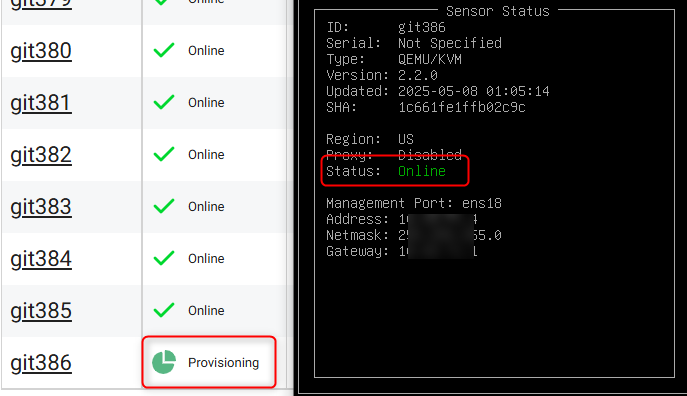
When the sensor is provisioned without a link on any of the monitoring ports, the portal will show the sensor status as provisioning even though sensor is online.

For the sensor status to appear as online in the FortiNDR Cloud portal, you must establish a link on at least one monitoring port and reboot the sensor.

2.1.0

When disabling proxy, the previous proxy configuration will be deleted and when enabling the proxy again, need to provide the required configuration again and save the configuration

1.11.0

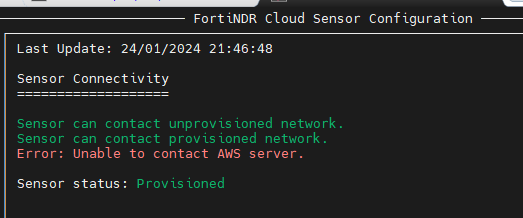
Sensor diagnostics falsely states Unable to contact AWS server. This is a cosmetic defect and has no effect on the sensor functionality. This defect also exists in the prior versions and is a result of replacing some backend services.

1.9.0

After upgrading from version 1.6.x (legacy) to version 1.9.0, portal displays the ports both from the 1.6 version and 1.9.0 version. It should only show the ports in 1.9.0 version.

1.8.1

The sensor port media in the portal shows all ports as optical, regardless of the actual port media.

The portal shows the incorrect disk size.

When a PCAP task is in progress, rebooting the sensor or restarting the daemon does not terminate the task. Instead, it causes two PCAP files to be uploaded instead of one.

Known issues and limitations

Known issues and limitations

The following issues have been identified. To inquire about a particular bug, please contact Customer Service & Support.

2.5.0

PCAP Limitation PCAP capture is not supported on Azure and OCI sensors.
Collector port Default gateway is not displayed in the config console (cosmetic).
Proxy When a proxy is enabled on the Azure sensor, the sensor type may appear as Hyper‑V after provisioning. This is a known issue and has no functional impact on the sensor

2.4.0

PCAP Limitation

PCAP capture is not supported on Azure and OCI sensors

Diagnostics Limitation

Under rare conditions, sensor connectivity diagnostics may falsely indicate an invalid certificate. Use Legacy Diagnostics as a workaround for connectivity testing.

2.3.0

NetFlow

NetFlow may require a sensord restart or sensor reboot the first time it is enabled in order to receive Netflow traffic.

Collector interface

  • Gateway is not visible from the TUI.
  • Port link and speed not shown in portal (only IP address is displayed).

OCI Sensor:

  • NetFlow has limited functionality and may disrupt TAP traffic. The workaround is to use dedicated sensors for each purpose: one for NetFlow and another for TAP traffic rather than running both on the same sensor.
  • Collector interface cannot obtain DHCP IP (current limitation). The workaround is to assign the designated DHCP address as a static IP to the collector interface.
  • Collector port IP is not removed when unconfigured. The workaround is to reboot the sensor after resetting the collector interface.

2.2.0

Sensor initial connectivity scans do not go through proxy if proxy is enabled.

AWS sensor upgrade is not supported. To upgrade to this version, a new sensor must be provisioned.

When the sensor is provisioned without a link on any of the monitoring ports, the portal will show the sensor status as provisioning even though sensor is online.

For the sensor status to appear as online in the FortiNDR Cloud portal, you must establish a link on at least one monitoring port and reboot the sensor.

2.1.0

When disabling proxy, the previous proxy configuration will be deleted and when enabling the proxy again, need to provide the required configuration again and save the configuration

1.11.0

Sensor diagnostics falsely states Unable to contact AWS server. This is a cosmetic defect and has no effect on the sensor functionality. This defect also exists in the prior versions and is a result of replacing some backend services.

1.9.0

After upgrading from version 1.6.x (legacy) to version 1.9.0, portal displays the ports both from the 1.6 version and 1.9.0 version. It should only show the ports in 1.9.0 version.

1.8.1

The sensor port media in the portal shows all ports as optical, regardless of the actual port media.

The portal shows the incorrect disk size.

When a PCAP task is in progress, rebooting the sensor or restarting the daemon does not terminate the task. Instead, it causes two PCAP files to be uploaded instead of one.