Fortinet white logo
Fortinet white logo

New Features and improvements

New Features and improvements

This section details what's new in each maintenance release.

2.5.0

  • APAC region support: Sensors can now be deployed in the APAC region.
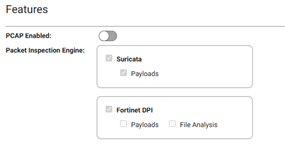
  • File Analysis: Sensors now have the ability to extract and scan files for malware.
  • DPI payload support: Sensors now have the ability to enable packet payload in the DPI logs.
  • Enabling features through the Portal: You can now enable sensor features from the FortiNDR Cloud portal.
  • DPI Engine Upgrade: Upgraded DPI engine to version 7.6.1179
  • Suricata memory cap: Increased the memory cap for Suricata for better performance.
  • Security updates: Several security vulnerabilities have been addressed.
  • Network drivers: Network interface drivers on several sensors were upgraded.
  • Zeek logging: Enabled SSL extension log and improved VLAN tagging.
  • Link scan: Added linkscan feature to monitor management port’s link status regularly, this is to ensure sensor operation after a power outage

2.4.0

  • ERSPAN Support: Sensors can now ingest traffic via ERSPAN for remote monitoring.
  • Device Enrichment: Added device enrichment using LDAP and DNS servers to enhance asset context and visibility
  • DPI Engine Upgrade: Upgraded DPI engine to version 7.6.1136
  • NetFlow Enhancements: Improved NetFlow performance, configuration workflow, and scalability for all sensors, including support for running NetFlow with a single dedicated collector interface to optimize performance
  • Sensor Upgrade Support: Added support for upgrading sensors deployed in AWS and Oracle Cloud Infrastructure (OCI)
  • Resiliency Improvements: Sensors now support automatic reboot on kernel panic
  • Platform Enhancements: Improved KVM/Proxmox DHCP support
  • Security Updates: Updated multiple packages to address known vulnerabilities

2.3.0

  • Netflow Support: Sensors can now be configured to receive NetFlow traffic, enabling improved network visibility and detection.
  • OCI Cloud Support: Sensor is now available on Oracle Cloud Infrastructure (OCI).
  • Azure Platform Support: Sensor is now available on Microsoft Azure.
  • Suricata Upgrade: Upgraded to Suricata v7.0.11
  • Expanded Protocol and Logging Support for Zeek and Suricata

2.2.0

  • Zeek upgraded to version 7.0.5.1
  • Suricata upgraded to version 7.0.10
  • GCP sensor is now available in the Google Cloud Marketplace
  • PF_RING upgraded to version 8.8
  • Sensor can now be provisioned without the requirement for the monitoring port/s to have a link.
  • Sensor can be reset to factory defaults using the serial console
  • New physical platforms 500G and 900G introduced

2.1.0

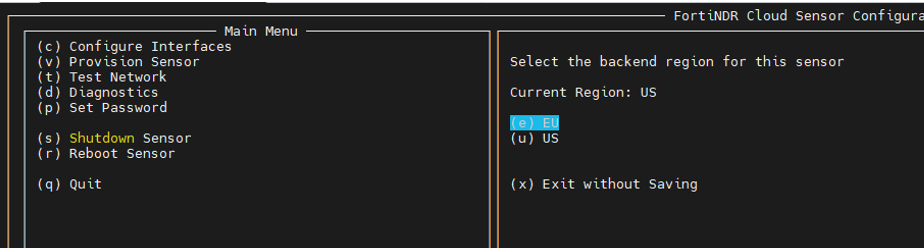
  • Support for sensor provisioning in the EU region.
  • Suricata upgraded to version 7.0.7.
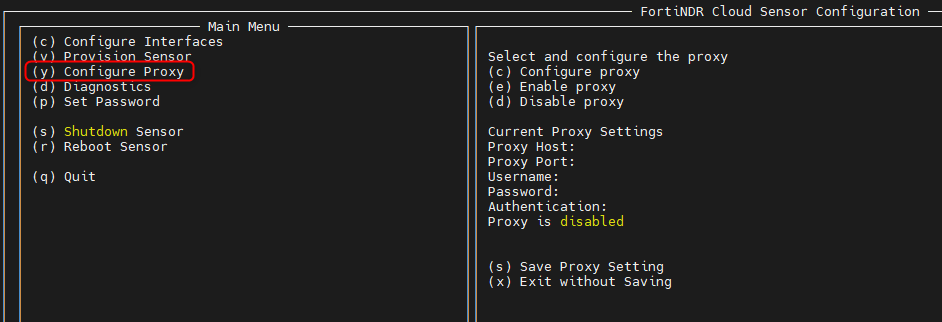
  • Proxy support.

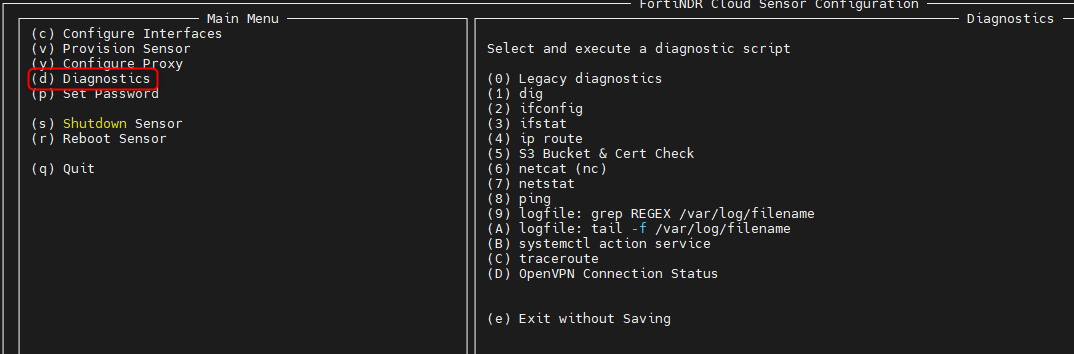
  • Improved diagnostics for more advanced troubleshooting.
  • New 2540 physical sensor with support for 40 Gbps.
  • New Hyper-V sensor.
  • Updated AWS sensor.
  • KVM sensor officially supported
  • Various security improvements.

2.0.0

  • Upgraded Sensor Operating System.

  • Support for sensor Pause/Resume.

  • Upgraded Zeek version.

  • Upgraded OpenSSL.

  • Upgraded OpenSSH.

  • Upgraded JA3 plugin in Zeek.

  • Enabled SSL/TLS certificate validation in Zeek.

  • Various security improvements.

1.12.0

  • Support for sensor decommissioning.

  • Upgraded Zeek and Suricata version for additional functionality and performance.

  • Enabled new protocols such as DNP3 and MODBUS for meta extraction.

  • Upgraded OpenSSH version.

1.11.0

  • Suricata was updated to version 6.0.12 release.

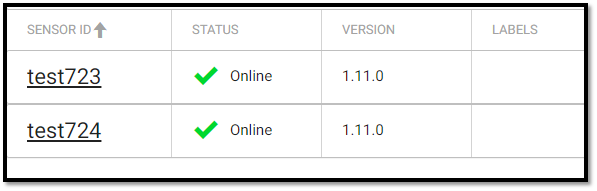
  • Sensor version is now reported on the Portal.
1.10.0

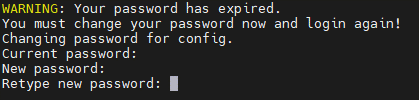
  • User is now asked to change the console password immediately after the first login.
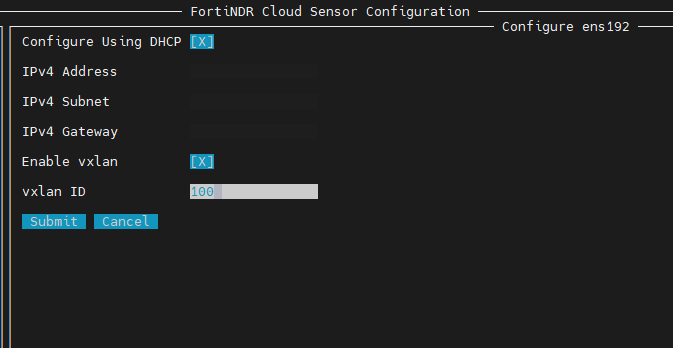
  • VXLAN support: This feature allows the user to forward traffic to the FortiNDR sensors’ interface using a vxlan tunnel. Currently VXLAN is supported on the sensor’s management port.

To configure VXLAN:
  1. In the configuration UI, press c or select Configure Interfaces.

  2. Select the current management port.

  3. Enable VXLAN.

  4. Type VXLAN ID of choice and select submit.

  5. Save the configuration

  6. Reboot the sensor by pressing r or selecting Reboot..
Note

Important:

After enabling the VXLAN feature, sensor will only process packets on the VXLAN interface (attached to the management port). Packets received on any other interfaces on the sensor will not be processed.

  • AWS sensor: As of version 1.10 the new Zeek based AWS sensor ami is available on the AWS marketplace.
  • Configure UI: In this version you are asked to change the password to access the configuration UI from the default (configure) password when you access the configuration UI for the first time

1.9.0

Interface selection utility

The new interface selection utility in the configuration menu allows you to select a port of choice as management port if you do not wish to use the management port identified by the sensor automatically.

Note

When selecting a different management port than the one detected by the sensor, all other ports will be considered as monitoring ports.

To configure interfaces:
  1. In the config UI, press c or go to Configure Interfaces.

  2. Select the interface that you want to designate as management interface (if it is different than the port already identified as management by the sensor).

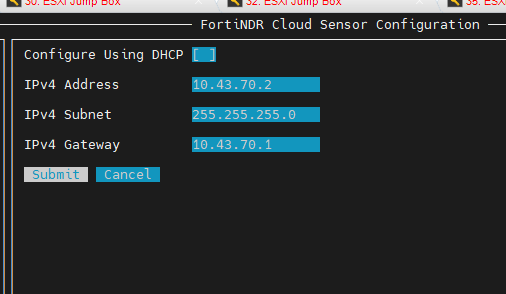
  3. Select DHCP or disable DHCP by pressing the space bar to enable static IP

  4. Click Submit.

New Features and improvements

New Features and improvements

This section details what's new in each maintenance release.

2.5.0

  • APAC region support: Sensors can now be deployed in the APAC region.
  • File Analysis: Sensors now have the ability to extract and scan files for malware.
  • DPI payload support: Sensors now have the ability to enable packet payload in the DPI logs.
  • Enabling features through the Portal: You can now enable sensor features from the FortiNDR Cloud portal.

  • DPI Engine Upgrade: Upgraded DPI engine to version 7.6.1179
  • Suricata memory cap: Increased the memory cap for Suricata for better performance.
  • Security updates: Several security vulnerabilities have been addressed.
  • Network drivers: Network interface drivers on several sensors were upgraded.
  • Zeek logging: Enabled SSL extension log and improved VLAN tagging.
  • Link scan: Added linkscan feature to monitor management port’s link status regularly, this is to ensure sensor operation after a power outage

2.4.0

  • ERSPAN Support: Sensors can now ingest traffic via ERSPAN for remote monitoring.
  • Device Enrichment: Added device enrichment using LDAP and DNS servers to enhance asset context and visibility
  • DPI Engine Upgrade: Upgraded DPI engine to version 7.6.1136
  • NetFlow Enhancements: Improved NetFlow performance, configuration workflow, and scalability for all sensors, including support for running NetFlow with a single dedicated collector interface to optimize performance
  • Sensor Upgrade Support: Added support for upgrading sensors deployed in AWS and Oracle Cloud Infrastructure (OCI)
  • Resiliency Improvements: Sensors now support automatic reboot on kernel panic
  • Platform Enhancements: Improved KVM/Proxmox DHCP support
  • Security Updates: Updated multiple packages to address known vulnerabilities

2.3.0

  • Netflow Support: Sensors can now be configured to receive NetFlow traffic, enabling improved network visibility and detection.
  • OCI Cloud Support: Sensor is now available on Oracle Cloud Infrastructure (OCI).
  • Azure Platform Support: Sensor is now available on Microsoft Azure.
  • Suricata Upgrade: Upgraded to Suricata v7.0.11
  • Expanded Protocol and Logging Support for Zeek and Suricata

2.2.0

  • Zeek upgraded to version 7.0.5.1
  • Suricata upgraded to version 7.0.10
  • GCP sensor is now available in the Google Cloud Marketplace
  • PF_RING upgraded to version 8.8
  • Sensor can now be provisioned without the requirement for the monitoring port/s to have a link.
  • Sensor can be reset to factory defaults using the serial console
  • New physical platforms 500G and 900G introduced

2.1.0

  • Support for sensor provisioning in the EU region.

  • Suricata upgraded to version 7.0.7.
  • Proxy support.

  • Improved diagnostics for more advanced troubleshooting.

  • New 2540 physical sensor with support for 40 Gbps.
  • New Hyper-V sensor.
  • Updated AWS sensor.
  • KVM sensor officially supported
  • Various security improvements.

2.0.0

  • Upgraded Sensor Operating System.

  • Support for sensor Pause/Resume.

  • Upgraded Zeek version.

  • Upgraded OpenSSL.

  • Upgraded OpenSSH.

  • Upgraded JA3 plugin in Zeek.

  • Enabled SSL/TLS certificate validation in Zeek.

  • Various security improvements.

1.12.0

  • Support for sensor decommissioning.

  • Upgraded Zeek and Suricata version for additional functionality and performance.

  • Enabled new protocols such as DNP3 and MODBUS for meta extraction.

  • Upgraded OpenSSH version.

1.11.0

  • Suricata was updated to version 6.0.12 release.

  • Sensor version is now reported on the Portal.

1.10.0

  • User is now asked to change the console password immediately after the first login.

  • VXLAN support: This feature allows the user to forward traffic to the FortiNDR sensors’ interface using a vxlan tunnel. Currently VXLAN is supported on the sensor’s management port.

To configure VXLAN:
  1. In the configuration UI, press c or select Configure Interfaces.

  2. Select the current management port.

  3. Enable VXLAN.

  4. Type VXLAN ID of choice and select submit.

  5. Save the configuration

  6. Reboot the sensor by pressing r or selecting Reboot..

Note

Important:

After enabling the VXLAN feature, sensor will only process packets on the VXLAN interface (attached to the management port). Packets received on any other interfaces on the sensor will not be processed.

  • AWS sensor: As of version 1.10 the new Zeek based AWS sensor ami is available on the AWS marketplace.
  • Configure UI: In this version you are asked to change the password to access the configuration UI from the default (configure) password when you access the configuration UI for the first time

1.9.0

Interface selection utility

The new interface selection utility in the configuration menu allows you to select a port of choice as management port if you do not wish to use the management port identified by the sensor automatically.

Note

When selecting a different management port than the one detected by the sensor, all other ports will be considered as monitoring ports.

To configure interfaces:
  1. In the config UI, press c or go to Configure Interfaces.

  2. Select the interface that you want to designate as management interface (if it is different than the port already identified as management by the sensor).
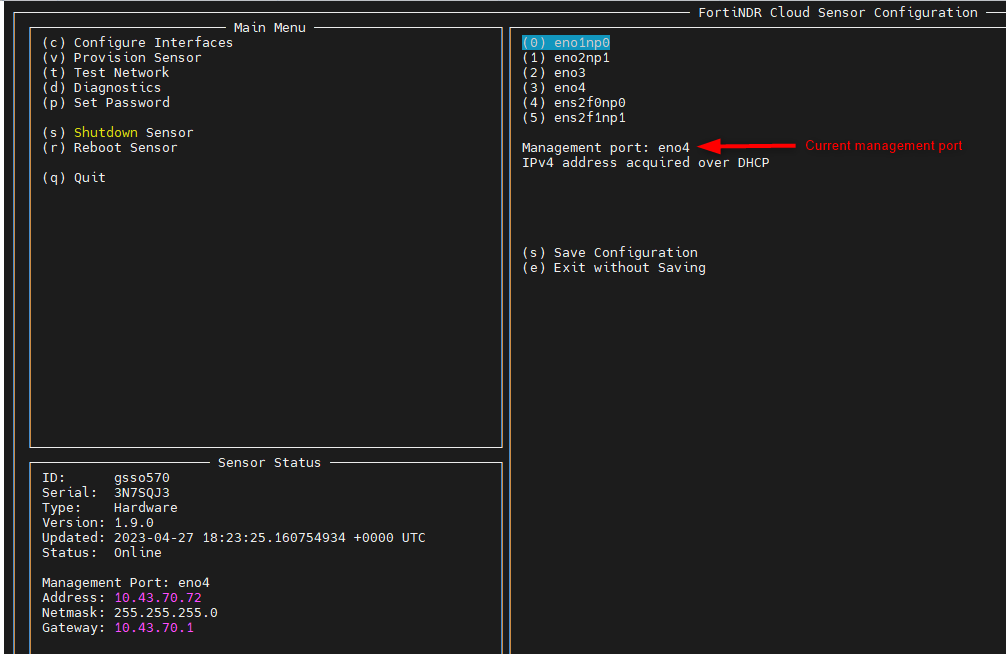
  3. Select DHCP or disable DHCP by pressing the space bar to enable static IP

  4. Click Submit.