
Fortinet white logo
Fortinet white logo

SPA Deployment Guide using BGP on Loopback

7.2.0

Deployment overview

Deployment overview

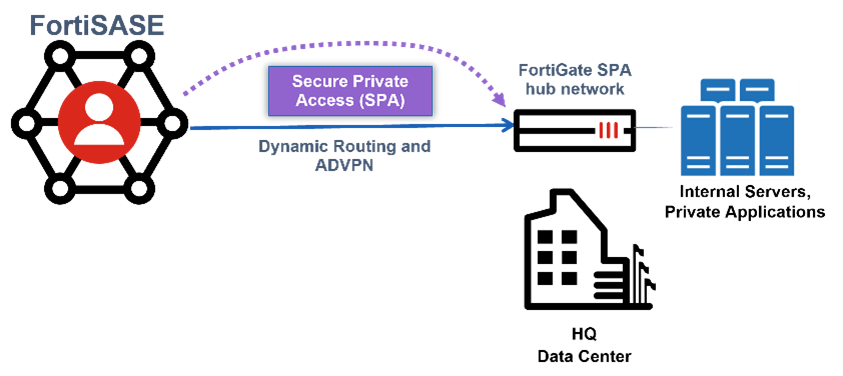
Organizations that have resources behind a FortiGate secure private access (SPA) hub network can provide their FortiSASE endpoints with access to private resources.

Scenarios involving a FortiGate as a FortiSASE SPA hub allows broader and seamless access to privately hosted TCP- and UDP-based applications.
This deployment document was tested with a particular FortiSASE version and particular firmware versions of associated Fortinet products. The features in this deployment guide may have been updated since this document was originally published. For the latest details about features included in this guide, please refer to the FortiSASE 7.2 Administration Guide.

The SPA Deployment Guide using BGP on loopback contains deployment configurations for three use cases where the FortiGate SPA hub network varies in implementation:

Intended audience

Midlevel network and security administrators of FortiGate devices in companies of all sizes and verticals should find this guide helpful. A working knowledge of FortiOS, FortiGate, and FortiManager configuration and the Fortinet Security Fabric is helpful.

About this guide

This deployment guide describes the steps involved in deploying a specific architecture for the FortiSASE SPA use case using three different implementations of the FortiGate as a FortiSASE SPA hub.

Readers should first evaluate their environment to determine whether the architecture outlined in this guide suits them. Reviewing the reference architecture guide(s), such as the FortiSASE Architecture Guide or FortiSASE SPA Architecture Guide is advisable if readers are still in the process of selecting the right architecture. See also the FortiSASE Concept Guide.

This deployment guide presents one of possibly many ways to deploy the solution. It may also omit specific steps where readers must make design decisions to further configure their devices. Reviewing supplementary material found on the Fortinet Document Library in product administration guides, example guides, cookbooks, release notes, and other documents is recommended, where appropriate.

Deployment overview

Deployment overview

Organizations that have resources behind a FortiGate secure private access (SPA) hub network can provide their FortiSASE endpoints with access to private resources.

Scenarios involving a FortiGate as a FortiSASE SPA hub allows broader and seamless access to privately hosted TCP- and UDP-based applications.

This deployment document was tested with a particular FortiSASE version and particular firmware versions of associated Fortinet products. The features in this deployment guide may have been updated since this document was originally published. For the latest details about features included in this guide, please refer to the FortiSASE 7.2 Administration Guide.

The SPA Deployment Guide using BGP on loopback contains deployment configurations for three use cases where the FortiGate SPA hub network varies in implementation:

Intended audience

Midlevel network and security administrators of FortiGate devices in companies of all sizes and verticals should find this guide helpful. A working knowledge of FortiOS, FortiGate, and FortiManager configuration and the Fortinet Security Fabric is helpful.

About this guide

This deployment guide describes the steps involved in deploying a specific architecture for the FortiSASE SPA use case using three different implementations of the FortiGate as a FortiSASE SPA hub.

Readers should first evaluate their environment to determine whether the architecture outlined in this guide suits them. Reviewing the reference architecture guide(s), such as the FortiSASE Architecture Guide or FortiSASE SPA Architecture Guide is advisable if readers are still in the process of selecting the right architecture. See also the FortiSASE Concept Guide.

This deployment guide presents one of possibly many ways to deploy the solution. It may also omit specific steps where readers must make design decisions to further configure their devices. Reviewing supplementary material found on the Fortinet Document Library in product administration guides, example guides, cookbooks, release notes, and other documents is recommended, where appropriate.