

Understanding deployment topologies
When deploying a FortiGate-based assessment, there are two primary deployment topologies you can use: One-Arm Sniffer and Transparent Mode.

|
Configuration files generated by the CTAP Cloud portal support both One-Arm Sniffer and Transparent Mode at the same time. The interfaces used by each mode are pre-defined in the configuration file. Smaller models will typically only include a single 1 GE port, but devices with 10 GE capabilities will also be configured with a 10 GE interface. Similarly, transparent mode ports (LAN and WAN destined) are pre-defined and map to their respective 1 GE interfaces (or 10 GE interfaces in higher end models). |
One-Arm Sniffer
One-Arm Sniffer mode is the least invasive deployment method that can be used during an assessment and is the most common way to deploy FortiGate-based assessments. This deployment configuration is also sometimes referred to as promiscuous mode or mirrored mode.
FortiGates deployed in sniffer mode are simply analyzing a copy of inbound and outbound network traffic sent from an upstream switch. A copy of the network traffic is sent from a mirrored port on the switch. In other words, the switch facilitates both LAN destined and WAN destined traffic, and a third mirrored port is configured to siphon traffic to the deployed FortiGate for additional inspection.
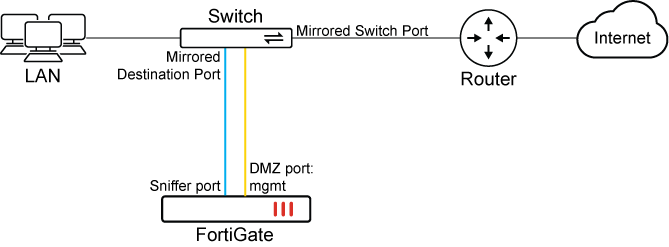
|
Advantages |
Disadvantages |
|---|---|
|
|
|
|
The CTAP team recommends using One-Arm Sniffer mode when possible as it is the least intrusive option for running assessments. |
Transparent Mode
When deployed in Transparent Mode, the FortiGate sits directly on the network backbone and inspects traffic as it flows through the system (LAN <> WAN). Since it can affect the flow of network traffic, it is less commonly used during assessments. Transparent mode is also sometimes called an inline, virtual wire, or port pair configuration.

|
Advantages |
Disadvantages |
|---|---|
|
|
|
|
The CTAP team only recommends using transparent mode when the end customer explicitly requests it. It applies primarily in cases where the a demonstration of the FortiGate's performance relative to the model used is requested or there is no managed switch available. |