

diagnose hardware harddisk
Use this command to retrieve diagnostic information for hard disks installed in the system. It integrates smartctl functionality to expose SMART (Self-Monitoring, Analysis and Reporting Technology) data, allowing administrators to monitor disk health and detect early signs of failure.
Note: SMART support may vary by platform and disk type. If unsupported, the harddisk or logdisk commands may return warnings or partial output.
Syntax
diagnose hardware {get|set} harddisk {attributes|errors|health|info|list}
|
attributes |
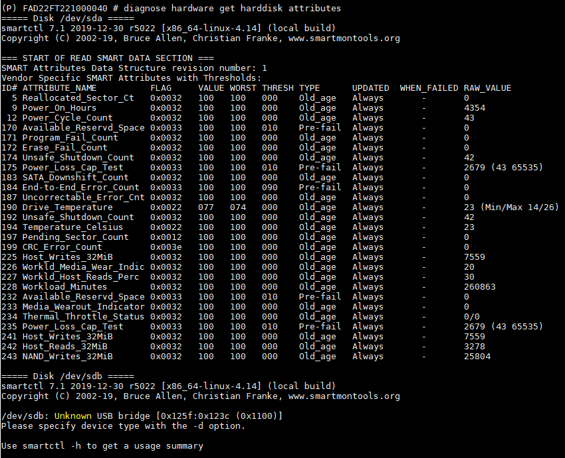
Display SMART attributes such as temperature, power cycle count, reallocated sectors, etc. |
|
errors |
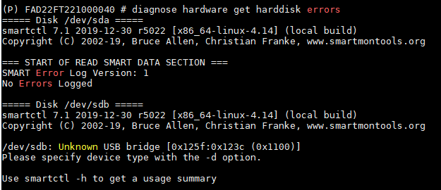
Show SMART error log entries recorded by the disk controller. |
|
health |
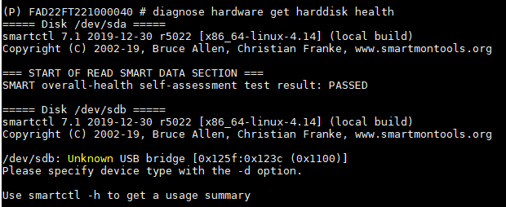
Check and reports the disk’s overall SMART health status. |
|
info |
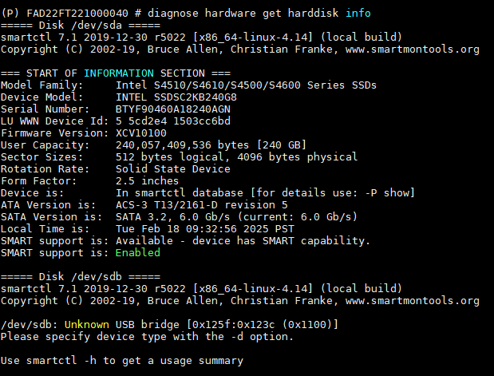
Display basic disk identity information, including model, firmware, and capacity. |
|
list |
List all detected hard disks on the system. |
Examples
diagnose hardware get harddisk attributes:
diagnose hardware get harddisk errors:
diagnose hardware get harddisk health:
diagnose hardware get harddisk info:
diagnose hardware get harddisk list:
