Fortinet white logo
Fortinet white logo

Data Partition Expansion 7.6.2

Data Partition Expansion 7.6.2

In FortiADC 8.0.2, the data partition size is expanded to support larger firmware images and new feature implementations. The existing 200MB partition on most platforms has been a limiting factor for future enhancements. This update increases the partition size to the maximum allowable capacity based on the system's hardware, ensuring compatibility with upcoming releases.

This expansion applies only to hardware appliances and private cloud instances. Public cloud images will maintain the current partition size.

Key Enhancements

Benefit

Details

Increased Storage Capacity Expands the data partition from 200MB to the maximum available space on supported hardware and private cloud platforms, allowing more room for firmware images, logs, and feature enhancements.
Seamless Future Upgrades Eliminates storage-related upgrade failures, ensuring smooth transitions to newer firmware versions.
Enhanced System Longevity Prevents storage limitations from restricting feature adoption, extending the platform’s scalability and maintainability.

Upgrade Considerations and Limitations

Expanding the data partition in FortiADC 7.6.2 introduces specific upgrade requirements and operational impacts. Administrators must follow a structured upgrade path to ensure a smooth transition while considering potential limitations.

Mandatory Upgrade Path

Upgrading beyond 7.6.2 (such as 7.6.3) requires installing 7.6.2 first. This ensures that the partition expansion is completed before applying a newer firmware version. Any attempt to upgrade directly to a post-7.6.2 release without first installing 7.6.2 will be blocked.

Longer Upgrade Duration

Because the upgrade includes a partition resizing process, the total upgrade time is longer than a typical firmware update. The duration depends on the platform and storage configuration, so administrators should plan accordingly to minimize downtime.

Irreversible Partition Change

Once the partition is expanded in 7.6.2, it cannot be reverted by downgrading to a previous firmware version. The partition remains in its expanded state even if an earlier release is installed. Before upgrading, ensure that your environment is compatible with 7.6.2 and later versions.

HA Cluster Upgrade Best Practices

For HA (High Availability) clusters, follow these guidelines to prevent service disruption:

  • Do not toggle HA mode during the upgrade, as this can lead to downtime for all nodes in the process.

  • Upgrade each node individually, rather than upgrading all nodes at once, to minimize potential issues.

  • For Active-Passive (A-P) clusters, start by upgrading the secondary node. Once the secondary node is fully operational, proceed to upgrade the primary node to ensure continued availability.

Verifying Successful Data Partition Expansion

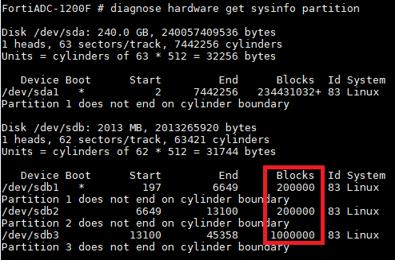
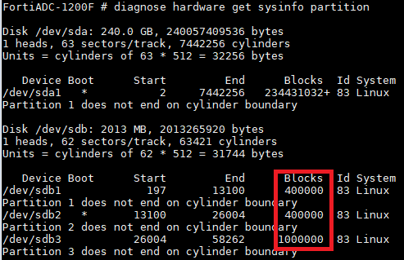
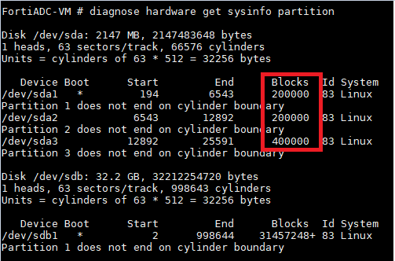
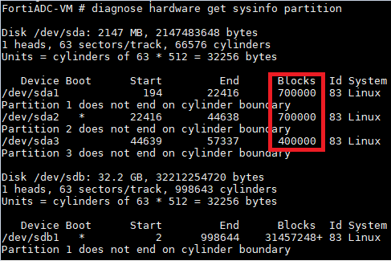
After performing an upgrade to FortiADC version 7.6.2 or later, the data partition will be expanded to provide increased storage capacity. To verify that the expansion has been successfully applied, you can use the following CLI command:

diagnose hardware get sysinfo partition

This command returns detailed information on the system’s storage partitions, including the size of the data partition. By comparing the partition size values before and after the upgrade, you can confirm that the partition has been expanded as expected.

Example output comparison:

Platform

Before Upgrade to 7.6.2

After Upgrade to 7.6.2

Hardware (1200F)
Virtual Machine

Data Partition Expansion 7.6.2

Data Partition Expansion 7.6.2

In FortiADC 8.0.2, the data partition size is expanded to support larger firmware images and new feature implementations. The existing 200MB partition on most platforms has been a limiting factor for future enhancements. This update increases the partition size to the maximum allowable capacity based on the system's hardware, ensuring compatibility with upcoming releases.

This expansion applies only to hardware appliances and private cloud instances. Public cloud images will maintain the current partition size.

Key Enhancements

Benefit

Details

Increased Storage Capacity Expands the data partition from 200MB to the maximum available space on supported hardware and private cloud platforms, allowing more room for firmware images, logs, and feature enhancements.
Seamless Future Upgrades Eliminates storage-related upgrade failures, ensuring smooth transitions to newer firmware versions.
Enhanced System Longevity Prevents storage limitations from restricting feature adoption, extending the platform’s scalability and maintainability.

Upgrade Considerations and Limitations

Expanding the data partition in FortiADC 7.6.2 introduces specific upgrade requirements and operational impacts. Administrators must follow a structured upgrade path to ensure a smooth transition while considering potential limitations.

Mandatory Upgrade Path

Upgrading beyond 7.6.2 (such as 7.6.3) requires installing 7.6.2 first. This ensures that the partition expansion is completed before applying a newer firmware version. Any attempt to upgrade directly to a post-7.6.2 release without first installing 7.6.2 will be blocked.

Longer Upgrade Duration

Because the upgrade includes a partition resizing process, the total upgrade time is longer than a typical firmware update. The duration depends on the platform and storage configuration, so administrators should plan accordingly to minimize downtime.

Irreversible Partition Change

Once the partition is expanded in 7.6.2, it cannot be reverted by downgrading to a previous firmware version. The partition remains in its expanded state even if an earlier release is installed. Before upgrading, ensure that your environment is compatible with 7.6.2 and later versions.

HA Cluster Upgrade Best Practices

For HA (High Availability) clusters, follow these guidelines to prevent service disruption:

  • Do not toggle HA mode during the upgrade, as this can lead to downtime for all nodes in the process.

  • Upgrade each node individually, rather than upgrading all nodes at once, to minimize potential issues.

  • For Active-Passive (A-P) clusters, start by upgrading the secondary node. Once the secondary node is fully operational, proceed to upgrade the primary node to ensure continued availability.

Verifying Successful Data Partition Expansion

After performing an upgrade to FortiADC version 7.6.2 or later, the data partition will be expanded to provide increased storage capacity. To verify that the expansion has been successfully applied, you can use the following CLI command:

diagnose hardware get sysinfo partition

This command returns detailed information on the system’s storage partitions, including the size of the data partition. By comparing the partition size values before and after the upgrade, you can confirm that the partition has been expanded as expected.

Example output comparison:

Platform

Before Upgrade to 7.6.2

After Upgrade to 7.6.2

Hardware (1200F)
Virtual Machine