

Improvements
The following table summarizes the behavior and GUI changes in this release.
25.4.a
|
Feature |
Description |
|---|---|
|
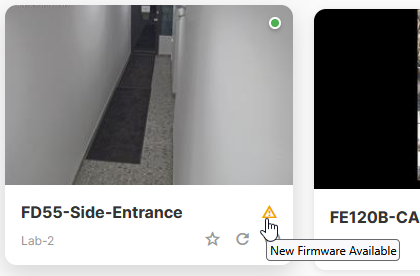
New firmware availability status |
When new firmware is available for cameras, you may want its new features, enhancements, or bug fixes. Owners, Org Admin roles, and Site Admin roles can use the Status column on the Manage Camera dialog. Other users can also now see it when they go to Camera: an attention icon appears on the camera thumbnail image tile; on mouseover, the reason is shown.
|
|
More motion detection logs |
Logs now include more motion detection information. |
|
SD card statuses |
Previously, if a camera's SD card Status was Unknown, then the disk was not mounted on the file system and could not store recordings locally, but it was not possible to distinguish the reasons. The SD card status now has split statuses for Formatting, Verifying, and Read-Only. |
|
Analytics tables |
On Analytics, the button Table is now available. This allows you to show or hide the table shown below the chart, which you can also export to download and open the data in spreadsheet software such as Microsoft Excel, Google Sheets, etc. |
25.4.0
|
Feature |
Description |
|---|---|
|
Simplified permissions |
Several changes now simplify creation of new accounts, claiming cameras, and assigning permissions, such as:
|
|
Simplified log messages |
Streamlined log messages reduce repetitive debug-level details, and now only show logs to site-level and organization-level administrators and owners. Camera operators and live video stream viewers do not see logs. |
|
More accurate camera connectivity statuses |
Each time interval now shows a percentage of time where the camera was online, offline, or required attention. (Before, if the camera was offline even for only one minute, the status would indicate that the camera was offline for the entire day.) Dormant cameras also no longer remain stuck in the last known status when the camera connected to FortiCamera Cloud, such as rebooting. |