

Customizing the dashboard
You can select which widgets to display on the Dashboard and where they are located on the page. You can also configure the time period and refresh interval for individual widgets.
Dashboard toolbar
The dashboard toolbar is located near the bottom of the pages. You can perform the following tasks:
- Click Add Widget to add a widget to the dashboard.

- Click Reset to restore the dashboard settings. This will remove any widgets you added to Dashboard and revert any changes you made to the widget settings.

To add a widget to the Dashboard:
- Click the Add icon. The Widget Selection dialog opens.
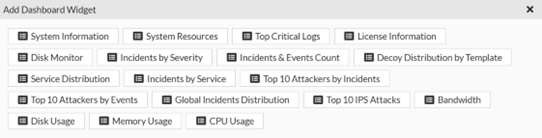
- Select the widget you want to add to the Dashboard.
Widget toolbar
The widget tools are located in the widget header.
- Select the hamburger menu to access options for resizing the widget, configuring the widget title and refresh interval, or removing the widget. The widgets setting will vary depending on the widget.

- Click Refresh Data to refresh the widget data.
