
Fortinet white logo
Fortinet white logo

Viewing Vulnerabilities

Viewing Vulnerabilities

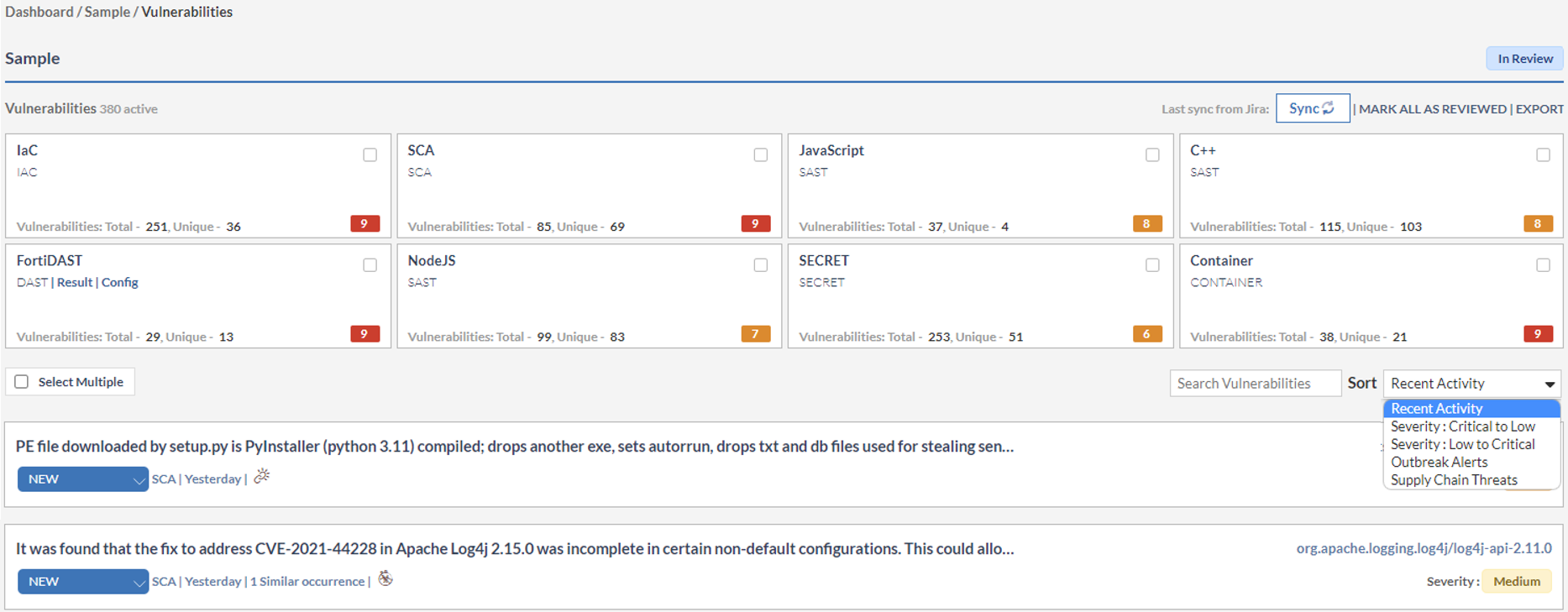
All vulnerabilities are listed in this panel along with the associated source file name, the line number (SAST)/URL (DAST), and the assigned severity.

  • Active vulnerabilities are those that are currently present in your application. In this case, there are 339 active vulnerabilities.
  • The vulnerabilities for each scanner type display the number of Unique vulnerabilities. A unique vulnerability can have multiple instances but it is counted only once here.
  • You can manually Sync the vulnerabilities from the JIRA plugin for each application.
  • You can download vulnerabilities in .csv format, click Export.
  • Use sort to display the vulnerabilities based on recent activity, severity level, outbreak alerts and supply chain threats.
Viewing Vulnerabilities

Viewing Vulnerabilities

All vulnerabilities are listed in this panel along with the associated source file name, the line number (SAST)/URL (DAST), and the assigned severity.

  • Active vulnerabilities are those that are currently present in your application. In this case, there are 339 active vulnerabilities.
  • The vulnerabilities for each scanner type display the number of Unique vulnerabilities. A unique vulnerability can have multiple instances but it is counted only once here.
  • You can manually Sync the vulnerabilities from the JIRA plugin for each application.
  • You can download vulnerabilities in .csv format, click Export.
  • Use sort to display the vulnerabilities based on recent activity, severity level, outbreak alerts and supply chain threats.