

Email Notification
The Email Notification page allows you to customize email notifications for important events, vulnerability alerts, and product updates related to your applications within FortiDevSec.

|
|
Click Save Settings after making any changes to apply your notification preferences. The following settings can be configured.
-
Opt out from all emails - Toggle this setting to disable all email notifications, overriding any other settings.

-
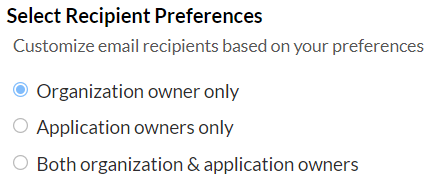
Select Recipient Preferences - Choose who receives email notifications.
-
Organization owner only -Only the organization owner will receive email notifications.
-
Application owners only - Only the application owner will receive email notifications.
-
Both organization & application owners - Both organization owners and application owners will receive email notifications.
-
-
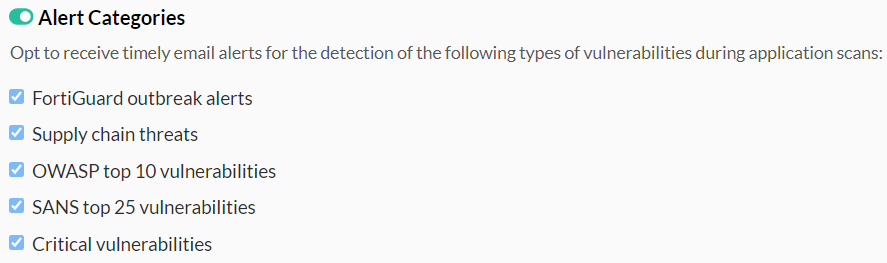
Alert Categories - Enable email alerts for the following vulnerability types. The email notification will be sent after each scan completes.
-
FortiGuard outbreak alerts - Receive notifications about critical vulnerabilities identified by FortiGuard Labs.
-
Supply chain threats - Receive notifications about vulnerabilities introduced through third-party dependencies in your applications.
-
OWASP Top 10 vulnerabilities - Receive notifications about vulnerabilities belonging to the OWASP Top 10 list.
-
SANS Top 25 vulnerabilities - Receive notifications about vulnerabilities classified within the SANS Top 25 list.
-
Critical vulnerabilities -Receive notifications about high-risk vulnerabilities that could lead to severe compromise.
-
-
Scan Report Notifications - Choose how often you want to receive scan report summaries. .
-
Daily - Receive a consolidated email notification summarizing scans performed each day.
Notes:-
Currently, the only supported option is Daily.
-
Reports are sent only to the organization owners. You must select Organization owners only or Both organization & application owners as recipients to receive daily reports.

-
-
-
Risk Level Threshold - Set a risk rating threshold (from 0 to 9). If an application's risk rating exceeds this threshold, selected recipients will receive an email notification.

-
Communication Alerts - Enable this option to receive emails about product updates, new features, and other relevant FortiDevSec announcements.

Note: By default, email notifications are configured with the following settings:
-
Recipients: Organization owners
-
Risk Level Threshold: 3
-
Communication Alerts: Enabled