Fortinet white logo
Fortinet white logo

User Guide

Modifying the Vulnerability Status

Modifying the Vulnerability Status

You can modify the status of each vulnerability or of all vulnerabilities.

Perform the following steps to change the status of vulnerability.

  1. In the Vulnerability Catalog page, select an application

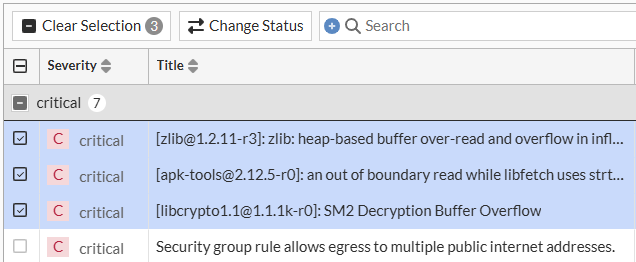
  2. Select the check box next to the desired vulnerability or multiple vulnerabilities.

  3. Click Change Status.

  4. From the drop-down menu, choose the desired status to apply.
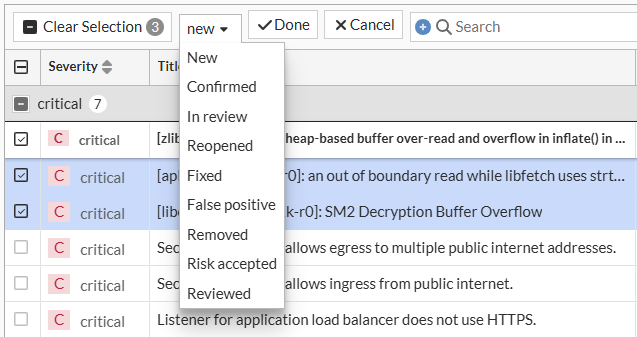
  5. Click Done.

The status of the selected vulnerabilities changes.

The following status types are supported.

  • New: This is a new vulnerability detected by the scan.
  • Confirmed: This is a real vulnerability and requires a fix.
  • In Review: This vulnerability is currently in review/looked into for further action.
  • Reviewed: This vulnerability review is complete.
  • Reopened: This is a fixed vulnerability detected again in the rescan and requires to be addressed.
  • Fixed: This vulnerability is fixed and does not appear in the next scan result.
  • Risk Accepted: This vulnerability is an accepted risk and continues to exist without any potential damage.
  • False Positive: This vulnerability is a potential flaw in the scanner or is indicative of a unique feature of the application.
  • Removed: This vulnerability is overlooked in the application.

Note

Changing a vulnerability's status to Removed, Risk Accepted, or False Positive in the Vulnerability Catalog page excludes it from future risk rating calculations. The existing risk rating remains unchanged until the next scan.

Modifying the Vulnerability Status

Modifying the Vulnerability Status

You can modify the status of each vulnerability or of all vulnerabilities.

Perform the following steps to change the status of vulnerability.

  1. In the Vulnerability Catalog page, select an application

  2. Select the check box next to the desired vulnerability or multiple vulnerabilities.

  3. Click Change Status.

  4. From the drop-down menu, choose the desired status to apply.

  5. Click Done.

The status of the selected vulnerabilities changes.

The following status types are supported.

  • New: This is a new vulnerability detected by the scan.
  • Confirmed: This is a real vulnerability and requires a fix.
  • In Review: This vulnerability is currently in review/looked into for further action.
  • Reviewed: This vulnerability review is complete.
  • Reopened: This is a fixed vulnerability detected again in the rescan and requires to be addressed.
  • Fixed: This vulnerability is fixed and does not appear in the next scan result.
  • Risk Accepted: This vulnerability is an accepted risk and continues to exist without any potential damage.
  • False Positive: This vulnerability is a potential flaw in the scanner or is indicative of a unique feature of the application.
  • Removed: This vulnerability is overlooked in the application.
Note

Changing a vulnerability's status to Removed, Risk Accepted, or False Positive in the Vulnerability Catalog page excludes it from future risk rating calculations. The existing risk rating remains unchanged until the next scan.