Fortinet white logo
Fortinet white logo

New Features

New Features

FortiEdge Cloud 25.3 delivers the following features/enhancements to FortiEdge Cloud. For more information, see FortiEdge Cloud 25.3 New Features document.

Feature

Description

Device Support

This release of FortiEdge Cloud now supports the following devices:

  • FortiExtender

    • FER-511G

    • FEV-511G

  • FortiSwitch

    • 2048F-B2F

    • 1048G

    • 3032G

Wi-Fi Client MAC Filtering Improvements

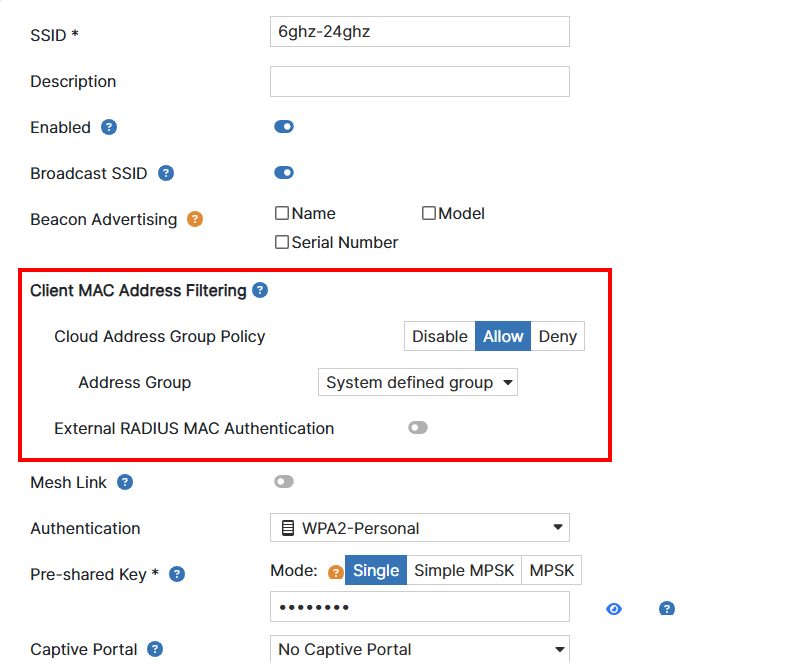
In this release, MAC filtering is enhanced by adding a deny list option. The Cloud Address Group Policy field now has three settings to provide more control over network access:

  • Disable: Bypasses MAC address authentication for the listed addresses.

  • Allow: The MAC Access Control list works as a whitelist, only allowing the listed MAC addresses to connect.

  • Deny: The MAC Access Control list now works as a blacklist, blocking access for the listed addresses while allowing all others to connect.

This new deny list option gives you more flexibility to manage network access, whether you need to restrict specific devices or allow only certain ones.

Configure the allowed list of MAC addresses that can connect to an SSID in the MAC Access Control list (Wireless > User Access Control > MAC Access Control) and add or edit an SSID in the Wireless > SSID window. Navigate to the Client MAC Address Filtering section:

Note:

  • When Cloud Address Group Policy is enabled, MAC address is validated in MAC Access Control list.

  • We can select either External RADIUS MAC Authentication or Cloud Address Group Policy, not both. When External RADIUS MAC Authentication is chosen, AP acts as authenticator and when Cloud Address Group Policy is chosen, cloud acts as authenticator.

Multiple PDN Support for FortiExtender (FEX- 511G and FEX-511G-WiFi)

FortiEdge Cloud is now enhanced to support multiple PDN (Packet Data Network) for your devices.

Note: This feature only works when a single SIM card is in the FortiExtender.

Extender Profile Settings

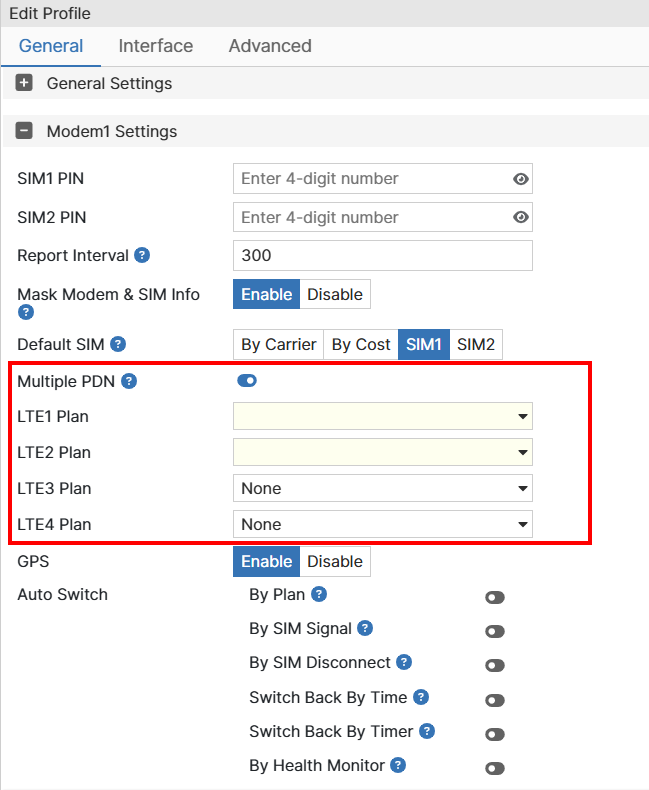
FortiExtender 511G profiles now have a Multiple PDN option under Modem Settings, allowing you to select up to four LTE interface plans. The first two plans are mandatory, and you can add two more. You can reuse the same carrier plans across different interfaces, but only plans already configured under Carrier Plan Settings are available for selection. Once a carrier plan is used in a Multiple PDN configuration, it cannot be removed from the profile.

Extender Device Configurations Settings

The LTE Settings Modem for FortiExtender 511G profiles has also been updated with a Multiple PDN option. When you override carrier plans during device configuration, only those specific plans will be available for selection when Multiple PDN is enabled. Once a plan is selected for use, it cannot be deleted until its association is removed.

Note:

  • A carrier plan that is being used cannot be deleted.

  • Add unique carrier plan/APN for Multiple PDN else Multiple PDN virtual interfaces will go down.

  • When configuring the carrier plans, first determine how many APNs your ISP supports. Then, attach the carrier plans according to the APN order provided by your ISP.

  • The Affected Devices and Profiles section for a carrier plan lists the plan when used in Multiple PDN configuration as well.

Enhanced Device Notification Rules

With this release, you can now define notification rules with more precision. You can set up alerts for a single device, multiple devices, an entire device group, or all active devices. This gives you more granular control over when and how notifications are triggered, ensuring that alerts are highly relevant to your specific operational needs.

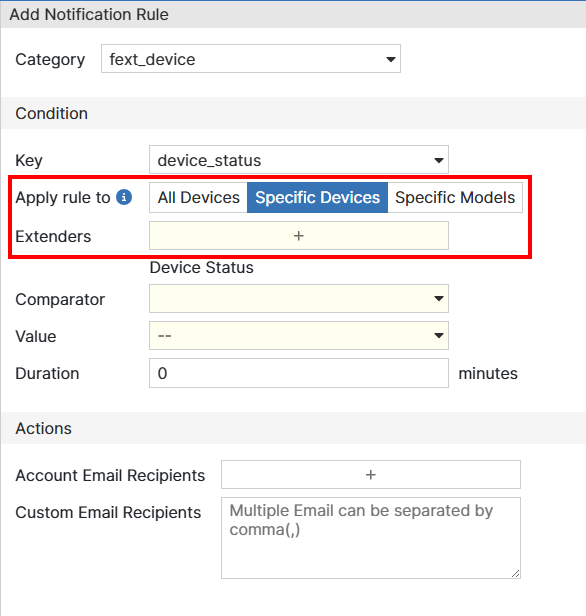
To add notification rules to specific devices, navigate to Extender > Notifications and click Add.

Under Condition section, in the Apply rule to field, select one of the following options.

  • All Devices: Select to apply the notification rule to all the devices.

  • Specific Devices: Select to apply the notification rule for specific devices. Click + in the Extenders field to select the devices.

  • Specific Models: Select to apply the notification rule for specific models. Click + in the Extender Models field to select the models.

API Enhancements for FortiCloud Multi-Tenancy

This release introduces new API support for FortiEdge Cloud's Multi-Tenancy feature, which is now part of FortiCloud Organization. Three new APIs are added to streamline management for API users. These APIs allow retrieval of ORG/OU structure and selecting member account. Once a member account is selected, all the subsequent REST APIs will work on the selected account.

Note: The new APIs are available for only API Users and ORG Accounts.

  • GET /api/v1/orgou/tree: Retrieves the ORG/OU structure to get a clear view of your organization's hierarchy.

  • POST /api/v1/orgou/select: Selects a member account to choose a specific account to work with. Once an account is selected, all subsequent REST API calls will apply to that chosen account.

  • GET /api/v1/orgou/selected: Retrieves currently selected account.

Note: Fortinet API documentation is available on FNDN at https://fndn.fortinet.net.

New Features

New Features

FortiEdge Cloud 25.3 delivers the following features/enhancements to FortiEdge Cloud. For more information, see FortiEdge Cloud 25.3 New Features document.

Feature

Description

Device Support

This release of FortiEdge Cloud now supports the following devices:

  • FortiExtender

    • FER-511G

    • FEV-511G

  • FortiSwitch

    • 2048F-B2F

    • 1048G

    • 3032G

Wi-Fi Client MAC Filtering Improvements

In this release, MAC filtering is enhanced by adding a deny list option. The Cloud Address Group Policy field now has three settings to provide more control over network access:

  • Disable: Bypasses MAC address authentication for the listed addresses.

  • Allow: The MAC Access Control list works as a whitelist, only allowing the listed MAC addresses to connect.

  • Deny: The MAC Access Control list now works as a blacklist, blocking access for the listed addresses while allowing all others to connect.

This new deny list option gives you more flexibility to manage network access, whether you need to restrict specific devices or allow only certain ones.

Configure the allowed list of MAC addresses that can connect to an SSID in the MAC Access Control list (Wireless > User Access Control > MAC Access Control) and add or edit an SSID in the Wireless > SSID window. Navigate to the Client MAC Address Filtering section:

Note:

  • When Cloud Address Group Policy is enabled, MAC address is validated in MAC Access Control list.

  • We can select either External RADIUS MAC Authentication or Cloud Address Group Policy, not both. When External RADIUS MAC Authentication is chosen, AP acts as authenticator and when Cloud Address Group Policy is chosen, cloud acts as authenticator.

Multiple PDN Support for FortiExtender (FEX- 511G and FEX-511G-WiFi)

FortiEdge Cloud is now enhanced to support multiple PDN (Packet Data Network) for your devices.

Note: This feature only works when a single SIM card is in the FortiExtender.

Extender Profile Settings

FortiExtender 511G profiles now have a Multiple PDN option under Modem Settings, allowing you to select up to four LTE interface plans. The first two plans are mandatory, and you can add two more. You can reuse the same carrier plans across different interfaces, but only plans already configured under Carrier Plan Settings are available for selection. Once a carrier plan is used in a Multiple PDN configuration, it cannot be removed from the profile.

Extender Device Configurations Settings

The LTE Settings Modem for FortiExtender 511G profiles has also been updated with a Multiple PDN option. When you override carrier plans during device configuration, only those specific plans will be available for selection when Multiple PDN is enabled. Once a plan is selected for use, it cannot be deleted until its association is removed.

Note:

  • A carrier plan that is being used cannot be deleted.

  • Add unique carrier plan/APN for Multiple PDN else Multiple PDN virtual interfaces will go down.

  • When configuring the carrier plans, first determine how many APNs your ISP supports. Then, attach the carrier plans according to the APN order provided by your ISP.

  • The Affected Devices and Profiles section for a carrier plan lists the plan when used in Multiple PDN configuration as well.

Enhanced Device Notification Rules

With this release, you can now define notification rules with more precision. You can set up alerts for a single device, multiple devices, an entire device group, or all active devices. This gives you more granular control over when and how notifications are triggered, ensuring that alerts are highly relevant to your specific operational needs.

To add notification rules to specific devices, navigate to Extender > Notifications and click Add.

Under Condition section, in the Apply rule to field, select one of the following options.

  • All Devices: Select to apply the notification rule to all the devices.

  • Specific Devices: Select to apply the notification rule for specific devices. Click + in the Extenders field to select the devices.

  • Specific Models: Select to apply the notification rule for specific models. Click + in the Extender Models field to select the models.

API Enhancements for FortiCloud Multi-Tenancy

This release introduces new API support for FortiEdge Cloud's Multi-Tenancy feature, which is now part of FortiCloud Organization. Three new APIs are added to streamline management for API users. These APIs allow retrieval of ORG/OU structure and selecting member account. Once a member account is selected, all the subsequent REST APIs will work on the selected account.

Note: The new APIs are available for only API Users and ORG Accounts.

  • GET /api/v1/orgou/tree: Retrieves the ORG/OU structure to get a clear view of your organization's hierarchy.

  • POST /api/v1/orgou/select: Selects a member account to choose a specific account to work with. Once an account is selected, all subsequent REST API calls will apply to that chosen account.

  • GET /api/v1/orgou/selected: Retrieves currently selected account.

Note: Fortinet API documentation is available on FNDN at https://fndn.fortinet.net.