

Distribution lists
The DISTRIBUTION LISTS option enables you to specify recipients who will receive an email when a security event or incident is triggered. FortiEDR sends only one email per event or incident aggregation. No additional emails will be sent for subsequent events or incidents triggered by the same process with different characteristics, such as a different hostname, file path, hash, etc.

|
You must configure SMTP before using the Distribution List option. For more details, see SMTP. Ensure the devices are part of Collector Groups that are assigned to a Playbook policy in which the Send Email Notification option is checked. |
Each email contains all the variants collected by FortiEDR about that security event. The system is provided with a Distribution List called All Recipients that contains all FortiEDR Central Manager users. All other recipients that are added to the system are also automatically added to the All Recipients list.

This window displays a row for each Distribution List. Click the Expand button ( ) in a row to view the recipients assigned to that list.
Use the Create List button ( ) to create a new distribution list.
Use the Add Recipient button ( ) to add a recipient or user to a distribution list.
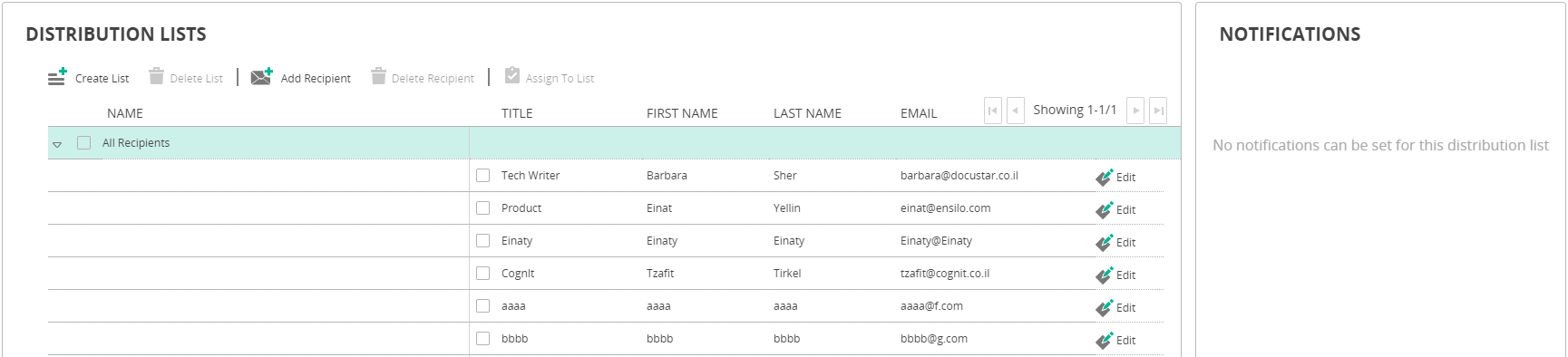
Select a distribution list row and then use the Enabled/Disabled option in the NOTIFICATIONS pane on the right to enable or disable the list per event type (system events or security events).
