

Classifying traffic by source interface
In firewall shaping policies, you can classify traffic by source interface with the following command:
config firewall shaping-policy
edit 1
set srcintf <interface_name>
......
next
end
Sample configuration
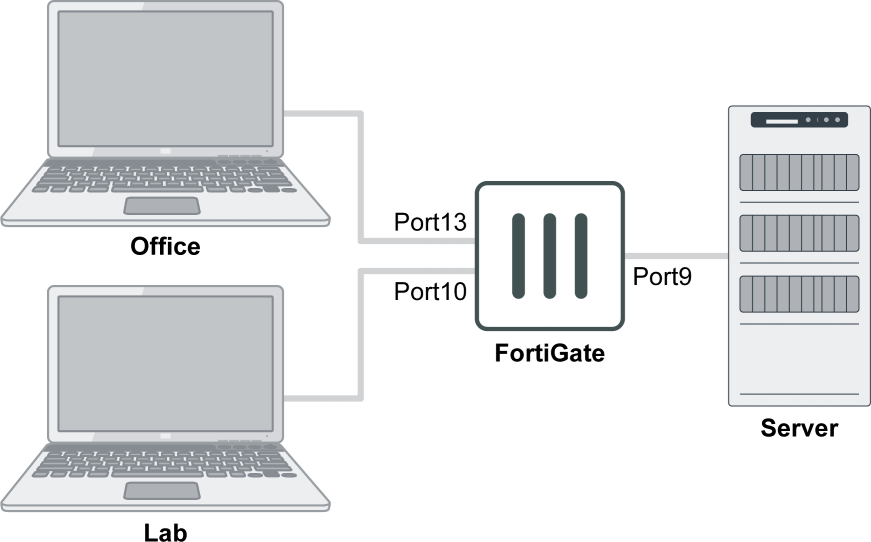
For this example, there are two shaping policies:
- Policy 1 is for traffic from the Office to the Server, with the speed limited to 5 MB/s.
- Policy 2 is for traffic from the Lab to the Server, with the speed limited to 1 MB/s.
To configure the traffic shaping policy:
config firewall shaping-policy
    edit 1
        set name "Office_Speed_5MB"
        set service "ALL"
        set srcintf "port13"
        set dstintf "port9"
        set traffic-shaper "5MB/s"
        set traffic-shaper-reverse "5MB/s"
        set srcaddr "all"
        set dstaddr "all"
    next
    edit 2
        set name "Lab_Speed_1MB"
        set service "ALL"
        set srcintf "port10"
        set dstintf "port9"
        set traffic-shaper "1MB/s"
        set traffic-shaper-reverse "1MB/s"
        set srcaddr "all"
        set dstaddr "all"
    next
end