
Fortinet white logo
Fortinet white logo

New Features

Traffic shaping extensions

Traffic shaping extensions

Note

This information is also available in the FortiOS 7.4 Administration Guide:

Traffic shaping now supports the following.

  • Local-in and local-out traffic matching: the FortiGate can apply shaping policies to local traffic entering or leaving the firewall interface based on source and destination IP addresses, ports, protocols, and applications.
  • VLAN CoS matching on a shaping policy: the FortiGate can use the class of service (CoS) value of VLAN packets as a matching criterion for shaping policies. This enables the FortiGate to prioritize traffic based on the CoS value assigned by the switch or router.
  • Multi-stage VLAN CoS marking: the FortiGate can configure the traffic shaper to dynamically change the CoS value of outgoing VLAN packets based on the shaper profile. This allows the FortiGate to mark traffic with different CoS values at different stages of the shaping process.
config firewall shaping-policy
    edit <id>
        set traffic-type {forwarding | local-in | local-out}
        set cos-mask <3-bit_binary>
        set cos <3-bit_binary>
    next
end

traffic-type {forwarding | local-in | local-out}

Set the traffic type.

  • forwarding: use forwarding traffic (default)
  • local-in: local-in traffic
  • local-out: local-out traffic

cos-mask <3-bit_binary>

Set the VLAN CoS evaluated bits, 3-bit binary (000 - 111). This setting is only available for forwarding traffic.

cos <3-bit_binary>

Set the VLAN CoS bit pattern, 3-bit binary (000 - 111). This setting is available once cos-mask is configured.

config firewall shaper traffic-shaper
    edit <name>
        set bandwidth-unit {kbps | mbps | gbps}
        set guaranteed-bandwidth <integer>
        set maximum-bandwidth <integer>
        set cos-marking {enable | disable}
        set cos-marking-method {static | multi-stage}
        set cos <3-bit_binary>
        set exceed-cos <3-bit_binary>
        set maximum-cos <3-bit_binary>
        set exceed-bandwidth <integer>
    next
end

cos-marking {enable | disable}

Enable/disable VLAN CoS marking (default = disable).

cos-marking-method {static | multi-stage}

Set the VLAN CoS marking method.

  • static: use static VLAN CoS marking (default)
  • multi-stage: multi-stage VLAN CoS marking

cos <3-bit_binary>

Set the VLAN CoS mark, 3-bit binary (000 - 111).

exceed-cos <3-bit_binary>

Set the VLAN CoS mark for traffic in guaranteed-bandwidth and exceed-bandwidth, 3-bit binary (000 - 111).

maximum-cos <3-bit_binary>

Set the VLAN CoS mark for traffic in exceed-bandwidth and maximum-bandwidth, 3-bit binary (000 - 111).

exceed-bandwidth <integer>

Set the exceed bandwidth used for DSCP or VLAN CoS multi-stage marking. The integer value range depends on the bandwidth-unit setting. This setting is only available for CoS multi-stage marking.

Examples

This topic contains the following examples:

Example 1: local-in traffic shaping

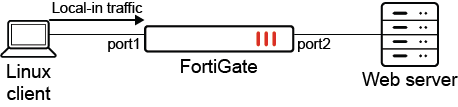
In this example, the traffic shaping policy applies to local-in traffic. The local-in traffic originates from the Linux client and is destined to port1 on the FortiGate.
To configure the traffic shaping policy:
config firewall shaping-policy
    edit 2
        set traffic-type local-in
        set service "ALL"
        set schedule "always"
        set class-id 3
        set srcaddr "all"
        set dstaddr "all"
    next
end
To verify the configuration:
  1. Check the shaping policy information for local-in traffic to verify that the correct class ID (3) is applied:

    # diagnose firewall iprope list 100018
    policy index=2 uuid_idx=1300 action=accept
    flag (0): 
    schedule(always)
    cos_fwd=0  cos_rev=0 
    group=00100018 av=00000000 au=00000000 split=00000000
    host=1 chk_client_info=0x0 app_list=0 ips_view=0
    misc=0
    zone(1): 0 -> zone(1): 0 
    source(1): 0.0.0.0-255.255.255.255, uuid_idx=1106, 
    dest(1): 0.0.0.0-255.255.255.255, uuid_idx=1106, 
    service(1): 
            [0:0x0:0/(0,65535)->(0,65535)] flags:0 helper:auto  
    class_id: 3
  2. Check the session list to verify that the class ID (3) matches the shaping policy ID (2):

    # diagnose sys session list 
    session info: proto=6 proto_state=01 duration=1195 expire=3574 timeout=3600 flags=00000000 socktype=0 sockport=0 av_idx=0 use=3
    origin-shaper=
    reply-shaper=
    per_ip_shaper=
    class_id=3 shaping_policy_id=2 ha_id=0 policy_dir=0 tunnel=/ vlan_cos=0/0
    state=log local may_dirty 
    statistic(bytes/packets/allow_err): org=18274/350/1 reply=826037/603/1 tuples=2
    tx speed(Bps/kbps): 0/0 rx speed(Bps/kbps): 1/0
    orgin->sink: org pre->in, reply out->post dev=17->34/34->17 gwy=172.16.200.2/0.0.0.0
    hook=pre dir=org act=noop 172.16.200.254:55432->172.16.200.2:443(0.0.0.0:0)
    hook=post dir=reply act=noop 172.16.200.2:443->172.16.200.254:55432(0.0.0.0:0)
    pos/(before,after) 0/(0,0), 0/(0,0)
    src_mac=08:5b:0e:7d:42:db
    misc=0 policy_id=4294967295 pol_uuid_idx=0 auth_info=0 chk_client_info=0 vd=1
    serial=0000009d tos=ff/ff app_list=0 app=0 url_cat=0
    rpdb_link_id=00000000 ngfwid=n/a
    npu_state=00000000
    no_ofld_reason:  local

Example 2: local-out traffic shaping

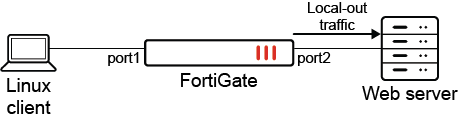
In this example, the traffic shaping policy applies to local-out traffic. The local-out traffic originates from port2 on the FortiGate and is destined to an external web server.
To configure the traffic shaping policy:
 config firewall shaping-policy
    edit 3
        set traffic-type local-out
        set service "ALL"
        set schedule "always"
        set class-id 2
        set srcaddr "all"
        set dstaddr "all"
    next
end
To verify the configuration:
  1. Check the shaping policy information for local-out traffic to verify that the correct class ID (2) is applied:

    # diagnose firewall iprope list 100019
    policy index=3 uuid_idx=1301 action=accept
    flag (0): 
    schedule(always)
    cos_fwd=0  cos_rev=0 
    group=00100019 av=00000000 au=00000000 split=00000000
    host=1 chk_client_info=0x0 app_list=0 ips_view=0
    misc=0
    zone(1): 0 -> zone(1): 0 
    source(1): 0.0.0.0-255.255.255.255, uuid_idx=1106, 
    dest(1): 0.0.0.0-255.255.255.255, uuid_idx=1106, 
    service(1): 
            [0:0x0:0/(0,65535)->(0,65535)] flags:0 helper:auto  
    class_id: 2
  2. Check the session list to verify that the class ID (2) matches the shaping policy ID (3):

    # diagnose sys session list
    session info: proto=6 proto_state=05 duration=40 expire=110 timeout=3600 flags=00000000 socktype=0 sockport=0 av_idx=0 use=3
    origin-shaper=
    reply-shaper=
    per_ip_shaper=
    class_id=2 shaping_policy_id=3 ha_id=0 policy_dir=0 tunnel=/ vlan_cos=255/255
    state=log local 
    statistic(bytes/packets/allow_err): org=3676/14/1 reply=3848/11/1 tuples=2
    tx speed(Bps/kbps): 90/0 rx speed(Bps/kbps): 94/0
    orgin->sink: org out->post, reply pre->in dev=34->17/17->34 gwy=0.0.0.0/172.16.200.2
    hook=out dir=org act=noop 172.16.200.2:19178->140.174.22.68:443(0.0.0.0:0)
    hook=in dir=reply act=noop 140.174.22.68:443->172.16.200.2:19178(0.0.0.0:0)
    pos/(before,after) 0/(0,0), 0/(0,0)
    dst_mac=08:5b:0e:7d:42:db
    misc=0 policy_id=0 pol_uuid_idx=0 auth_info=0 chk_client_info=0 vd=1
    serial=00000f1b tos=ff/ff app_list=0 app=0 url_cat=0
    rpdb_link_id=00000000 ngfwid=n/a
    npu_state=00000000
    no_ofld_reason:  local

Example 3: VLAN CoS marking on a firewall policy and matching on a shaping policy

In this example, FortiGate A forwards traffic to FortiGate B with VLAN CoS 3, which matches firewall policy 6. When FortiGate B receives traffic, it applies the traffic shaping policy and will prioritize based on the CoS value.

The VLAN CoS range is 000 to 111 (0 - 7), which includes the following values: 000, 001, 010, 011, 100, 101, 110, and 111. The cos and cos-mask settings can be used to match multiple vlan_cos values with a single shaping policy. The following matching logic is used: (vlan_cos AND cos-mask) == (cos AND cos-mask).

Note

To match all possible vlan_cos values, set the cos-mask to 000.

To configure VLAN CoS marking with traffic shaping:
  1. Configure the firewall policy on FortiGate A with VLAN CoS forwarding:

    config firewall policy
        edit 6
            set srcintf "port1"
            set dstintf "vlan100"
            set action accept
            set srcaddr "all"
            set dstaddr "all"
            set srcaddr6 "all"
            set dstaddr6 "all"
            set schedule "always"
            set service "ALL"
            set logtraffic all
            set vlan-cos-fwd 3
        next
    end

    Traffic marked with CoS 3 will be forwarded to FortiGate B.

  2. On FortiGate A, check the session list to verify that CoS 3 is marked:

    # diagnose sys session list 
    session info: proto=1 proto_state=00 duration=1 expire=59 timeout=0 flags=00000000 socktype=0 sockport=0 av_idx=0 use=3
    origin-shaper=
    reply-shaper=
    per_ip_shaper=
    class_id=0 ha_id=0 policy_dir=0 tunnel=/ vlan_cos=3/255
    state=log may_dirty npu f00 
    statistic(bytes/packets/allow_err): org=168/2/1 reply=168/2/1 tuples=2
    tx speed(Bps/kbps): 0/0 rx speed(Bps/kbps): 0/0
    orgin->sink: org pre->post, reply pre->post dev=19->47/47->19 gwy=20.20.20.2/10.1.100.11
    hook=pre dir=org act=noop 10.1.100.11:28489->192.168.4.33:8(0.0.0.0:0)
    hook=post dir=reply act=noop 192.168.4.33:28489->10.1.100.11:0(0.0.0.0:0)
    src_mac=00:0c:29:57:2a:01  dst_mac=70:4c:a5:7d:d4:95
    misc=0 policy_id=6 pol_uuid_idx=1128 auth_info=0 chk_client_info=0 vd=2
    serial=000717ca tos=ff/ff app_list=0 app=0 url_cat=0
    rpdb_link_id=00000000 ngfwid=n/a
    npu_state=0x4000c00 ofld-O ofld-R
    npu info: flag=0x81/0x81, offload=8/8, ips_offload=0/0, epid=79/78, ipid=78/79, vlan=0x0000/0x0064
    vlifid=78/79, vtag_in=0x0000/0x0064 in_npu=2/2, out_npu=2/2, fwd_en=0/0, qid=0/1
  3. Configure the traffic shaping policy to match VLAN CoS 3:

    config firewall shaping-policy
        edit 1
            set traffic-type forwarding
            set name "vlan-cos-matching"
            set service "ALL"
            set srcintf "vlan100"
            set dstintf "vlan200"
            set class-id 2
            set cos-mask 111
            set cos 011
            set srcaddr "all"
            set dstaddr "all"
        next
    end

    Based on this shaping policy:

    • vlan_cos = 3, which corresponds to 011

      cos-mask = 111

      AND both get 011

    • cos-mask = 111

      cos = 011

      AND both get 011

    • (vlan_cos AND cos-mask) == (cos AND cos-mask), so traffic will pass

    The shaping policy will match vlan_cos3.

  4. Configure the firewall policy on FortiGate B:

    config firewall policy
        edit 3
            set srcintf "vlan100"
            set dstintf "vlan200"
            set action accept
            set srcaddr "all"
            set dstaddr "all"
            set srcaddr6 "all"
            set dstaddr6 "all"
            set schedule "always"
            set service "ALL"
            set logtraffic all
        next
    end
  5. On FortiGate B, check the session list to verify that the class ID (2) matches the shaping policy ID (1):

    # diagnose sys session list 
    session info: proto=1 proto_state=00 duration=672 expire=59 timeout=0 flags=00000000 socktype=0 sockport=0 av_idx=0 use=3
    origin-shaper=
    reply-shaper=
    per_ip_shaper=
    class_id=2 shaping_policy_id=1 ha_id=0 policy_dir=0 tunnel=/ vlan_cos=0/0
    state=log may_dirty f00 
    statistic(bytes/packets/allow_err): org=56532/673/1 reply=56532/673/1 tuples=2
    tx speed(Bps/kbps): 82/0 rx speed(Bps/kbps): 82/0
    orgin->sink: org pre->post, reply pre->post dev=59->61/61->59 gwy=20.20.200.3/20.20.20.1
    hook=pre dir=org act=noop 10.1.100.11:28735->192.168.4.33:8(0.0.0.0:0)
    hook=post dir=reply act=noop 192.168.4.33:28735->10.1.100.11:0(0.0.0.0:0)
    src_mac=90:6c:ac:fb:bb:97  dst_mac=04:d5:90:36:73:3f
    misc=0 policy_id=3 pol_uuid_idx=1245 auth_info=0 chk_client_info=0 vd=1
    serial=0000160b tos=ff/ff app_list=0 app=0 url_cat=0
    rpdb_link_id=00000000 ngfwid=n/a
    npu_state=0x040000
    no_ofld_reason:  non-npu-intf

    Note

    If a particular session matches both the firewall policy and firewall shaping-policy, then anything configured in the firewall shaping-policy overrides whatever was configured in the firewall policy.

Example 4: mutli-stage VLAN CoS marking on a traffic shaper

In this example, mutli-stage VLAN CoS marking is configured using traffic shapers on FortiGate A and FortiGate B. FortiGate A applies multi-stage CoS marking with the following traffic shaper settings:

  • Traffic below the guaranteed bandwidth will apply CoS 6.

  • Traffic greater than the guaranteed bandwidth will apply CoS 6 and 5.

  • Traffic greater than the exceed bandwidth will apply CoS 6, 5, and 4.

A traffic shaper and shaping policy are configured on FortiGate B. When traffic comes from FortiGate A with CoS 6, the traffic shaping policy will be applied because the CoS matches.

Note

Multi-stage VLAN CoS marking is not supported on NP models. Traffic is not offloaded when it is enabled.

To configure mutli-stage VLAN CoS marking on FortiGate A:
  1. Configure the firewall policy:

    config firewall policy
        edit 7
            set srcintf "port1"
            set dstintf "vlan100"
            set action accept
            set srcaddr "all"
            set dstaddr "all"
            set srcaddr6 "all"
            set dstaddr6 "all"
            set schedule "always"
            set service "ALL"
            set logtraffic all
            set traffic-shaper "multi-stage-cos-fgta"
            set traffic-shaper-reverse "multi-stage-cos-fgta"
        next
    end
  2. Configure the traffic shaper:

    config firewall shaper traffic-shaper
        edit "multi-stage-cos-fgta"
            set guaranteed-bandwidth 1000
            set maximum-bandwidth 4000
            set per-policy enable
            set exceed-bandwidth 2000
            set cos-marking enable
            set cos-marking-method multi-stage
            set cos 110
            set exceed-cos 101
            set maximum-cos 100
        next
    end
  3. Check the session list to verify that CoS 6 is marked:

    # diagnose sys session list 
    session info: proto=17 proto_state=00 duration=6 expire=180 timeout=0 flags=00000000 socktype=0 sockport=0 av_idx=0 use=3
    origin-shaper=multi-stage-cos-fgta prio=2 guarantee 125000Bps max 500000Bps traffic 504900Bps drops 163905268B
    reply-shaper=multi-stage-cos-fgta prio=2 guarantee 125000Bps max 500000Bps traffic 504900Bps drops 0B
    per_ip_shaper=
    class_id=0 ha_id=0 policy_dir=0 tunnel=/ vlan_cos=6/6
    state=log may_dirty npu npd os rs f00 
    statistic(bytes/packets/allow_err): org=3804176/292/1 reply=0/0/0 tuples=2
    tx speed(Bps/kbps): 583462/4667 rx speed(Bps/kbps): 0/0
    orgin->sink: org pre->post, reply pre->post dev=19->47/47->19 gwy=20.20.20.2/0.0.0.0
    hook=pre dir=org act=noop 10.1.100.11:37586->192.168.4.33:5001(0.0.0.0:0)
    hook=post dir=reply act=noop 192.168.4.33:5001->10.1.100.11:37586(0.0.0.0:0)
    src_mac=00:0c:29:57:2a:01  dst_mac=70:4c:a5:7d:d4:95
    misc=0 policy_id=7 pol_uuid_idx=1129 auth_info=0 chk_client_info=0 vd=2
    serial=0006613c tos=ff/ff app_list=0 app=0 url_cat=0
    rpdb_link_id=00000000 ngfwid=n/a
    npu_state=0x4000000
    npu info: flag=0x00/0x00, offload=0/0, ips_offload=0/0, epid=0/0, ipid=0/0, vlan=0x0000/0x0000
    vlifid=0/0, vtag_in=0x0000/0x0000 in_npu=0/0, out_npu=0/0, fwd_en=0/0, qid=0/0
    no_ofld_reason:  offload-denied
To configure mutli-stage VLAN CoS marking on FortiGate B:
  1. Configure the firewall policy:

    config firewall policy
        edit 4
            set srcintf "vlan100"
            set dstintf "vlan200"
            set action accept
            set srcaddr "all"
            set dstaddr "all"
            set srcaddr6 "all"
            set dstaddr6 "all"
            set schedule "always"
            set service "ALL"
            set logtraffic all
        next
    end
  2. Configure the traffic shaper:

    config firewall shaper traffic-shaper
        edit "multi-stage-cos-fgtb"
            set guaranteed-bandwidth 250
            set maximum-bandwidth 1000
            set per-policy enable
            set cos-marking enable
            set cos-marking-method multi-stage
            set cos 100
            set exceed-cos 101
            set maximum-cos 110
            set exceed-bandwidth 500
        next
    end

    Based on this traffic shaper, the following CoS marking rules will be applied:

    • If all traffic is less than the guaranteed bandwidth, then the traffic will be marked with CoS 4.

    • If all traffic is greater than the guaranteed bandwidth but less than the exceed bandwidth, then 50% of the traffic will be marked as CoS 4 and 50% as CoS 5.

    • If traffic is greater than the guaranteed bandwidth but less than the maximum bandwidth, then 50% of the traffic will be marked as CoS 6; CoS 4 and 5 will have another 50%.

    • If traffic is greater than the maximum bandwidth, then 50% of the traffic will be marked as CoS 6, 25% will be marked as CoS 4, and 25% will be marked as CoS 5. Packet drops will be visible in the debug output.

  3. Configure the traffic shaping policy:

    config firewall shaping-policy
        edit 1
            set service "ALL"
            set srcintf "vlan100"
            set dstintf "vlan200"
            set traffic-shaper "multi-stage-cos-fgtb"
            set traffic-shaper-reverse "multi-stage-cos-fgtb"
            set class-id 2
            set cos-mask 111
            set cos 110
            set srcaddr "all"
            set dstaddr "all"
        next
    end
  4. Check the session list to verify that the shaping ID (1) applied and CoS 4 is marked:

    # diagnose sys session list 
    session info: proto=1 proto_state=00 duration=1 expire=59 timeout=0 flags=00000000 socktype=0 sockport=0 av_idx=0 use=3
    origin-shaper=multi-stage-cos-fgtb prio=2 guarantee 31250Bps max 125000Bps traffic 236Bps drops 0B
    reply-shaper=multi-stage-cos-fgtb prio=2 guarantee 31250Bps max 125000Bps traffic 236Bps drops 0B
    per_ip_shaper=
    class_id=2 shaping_policy_id=1 ha_id=0 policy_dir=0 tunnel=/ vlan_cos=4/4
    state=log may_dirty os rs f00 
    statistic(bytes/packets/allow_err): org=168/2/1 reply=168/2/1 tuples=2
    tx speed(Bps/kbps): 120/0 rx speed(Bps/kbps): 120/0
    orgin->sink: org pre->post, reply pre->post dev=59->61/61->59 gwy=20.20.200.3/20.20.20.1
    hook=pre dir=org act=noop 10.1.100.11:29899->192.168.4.33:8(0.0.0.0:0)
    hook=post dir=reply act=noop 192.168.4.33:29899->10.1.100.11:0(0.0.0.0:0)
    src_mac=90:6c:ac:fb:bb:97  dst_mac=04:d5:90:36:73:3f
    misc=0 policy_id=3 pol_uuid_idx=1377 auth_info=0 chk_client_info=0 vd=4
    serial=00024329 tos=ff/ff app_list=0 app=0 url_cat=0
    rpdb_link_id=00000000 ngfwid=n/a
    npu_state=0x040000
    no_ofld_reason:  non-npu-intf
    total session 1

Traffic shaping extensions

Traffic shaping extensions

Note

This information is also available in the FortiOS 7.4 Administration Guide:

Traffic shaping now supports the following.

  • Local-in and local-out traffic matching: the FortiGate can apply shaping policies to local traffic entering or leaving the firewall interface based on source and destination IP addresses, ports, protocols, and applications.
  • VLAN CoS matching on a shaping policy: the FortiGate can use the class of service (CoS) value of VLAN packets as a matching criterion for shaping policies. This enables the FortiGate to prioritize traffic based on the CoS value assigned by the switch or router.
  • Multi-stage VLAN CoS marking: the FortiGate can configure the traffic shaper to dynamically change the CoS value of outgoing VLAN packets based on the shaper profile. This allows the FortiGate to mark traffic with different CoS values at different stages of the shaping process.
config firewall shaping-policy
    edit <id>
        set traffic-type {forwarding | local-in | local-out}
        set cos-mask <3-bit_binary>
        set cos <3-bit_binary>
    next
end

traffic-type {forwarding | local-in | local-out}

Set the traffic type.

  • forwarding: use forwarding traffic (default)
  • local-in: local-in traffic
  • local-out: local-out traffic

cos-mask <3-bit_binary>

Set the VLAN CoS evaluated bits, 3-bit binary (000 - 111). This setting is only available for forwarding traffic.

cos <3-bit_binary>

Set the VLAN CoS bit pattern, 3-bit binary (000 - 111). This setting is available once cos-mask is configured.

config firewall shaper traffic-shaper
    edit <name>
        set bandwidth-unit {kbps | mbps | gbps}
        set guaranteed-bandwidth <integer>
        set maximum-bandwidth <integer>
        set cos-marking {enable | disable}
        set cos-marking-method {static | multi-stage}
        set cos <3-bit_binary>
        set exceed-cos <3-bit_binary>
        set maximum-cos <3-bit_binary>
        set exceed-bandwidth <integer>
    next
end

cos-marking {enable | disable}

Enable/disable VLAN CoS marking (default = disable).

cos-marking-method {static | multi-stage}

Set the VLAN CoS marking method.

  • static: use static VLAN CoS marking (default)
  • multi-stage: multi-stage VLAN CoS marking

cos <3-bit_binary>

Set the VLAN CoS mark, 3-bit binary (000 - 111).

exceed-cos <3-bit_binary>

Set the VLAN CoS mark for traffic in guaranteed-bandwidth and exceed-bandwidth, 3-bit binary (000 - 111).

maximum-cos <3-bit_binary>

Set the VLAN CoS mark for traffic in exceed-bandwidth and maximum-bandwidth, 3-bit binary (000 - 111).

exceed-bandwidth <integer>

Set the exceed bandwidth used for DSCP or VLAN CoS multi-stage marking. The integer value range depends on the bandwidth-unit setting. This setting is only available for CoS multi-stage marking.

Examples

This topic contains the following examples:

Example 1: local-in traffic shaping

In this example, the traffic shaping policy applies to local-in traffic. The local-in traffic originates from the Linux client and is destined to port1 on the FortiGate.

To configure the traffic shaping policy:
config firewall shaping-policy
    edit 2
        set traffic-type local-in
        set service "ALL"
        set schedule "always"
        set class-id 3
        set srcaddr "all"
        set dstaddr "all"
    next
end
To verify the configuration:
  1. Check the shaping policy information for local-in traffic to verify that the correct class ID (3) is applied:

    # diagnose firewall iprope list 100018
    policy index=2 uuid_idx=1300 action=accept
    flag (0): 
    schedule(always)
    cos_fwd=0  cos_rev=0 
    group=00100018 av=00000000 au=00000000 split=00000000
    host=1 chk_client_info=0x0 app_list=0 ips_view=0
    misc=0
    zone(1): 0 -> zone(1): 0 
    source(1): 0.0.0.0-255.255.255.255, uuid_idx=1106, 
    dest(1): 0.0.0.0-255.255.255.255, uuid_idx=1106, 
    service(1): 
            [0:0x0:0/(0,65535)->(0,65535)] flags:0 helper:auto  
    class_id: 3
  2. Check the session list to verify that the class ID (3) matches the shaping policy ID (2):

    # diagnose sys session list 
    session info: proto=6 proto_state=01 duration=1195 expire=3574 timeout=3600 flags=00000000 socktype=0 sockport=0 av_idx=0 use=3
    origin-shaper=
    reply-shaper=
    per_ip_shaper=
    class_id=3 shaping_policy_id=2 ha_id=0 policy_dir=0 tunnel=/ vlan_cos=0/0
    state=log local may_dirty 
    statistic(bytes/packets/allow_err): org=18274/350/1 reply=826037/603/1 tuples=2
    tx speed(Bps/kbps): 0/0 rx speed(Bps/kbps): 1/0
    orgin->sink: org pre->in, reply out->post dev=17->34/34->17 gwy=172.16.200.2/0.0.0.0
    hook=pre dir=org act=noop 172.16.200.254:55432->172.16.200.2:443(0.0.0.0:0)
    hook=post dir=reply act=noop 172.16.200.2:443->172.16.200.254:55432(0.0.0.0:0)
    pos/(before,after) 0/(0,0), 0/(0,0)
    src_mac=08:5b:0e:7d:42:db
    misc=0 policy_id=4294967295 pol_uuid_idx=0 auth_info=0 chk_client_info=0 vd=1
    serial=0000009d tos=ff/ff app_list=0 app=0 url_cat=0
    rpdb_link_id=00000000 ngfwid=n/a
    npu_state=00000000
    no_ofld_reason:  local

Example 2: local-out traffic shaping

In this example, the traffic shaping policy applies to local-out traffic. The local-out traffic originates from port2 on the FortiGate and is destined to an external web server.

To configure the traffic shaping policy:
 config firewall shaping-policy
    edit 3
        set traffic-type local-out
        set service "ALL"
        set schedule "always"
        set class-id 2
        set srcaddr "all"
        set dstaddr "all"
    next
end
To verify the configuration:
  1. Check the shaping policy information for local-out traffic to verify that the correct class ID (2) is applied:

    # diagnose firewall iprope list 100019
    policy index=3 uuid_idx=1301 action=accept
    flag (0): 
    schedule(always)
    cos_fwd=0  cos_rev=0 
    group=00100019 av=00000000 au=00000000 split=00000000
    host=1 chk_client_info=0x0 app_list=0 ips_view=0
    misc=0
    zone(1): 0 -> zone(1): 0 
    source(1): 0.0.0.0-255.255.255.255, uuid_idx=1106, 
    dest(1): 0.0.0.0-255.255.255.255, uuid_idx=1106, 
    service(1): 
            [0:0x0:0/(0,65535)->(0,65535)] flags:0 helper:auto  
    class_id: 2
  2. Check the session list to verify that the class ID (2) matches the shaping policy ID (3):

    # diagnose sys session list
    session info: proto=6 proto_state=05 duration=40 expire=110 timeout=3600 flags=00000000 socktype=0 sockport=0 av_idx=0 use=3
    origin-shaper=
    reply-shaper=
    per_ip_shaper=
    class_id=2 shaping_policy_id=3 ha_id=0 policy_dir=0 tunnel=/ vlan_cos=255/255
    state=log local 
    statistic(bytes/packets/allow_err): org=3676/14/1 reply=3848/11/1 tuples=2
    tx speed(Bps/kbps): 90/0 rx speed(Bps/kbps): 94/0
    orgin->sink: org out->post, reply pre->in dev=34->17/17->34 gwy=0.0.0.0/172.16.200.2
    hook=out dir=org act=noop 172.16.200.2:19178->140.174.22.68:443(0.0.0.0:0)
    hook=in dir=reply act=noop 140.174.22.68:443->172.16.200.2:19178(0.0.0.0:0)
    pos/(before,after) 0/(0,0), 0/(0,0)
    dst_mac=08:5b:0e:7d:42:db
    misc=0 policy_id=0 pol_uuid_idx=0 auth_info=0 chk_client_info=0 vd=1
    serial=00000f1b tos=ff/ff app_list=0 app=0 url_cat=0
    rpdb_link_id=00000000 ngfwid=n/a
    npu_state=00000000
    no_ofld_reason:  local

Example 3: VLAN CoS marking on a firewall policy and matching on a shaping policy

In this example, FortiGate A forwards traffic to FortiGate B with VLAN CoS 3, which matches firewall policy 6. When FortiGate B receives traffic, it applies the traffic shaping policy and will prioritize based on the CoS value.

The VLAN CoS range is 000 to 111 (0 - 7), which includes the following values: 000, 001, 010, 011, 100, 101, 110, and 111. The cos and cos-mask settings can be used to match multiple vlan_cos values with a single shaping policy. The following matching logic is used: (vlan_cos AND cos-mask) == (cos AND cos-mask).

Note

To match all possible vlan_cos values, set the cos-mask to 000.

To configure VLAN CoS marking with traffic shaping:
  1. Configure the firewall policy on FortiGate A with VLAN CoS forwarding:

    config firewall policy
        edit 6
            set srcintf "port1"
            set dstintf "vlan100"
            set action accept
            set srcaddr "all"
            set dstaddr "all"
            set srcaddr6 "all"
            set dstaddr6 "all"
            set schedule "always"
            set service "ALL"
            set logtraffic all
            set vlan-cos-fwd 3
        next
    end

    Traffic marked with CoS 3 will be forwarded to FortiGate B.

  2. On FortiGate A, check the session list to verify that CoS 3 is marked:

    # diagnose sys session list 
    session info: proto=1 proto_state=00 duration=1 expire=59 timeout=0 flags=00000000 socktype=0 sockport=0 av_idx=0 use=3
    origin-shaper=
    reply-shaper=
    per_ip_shaper=
    class_id=0 ha_id=0 policy_dir=0 tunnel=/ vlan_cos=3/255
    state=log may_dirty npu f00 
    statistic(bytes/packets/allow_err): org=168/2/1 reply=168/2/1 tuples=2
    tx speed(Bps/kbps): 0/0 rx speed(Bps/kbps): 0/0
    orgin->sink: org pre->post, reply pre->post dev=19->47/47->19 gwy=20.20.20.2/10.1.100.11
    hook=pre dir=org act=noop 10.1.100.11:28489->192.168.4.33:8(0.0.0.0:0)
    hook=post dir=reply act=noop 192.168.4.33:28489->10.1.100.11:0(0.0.0.0:0)
    src_mac=00:0c:29:57:2a:01  dst_mac=70:4c:a5:7d:d4:95
    misc=0 policy_id=6 pol_uuid_idx=1128 auth_info=0 chk_client_info=0 vd=2
    serial=000717ca tos=ff/ff app_list=0 app=0 url_cat=0
    rpdb_link_id=00000000 ngfwid=n/a
    npu_state=0x4000c00 ofld-O ofld-R
    npu info: flag=0x81/0x81, offload=8/8, ips_offload=0/0, epid=79/78, ipid=78/79, vlan=0x0000/0x0064
    vlifid=78/79, vtag_in=0x0000/0x0064 in_npu=2/2, out_npu=2/2, fwd_en=0/0, qid=0/1
  3. Configure the traffic shaping policy to match VLAN CoS 3:

    config firewall shaping-policy
        edit 1
            set traffic-type forwarding
            set name "vlan-cos-matching"
            set service "ALL"
            set srcintf "vlan100"
            set dstintf "vlan200"
            set class-id 2
            set cos-mask 111
            set cos 011
            set srcaddr "all"
            set dstaddr "all"
        next
    end

    Based on this shaping policy:

    • vlan_cos = 3, which corresponds to 011

      cos-mask = 111

      AND both get 011

    • cos-mask = 111

      cos = 011

      AND both get 011

    • (vlan_cos AND cos-mask) == (cos AND cos-mask), so traffic will pass

    The shaping policy will match vlan_cos3.

  4. Configure the firewall policy on FortiGate B:

    config firewall policy
        edit 3
            set srcintf "vlan100"
            set dstintf "vlan200"
            set action accept
            set srcaddr "all"
            set dstaddr "all"
            set srcaddr6 "all"
            set dstaddr6 "all"
            set schedule "always"
            set service "ALL"
            set logtraffic all
        next
    end
  5. On FortiGate B, check the session list to verify that the class ID (2) matches the shaping policy ID (1):

    # diagnose sys session list 
    session info: proto=1 proto_state=00 duration=672 expire=59 timeout=0 flags=00000000 socktype=0 sockport=0 av_idx=0 use=3
    origin-shaper=
    reply-shaper=
    per_ip_shaper=
    class_id=2 shaping_policy_id=1 ha_id=0 policy_dir=0 tunnel=/ vlan_cos=0/0
    state=log may_dirty f00 
    statistic(bytes/packets/allow_err): org=56532/673/1 reply=56532/673/1 tuples=2
    tx speed(Bps/kbps): 82/0 rx speed(Bps/kbps): 82/0
    orgin->sink: org pre->post, reply pre->post dev=59->61/61->59 gwy=20.20.200.3/20.20.20.1
    hook=pre dir=org act=noop 10.1.100.11:28735->192.168.4.33:8(0.0.0.0:0)
    hook=post dir=reply act=noop 192.168.4.33:28735->10.1.100.11:0(0.0.0.0:0)
    src_mac=90:6c:ac:fb:bb:97  dst_mac=04:d5:90:36:73:3f
    misc=0 policy_id=3 pol_uuid_idx=1245 auth_info=0 chk_client_info=0 vd=1
    serial=0000160b tos=ff/ff app_list=0 app=0 url_cat=0
    rpdb_link_id=00000000 ngfwid=n/a
    npu_state=0x040000
    no_ofld_reason:  non-npu-intf

    Note

    If a particular session matches both the firewall policy and firewall shaping-policy, then anything configured in the firewall shaping-policy overrides whatever was configured in the firewall policy.

Example 4: mutli-stage VLAN CoS marking on a traffic shaper

In this example, mutli-stage VLAN CoS marking is configured using traffic shapers on FortiGate A and FortiGate B. FortiGate A applies multi-stage CoS marking with the following traffic shaper settings:

  • Traffic below the guaranteed bandwidth will apply CoS 6.

  • Traffic greater than the guaranteed bandwidth will apply CoS 6 and 5.

  • Traffic greater than the exceed bandwidth will apply CoS 6, 5, and 4.

A traffic shaper and shaping policy are configured on FortiGate B. When traffic comes from FortiGate A with CoS 6, the traffic shaping policy will be applied because the CoS matches.

Note

Multi-stage VLAN CoS marking is not supported on NP models. Traffic is not offloaded when it is enabled.

To configure mutli-stage VLAN CoS marking on FortiGate A:
  1. Configure the firewall policy:

    config firewall policy
        edit 7
            set srcintf "port1"
            set dstintf "vlan100"
            set action accept
            set srcaddr "all"
            set dstaddr "all"
            set srcaddr6 "all"
            set dstaddr6 "all"
            set schedule "always"
            set service "ALL"
            set logtraffic all
            set traffic-shaper "multi-stage-cos-fgta"
            set traffic-shaper-reverse "multi-stage-cos-fgta"
        next
    end
  2. Configure the traffic shaper:

    config firewall shaper traffic-shaper
        edit "multi-stage-cos-fgta"
            set guaranteed-bandwidth 1000
            set maximum-bandwidth 4000
            set per-policy enable
            set exceed-bandwidth 2000
            set cos-marking enable
            set cos-marking-method multi-stage
            set cos 110
            set exceed-cos 101
            set maximum-cos 100
        next
    end
  3. Check the session list to verify that CoS 6 is marked:

    # diagnose sys session list 
    session info: proto=17 proto_state=00 duration=6 expire=180 timeout=0 flags=00000000 socktype=0 sockport=0 av_idx=0 use=3
    origin-shaper=multi-stage-cos-fgta prio=2 guarantee 125000Bps max 500000Bps traffic 504900Bps drops 163905268B
    reply-shaper=multi-stage-cos-fgta prio=2 guarantee 125000Bps max 500000Bps traffic 504900Bps drops 0B
    per_ip_shaper=
    class_id=0 ha_id=0 policy_dir=0 tunnel=/ vlan_cos=6/6
    state=log may_dirty npu npd os rs f00 
    statistic(bytes/packets/allow_err): org=3804176/292/1 reply=0/0/0 tuples=2
    tx speed(Bps/kbps): 583462/4667 rx speed(Bps/kbps): 0/0
    orgin->sink: org pre->post, reply pre->post dev=19->47/47->19 gwy=20.20.20.2/0.0.0.0
    hook=pre dir=org act=noop 10.1.100.11:37586->192.168.4.33:5001(0.0.0.0:0)
    hook=post dir=reply act=noop 192.168.4.33:5001->10.1.100.11:37586(0.0.0.0:0)
    src_mac=00:0c:29:57:2a:01  dst_mac=70:4c:a5:7d:d4:95
    misc=0 policy_id=7 pol_uuid_idx=1129 auth_info=0 chk_client_info=0 vd=2
    serial=0006613c tos=ff/ff app_list=0 app=0 url_cat=0
    rpdb_link_id=00000000 ngfwid=n/a
    npu_state=0x4000000
    npu info: flag=0x00/0x00, offload=0/0, ips_offload=0/0, epid=0/0, ipid=0/0, vlan=0x0000/0x0000
    vlifid=0/0, vtag_in=0x0000/0x0000 in_npu=0/0, out_npu=0/0, fwd_en=0/0, qid=0/0
    no_ofld_reason:  offload-denied
To configure mutli-stage VLAN CoS marking on FortiGate B:
  1. Configure the firewall policy:

    config firewall policy
        edit 4
            set srcintf "vlan100"
            set dstintf "vlan200"
            set action accept
            set srcaddr "all"
            set dstaddr "all"
            set srcaddr6 "all"
            set dstaddr6 "all"
            set schedule "always"
            set service "ALL"
            set logtraffic all
        next
    end
  2. Configure the traffic shaper:

    config firewall shaper traffic-shaper
        edit "multi-stage-cos-fgtb"
            set guaranteed-bandwidth 250
            set maximum-bandwidth 1000
            set per-policy enable
            set cos-marking enable
            set cos-marking-method multi-stage
            set cos 100
            set exceed-cos 101
            set maximum-cos 110
            set exceed-bandwidth 500
        next
    end

    Based on this traffic shaper, the following CoS marking rules will be applied:

    • If all traffic is less than the guaranteed bandwidth, then the traffic will be marked with CoS 4.

    • If all traffic is greater than the guaranteed bandwidth but less than the exceed bandwidth, then 50% of the traffic will be marked as CoS 4 and 50% as CoS 5.

    • If traffic is greater than the guaranteed bandwidth but less than the maximum bandwidth, then 50% of the traffic will be marked as CoS 6; CoS 4 and 5 will have another 50%.

    • If traffic is greater than the maximum bandwidth, then 50% of the traffic will be marked as CoS 6, 25% will be marked as CoS 4, and 25% will be marked as CoS 5. Packet drops will be visible in the debug output.

  3. Configure the traffic shaping policy:

    config firewall shaping-policy
        edit 1
            set service "ALL"
            set srcintf "vlan100"
            set dstintf "vlan200"
            set traffic-shaper "multi-stage-cos-fgtb"
            set traffic-shaper-reverse "multi-stage-cos-fgtb"
            set class-id 2
            set cos-mask 111
            set cos 110
            set srcaddr "all"
            set dstaddr "all"
        next
    end
  4. Check the session list to verify that the shaping ID (1) applied and CoS 4 is marked:

    # diagnose sys session list 
    session info: proto=1 proto_state=00 duration=1 expire=59 timeout=0 flags=00000000 socktype=0 sockport=0 av_idx=0 use=3
    origin-shaper=multi-stage-cos-fgtb prio=2 guarantee 31250Bps max 125000Bps traffic 236Bps drops 0B
    reply-shaper=multi-stage-cos-fgtb prio=2 guarantee 31250Bps max 125000Bps traffic 236Bps drops 0B
    per_ip_shaper=
    class_id=2 shaping_policy_id=1 ha_id=0 policy_dir=0 tunnel=/ vlan_cos=4/4
    state=log may_dirty os rs f00 
    statistic(bytes/packets/allow_err): org=168/2/1 reply=168/2/1 tuples=2
    tx speed(Bps/kbps): 120/0 rx speed(Bps/kbps): 120/0
    orgin->sink: org pre->post, reply pre->post dev=59->61/61->59 gwy=20.20.200.3/20.20.20.1
    hook=pre dir=org act=noop 10.1.100.11:29899->192.168.4.33:8(0.0.0.0:0)
    hook=post dir=reply act=noop 192.168.4.33:29899->10.1.100.11:0(0.0.0.0:0)
    src_mac=90:6c:ac:fb:bb:97  dst_mac=04:d5:90:36:73:3f
    misc=0 policy_id=3 pol_uuid_idx=1377 auth_info=0 chk_client_info=0 vd=4
    serial=00024329 tos=ff/ff app_list=0 app=0 url_cat=0
    rpdb_link_id=00000000 ngfwid=n/a
    npu_state=0x040000
    no_ofld_reason:  non-npu-intf
    total session 1