
Fortinet white logo
Fortinet white logo

New Features

New default configurations on FortiWiFi platforms 7.6.5

New default configurations on FortiWiFi platforms 7.6.5

Several default configurations on FortiWiFi have been updated to simplify and secure the setup process. Default soft-switch interfaces and open SSIDs have been removed across all FortiWiFi platforms. On 4xF/6xF/G-series models, new preconfigured wireless interfaces provide easier wireless setup with built-in IP, DHCP, and firewall policy support. On FortiWiFi-8xF-2R models, WiFi VAPs now operate in bridge mode, integrating with the hardware switch so clients receive DHCP from the internal interface, making it easier to manage and enforce firewall policies. The FortiWiFi related sections in the FortiOS GUI have also been updated.

On all FortiWiFi platforms:
  • The default soft-switch interface has been removed.
  • The default wifi VAP interface is no longer a member of the software switch.
  • The default guestwifi VAP interface has been removed.
On FortiWiFi-4xF/6xF and G-series models:
  • The default wifi VAP interface is still in tunnel mode and is preconfigured with an IP address, DHCP server, and firewall policies for easier WiFi setup.
On FortiWiFi-8xF-2R models:
  • The aplink interface (an aggregation mode interface of apink1 and aplink2) and aplink2 interfaces have been removed, and aplink1 has been added into the existing hardware switch interface internal.
  • The default wifi VAP interface operates in bridge mode. FortiWiFi-8xF-2R will automatically assign all bridge-mode VAPs to the local radio.
  • When the wifi VAP or any other bridge-mode VAP is working on the local radio of a FortiWiFi-8xF-2R unit, WiFi clients will receive DHCP IP addresses from the DHCP server on the internal interface and send/receive data traffic through internal hard-switch ports. This enables firewall policies on internal to apply to WiFi clients.

FortiOS GUI:
  • When a FortiWiFi local radio is operating in AP mode, the Local WiFi Radio page under the WiFi & Switch Controller menu is now located in the Managed FortiAPs table.
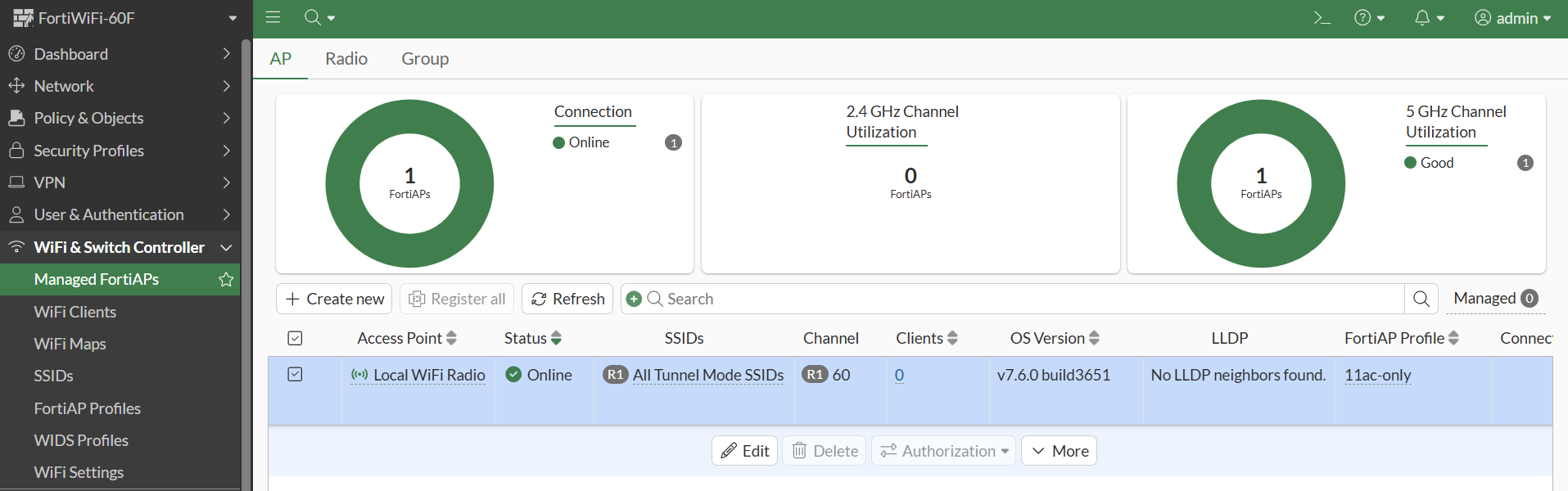
  • When a FortiWiFi local radio is operating in Wireless Client mode, a new Client Mode Setting page is available under the WiFi & Switch Controller menu.
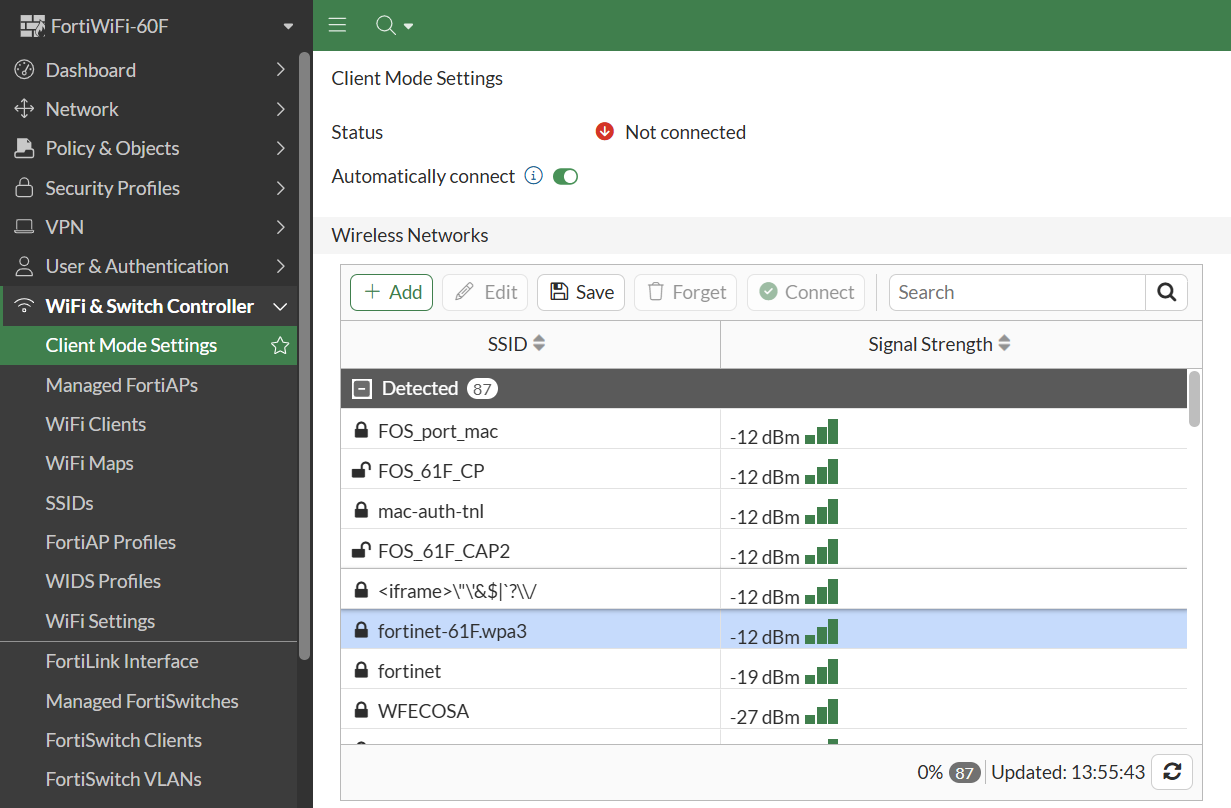
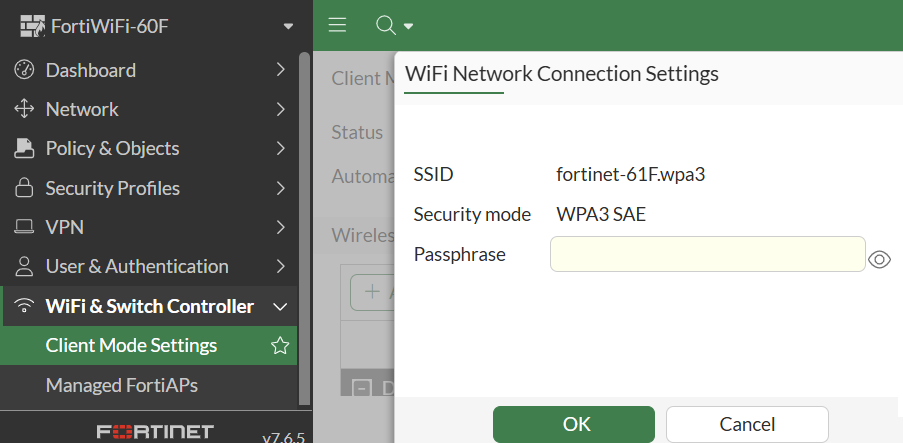
  • In Client Mode Settings, you can select from the detected SSIDs and click Save to set up a WiFi connection in the WiFi Connection Settings page.
New default configurations on FortiWiFi platforms 7.6.5

New default configurations on FortiWiFi platforms 7.6.5

Several default configurations on FortiWiFi have been updated to simplify and secure the setup process. Default soft-switch interfaces and open SSIDs have been removed across all FortiWiFi platforms. On 4xF/6xF/G-series models, new preconfigured wireless interfaces provide easier wireless setup with built-in IP, DHCP, and firewall policy support. On FortiWiFi-8xF-2R models, WiFi VAPs now operate in bridge mode, integrating with the hardware switch so clients receive DHCP from the internal interface, making it easier to manage and enforce firewall policies. The FortiWiFi related sections in the FortiOS GUI have also been updated.

On all FortiWiFi platforms:
  • The default soft-switch interface has been removed.
  • The default wifi VAP interface is no longer a member of the software switch.
  • The default guestwifi VAP interface has been removed.
On FortiWiFi-4xF/6xF and G-series models:
  • The default wifi VAP interface is still in tunnel mode and is preconfigured with an IP address, DHCP server, and firewall policies for easier WiFi setup.
On FortiWiFi-8xF-2R models:
  • The aplink interface (an aggregation mode interface of apink1 and aplink2) and aplink2 interfaces have been removed, and aplink1 has been added into the existing hardware switch interface internal.
  • The default wifi VAP interface operates in bridge mode. FortiWiFi-8xF-2R will automatically assign all bridge-mode VAPs to the local radio.
  • When the wifi VAP or any other bridge-mode VAP is working on the local radio of a FortiWiFi-8xF-2R unit, WiFi clients will receive DHCP IP addresses from the DHCP server on the internal interface and send/receive data traffic through internal hard-switch ports. This enables firewall policies on internal to apply to WiFi clients.

FortiOS GUI:
  • When a FortiWiFi local radio is operating in AP mode, the Local WiFi Radio page under the WiFi & Switch Controller menu is now located in the Managed FortiAPs table.

  • When a FortiWiFi local radio is operating in Wireless Client mode, a new Client Mode Setting page is available under the WiFi & Switch Controller menu.

  • In Client Mode Settings, you can select from the detected SSIDs and click Save to set up a WiFi connection in the WiFi Connection Settings page.