

EKS SDN connector using access key
AWS SDN connectors support dynamic address groups based on AWS Kubernetes (EKS) filters.

|
If there is an authorization issue with the dynamic address resolution of Kubernetes (K8s) IP addresses and/or the K8s dynamic addresses fail to display, confirm that you have set the correct Identity & Access Management permissions or role assignments. For more information, see How do I provide access to other IAM users and roles after cluster creation in Amazon EKS?. |
To enable an AWS SDN connector to fetch IP addresses from EKS:
-
Go to Security Fabric > External Connectors. Click Create New, then select Amazon Web Services (AWS). Configure the SDN connector as desired. See AWS SDN connector using access keys.
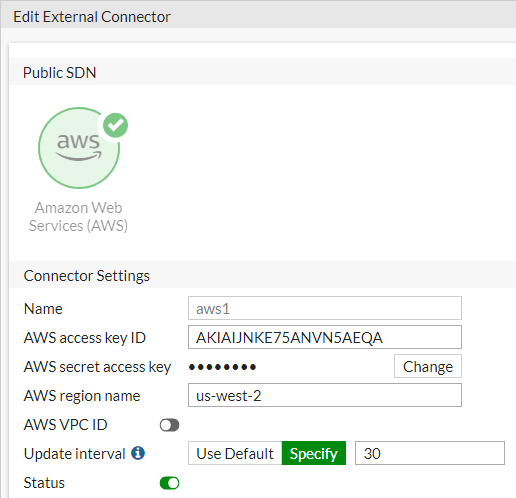
-
Go to Policies & Objects > Addresses and select Address.
-
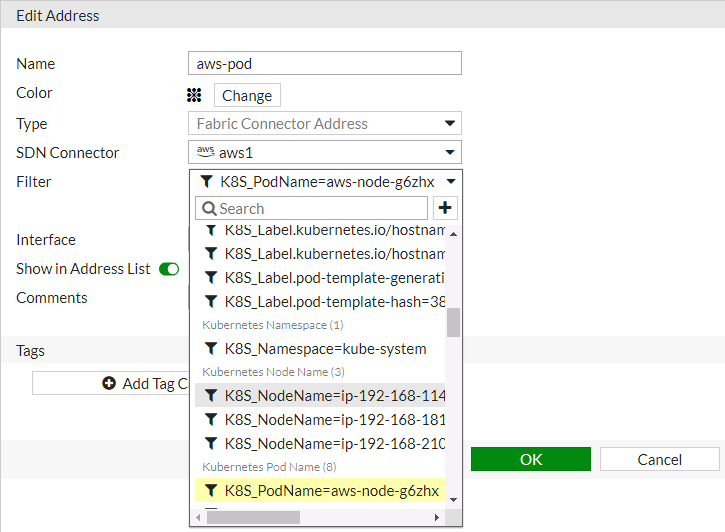
Click Create new to create a dynamic firewall address for the configured SDN connector using the supported K8s filter.
-
From the Type dropdown list, select Dynamic.
-
From the Sub Type dropdown list, select Fabric Connector Address.
-
From the SDN Connector dropdown list, select the desired SDN connector.
-
In the Filter field, add the desired filters. The following filters are supported:
Filter
Description
k8s_cluster
Name of K8s cluster.
k8s_namespace
Namespace of a K8s service or pod.
k8s_svcname
Name of a K8s service.
k8s_nodename
Name of a K8s node.
k8s_zone
Zone of a K8s node.
k8s_region
Region of a Kubernetes node.
k8s_podname
Name of a Kubernetes pod.
k8s_label.xxx
Name of label of a Kubernetes resource (cluster/service/node/pod).
-
Configure the rest of the settings, then click OK.
-
Ensure that the SDN connector resolves the dynamic firewall address IP addresses by going to Policy & Objects > Addresses and hovering over the newly created address.
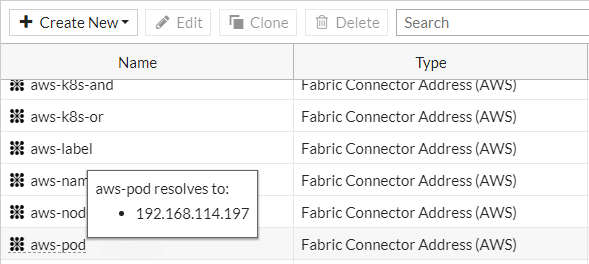
To configure an EKS SDN connector through the CLI:
-
Configure the SDN connector:
config system sdn-connector edit "aws1" set type aws set access-key "AKIAIJNKE75ANVN5AEQA" set secret-key xxxxx set region "us-west-2" set update-interval 30 next end -
Create a dynamic firewall address for the SDN connector with a supported Kubernetes filter:
config firewall address
    edit "aws-pod"
        set type dynamic
        set sdn "aws1"
        set filter "K8S_PodName=aws-node-g6zhx"
    next
end
The SDN connector resolves the dynamic firewall address IP address:
config firewall address
    edit "aws-pod"
        set type dynamic
        set sdn "aws1"
        set filter "K8S_PodName=aws-node-g6zhx"
        config list
            edit "192.168.114.197"
            next
        end
    next
end