

Agentless VPN
A Virtual Private Network (VPN) allows remote users to securely access private networks over the Internet, protecting data from unauthorized access. Employees working remotely can use a VPN to connect securely to their office network. VPNs also enable secure interconnectivity between multiple office locations.
Agentless VPN uses the Secure Socket Layer (SSL) protocol to establish a secure tunnel through a web browser, eliminating the need for a dedicated VPN client. Operating at the application layer of the OSI model, it provides clientless access to specific network resources without additional software installation.
Users authenticate to FortiGate's Agentless VPN web portal, which provides access to network services and resources, including HTTP/HTTPS, Telnet, FTP, SMB/CIFS, VNC, RDP, and SSH. When a user starts a connection to a server from the web portal, FortiOS proxies the communication with the server. All communication between the FortiGate and the user continues over HTTPS, regardless of the service being accessed.
Agentless VPN security restricts and validates HTTP messages sent from clients to FortiGate. With advanced checks and binary code verification, FortiGate automatically detects and blocks certain HTTP methods that could be exploited for unauthorized access attempts. By implementing this proactive defense, FortiGate enhances the security of its Agentless VPN feature, ensuring a safer environment for users.
Agentless VPN can be used when you require:
-
A clientless solution in which all remote services are accessed through a web portal
-
Tight control over the contents of the web portal
-
Limited services to be provided to the remote users
Considerations to use Agentless VPN:
-
Multiple applications and protocols are not supported.
-
VNC and RDP access might have limitations, such as unsupported shortcut keys.
-
In some configurations, RDP can consume a significant amount of memory and CPU resources.
-
Firewall performance might decrease as remote usage increases.
-
Highly customized web pages might render incorrectly.
Alternative remote-access solutions in FortiOS are IPsec VPN and Zero Trust Network Access.
To overcome the limitations of Agentless VPN, consider using IPsec VPN, which requires the FortiClient VPN agent to be installed on the remote endpoint. The FortiClient VPN client is available in both free and paid tiers, offering enhanced security and performance. For supported operating systems, refer to the FortiClient Technical Specifications.
For the highest VPN throughput and reliability, configure a dial-up IPsec VPN, which provides superior performance compared to SSL-based VPN solutions. See FortiClient as dialup client.

|
By default, the VPN > Agentless VPN and VPN > Agentless VPN Settings menus are hidden from the GUI and the CLI. To enable Agentless VPN, enter: config system global
set sslvpn-web-mode enable
end
To enable Agentless VPN feature visibility in the CLI, enter: config system settings
set gui-sslvpn enable
end
To enable Agentless VPN feature visibility in the GUI, go to System > Feature Visibility, enable Agentless VPN, and click Apply. When |
A user must have valid username and password credentials to log in to an Agentless VPN web portal. Other multi-factor authentication components may also be configured and required, such as FortiTokens.
After logging in, the Agentless VPN web portal page appears:
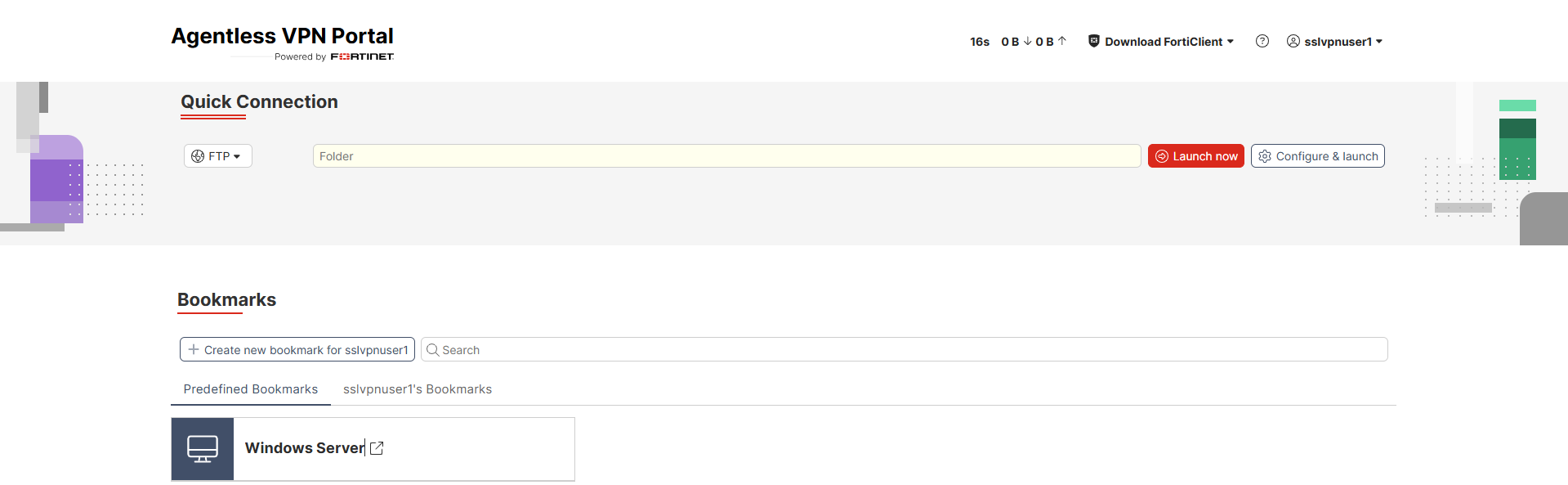
An Agentless VPN web portal includes the following features:
-
The session information is displayed in the right corner of the top banner. This includes the elapsed time since logging in and the volume of inbound and outbound HTTP and HTTPS traffic.
-
The Launch FortiClient button appears if FortiClient is installed. Click the button to open the FortiClient Remote Access tab. FortiClient does not automatically create a VPN connection based on the web-mode connection information.
-
The Download FortiClient button downloads the FortiClient application for various operating systems.
-
The Bookmarks widget includes links to network resources (administrator-defined bookmarks), and users can create their own bookmarks.
-
The Quick Connection dropdown menu enables a connection to network resources without using or creating a bookmark.
The following topics provide information about Agentless VPN in FortiOS: