
Fortinet white logo
Fortinet white logo

Administration Guide

Embedded SD-WAN SLA priorities in ICMP probes

Embedded SD-WAN SLA priorities in ICMP probes

In SD-WAN hub-and-spoke topologies, each spoke can embed an SLA priority (priority-in-sla and priority-out-sla) in ICMP probes and send them to the hub. The hub can use the received SLA priorities from each spoke to manage route priority for hub-to-spoke traffic. By offloading the evaluation of the spoke and hub routes to each spoke, the processing is spread amongst many FortiGates, instead of all on the hub.

The priority-in-sla and priority-out-sla settings can be customized for each member of a spoke, allowing different members to have different values when in or out of SLA. This is particularly useful when a spoke has underlays of different types and uses. For example, a spoke that has a broadband connection and an LTE connection will typically prefer to send traffic across the broadband underlay when both are in SLA.

Spoke-initiated speed tests can also use the embedded information. When configured, a spoke will continually embed an out-of SLA priority into ICMP probes on the overlay during a speed test. The hub will use the received out-of SLA priority information to manage route priorities and detour hub-to-spoke user traffic to other tunnels. This is to ensure that the speed test is not affected by any traffic for the duration of the test.

Examples

The SD-WAN topology with ADVPN and BGP neighbor on loopback is used for the following two examples:
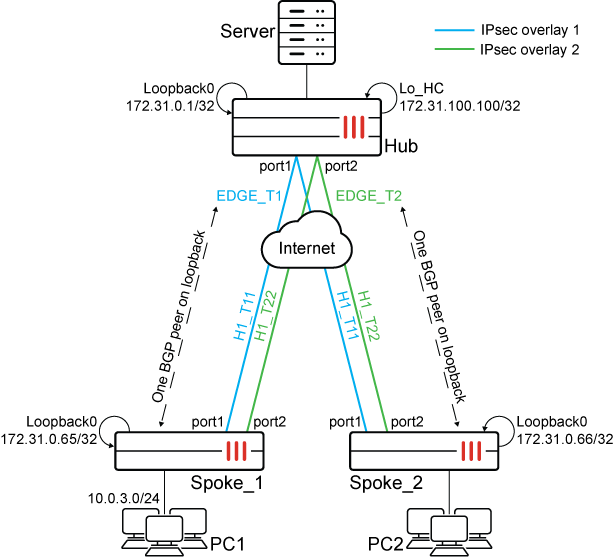
Example 1: Embedded priority configuration

In this example, a health check named hub is configured to embed its measured health status. When the health check is in SLA, the spoke sends an in-SLA priority of 10. When it is out of SLA, the spoke sends an out-of-SLA priority of 100. As there are two link-cost-factor thresholds (latency: 100, packet-loss: 50), the spoke sends in-SLA only if both factors are satisfied.

To configure the example:
  1. Configure SD-WAN and BGP on Spoke_1:

    1. Configure SD-WAN:

      config system sdwan
          set status enable
          config zone
              edit "overlay"
              next
          end
          config members
              edit 4
                  set interface "H1_T11"
                  set zone "overlay"
                  set source 172.31.0.65
                  set priority 10
                  set priority-in-sla 10
                  set priority-out-sla 20
              next
              edit 5
                  set interface "H1_T22"
                  set zone "overlay"
                  set source 172.31.0.65
                  set priority 10
                  set priority-in-sla 15
                  set priority-out-sla 25
              next
          end
          config health-check
              edit "HUB"
                  set embed-measured-health enable 
                  set sla-id-redistribute 1
                  set members 4 5   
                  config sla
                      edit 1
                          set link-cost-factor latency
                          set latency-threshold 50
                      next
                  end
              next
          end
      end
    2. Configure BGP:

      config router bgp
          set as 65001
          set router-id 172.31.0.65
          ...
          config neighbor
              edit "172.31.0.1"
                  ...
                  set remote-as 65001        
                  set update-source "Loopback0"
              next
          end
          config network
              edit 1
                  set prefix 10.0.3.0 255.255.255.0
              next
          end
          ...
      end
    3. View the health-check settings:

      # diagnose sys sdwan health-check
      Health Check(HUB):
      Seq(4 H1_T11): state(alive), packet-loss(0.000%) latency(0.230), jitter(0.040), mos(4.404), bandwidth-up(999998), bandwidth-dw(999996), bandwidth-bi(1999994) sla_map=0x1
      Seq(5 H1_T22): state(alive), packet-loss(0.000%) latency(0.188), jitter(0.007), mos(4.404), bandwidth-up(999998), bandwidth-dw(999996), bandwidth-bi(1999994) sla_map=0x1
  2. Configure SD-WAN and BGP on Spoke_2:

    1. Configure SD-WAN:

      config system sdwan
          set status enable
          config zone
              edit "overlay"
              next
          end
          config members
              edit 4
                  set interface "H1_T11"
                  set zone "overlay"
                  set source 172.31.0.65
                  set priority 10
                  set priority-in-sla 30
                  set priority-out-sla 40
              next
              edit 5
                  set interface "H1_T22"
                  set zone "overlay"
                  set source 172.31.0.65
                  set priority 10
                  set priority-in-sla 35
                  set priority-out-sla 45
              next
          end
          config health-check
              edit "HUB"
                  set embed-measured-health enable 
                  set sla-id-redistribute 1
                  set members 4 5   
                  config sla
                      edit 1
                          set link-cost-factor latency
                          set latency-threshold 70
                      next
                  end
              next
          end
      end
    2. Configure BGP:

      config router bgp
          set as 65001
          set router-id 172.31.0.65
          ...
          config neighbor
              edit "172.31.0.1"
                  ...
                  set remote-as 65001        
                  set update-source "Loopback0"
              next
          end
          config network
              edit 1
                  set prefix 10.0.4.0 255.255.255.0
              next
          end
          ...
      end
    3. View the health-check settings:

      # diagnose sys sdwan health-check
      Health Check(HUB):
      Seq(4 H1_T11): state(alive), packet-loss(0.000%) latency(0.230), jitter(0.040), mos(4.404), bandwidth-up(999998), bandwidth-dw(999996), bandwidth-bi(1999994) sla_map=0x1
      Seq(5 H1_T22): state(alive), packet-loss(0.000%) latency(0.188), jitter(0.007), mos(4.404), bandwidth-up(999998), bandwidth-dw(999996), bandwidth-bi(1999994) sla_map=0x1
  3. Configure SD-WAN and BGP on the Hub:

    1. Configure SD-WAN:

      config system sdwan
          set status enable
          config zone
              edit "overlay"
              next
          end
          config members
              edit 1
                  set interface "EDGE_T1"
                  set zone "overlay"
              next
              edit 2
                  set interface "EDGE_T2"
                  set zone "overlay"
              next
          end
          config health-check
              edit "Remote_HC"
                  set detect-mode remote
                  set sla-id-redistribute 1
                  set members 1 2
                  config sla
                      edit 1
                          set link-cost-factor remote
                      next
                  end
              next
          end
      end
      Tooltip

      In mixed deployments where some spokes may not send the SLA priority and only send SLA status (such as SLA-in or SLA-out), the hub can be configured to set default in-SLA and out-SLA values for routes. The following bold lines could added to the hub configuration:

      config sla
          edit 1
              set link-cost-factor remote
              set link-cost-factor-default latency
              set priority-in-sla 11
              set priority-out-sla 101
          next
      end
    2. Configure BGP:

      config router bgp
          set as 65001
          set router-id 172.31.0.1
          set recursive-inherit-priority enable
          ...
          config neighbor-group
              edit "EDGE"
                  set remote-as 65001
                  set update-source "Loopback0"
                  set route-reflector-client enable
              next
          end
          config neighbor-range
              edit 1
                  set prefix 172.31.0.64 255.255.255.192
                  set neighbor-group "EDGE"
              next
          end
          ...
      end
    3. View the health-check settings:

      The following example shows:

      • rmt_ver=2 indicates that SLA information, SLA status, and overlay priority have been received.

      • rmt_sla=out indicates that received SLA status is out of SLA.

      • rmt_sla=in indicates that received SLA status is in SLA.

      • rmt_prio indicates the received overlay priority value.

      • EDGE_T1_0 is to H1_T11 on Spoke_1, and EDGE_T1_1 is to H1_T11 on Spoke_2.

      • EDGE_T2_1 is to H1_T22 on Spoke_1, and EDGE_T1_0 is to H1_T22 on Spoke_2.

      # diagnose sys sdwan health-check remote
      
      Remote Health Check: Remote_HC(1)
        Passive remote statistics of EDGE_T1(46):
          EDGE_T1_0(10.0.0.20): timestamp=06-12 14:04:29, src=172.31.0.65, latency=0.247, jitter=0.028, pktloss=0.000%, mos=4.404, SLA id=1(pass), rmt_ver=2, rmt_sla=in, rmt_prio=10
          EDGE_T1_1(172.31.0.66): timestamp=06-12 14:04:30, src=172.31.0.66, latency=0.246, jitter=0.031, pktloss=0.000%, mos=4.404, SLA id=1(pass), rmt_ver=2, rmt_sla=in, rmt_prio=30
      
      Remote Health Check: Remote_HC(2)
        Passive remote statistics of EDGE_T2(47):
          EDGE_T2_0(10.0.0.15): timestamp=06-12 14:04:30, src=172.31.0.66, latency=0.191, jitter=0.008, pktloss=0.000%, mos=4.404, SLA id=1(pass), rmt_ver=2, rmt_sla=in, rmt_prio=35
          EDGE_T2_1(172.31.0.65): timestamp=06-12 14:04:29, src=172.31.0.65, latency=0.201, jitter=0.008, pktloss=0.000%, mos=4.404, SLA id=1(pass), rmt_ver=2, rmt_sla=in, rmt_prio=15
  4. After the spokes' overlay priorities are embedded in ICMP probes and transported to the hub, view the routing tables on the hub.

    The hub sets overlay priorities on IKE routes over EDGE_T1 and EDGE_T2. Meanwhile, recursively resolved BGP routes inherit the priorities from those IKE routes.

    1. On the hub, get the static routing table:

      # get router info routing-table static
      Routing table for VRF=0
      S       172.31.0.65/32 [15/0] via EDGE_T1 tunnel 10.0.0.20, [10/0]
                             [15/0] via EDGE_T2 tunnel 172.31.0.65, [15/0]
      S       172.31.0.66/32 [15/0] via EDGE_T1 tunnel 172.31.0.66, [30/0]
                             [15/0] via EDGE_T2 tunnel 10.0.0.15, [35/0]
    2. On the hub, get the BGP routing table:

      # get router info routing-table bgp
      Routing table for VRF=0
      B       10.0.3.0/24 [200/0] via 172.31.0.65 (recursive via EDGE_T1 tunnel 10.0.0.20 [10]), 01:15:46
                                                  (recursive via EDGE_T2 tunnel 172.31.0.65 [15]), 01:15:46, [1/0]
      B       10.0.4.0/24 [200/0] via 172.31.0.66 (recursive via EDGE_T1 tunnel 172.31.0.66 [30]), 01:13:46
                                                  (recursive via EDGE_T2 tunnel 10.0.0.15 [35]), 01:13:46, [1/0]
  5. Change the latency on Spoke_1 and Spoke_2, and view the results.

    1. On Spoke_1, increase H1_T11's latency to 60 to make it out of SLA.

    2. On Spoke_2, increase H1_T11's latency to 80 to make it out of SLA.

    3. On Spoke_1, run a health check:

      # diagnose sys sdwan  health-check
      Health Check(HUB):
      Seq(4 H1_T11): state(alive), packet-loss(0.000%) latency(60.247), jitter(0.036), mos(4.373), bandwidth-up(999998), bandwidth-dw(999997), bandwidth-bi(1999995) sla_map=0x0
      Seq(5 H1_T22): state(alive), packet-loss(0.000%) latency(0.218), jitter(0.016), mos(4.404), bandwidth-up(999998), bandwidth-dw(999998), bandwidth-bi(1999996) sla_map=0x
      
    4. On Spoke_2, run a health check:

      # diagnose sys sdwan  health-check
      Health Check(HUB):
      Seq(4 H1_T11): state(alive), packet-loss(0.000%) latency(80.217), jitter(0.022), mos(4.361), bandwidth-up(999998), bandwidth-dw(999998), bandwidth-bi(1999996) sla_map=0x0
      Seq(5 H1_T22): state(alive), packet-loss(0.000%) latency(0.202), jitter(0.016), mos(4.404), bandwidth-up(999998), bandwidth-dw(999997), bandwidth-bi(1999995) sla_map=0x1
  6. After the hub receives the updated overlay priorities, run a health check on the hub and view the routing tables.

    The hub has updated the route priorities.

    1. Run a health check:

      # diagnose sys sdwan health-check remote
      
      Remote Health Check: Remote_HC(1)
        Passive remote statistics of EDGE_T1(46):
        EDGE_T1_0(10.0.0.20): timestamp=06-12 14:19:26, src=172.31.0.65, latency=60.249, jitter=0.031, pktloss=0.000%, mos=4.373, SLA id=1(remote), rmt_ver=2, rmt_sla=out, rmt_prio=20
      EDGE_T1_1(172.31.0.66): timestamp=06-12 14:19:26, src=172.31.0.66, latency=80.222, jitter=0.021, pktloss=0.000%, mos=4.361, SLA id=1(remote), rmt_ver=2, rmt_sla=out, rmt_prio=40
      
      Remote Health Check: Remote_HC(2)
        Passive remote statistics of EDGE_T2(47):
        EDGE_T2_0(10.0.0.15): timestamp=06-12 14:19:26, src=172.31.0.66, latency=0.205, jitter=0.011, pktloss=0.000%, mos=4.404, SLA id=1(pass), rmt_ver=2, rmt_sla=in, rmt_prio=35
        EDGE_T2_1(172.31.0.65): timestamp=06-12 14:19:26, src=172.31.0.65, latency=0.215, jitter=0.009, pktloss=0.000%, mos=4.404, SLA id=1(pass), rmt_ver=2, rmt_sla=in, rmt_prio=15
    2. View the static routing table:

      For EDGE_T1, the priority changed from 10 to 20 and from 30 to 40 because it is out of SLA.

      # get router info routing-table static
      Routing table for VRF=0
      S       172.31.0.65/32 [15/0] via EDGE_T2 tunnel 172.31.0.65, [15/0]
                                        [15/0] via EDGE_T1 tunnel 10.0.0.20, [20/0]
      S       172.31.0.66/32 [15/0] via EDGE_T2 tunnel 10.0.0.15, [35/0]
                                        [15/0] via EDGE_T1 tunnel 172.31.0.66, [40/0]
    3. View the BGP routing table:

      • For 10.0.3.0/24, EDGE_T2 is preferred. Priority for EDGE_T1 changed from 10 to 20.

      • For 10.0.4.0/24, EDGE_T2 is preferred. Priority for EDGE_T1 changed from 30 to 40.

      # get router info routing-table  bgp
      Routing table for VRF=0
      B       10.0.3.0/24 [200/0] via 172.31.0.65 (recursive via EDGE_T2 tunnel 172.31.0.65 [15]), 00:07:28 
                                                  (recursive via EDGE_T1 tunnel 10.0.0.20 [20]), 00:07:28, [1/0]      
      B       10.0.4.0/24 [200/0] via 172.31.0.66 (recursive via EDGE_T2 tunnel 10.0.0.15 [35]), 00:07:28                                                          (recursive via EDGE_T1 tunnel 172.31.0.66 [40]), 00:07:28, [1/0]   

Example 2: Speed test rerouting based on embedded SLA priorities

When spoke-initiated speed tests are enabled for this configuration, the out-of SLA priority is used by the hub to choose other routes during the speed test.

To configure speed tests:
  1. On the hub, enable speed tests and allow them on the underlays and overlays.

    1. Enable speed tests:

      config system global
          set speedtest-server enable
          set speedtestd-ctrl-port 6000
          set speedtestd-server-port 7000
      end
    2. Allow speed tests on the underlays:

      config system interface
          edit "port1"
             ...
              set allowaccess ping speed-test
            ...
          next
          edit "port2"
              ...
              set allowaccess ping speed-test
             ...
          next
      end
    3. Allow speed tests on the overlay, and specify a shaping profile:

      Update the interface to use measured values reported by the speed test for in and out bandwidth.

      config system interface
          edit "EDGE_T1"
              ...
              set allowaccess ping speed-test 
              set type tunnel
              set egress-shaping-profile "profile_1"
              set outbandwidth-source measured
              set inbandwidth-source measured
              ...
              set interface "port1"
          next
          edit "EDGE_T2"
              ...
              set allowaccess ping speed-test
              set type tunnel
              set egress-shaping-profile "profile_1"
              set outbandwidth-source measured
              set inbandwidth-source measured
              ...
              set interface "port2"
          next
      end
    4. View the shaping profile:

      config firewall shaping-profile
          edit "profile_1"                                                   
              set default-class-id 2
              config shaping-entries
                  edit 1
                      set class-id 2
                      set priority low
                      set guaranteed-bandwidth-percentage 10
                      set maximum-bandwidth-percentage 10
                  next
                  edit 2
                      set class-id 3
                      set priority medium
                      set guaranteed-bandwidth-percentage 30
                      set maximum-bandwidth-percentage 40
                  next
                  edit 3
                      set class-id 4
                      set guaranteed-bandwidth-percentage 20
                      set maximum-bandwidth-percentage 50
                  next
              end
          next
      end
  2. On Spoke_1, schedule speed tests:

    config system speed-test-schedule edit "H1_T11" set mode TCP set schedules "speed-test" set dynamic-server enable set ctrl-port 6000 set server-port 7000 next edit "H1_T22" set mode UDP set schedules "speed-test" set dynamic-server enable set ctrl-port 6000 set server-port 7000 next end

Before starting the speed test on Spoke_1, route priorities are based on the received overlay priorities on both H1_T11 and H1_T22

HUB (root) (Interim)# get router info routing-table bgp
Routing table for VRF=0 
B       10.0.3.0/24 [200/0] via 172.31.0.65 (recursive via EDGE_T1 tunnel 10.0.0.20 [10]), 00:11:56 
                                            (recursive via EDGE_T2 tunnel 172.31.0.65 [15]), 00:11:56, [1/0]

While the speed test is running on H1_T11 of Spoke_1, Spoke_1 will constantly embed out-of SLA overlay priority into probes on H1_T11 and send them to the hub. Then the Hub updates route priorities accordingly and detours hub-to-spoke traffic to H1_T22 to avoid the impact on speed test of H1_T11. EDGE_T2 is preferred, and the EDGE_T1 priority changed from 10 to 20.

HUB (root) (Interim)# get router info routing-table  bgp
Routing table for VRF=0Routing table for VRF=0
B       10.0.3.0/24 [200/0] via 172.31.0.65 (recursive via EDGE_T2 tunnel 172.31.0.65 [15]), 00:03:49            
                                            (recursive via EDGE_T1 tunnel 10.0.0.20 [20]), 00:03:49, [1/0]

During the speed test on H1_T22 of Spoke_1, Spoke_1 constantly embeds out-of SLA overlay priority into probes on H1_T22 and sends them to the hub. Then the Hub updates route priorities accordingly and detours hub-to-spoke traffic to H1_T11 to avoid the impact on speed test of H1_T22. EDGE_T1 is preferred, and the EDGE_T2 priority changed from 15 to 25.

HUB (root) (Interim)# get router info routing-table  bgp
Routing table for VRF=0
B       10.0.3.0/24 [200/0] via 172.31.0.65 (recursive via EDGE_T1 tunnel 10.0.0.20 [10]), 00:04:06
                                                                  (recursive via EDGE_T2 tunnel 172.31.0.65 [25]), 00:04:06, [1/0]

Once speed test completes, the results are applied on child tunnels as egress-shaping-profile on the hub.

HUB (root) (Interim)# diagnose vpn tunnel  list
list all ipsec tunnel in vd 0
------------------------------------------------------
name=EDGE_T1_0 ver=2 serial=22 172.31.1.1:0->172.31.3.1:0 nexthop=172.31.1.2 tun_id=10.0.0.20 tun_id6=::10.0.0.31 status=up dst_mtu=1500 weight=1
.....
  dec: spi=9932cb6a esp=aes-gcm key=36 0819373cc74d0eb2dae8ac559519b756010fb42d2453b1c046429f8aad4d7dcbb507b990
       ah=null key=0
  enc: spi=dea67361 esp=aes-gcm key=36 c2ac45b9c1144d6728b5a7a542d1a35c86d018af35f6f661888dc39f771dc4820e2a40ff
       ah=null key=0
  dec:pkts/bytes=0/0, enc:pkts/bytes=3789/517724
  npu_flag=03 npu_rgwy=172.31.3.1 npu_lgwy=172.31.1.1 npu_selid=26 dec_npuid=1 enc_npuid=1 npu_isaidx=719 npu_osaidx=39
egress traffic control:
        bandwidth=711495(kbps) lock_hit=0 default_class=2 n_active_class=3
        class-id=2      allocated-bandwidth=71149(kbps)         guaranteed-bandwidth=71149(kbps)
                        max-bandwidth=71149(kbps)       current-bandwidth=1(kbps)
                        priority=low    forwarded_bytes=82K
                        dropped_packets=0       dropped_bytes=0
        class-id=3      allocated-bandwidth=284597(kbps)        guaranteed-bandwidth=213448(kbps)
                        max-bandwidth=284597(kbps)      current-bandwidth=0(kbps)
                        priority=medium         forwarded_bytes=0
                        dropped_packets=0       dropped_bytes=0
        class-id=4      allocated-bandwidth=355747(kbps)        guaranteed-bandwidth=142298(kbps)
                        max-bandwidth=355747(kbps)      current-bandwidth=0(kbps)
                        priority=high   forwarded_bytes=0
                        dropped_packets=0       dropped_bytes=0
------------------------------------------------------
name=EDGE_T2_1 ver=2 serial=1c 172.31.1.5:0->172.31.3.5:0 nexthop=172.31.1.6 tun_id=172.31.0.65 tun_id6=::10.0.0.25 status=up dst_mtu=1500 weight=1
......
  dec: spi=9932cb69 esp=aes-gcm key=36 01842dbbe1fe98fc6503b491c0768a844d815074950589b48db8a9a00c7505e73a96dc84
       ah=null key=0
  enc: spi=dea67360 esp=aes-gcm key=36 c2e4cb1065325de7970d6f8edb3cac8829a33420ff79acedd6dcf4012e4614dd92d7b16b
       ah=null key=0
  dec:pkts/bytes=0/0, enc:pkts/bytes=3518/499252
  npu_flag=03 npu_rgwy=172.31.3.5 npu_lgwy=172.31.1.5 npu_selid=27 dec_npuid=1 enc_npuid=1 npu_isaidx=718 npu_osaidx=40
egress traffic control:
        bandwidth=374876(kbps) lock_hit=0 default_class=2 n_active_class=3
        class-id=2      allocated-bandwidth=37487(kbps)         guaranteed-bandwidth=37487(kbps)
                        max-bandwidth=37487(kbps)       current-bandwidth=2(kbps)
                        priority=low    forwarded_bytes=78K
                        dropped_packets=0       dropped_bytes=0
        class-id=3      allocated-bandwidth=149950(kbps)        guaranteed-bandwidth=112462(kbps)
                        max-bandwidth=149950(kbps)      current-bandwidth=0(kbps)
                        priority=medium         forwarded_bytes=0
                        dropped_packets=0       dropped_bytes=0
        class-id=4      allocated-bandwidth=187438(kbps)        guaranteed-bandwidth=74975(kbps)
                        max-bandwidth=187438(kbps)      current-bandwidth=0(kbps)
                        priority=high   forwarded_bytes=0
                        dropped_packets=0       dropped_bytes=0

Embedded SD-WAN SLA priorities in ICMP probes

Embedded SD-WAN SLA priorities in ICMP probes

In SD-WAN hub-and-spoke topologies, each spoke can embed an SLA priority (priority-in-sla and priority-out-sla) in ICMP probes and send them to the hub. The hub can use the received SLA priorities from each spoke to manage route priority for hub-to-spoke traffic. By offloading the evaluation of the spoke and hub routes to each spoke, the processing is spread amongst many FortiGates, instead of all on the hub.

The priority-in-sla and priority-out-sla settings can be customized for each member of a spoke, allowing different members to have different values when in or out of SLA. This is particularly useful when a spoke has underlays of different types and uses. For example, a spoke that has a broadband connection and an LTE connection will typically prefer to send traffic across the broadband underlay when both are in SLA.

Spoke-initiated speed tests can also use the embedded information. When configured, a spoke will continually embed an out-of SLA priority into ICMP probes on the overlay during a speed test. The hub will use the received out-of SLA priority information to manage route priorities and detour hub-to-spoke user traffic to other tunnels. This is to ensure that the speed test is not affected by any traffic for the duration of the test.

Examples

The SD-WAN topology with ADVPN and BGP neighbor on loopback is used for the following two examples:

Example 1: Embedded priority configuration

In this example, a health check named hub is configured to embed its measured health status. When the health check is in SLA, the spoke sends an in-SLA priority of 10. When it is out of SLA, the spoke sends an out-of-SLA priority of 100. As there are two link-cost-factor thresholds (latency: 100, packet-loss: 50), the spoke sends in-SLA only if both factors are satisfied.

To configure the example:
  1. Configure SD-WAN and BGP on Spoke_1:

    1. Configure SD-WAN:

      config system sdwan
          set status enable
          config zone
              edit "overlay"
              next
          end
          config members
              edit 4
                  set interface "H1_T11"
                  set zone "overlay"
                  set source 172.31.0.65
                  set priority 10
                  set priority-in-sla 10
                  set priority-out-sla 20
              next
              edit 5
                  set interface "H1_T22"
                  set zone "overlay"
                  set source 172.31.0.65
                  set priority 10
                  set priority-in-sla 15
                  set priority-out-sla 25
              next
          end
          config health-check
              edit "HUB"
                  set embed-measured-health enable 
                  set sla-id-redistribute 1
                  set members 4 5   
                  config sla
                      edit 1
                          set link-cost-factor latency
                          set latency-threshold 50
                      next
                  end
              next
          end
      end
    2. Configure BGP:

      config router bgp
          set as 65001
          set router-id 172.31.0.65
          ...
          config neighbor
              edit "172.31.0.1"
                  ...
                  set remote-as 65001        
                  set update-source "Loopback0"
              next
          end
          config network
              edit 1
                  set prefix 10.0.3.0 255.255.255.0
              next
          end
          ...
      end
    3. View the health-check settings:

      # diagnose sys sdwan health-check
      Health Check(HUB):
      Seq(4 H1_T11): state(alive), packet-loss(0.000%) latency(0.230), jitter(0.040), mos(4.404), bandwidth-up(999998), bandwidth-dw(999996), bandwidth-bi(1999994) sla_map=0x1
      Seq(5 H1_T22): state(alive), packet-loss(0.000%) latency(0.188), jitter(0.007), mos(4.404), bandwidth-up(999998), bandwidth-dw(999996), bandwidth-bi(1999994) sla_map=0x1
  2. Configure SD-WAN and BGP on Spoke_2:

    1. Configure SD-WAN:

      config system sdwan
          set status enable
          config zone
              edit "overlay"
              next
          end
          config members
              edit 4
                  set interface "H1_T11"
                  set zone "overlay"
                  set source 172.31.0.65
                  set priority 10
                  set priority-in-sla 30
                  set priority-out-sla 40
              next
              edit 5
                  set interface "H1_T22"
                  set zone "overlay"
                  set source 172.31.0.65
                  set priority 10
                  set priority-in-sla 35
                  set priority-out-sla 45
              next
          end
          config health-check
              edit "HUB"
                  set embed-measured-health enable 
                  set sla-id-redistribute 1
                  set members 4 5   
                  config sla
                      edit 1
                          set link-cost-factor latency
                          set latency-threshold 70
                      next
                  end
              next
          end
      end
    2. Configure BGP:

      config router bgp
          set as 65001
          set router-id 172.31.0.65
          ...
          config neighbor
              edit "172.31.0.1"
                  ...
                  set remote-as 65001        
                  set update-source "Loopback0"
              next
          end
          config network
              edit 1
                  set prefix 10.0.4.0 255.255.255.0
              next
          end
          ...
      end
    3. View the health-check settings:

      # diagnose sys sdwan health-check
      Health Check(HUB):
      Seq(4 H1_T11): state(alive), packet-loss(0.000%) latency(0.230), jitter(0.040), mos(4.404), bandwidth-up(999998), bandwidth-dw(999996), bandwidth-bi(1999994) sla_map=0x1
      Seq(5 H1_T22): state(alive), packet-loss(0.000%) latency(0.188), jitter(0.007), mos(4.404), bandwidth-up(999998), bandwidth-dw(999996), bandwidth-bi(1999994) sla_map=0x1
  3. Configure SD-WAN and BGP on the Hub:

    1. Configure SD-WAN:

      config system sdwan
          set status enable
          config zone
              edit "overlay"
              next
          end
          config members
              edit 1
                  set interface "EDGE_T1"
                  set zone "overlay"
              next
              edit 2
                  set interface "EDGE_T2"
                  set zone "overlay"
              next
          end
          config health-check
              edit "Remote_HC"
                  set detect-mode remote
                  set sla-id-redistribute 1
                  set members 1 2
                  config sla
                      edit 1
                          set link-cost-factor remote
                      next
                  end
              next
          end
      end
      Tooltip

      In mixed deployments where some spokes may not send the SLA priority and only send SLA status (such as SLA-in or SLA-out), the hub can be configured to set default in-SLA and out-SLA values for routes. The following bold lines could added to the hub configuration:

      config sla
          edit 1
              set link-cost-factor remote
              set link-cost-factor-default latency
              set priority-in-sla 11
              set priority-out-sla 101
          next
      end
    2. Configure BGP:

      config router bgp
          set as 65001
          set router-id 172.31.0.1
          set recursive-inherit-priority enable
          ...
          config neighbor-group
              edit "EDGE"
                  set remote-as 65001
                  set update-source "Loopback0"
                  set route-reflector-client enable
              next
          end
          config neighbor-range
              edit 1
                  set prefix 172.31.0.64 255.255.255.192
                  set neighbor-group "EDGE"
              next
          end
          ...
      end
    3. View the health-check settings:

      The following example shows:

      • rmt_ver=2 indicates that SLA information, SLA status, and overlay priority have been received.

      • rmt_sla=out indicates that received SLA status is out of SLA.

      • rmt_sla=in indicates that received SLA status is in SLA.

      • rmt_prio indicates the received overlay priority value.

      • EDGE_T1_0 is to H1_T11 on Spoke_1, and EDGE_T1_1 is to H1_T11 on Spoke_2.

      • EDGE_T2_1 is to H1_T22 on Spoke_1, and EDGE_T1_0 is to H1_T22 on Spoke_2.

      # diagnose sys sdwan health-check remote
      
      Remote Health Check: Remote_HC(1)
        Passive remote statistics of EDGE_T1(46):
          EDGE_T1_0(10.0.0.20): timestamp=06-12 14:04:29, src=172.31.0.65, latency=0.247, jitter=0.028, pktloss=0.000%, mos=4.404, SLA id=1(pass), rmt_ver=2, rmt_sla=in, rmt_prio=10
          EDGE_T1_1(172.31.0.66): timestamp=06-12 14:04:30, src=172.31.0.66, latency=0.246, jitter=0.031, pktloss=0.000%, mos=4.404, SLA id=1(pass), rmt_ver=2, rmt_sla=in, rmt_prio=30
      
      Remote Health Check: Remote_HC(2)
        Passive remote statistics of EDGE_T2(47):
          EDGE_T2_0(10.0.0.15): timestamp=06-12 14:04:30, src=172.31.0.66, latency=0.191, jitter=0.008, pktloss=0.000%, mos=4.404, SLA id=1(pass), rmt_ver=2, rmt_sla=in, rmt_prio=35
          EDGE_T2_1(172.31.0.65): timestamp=06-12 14:04:29, src=172.31.0.65, latency=0.201, jitter=0.008, pktloss=0.000%, mos=4.404, SLA id=1(pass), rmt_ver=2, rmt_sla=in, rmt_prio=15
  4. After the spokes' overlay priorities are embedded in ICMP probes and transported to the hub, view the routing tables on the hub.

    The hub sets overlay priorities on IKE routes over EDGE_T1 and EDGE_T2. Meanwhile, recursively resolved BGP routes inherit the priorities from those IKE routes.

    1. On the hub, get the static routing table:

      # get router info routing-table static
      Routing table for VRF=0
      S       172.31.0.65/32 [15/0] via EDGE_T1 tunnel 10.0.0.20, [10/0]
                             [15/0] via EDGE_T2 tunnel 172.31.0.65, [15/0]
      S       172.31.0.66/32 [15/0] via EDGE_T1 tunnel 172.31.0.66, [30/0]
                             [15/0] via EDGE_T2 tunnel 10.0.0.15, [35/0]
    2. On the hub, get the BGP routing table:

      # get router info routing-table bgp
      Routing table for VRF=0
      B       10.0.3.0/24 [200/0] via 172.31.0.65 (recursive via EDGE_T1 tunnel 10.0.0.20 [10]), 01:15:46
                                                  (recursive via EDGE_T2 tunnel 172.31.0.65 [15]), 01:15:46, [1/0]
      B       10.0.4.0/24 [200/0] via 172.31.0.66 (recursive via EDGE_T1 tunnel 172.31.0.66 [30]), 01:13:46
                                                  (recursive via EDGE_T2 tunnel 10.0.0.15 [35]), 01:13:46, [1/0]
  5. Change the latency on Spoke_1 and Spoke_2, and view the results.

    1. On Spoke_1, increase H1_T11's latency to 60 to make it out of SLA.

    2. On Spoke_2, increase H1_T11's latency to 80 to make it out of SLA.

    3. On Spoke_1, run a health check:

      # diagnose sys sdwan  health-check
      Health Check(HUB):
      Seq(4 H1_T11): state(alive), packet-loss(0.000%) latency(60.247), jitter(0.036), mos(4.373), bandwidth-up(999998), bandwidth-dw(999997), bandwidth-bi(1999995) sla_map=0x0
      Seq(5 H1_T22): state(alive), packet-loss(0.000%) latency(0.218), jitter(0.016), mos(4.404), bandwidth-up(999998), bandwidth-dw(999998), bandwidth-bi(1999996) sla_map=0x
      
    4. On Spoke_2, run a health check:

      # diagnose sys sdwan  health-check
      Health Check(HUB):
      Seq(4 H1_T11): state(alive), packet-loss(0.000%) latency(80.217), jitter(0.022), mos(4.361), bandwidth-up(999998), bandwidth-dw(999998), bandwidth-bi(1999996) sla_map=0x0
      Seq(5 H1_T22): state(alive), packet-loss(0.000%) latency(0.202), jitter(0.016), mos(4.404), bandwidth-up(999998), bandwidth-dw(999997), bandwidth-bi(1999995) sla_map=0x1
  6. After the hub receives the updated overlay priorities, run a health check on the hub and view the routing tables.

    The hub has updated the route priorities.

    1. Run a health check:

      # diagnose sys sdwan health-check remote
      
      Remote Health Check: Remote_HC(1)
        Passive remote statistics of EDGE_T1(46):
        EDGE_T1_0(10.0.0.20): timestamp=06-12 14:19:26, src=172.31.0.65, latency=60.249, jitter=0.031, pktloss=0.000%, mos=4.373, SLA id=1(remote), rmt_ver=2, rmt_sla=out, rmt_prio=20
      EDGE_T1_1(172.31.0.66): timestamp=06-12 14:19:26, src=172.31.0.66, latency=80.222, jitter=0.021, pktloss=0.000%, mos=4.361, SLA id=1(remote), rmt_ver=2, rmt_sla=out, rmt_prio=40
      
      Remote Health Check: Remote_HC(2)
        Passive remote statistics of EDGE_T2(47):
        EDGE_T2_0(10.0.0.15): timestamp=06-12 14:19:26, src=172.31.0.66, latency=0.205, jitter=0.011, pktloss=0.000%, mos=4.404, SLA id=1(pass), rmt_ver=2, rmt_sla=in, rmt_prio=35
        EDGE_T2_1(172.31.0.65): timestamp=06-12 14:19:26, src=172.31.0.65, latency=0.215, jitter=0.009, pktloss=0.000%, mos=4.404, SLA id=1(pass), rmt_ver=2, rmt_sla=in, rmt_prio=15
    2. View the static routing table:

      For EDGE_T1, the priority changed from 10 to 20 and from 30 to 40 because it is out of SLA.

      # get router info routing-table static
      Routing table for VRF=0
      S       172.31.0.65/32 [15/0] via EDGE_T2 tunnel 172.31.0.65, [15/0]
                                        [15/0] via EDGE_T1 tunnel 10.0.0.20, [20/0]
      S       172.31.0.66/32 [15/0] via EDGE_T2 tunnel 10.0.0.15, [35/0]
                                        [15/0] via EDGE_T1 tunnel 172.31.0.66, [40/0]
    3. View the BGP routing table:

      • For 10.0.3.0/24, EDGE_T2 is preferred. Priority for EDGE_T1 changed from 10 to 20.

      • For 10.0.4.0/24, EDGE_T2 is preferred. Priority for EDGE_T1 changed from 30 to 40.

      # get router info routing-table  bgp
      Routing table for VRF=0
      B       10.0.3.0/24 [200/0] via 172.31.0.65 (recursive via EDGE_T2 tunnel 172.31.0.65 [15]), 00:07:28 
                                                  (recursive via EDGE_T1 tunnel 10.0.0.20 [20]), 00:07:28, [1/0]      
      B       10.0.4.0/24 [200/0] via 172.31.0.66 (recursive via EDGE_T2 tunnel 10.0.0.15 [35]), 00:07:28                                                          (recursive via EDGE_T1 tunnel 172.31.0.66 [40]), 00:07:28, [1/0]   

Example 2: Speed test rerouting based on embedded SLA priorities

When spoke-initiated speed tests are enabled for this configuration, the out-of SLA priority is used by the hub to choose other routes during the speed test.

To configure speed tests:
  1. On the hub, enable speed tests and allow them on the underlays and overlays.

    1. Enable speed tests:

      config system global
          set speedtest-server enable
          set speedtestd-ctrl-port 6000
          set speedtestd-server-port 7000
      end
    2. Allow speed tests on the underlays:

      config system interface
          edit "port1"
             ...
              set allowaccess ping speed-test
            ...
          next
          edit "port2"
              ...
              set allowaccess ping speed-test
             ...
          next
      end
    3. Allow speed tests on the overlay, and specify a shaping profile:

      Update the interface to use measured values reported by the speed test for in and out bandwidth.

      config system interface
          edit "EDGE_T1"
              ...
              set allowaccess ping speed-test 
              set type tunnel
              set egress-shaping-profile "profile_1"
              set outbandwidth-source measured
              set inbandwidth-source measured
              ...
              set interface "port1"
          next
          edit "EDGE_T2"
              ...
              set allowaccess ping speed-test
              set type tunnel
              set egress-shaping-profile "profile_1"
              set outbandwidth-source measured
              set inbandwidth-source measured
              ...
              set interface "port2"
          next
      end
    4. View the shaping profile:

      config firewall shaping-profile
          edit "profile_1"                                                   
              set default-class-id 2
              config shaping-entries
                  edit 1
                      set class-id 2
                      set priority low
                      set guaranteed-bandwidth-percentage 10
                      set maximum-bandwidth-percentage 10
                  next
                  edit 2
                      set class-id 3
                      set priority medium
                      set guaranteed-bandwidth-percentage 30
                      set maximum-bandwidth-percentage 40
                  next
                  edit 3
                      set class-id 4
                      set guaranteed-bandwidth-percentage 20
                      set maximum-bandwidth-percentage 50
                  next
              end
          next
      end
  2. On Spoke_1, schedule speed tests:

    config system speed-test-schedule edit "H1_T11" set mode TCP set schedules "speed-test" set dynamic-server enable set ctrl-port 6000 set server-port 7000 next edit "H1_T22" set mode UDP set schedules "speed-test" set dynamic-server enable set ctrl-port 6000 set server-port 7000 next end

Before starting the speed test on Spoke_1, route priorities are based on the received overlay priorities on both H1_T11 and H1_T22

HUB (root) (Interim)# get router info routing-table bgp
Routing table for VRF=0 
B       10.0.3.0/24 [200/0] via 172.31.0.65 (recursive via EDGE_T1 tunnel 10.0.0.20 [10]), 00:11:56 
                                            (recursive via EDGE_T2 tunnel 172.31.0.65 [15]), 00:11:56, [1/0]

While the speed test is running on H1_T11 of Spoke_1, Spoke_1 will constantly embed out-of SLA overlay priority into probes on H1_T11 and send them to the hub. Then the Hub updates route priorities accordingly and detours hub-to-spoke traffic to H1_T22 to avoid the impact on speed test of H1_T11. EDGE_T2 is preferred, and the EDGE_T1 priority changed from 10 to 20.

HUB (root) (Interim)# get router info routing-table  bgp
Routing table for VRF=0Routing table for VRF=0
B       10.0.3.0/24 [200/0] via 172.31.0.65 (recursive via EDGE_T2 tunnel 172.31.0.65 [15]), 00:03:49            
                                            (recursive via EDGE_T1 tunnel 10.0.0.20 [20]), 00:03:49, [1/0]

During the speed test on H1_T22 of Spoke_1, Spoke_1 constantly embeds out-of SLA overlay priority into probes on H1_T22 and sends them to the hub. Then the Hub updates route priorities accordingly and detours hub-to-spoke traffic to H1_T11 to avoid the impact on speed test of H1_T22. EDGE_T1 is preferred, and the EDGE_T2 priority changed from 15 to 25.

HUB (root) (Interim)# get router info routing-table  bgp
Routing table for VRF=0
B       10.0.3.0/24 [200/0] via 172.31.0.65 (recursive via EDGE_T1 tunnel 10.0.0.20 [10]), 00:04:06
                                                                  (recursive via EDGE_T2 tunnel 172.31.0.65 [25]), 00:04:06, [1/0]

Once speed test completes, the results are applied on child tunnels as egress-shaping-profile on the hub.

HUB (root) (Interim)# diagnose vpn tunnel  list
list all ipsec tunnel in vd 0
------------------------------------------------------
name=EDGE_T1_0 ver=2 serial=22 172.31.1.1:0->172.31.3.1:0 nexthop=172.31.1.2 tun_id=10.0.0.20 tun_id6=::10.0.0.31 status=up dst_mtu=1500 weight=1
.....
  dec: spi=9932cb6a esp=aes-gcm key=36 0819373cc74d0eb2dae8ac559519b756010fb42d2453b1c046429f8aad4d7dcbb507b990
       ah=null key=0
  enc: spi=dea67361 esp=aes-gcm key=36 c2ac45b9c1144d6728b5a7a542d1a35c86d018af35f6f661888dc39f771dc4820e2a40ff
       ah=null key=0
  dec:pkts/bytes=0/0, enc:pkts/bytes=3789/517724
  npu_flag=03 npu_rgwy=172.31.3.1 npu_lgwy=172.31.1.1 npu_selid=26 dec_npuid=1 enc_npuid=1 npu_isaidx=719 npu_osaidx=39
egress traffic control:
        bandwidth=711495(kbps) lock_hit=0 default_class=2 n_active_class=3
        class-id=2      allocated-bandwidth=71149(kbps)         guaranteed-bandwidth=71149(kbps)
                        max-bandwidth=71149(kbps)       current-bandwidth=1(kbps)
                        priority=low    forwarded_bytes=82K
                        dropped_packets=0       dropped_bytes=0
        class-id=3      allocated-bandwidth=284597(kbps)        guaranteed-bandwidth=213448(kbps)
                        max-bandwidth=284597(kbps)      current-bandwidth=0(kbps)
                        priority=medium         forwarded_bytes=0
                        dropped_packets=0       dropped_bytes=0
        class-id=4      allocated-bandwidth=355747(kbps)        guaranteed-bandwidth=142298(kbps)
                        max-bandwidth=355747(kbps)      current-bandwidth=0(kbps)
                        priority=high   forwarded_bytes=0
                        dropped_packets=0       dropped_bytes=0
------------------------------------------------------
name=EDGE_T2_1 ver=2 serial=1c 172.31.1.5:0->172.31.3.5:0 nexthop=172.31.1.6 tun_id=172.31.0.65 tun_id6=::10.0.0.25 status=up dst_mtu=1500 weight=1
......
  dec: spi=9932cb69 esp=aes-gcm key=36 01842dbbe1fe98fc6503b491c0768a844d815074950589b48db8a9a00c7505e73a96dc84
       ah=null key=0
  enc: spi=dea67360 esp=aes-gcm key=36 c2e4cb1065325de7970d6f8edb3cac8829a33420ff79acedd6dcf4012e4614dd92d7b16b
       ah=null key=0
  dec:pkts/bytes=0/0, enc:pkts/bytes=3518/499252
  npu_flag=03 npu_rgwy=172.31.3.5 npu_lgwy=172.31.1.5 npu_selid=27 dec_npuid=1 enc_npuid=1 npu_isaidx=718 npu_osaidx=40
egress traffic control:
        bandwidth=374876(kbps) lock_hit=0 default_class=2 n_active_class=3
        class-id=2      allocated-bandwidth=37487(kbps)         guaranteed-bandwidth=37487(kbps)
                        max-bandwidth=37487(kbps)       current-bandwidth=2(kbps)
                        priority=low    forwarded_bytes=78K
                        dropped_packets=0       dropped_bytes=0
        class-id=3      allocated-bandwidth=149950(kbps)        guaranteed-bandwidth=112462(kbps)
                        max-bandwidth=149950(kbps)      current-bandwidth=0(kbps)
                        priority=medium         forwarded_bytes=0
                        dropped_packets=0       dropped_bytes=0
        class-id=4      allocated-bandwidth=187438(kbps)        guaranteed-bandwidth=74975(kbps)
                        max-bandwidth=187438(kbps)      current-bandwidth=0(kbps)
                        priority=high   forwarded_bytes=0
                        dropped_packets=0       dropped_bytes=0