
Fortinet white logo
Fortinet white logo

Administration Guide

Upgrade modem firmware directly from FortiGuard

Upgrade modem firmware directly from FortiGuard

LTE, 3G4G, and 5G modem firmware can be upgraded directly from the FortiGuard. This simplifies the process by eliminating the need for manual downloading and uploading, and offers users the flexibility to schedule the upgrade.

To schedule modem firmware upgrades from FortiGuard in the GUI:
  1. Go to Network > Interfaces.

  2. Select the LTE, 3G4G, or 5G modem interface and click Edit.
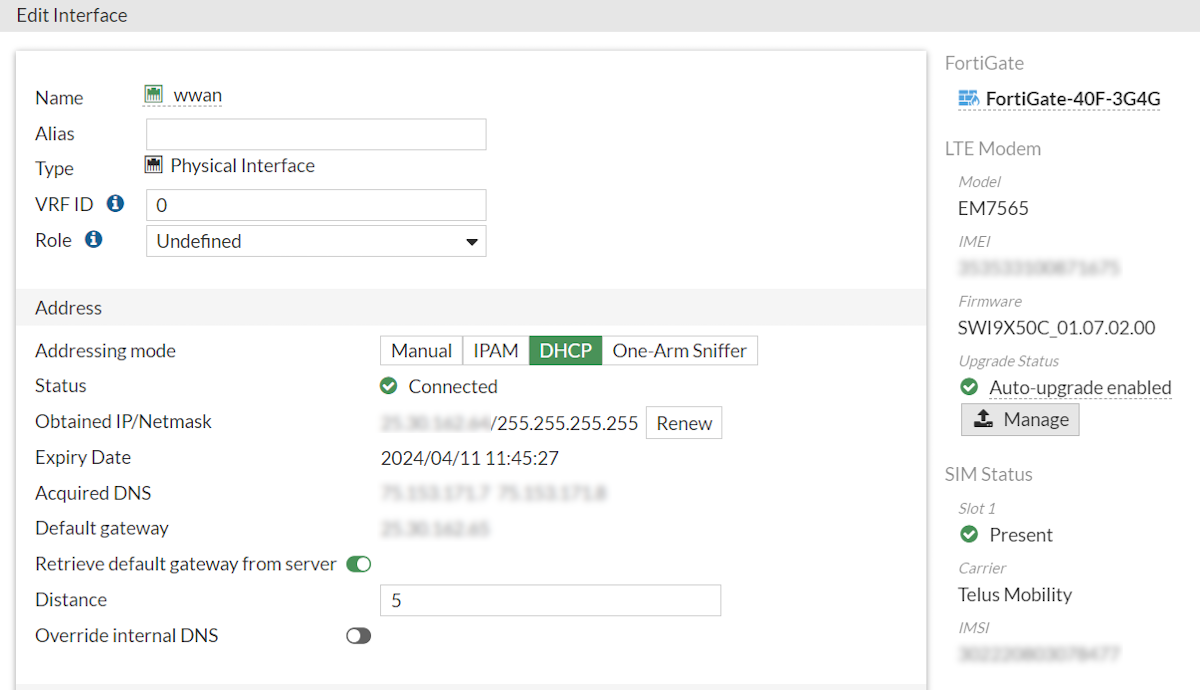
  3. Click Manage.

  4. Set the Method as FortiGuard.

  5. Configure the upgrade schedule:

    • Never: Disable modem firmware upgrades from FortiGuard.

    • One Time: Schedule a date and time to upgrade the firmware from FortiGuard.
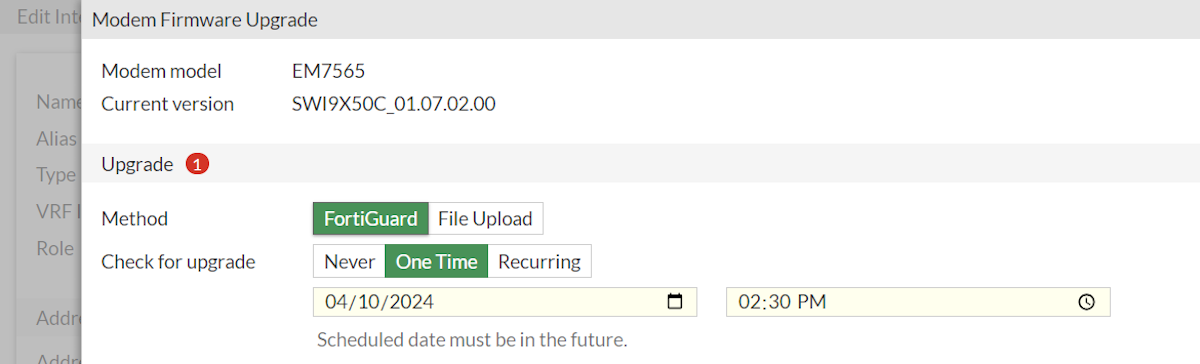
    • Recurring: Schedule a recurring upgrade to the firmware from FortiGuard based on a set Interval, start date, and start time.
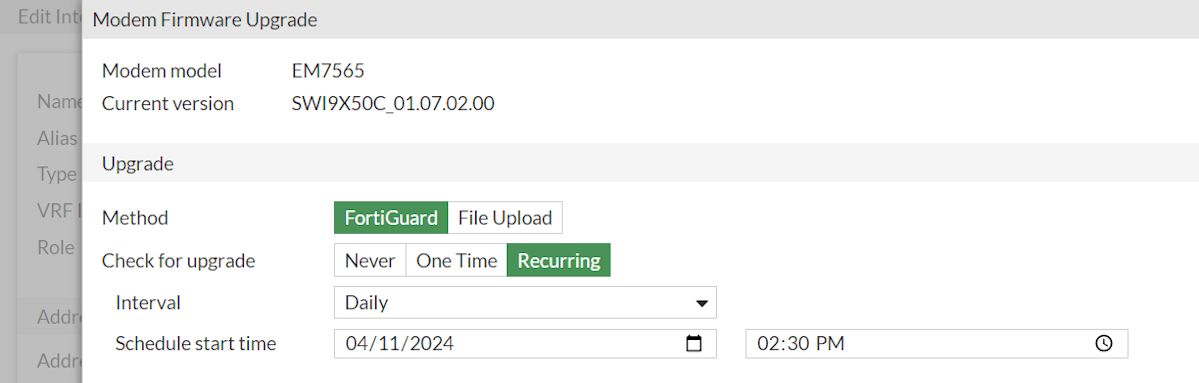
  6. Click OK.

To schedule a one time LTE modem firmware upgrade from FortiGuard in the CLI:
config system central-management
    set type fortiguard
    set ltefw-upgrade-time <YYYY-MM-DD HH:MM:SS>
end
To schedule a one time 3G4G or 5G modem firmware upgrade from FortiGuard in the CLI:
config system central-management
    set type fortiguard
    set modem-upgrade-time <YYYY-MM-DD HH:MM:SS>
end
To schedule recurring 3G4G or 5G modem firmware upgrades from FortiGuard in the CLI:
config system central-management
    set type fortiguard
    set ltefw-upgrade-time <YYYY-MM-DD HH:MM:SS>
    set ltefw-upgrade-frequency {everyHour | every12hour | everyDay | everyWeek}
end
To schedule recurring LTE modem firmware upgrades from FortiGuard in the CLI:
config system central-management
    set type fortiguard
    set modem-upgrade-time <YYYY-MM-DD HH:MM:SS>
    set modem-upgrade-frequency {everyHour | every12hour | everyDay | everyWeek}
end
To disable LTE modem firmware upgrades from FortiGuard in the CLI:
config system central-management
    set type fortiguard
    set allow-remote-lte-firmware-upgrade disable
end
To disable 3G4G or 5G modem firmware upgrades from FortiGuard in the CLI:
config system central-management
    set type fortiguard
    set allow-remote-modem-firmware-upgrade disable
end

Upgrade modem firmware directly from FortiGuard

Upgrade modem firmware directly from FortiGuard

LTE, 3G4G, and 5G modem firmware can be upgraded directly from the FortiGuard. This simplifies the process by eliminating the need for manual downloading and uploading, and offers users the flexibility to schedule the upgrade.

To schedule modem firmware upgrades from FortiGuard in the GUI:
  1. Go to Network > Interfaces.

  2. Select the LTE, 3G4G, or 5G modem interface and click Edit.

  3. Click Manage.

  4. Set the Method as FortiGuard.

  5. Configure the upgrade schedule:

    • Never: Disable modem firmware upgrades from FortiGuard.

    • One Time: Schedule a date and time to upgrade the firmware from FortiGuard.

    • Recurring: Schedule a recurring upgrade to the firmware from FortiGuard based on a set Interval, start date, and start time.

  6. Click OK.

To schedule a one time LTE modem firmware upgrade from FortiGuard in the CLI:
config system central-management
    set type fortiguard
    set ltefw-upgrade-time <YYYY-MM-DD HH:MM:SS>
end
To schedule a one time 3G4G or 5G modem firmware upgrade from FortiGuard in the CLI:
config system central-management
    set type fortiguard
    set modem-upgrade-time <YYYY-MM-DD HH:MM:SS>
end
To schedule recurring 3G4G or 5G modem firmware upgrades from FortiGuard in the CLI:
config system central-management
    set type fortiguard
    set ltefw-upgrade-time <YYYY-MM-DD HH:MM:SS>
    set ltefw-upgrade-frequency {everyHour | every12hour | everyDay | everyWeek}
end
To schedule recurring LTE modem firmware upgrades from FortiGuard in the CLI:
config system central-management
    set type fortiguard
    set modem-upgrade-time <YYYY-MM-DD HH:MM:SS>
    set modem-upgrade-frequency {everyHour | every12hour | everyDay | everyWeek}
end
To disable LTE modem firmware upgrades from FortiGuard in the CLI:
config system central-management
    set type fortiguard
    set allow-remote-lte-firmware-upgrade disable
end
To disable 3G4G or 5G modem firmware upgrades from FortiGuard in the CLI:
config system central-management
    set type fortiguard
    set allow-remote-modem-firmware-upgrade disable
end