

Certificate best practices for FortiManager HA with VRRP
Modern web browsers no longer use the Common Name (CN) field for hostname verification. Instead, they rely exclusively on the Subject Alternative Name (SAN) extension.
This document outlines best practices for deploying GUI certificates in a High Availability (HA) setup using Virtual Router Redundancy Protocol (VRRP), ensuring secure and seamless communication with your FortiManager HA environment.
For steps on configuring and uploading local certificates, refer to the following:
Recommended certificate configuration approaches
There are two primary options for configuring certificates for your FortiManager HA with VRRP deployment.
To illustrate the certificate configurations, the examples below use the following FortiManager HA VRRP setup details:
| Component | IP Type | IP Address | FQDN |
|---|---|---|---|
| FMG1 | Dedicated IP | 10.0.0.1/24 | fmg1.example.com |
| FMG2 | Dedicated IP | 10.0.0.2/24 | fmg2.example.com |
| FortiManager HA VRRP | VIP (Virtual IP) | 10.0.0.100 | fmg_vip.example.com |
Option 1: Use a single certificate with comprehensive SAN entries
This approach uses one certificate that includes all relevant identities in its SAN extension.
The certificate must contain the following in its SAN entries:
-
The FQDN and/or IP address of the VRRP Virtual IP (VIP) address.
-
This is required to trust the certificate when you access the FortiManager HA setup using the VRRP VIP address.
-
-
The FQDN and/or IP address of your primary FortiManager.
-
In some scenarios, you may need to access the primary FortiManager directly. Including its FQDN and/or IP address here ensures the certificate is trusted for direct access.
-
-
The FQDN and/or IP address of your secondary FortiManager.
-
Similarly, you may need to access the secondary FortiManager directly in certain situations. Adding its FQDN and/or IP address ensures the certificate is trusted for direct access.
-

|
Since the CN is no longer used for the hostname verification by modern browsers, you can use any name for this field, or simply use the VRRP VIP address. |
An example of the certificate configuration would look as follows:
-
Shared certificate:
Field
Value
CN fmg_vip.example.com SAN DNS: fmg_vip.example.com, DNS: fmg1.example.com, DNS: fmg2.example.com
The certificate configuration can also include the IP addresses in the SAN for broader access if required.
Option 2: Use distinct certificates for each FortiManager
If your organization's security policies require each FortiManager in the HA setup to have its own unique certificate, you can configure them as follows:
-
Primary FortiManager's Certificate SAN
-
The FQDN and/or IP address of the primary FortiManager.
-
The FQDN and/or IP address of the VRRP VIP address.
The CN for this certificate can be set to the FQDN or IP address of the primary FortiManager.
-
-
Secondary FortiManager's Certificate SAN:
-
The FQDN and/or IP address of the secondary FortiManager.
-
The FQDN and/or IP address of the VRRP VIP address.
The CN for this certificate can be set to the FQDN or IP address of the secondary FortiManager.
-
An example of the certificate configuration would look as follows:
-
FMG1 certificate:
Field
Value
CN fmg1.example.com SAN DNS: fmg_vip.example.com, DNS: fmg1.example.com
-
FMG2 certificate:
Field
Value
CN fmg2.example.com SAN DNS: fmg_vip.example.com, DNS: fmg2.example.com
The certificate configuration can also include the FMG2 and FortiManager HA VRRP IP addresses in the SAN for broader access if required.
Example - Demonstrating CN versus SAN behavior
This example scenario demonstrates that a certificate with the primary FortiManager's FQDN in the CN and the VRRP VIP FQDN in the SAN is only valid for the VIP FQDN. It's not trusted for direct access to the primary FortiManager FQDN. This further emphasizes the need to include all relevant FQDNs and/or IP addresses in the SAN extension for the certificate to be trusted across all access points.
In this example scenario, a certificate is configured as follows:
|
Field |
Value |
|---|---|
| CN | Primary FortiManager's FQDN |
| SAN |
VRRP VIP address's FQDN |
Result:
-
The certificate is trusted when accessing the FortiManager using:
-
The VRRP VIP FQDN (for instance
https://<vip_fqdn>)
-
-
The certificate is not trusted when accessing the primary FortiManager directly using its FQDN:
-
The Primary FortiManager's FQDN (for instance
https://primary_fqdn>)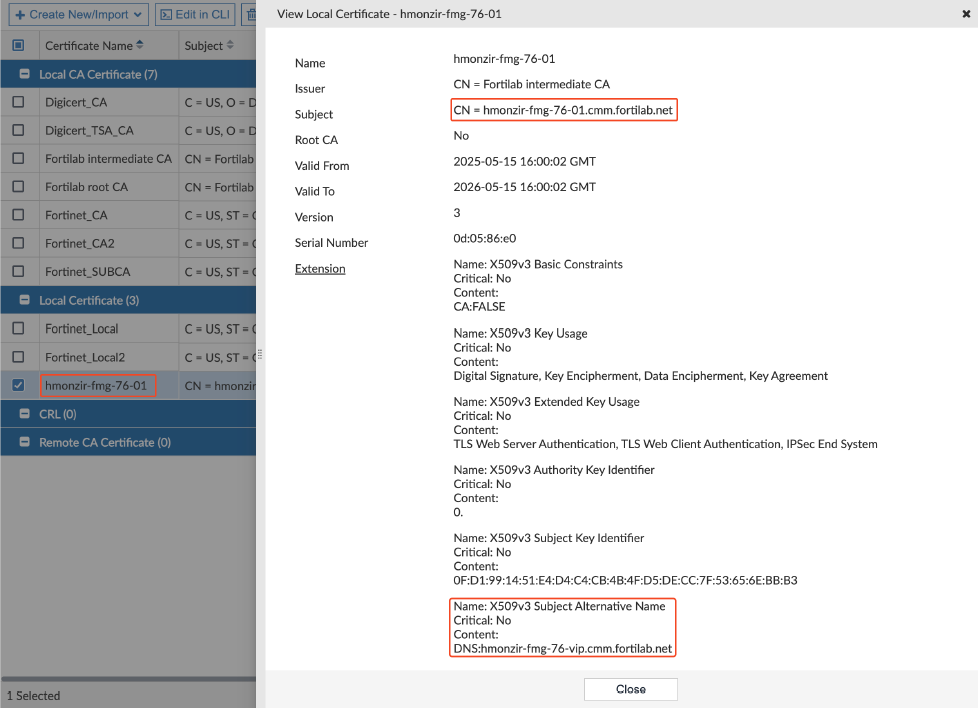
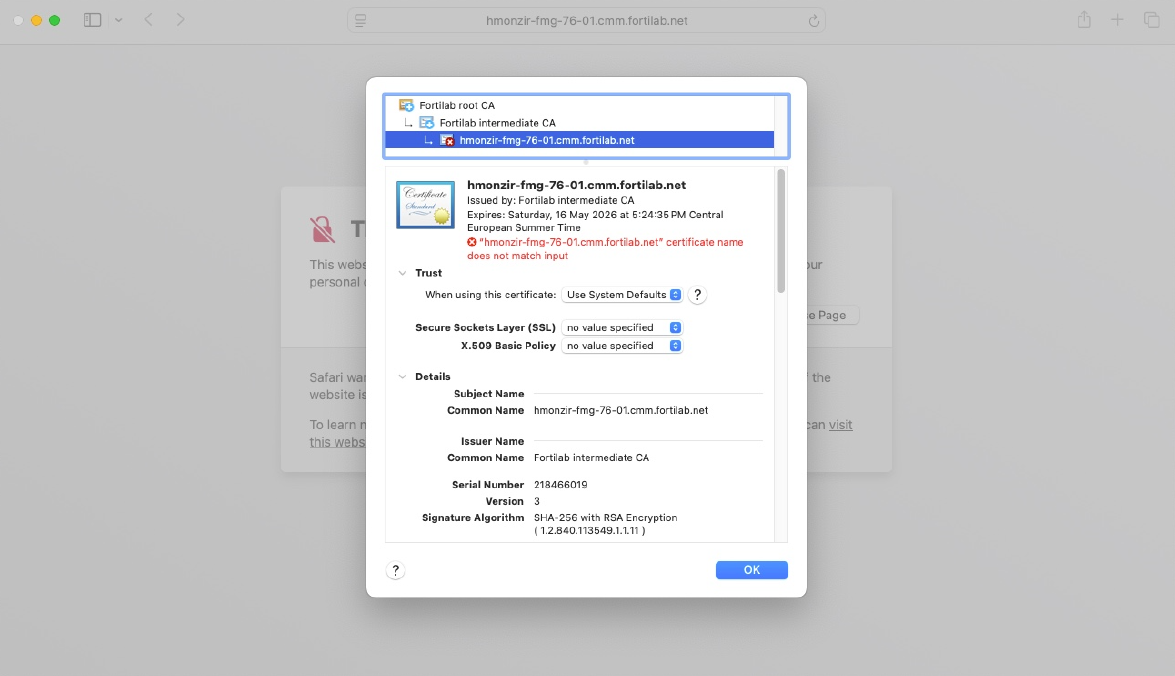
Note that in this case, the certificate isn't trusted even though the URL used matches the certificate's CN.
-
Additional resources
-
Safari: About trusted certificates
-
Chrome: Deprecations and removals
-
Firefox: Remove commonName matching from certificate hostname verification
-
RFC 2818: HTTP Over TLS