
Fortinet white logo
Fortinet white logo

User Guide

Core IQL concepts

Core IQL concepts

IQL Clause

IQL clauses follow the format <field> <operator> <value> and can be combined using logical operators like AND and OR. Parentheses can be used to control the order of these logical operators in a query.

Example:

ip = 8.8.8.8 AND host LIKE "%.google.com".

<field>

ip = 8.8.8.8

<operator>

AND host LIKE

<value>

"%.google.com"

Exercise:

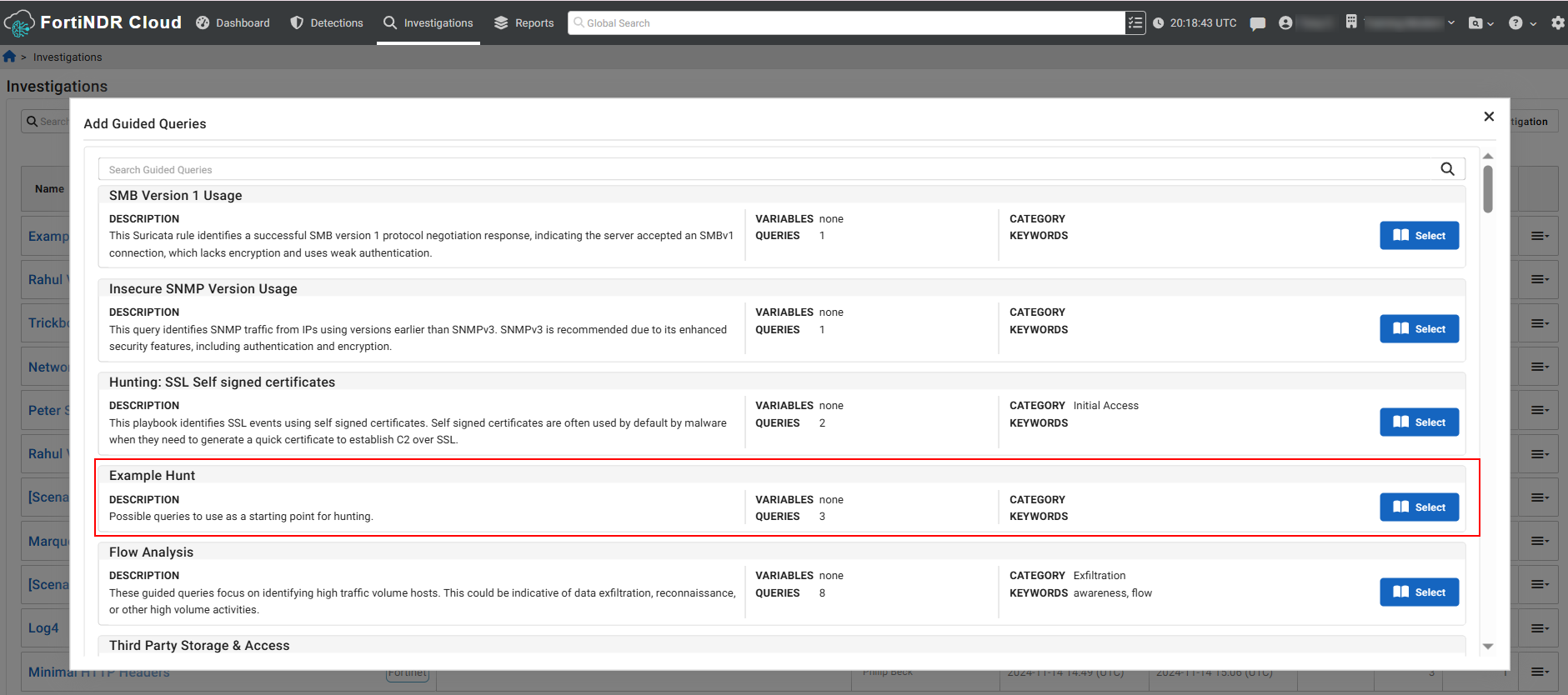
  1. Go to Investigations > Guided Queries.
  2. Run the Example Hunt query. For more information, see Guided queries
  3. After the query is completed, go to Investigations and click the query name in the list, then click View Results.
  4. In the Investigations Results page, click the Events tab.
  5. In the srccolumn, click an IP address to open the Entity Panel and then copy the IP at the very top of the pane.
  6. Use the IP and the fields in the Events tab to create a new query.

    Example: ip = 10.10.31.101 AND dst.geo.country LIKE "FR"

  7. To add this query to your investigation, click the investigation name in the bed crumb at the top-left of the page , and click Add Query at the bottom of the investigation details page.

Fields

Fields are used to specify and limit event types for querying and analyzing network events.

Event Type

An event type specifies the category of network events you want to query or analyze. The event_type field applies to all events, allowing you to filter and focus on particular types of network activities.

By using <event_type>:<field>, you can focus your query to a specific type of event. This helps make your search more precise and relevant to the data you are interested in.

Example event types:

Flow

A flow event refers to a record of network traffic between two endpoints. It typically includes information such as the source and destination IP addresses, source and destination ports, protocol used (e.g., TCP, UDP), the amount of data transferred, and the duration of the connection.

This information helps you monitor and analyze traffic patterns, detect anomalies, and identify potential security threats.

Exercise:
  1. Using the results to from the investigation, click Add Queryand name it Flow Events.
  2. In the Query field, type event_type = 'flow'.
  3. Click Add Query to run the query and then view the results.
  4. (Optional) Click the Individual columns dropdown to show and hide the columns to view the data.

HTTP

An HTTP event type refers to a record of HTTP traffic between a client and a server. It typically includes details about the HTTP request and response, such as the method used, the URL accessed, headers, and status codes.

This information helps you monitor web traffic, detect malicious activities such as web attacks, and ensure compliance with security policies.

Exercise:
  1. Using the results to from the investigation you created earlier, click Add Query and name it HTTP Events.
  2. In the Query field, type event_type = 'http'. Use lowercase for http.
  3. Click Add Query to run the query and then view the results.
DNS

A DNS event type refers to a record of DNS (Domain Name System) queries and responses between a client and a DNS server. It typically includes details about the DNS request and the corresponding response.

This information helps you monitor DNS traffic, detect anomalies such as DNS spoofing or tunneling, and ensure the integrity and security of domain name resolutions within the network.

Exercise:
  1. In Investigation Results page for the HTTP query, click an IP address in src column to open the Entity Panel.
  2. At the bottom of the Entity Panel, click Search Events. The Add Query to Investigation dialog opens.
  3. In the Query Name field, type DNS.
  4. In the Search Query field, type event_type = 'dns'.
  5. Click Add Query to run the query and then view the results.
SSL

An SSL event type refers to a record of SSL/TLS (Secure Sockets Layer/Transport Layer Security) traffic between a client and a server. It typically includes details about the SSL handshake, certificates, and encrypted data transfer.

This information helps you monitor encrypted traffic, ensure the security of SSL/TLS connections, and detect potential issues such as expired certificates, weak ciphers, or SSL/TLS vulnerabilities.

Exercise:
  1. Using the results to from the investigation, click Add Query and name it SSL Events.
  2. In the Query field, type event_type = 'ssl'.
  3. Click Add Query to run the query and then view the results.

Sub-fields

A sub-field is a more specific field within a broader parent field. When you search for a sub field without specifying the parent field, the search will include all subfields with that name.

Examples:

Parent field

Sub-field search

IP

src.ip, dst.ip, host.ip, answers.ip, referrer.host.ip, headers.location.ip, etc.

Domain

host.domain, query.domain, helo.domain, san_dns.domain, etc.

URI

uri.uri, referrer.uri, etc.

Query

uri.query, referrer.query (but not dns:query; use query.domain instead).

Exercise

This is exercise is based on the Example Hunt investigation you ran earlier.

  1. Click View Results next the first query in the list.

  2. Click the Events tab. The columns to the right of the type column represent the sub fields for the parent event.
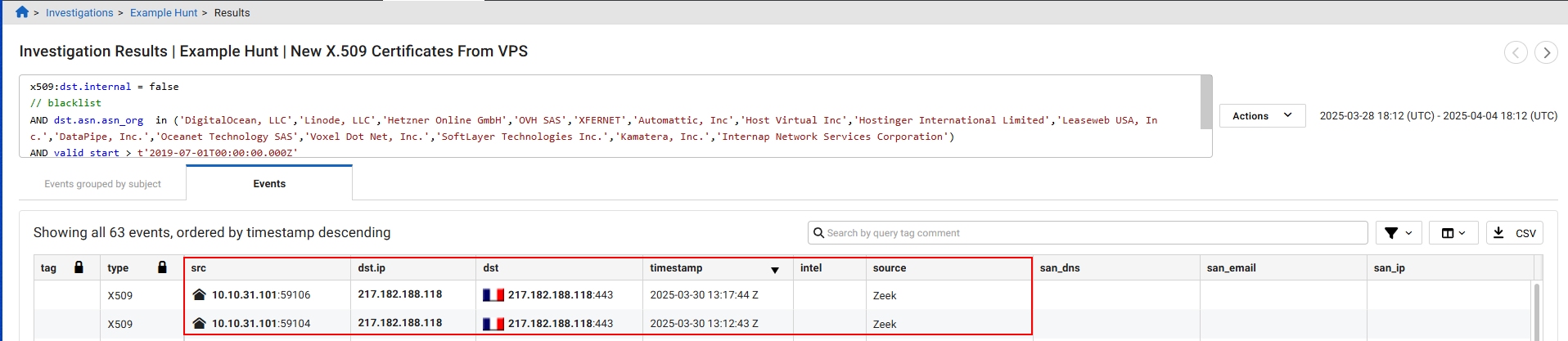
  3. Record a column header and its value. For the purpose of this exercise, we will use dst.ip.
  4. Go back to your investigation and click Add Query.
  5. In the query field, create a new query based on the event type and sub field. If you need help with an operator, see Operators.

    Example: event_type = 'flow'AND dst.ip = "10.10.1.5"

Commonly Confused Fields

Field

Example

URI uri.uri vs. uri.path and uri.query
MIME request_mime vs. request_mimes
File file.* vs. files.*
Note

Some fields cannot be searched, such as account and observation:context.

Value Types

A value type refers to the specific data or value that you are querying or filtering for within a field. It is the actual content you are looking for in your search. For example, in the clause <field> <operator> <value>, the content you are looking for is <value>.

Value types are used in conjunction with fields and operators to form complete IQL clauses, allowing you to perform precise and targeted searches within your data.

Integer

A number such as , 9, 54458, -8 (snmp:snmp_version != '3')

Float

A number with decimal points, such as 4.5, 125.5554

Boolean

True, false, or null (dns:src.internal = true and dns:dst.internal = false)

String Alphanumeric characters contained in single or double-quotes (kerberos:error_msg = 'KDC_ERR_CLIENT_REVOKED').
Timestamp

In the format t”2023-02-28T00:00:00.000Z” contained in single or double-quotes, 'millisecond- or microsecond-precision '(valid_start > t'2019-07-01T00:00:00.000Z)

IP Single IP or CIDR, quoted or unquoted (ip =8.8.8.8)
Object

Anything with a sub-field, such as: IP-objects, Domain-objects, Host-objects, URI-Objects, File-Objects, Email-Objects

Array IQL clause is satisfied if any value in the array satisfies the clause.(suricata:sig_id IN (10098240,10099368))

Object Types

An object type is the category or class of data that you are looking for. It helps you define what kind of information you want to find and makes your search more specific and accurate.

By specifying an object type, you can focus your search on particular kinds of data. This makes your queries more precise and helps you find exactly what you need.

The table below lists the available object types along with their descriptions and examples. Click on an object type in the Object Type column to view a sample query.

Object Type

Description

Example

IP Information related to internet protocol addresses.

ASN (Autonomous System Number), geo (geographical location), internal, port.

Flow Events: ip_bytes, pkts (packets).

ASN Details about the Autonomous System Number.

ASN, asn_org (organization), ISP (Internet Service Provider), org (organization).

Geo Geographical information.

City, country, location, subdivision.

Domain Information about domain names.

City, country, location, subdivision.

URI Uniform Resource Identifier details.

Fragment, host, path, port, query, scheme, uri.

File Information about files.

Bytes, MD5 (hash), MIME type, name, SHA1 (hash), SHA256 (hash).

email

Information related to email addresses.

Domain, email, name.

host

Combines IP and domain information.

Sample object queries

The following example queries are intended to help you get started with query objects. Each example uses curly braces {} for multiple conditions.

IP

This query will return results that match both the specified IP address and the country within the IP object.

ip {

address = "203.0.113.5"

AND geo.country = "Canada"

}

ip

This specifies that you are querying the IP object.

address = "203.0.113.5"

This condition filters the query to include only IP addresses that match 203.0.113.5.

AND geo.country = "Canada"

This additional condition ensures that the query also matches IP addresses located in Canada.

ASN

This query will return results that match both the specified ASN and organization within the ASN object.

asn {

asn = "12345"

AND org = "Example Organization"

}

asn

This specifies that you are querying the ASN object.

asn = "12345"

This condition filters the query to include only ASNs that match 12345.

AND org = "Example Organization"

This additional condition ensures that the query also matches ASNs associated with the organization named Example Organization.

Geo

This query will return results that match both the specified city and country within the geo object.

geo {

city = "Vancouver"

AND country = "Canada"

}

geo

This specifies that you are querying the geo object.

city = "Vancouver"

This condition filters the query to include only geographical locations in the city of Vancouver.

AND country = "Canada"

This additional condition ensures that the query also matches locations within Canada.

URI

This query will return results that match both the specified domain name and country within the domain object.

domain {

name = "example.com"

AND geo.country = "Canada"

}

domain

This specifies that you are querying the domain object.

name = "example.com"

This condition filters the query to include only domains that match example.com.

AND geo.country = "Canada"

This additional condition ensures that the query also matches domains located in Canada.

File

This query will return results that match both the specified file name and SHA-256 hash within the file object.

file {

name = "example.txt"

AND sha256 = "d2d2d2d2d2d2d2d2d2d2d2d2d2d2d2d2d2d2d2d2d2d2d2d2d2d2d2d2d2d2d2d2"

}

file

This specifies that you are querying the file object.

name = "example.txt"

This condition filters the query to include only files named example.txt.

AND sha256 = "d2d2d2d2d2d2d..."

This additional condition ensures that the query also matches files with the specified SHA-256 hash.

Domain.

This query will return results that match both the specified domain name and country within the domain object.

domain {

name = "example.com"

AND location.country = "Canada"

}

domain This specifies that you are querying the domain object.
name = "example.com" This condition filters the query to include only domains that match example.com.
AND location.country = "Canada" This additional condition ensures that the query also matches domains located in Canada.

Email

This query will return results that match both the specified domain and name within the email object.

email {

domain = "example.com"

AND name = "John Doe"

}

email

This specifies that you are querying the email object.

domain = "example.com"

This condition filters the query to include only emails from the domain example.com.

AND name = "John Doe"

This additional condition ensures that the query also matches emails associated with the name John Doe.

Host

The following query will return results that match both the specified IP address and domain within the host object.

host {

ip = "192.168.1.1"

AND domain = "example.com"

}

host This specifies that you are querying the host object.
ip = "192.168.1.1": This condition filters the query to include only hosts with the IP address 192.168.1.1.
AND domain = "example.com": This additional condition ensures that the query also matches hosts with the domain example.com.

Core IQL concepts

Core IQL concepts

IQL Clause

IQL clauses follow the format <field> <operator> <value> and can be combined using logical operators like AND and OR. Parentheses can be used to control the order of these logical operators in a query.

Example:

ip = 8.8.8.8 AND host LIKE "%.google.com".

<field>

ip = 8.8.8.8

<operator>

AND host LIKE

<value>

"%.google.com"

Exercise:

  1. Go to Investigations > Guided Queries.
  2. Run the Example Hunt query. For more information, see Guided queries

  3. After the query is completed, go to Investigations and click the query name in the list, then click View Results.
  4. In the Investigations Results page, click the Events tab.
  5. In the srccolumn, click an IP address to open the Entity Panel and then copy the IP at the very top of the pane.
  6. Use the IP and the fields in the Events tab to create a new query.

    Example: ip = 10.10.31.101 AND dst.geo.country LIKE "FR"

  7. To add this query to your investigation, click the investigation name in the bed crumb at the top-left of the page , and click Add Query at the bottom of the investigation details page.

Fields

Fields are used to specify and limit event types for querying and analyzing network events.

Event Type

An event type specifies the category of network events you want to query or analyze. The event_type field applies to all events, allowing you to filter and focus on particular types of network activities.

By using <event_type>:<field>, you can focus your query to a specific type of event. This helps make your search more precise and relevant to the data you are interested in.

Example event types:

Flow

A flow event refers to a record of network traffic between two endpoints. It typically includes information such as the source and destination IP addresses, source and destination ports, protocol used (e.g., TCP, UDP), the amount of data transferred, and the duration of the connection.

This information helps you monitor and analyze traffic patterns, detect anomalies, and identify potential security threats.

Exercise:
  1. Using the results to from the investigation, click Add Queryand name it Flow Events.
  2. In the Query field, type event_type = 'flow'.
  3. Click Add Query to run the query and then view the results.
  4. (Optional) Click the Individual columns dropdown to show and hide the columns to view the data.

HTTP

An HTTP event type refers to a record of HTTP traffic between a client and a server. It typically includes details about the HTTP request and response, such as the method used, the URL accessed, headers, and status codes.

This information helps you monitor web traffic, detect malicious activities such as web attacks, and ensure compliance with security policies.

Exercise:
  1. Using the results to from the investigation you created earlier, click Add Query and name it HTTP Events.
  2. In the Query field, type event_type = 'http'. Use lowercase for http.
  3. Click Add Query to run the query and then view the results.
DNS

A DNS event type refers to a record of DNS (Domain Name System) queries and responses between a client and a DNS server. It typically includes details about the DNS request and the corresponding response.

This information helps you monitor DNS traffic, detect anomalies such as DNS spoofing or tunneling, and ensure the integrity and security of domain name resolutions within the network.

Exercise:
  1. In Investigation Results page for the HTTP query, click an IP address in src column to open the Entity Panel.
  2. At the bottom of the Entity Panel, click Search Events. The Add Query to Investigation dialog opens.
  3. In the Query Name field, type DNS.
  4. In the Search Query field, type event_type = 'dns'.
  5. Click Add Query to run the query and then view the results.
SSL

An SSL event type refers to a record of SSL/TLS (Secure Sockets Layer/Transport Layer Security) traffic between a client and a server. It typically includes details about the SSL handshake, certificates, and encrypted data transfer.

This information helps you monitor encrypted traffic, ensure the security of SSL/TLS connections, and detect potential issues such as expired certificates, weak ciphers, or SSL/TLS vulnerabilities.

Exercise:
  1. Using the results to from the investigation, click Add Query and name it SSL Events.
  2. In the Query field, type event_type = 'ssl'.
  3. Click Add Query to run the query and then view the results.

Sub-fields

A sub-field is a more specific field within a broader parent field. When you search for a sub field without specifying the parent field, the search will include all subfields with that name.

Examples:

Parent field

Sub-field search

IP

src.ip, dst.ip, host.ip, answers.ip, referrer.host.ip, headers.location.ip, etc.

Domain

host.domain, query.domain, helo.domain, san_dns.domain, etc.

URI

uri.uri, referrer.uri, etc.

Query

uri.query, referrer.query (but not dns:query; use query.domain instead).

Exercise

This is exercise is based on the Example Hunt investigation you ran earlier.

  1. Click View Results next the first query in the list.

  2. Click the Events tab. The columns to the right of the type column represent the sub fields for the parent event.

  3. Record a column header and its value. For the purpose of this exercise, we will use dst.ip.
  4. Go back to your investigation and click Add Query.
  5. In the query field, create a new query based on the event type and sub field. If you need help with an operator, see Operators.

    Example: event_type = 'flow'AND dst.ip = "10.10.1.5"

Commonly Confused Fields

Field

Example

URI uri.uri vs. uri.path and uri.query
MIME request_mime vs. request_mimes
File file.* vs. files.*
Note

Some fields cannot be searched, such as account and observation:context.

Value Types

A value type refers to the specific data or value that you are querying or filtering for within a field. It is the actual content you are looking for in your search. For example, in the clause <field> <operator> <value>, the content you are looking for is <value>.

Value types are used in conjunction with fields and operators to form complete IQL clauses, allowing you to perform precise and targeted searches within your data.

Integer

A number such as , 9, 54458, -8 (snmp:snmp_version != '3')

Float

A number with decimal points, such as 4.5, 125.5554

Boolean

True, false, or null (dns:src.internal = true and dns:dst.internal = false)

String Alphanumeric characters contained in single or double-quotes (kerberos:error_msg = 'KDC_ERR_CLIENT_REVOKED').
Timestamp

In the format t”2023-02-28T00:00:00.000Z” contained in single or double-quotes, 'millisecond- or microsecond-precision '(valid_start > t'2019-07-01T00:00:00.000Z)

IP Single IP or CIDR, quoted or unquoted (ip =8.8.8.8)
Object

Anything with a sub-field, such as: IP-objects, Domain-objects, Host-objects, URI-Objects, File-Objects, Email-Objects

Array IQL clause is satisfied if any value in the array satisfies the clause.(suricata:sig_id IN (10098240,10099368))

Object Types

An object type is the category or class of data that you are looking for. It helps you define what kind of information you want to find and makes your search more specific and accurate.

By specifying an object type, you can focus your search on particular kinds of data. This makes your queries more precise and helps you find exactly what you need.

The table below lists the available object types along with their descriptions and examples. Click on an object type in the Object Type column to view a sample query.

Object Type

Description

Example

IP Information related to internet protocol addresses.

ASN (Autonomous System Number), geo (geographical location), internal, port.

Flow Events: ip_bytes, pkts (packets).

ASN Details about the Autonomous System Number.

ASN, asn_org (organization), ISP (Internet Service Provider), org (organization).

Geo Geographical information.

City, country, location, subdivision.

Domain Information about domain names.

City, country, location, subdivision.

URI Uniform Resource Identifier details.

Fragment, host, path, port, query, scheme, uri.

File Information about files.

Bytes, MD5 (hash), MIME type, name, SHA1 (hash), SHA256 (hash).

email

Information related to email addresses.

Domain, email, name.

host

Combines IP and domain information.

Sample object queries

The following example queries are intended to help you get started with query objects. Each example uses curly braces {} for multiple conditions.

IP

This query will return results that match both the specified IP address and the country within the IP object.

ip {

address = "203.0.113.5"

AND geo.country = "Canada"

}

ip

This specifies that you are querying the IP object.

address = "203.0.113.5"

This condition filters the query to include only IP addresses that match 203.0.113.5.

AND geo.country = "Canada"

This additional condition ensures that the query also matches IP addresses located in Canada.

ASN

This query will return results that match both the specified ASN and organization within the ASN object.

asn {

asn = "12345"

AND org = "Example Organization"

}

asn

This specifies that you are querying the ASN object.

asn = "12345"

This condition filters the query to include only ASNs that match 12345.

AND org = "Example Organization"

This additional condition ensures that the query also matches ASNs associated with the organization named Example Organization.

Geo

This query will return results that match both the specified city and country within the geo object.

geo {

city = "Vancouver"

AND country = "Canada"

}

geo

This specifies that you are querying the geo object.

city = "Vancouver"

This condition filters the query to include only geographical locations in the city of Vancouver.

AND country = "Canada"

This additional condition ensures that the query also matches locations within Canada.

URI

This query will return results that match both the specified domain name and country within the domain object.

domain {

name = "example.com"

AND geo.country = "Canada"

}

domain

This specifies that you are querying the domain object.

name = "example.com"

This condition filters the query to include only domains that match example.com.

AND geo.country = "Canada"

This additional condition ensures that the query also matches domains located in Canada.

File

This query will return results that match both the specified file name and SHA-256 hash within the file object.

file {

name = "example.txt"

AND sha256 = "d2d2d2d2d2d2d2d2d2d2d2d2d2d2d2d2d2d2d2d2d2d2d2d2d2d2d2d2d2d2d2d2"

}

file

This specifies that you are querying the file object.

name = "example.txt"

This condition filters the query to include only files named example.txt.

AND sha256 = "d2d2d2d2d2d2d..."

This additional condition ensures that the query also matches files with the specified SHA-256 hash.

Domain.

This query will return results that match both the specified domain name and country within the domain object.

domain {

name = "example.com"

AND location.country = "Canada"

}

domain This specifies that you are querying the domain object.
name = "example.com" This condition filters the query to include only domains that match example.com.
AND location.country = "Canada" This additional condition ensures that the query also matches domains located in Canada.

Email

This query will return results that match both the specified domain and name within the email object.

email {

domain = "example.com"

AND name = "John Doe"

}

email

This specifies that you are querying the email object.

domain = "example.com"

This condition filters the query to include only emails from the domain example.com.

AND name = "John Doe"

This additional condition ensures that the query also matches emails associated with the name John Doe.

Host

The following query will return results that match both the specified IP address and domain within the host object.

host {

ip = "192.168.1.1"

AND domain = "example.com"

}

host This specifies that you are querying the host object.
ip = "192.168.1.1": This condition filters the query to include only hosts with the IP address 192.168.1.1.
AND domain = "example.com": This additional condition ensures that the query also matches hosts with the domain example.com.