

Version 26.2.0
Improved functionality
File analysis
File Analysis provides advanced threat detection by inspecting files in transit across network protocols. It can be enabled as part of the DPI engine features. Using the Antivirus (AV) engine and AI-driven analysis, the system identifies and logs malicious activity that may bypass standard network telemetry. When enabled, the system automatically extracts files and submits them for multi-layered inspection.
|
Feature / Attribute |
Description |
|---|---|
| Supported Protocols | HTTP, SMB, FTP |
| File Type Scope | Limited to Windows Executable files (including .exe) |
| Recursive Inspection |
For archive files, the signature corresponds to the first malicious file identified within the archive |
|
Size limit |
200 MB |
Detected threats are categorized by the engine:
- AV Engine: Produces high-confidence detections for known malware.
- AI Analysis Engine: An AI-based malware detection engine that analyzes file characteristics to identify zero-day or evolved threats. Files detected by the AI Engine contain AI.Pallas.Suspicious in the signature name.
File analysis events are generated only for known or highly suspicious malicious files. Each event includes contextual data to support threat hunting and incident response. For more information, see File analysis.
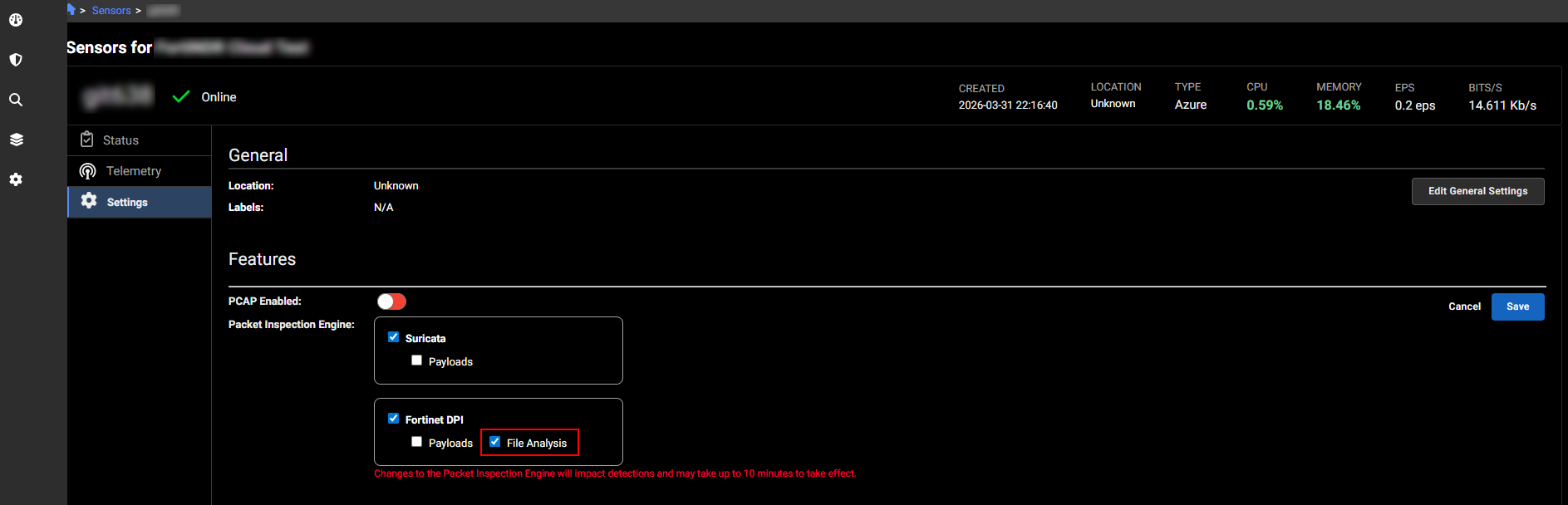
To enable the File Analysis feature, go to Settings > Sensors. When File Analysis is enabled, new file_analysis fields will appear in the investigation results.
Other improvements
- The Light/Dark Mode setting is now available in both the Profile menu at the top of the page and the Settings > Profile page in the left navigation.
- SSL events now support the following fields: ssl_client_ciphers, ssl_client_key_share_groups, and ssl_server_key_share_group.
- CSV downloads for NL queries with more than three aggregations will include the appropriate column headers.
- The Packet Capture sensor selector now defaults to no selection and requires users to choose one or more sensors, including All Sensors, before creating an investigation. The Create button remains disabled until a sensor is selected, helping prevent accidental captures.
- The Observation Context dialog has been improved for legibility.
- The styling in the Detections page has been improved.
- Table view is now the default view in the Triage Detectors page.
- The Resolution History & Context section in the Detection Details page now includes a See Details button that links directly to the Detection Context page.