Fortinet white logo
Fortinet white logo

Examples

Creating a secret with Unix template

Creating a secret with Unix template

To create a secret with Unix template:
  1. Go to Secrets > Secret List.
  2. In Secret List, select Create.

    The Create New Secret in: dialog appears.

  3. Select the folder where you intend to add the secret.
  4. Select Create Secret.

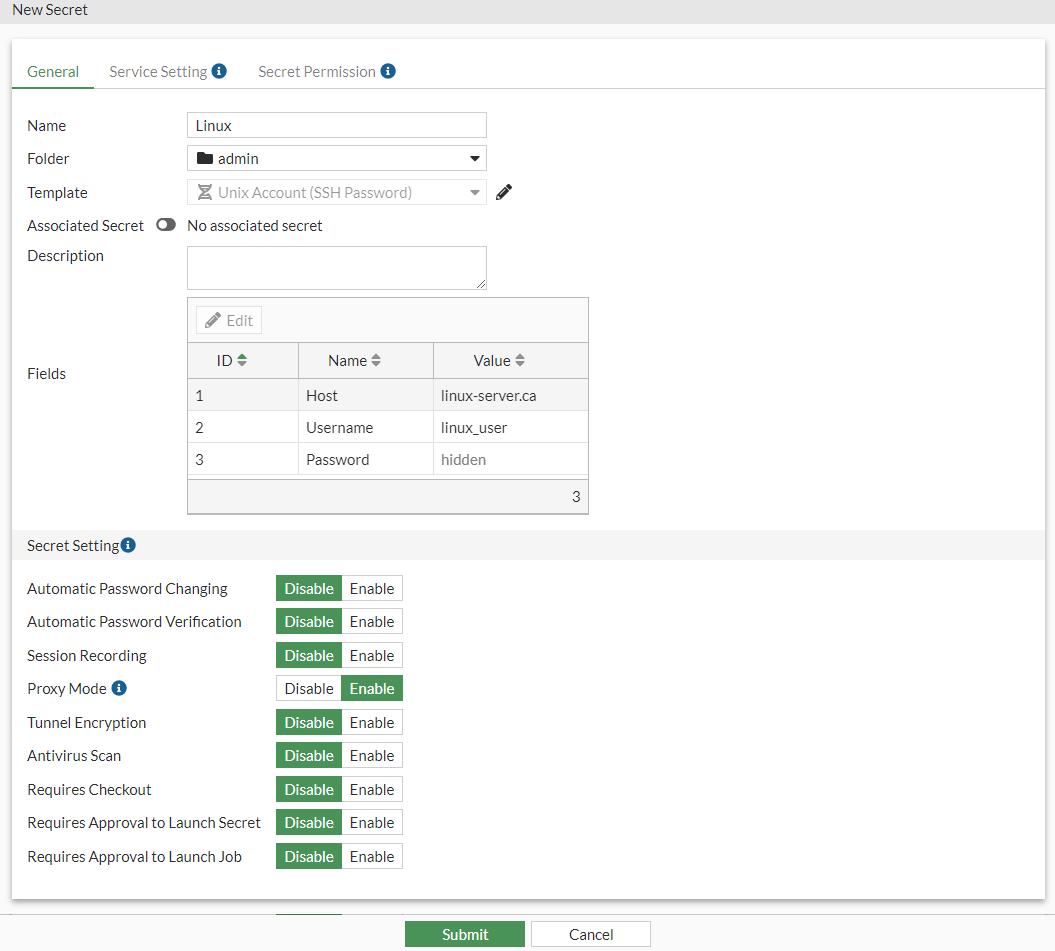
    The New Secret window opens.

  5. Enter a name for the secret.
  6. In the Template dropdown, select Unix Account (SSH Password) default template.
  7. In Fields, double-click a field to open it and enter the relevant information, click OK after filling in each field:
    1. Host: IP address or the FQDN of the Linux server
    2. Username: Username for the Linux server
    3. Password: Password for the Linux server
  8. Click Submit.

Creating a secret with Unix template

Creating a secret with Unix template

To create a secret with Unix template:
  1. Go to Secrets > Secret List.
  2. In Secret List, select Create.

    The Create New Secret in: dialog appears.

  3. Select the folder where you intend to add the secret.
  4. Select Create Secret.

    The New Secret window opens.

  5. Enter a name for the secret.
  6. In the Template dropdown, select Unix Account (SSH Password) default template.
  7. In Fields, double-click a field to open it and enter the relevant information, click OK after filling in each field:
    1. Host: IP address or the FQDN of the Linux server
    2. Username: Username for the Linux server
    3. Password: Password for the Linux server
  8. Click Submit.