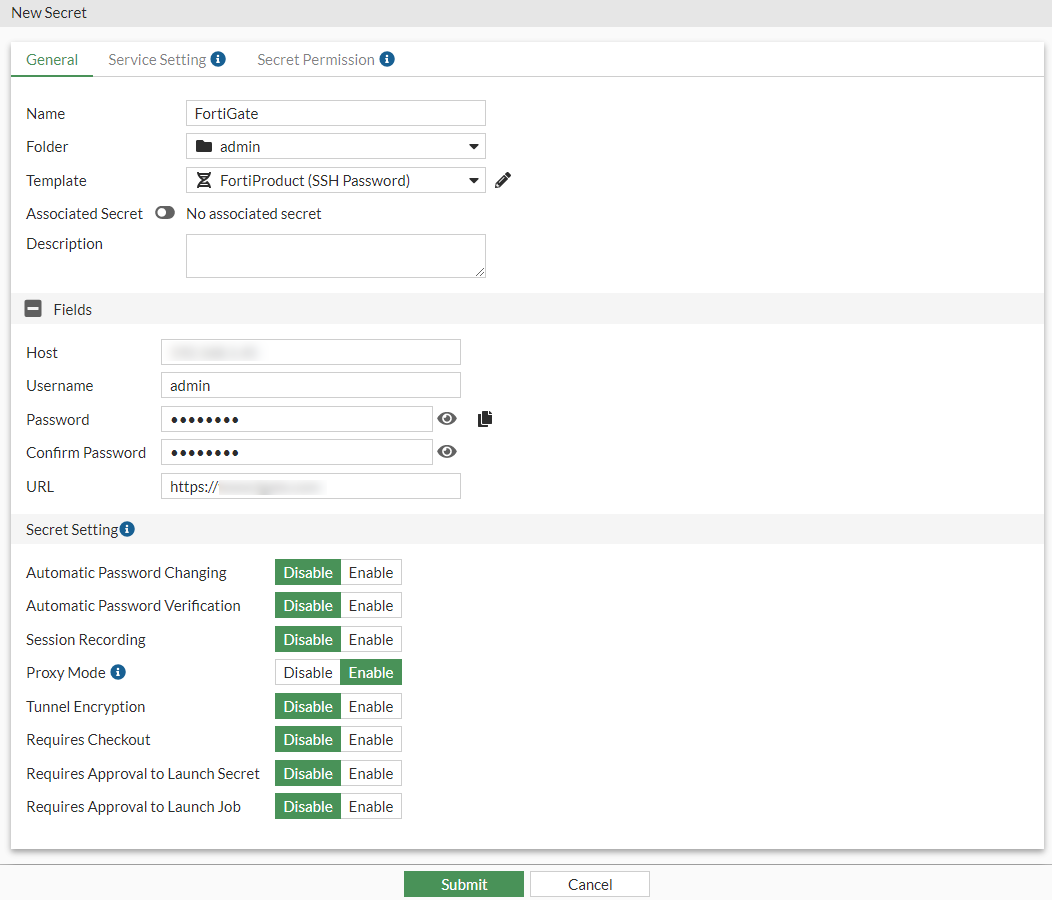
Creating a secret with Unix template
To create a secret with Unix template:
- Go to Secrets > Secret List.
- In Secret List, select Create.
The Create New Secret in: dialog appears.
- Select the folder where you intend to add the secret.
- Select Create Secret.
The New Secret window opens.
- Enter a name for the secret.
- In the Template dropdown, select FortiProduct (SSH Password) default template.
- In the Fields pane:
- In the Host field, enter the IP address or the FQDN of the FortiGate.
- In the Username field, enter the username for the FortiGate.
- In the Password field, enter the password for the FortiGate.
- In the Confirm Password field that appears after the password is filled in, enter the password again.
- In the URL field, enter the URL of the FortiGate.
The URL is the landing page of the FortiGate GUI, e.g.,
https://<Host for the FortiGate>.
- Click Submit.