
Fortinet white logo
Fortinet white logo

Examples

Configuring FortiPAM/FortiGate as the reverse gateway

Configuring FortiPAM/FortiGate as the reverse gateway

For information on the reverse gateway feature, see Gateway in the latest FortiPAM Administration Guide.

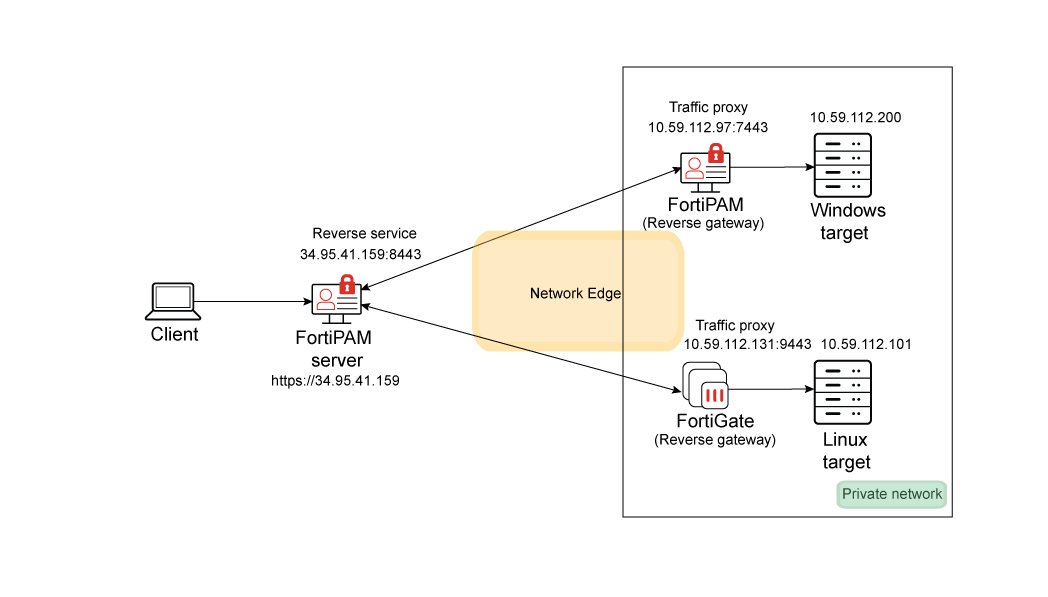
In this example, we demonstrate how to configure FortiPAM/FortiGate as a reverse gateway to provide access from a public network to a private resource.

Topology
Prerequisites
  • FortiPAM 1.4.0 or above.

  • FortiGate 7.6.3 or above.

  • Certificates required for reverse control connection mTLS.

    In this example the following certificates are used:

    • On the FortiPAM server: FortiPAM server certificate for reverse control plane connection: fortipam_cert5.pem.

    • On the FortiPAM server: Reverse gateway certificate CA: CA_Cert_1. Both gateways- FortiPAM and FortiGate use the same CA in the example.

    • On the reverse gateway (FortiPAM or FortiGate): FortiPAM server certificate CA: CA_Cert_1.

    • On the reverse gateway (FortiPAM): Reverse gateway FortiPAM certificate: fortipam_gw4.pem and its common name used for gateway ID in the FortiPAM server: foritpam_gw4.

    • On the reverse gateway (FortiGate): Reverse gateway FortiGate certificate: fortipam_gw5 and its common name used for gateway ID on the FortiPAM server: fortipam_gw5.

    To import a CA, on FortiPAM/FortiGate, go to System > Certificates and from the +Create/Import dropdown select Import CA Certificate.

    To import a certificate, on FortiPAM/FortiGate, go to System > Certificates and from the dropdown select Import Certificate.

To configure FortiPAM/FortiGate as the reverse gateway:
  1. Configuring the reverse service on FortiPAM (control plane)
  2. Configuring reverse service on the gateway (control plane)
  3. Configuring traffic proxy on the gateway for forwarding secret launch (traffic plane)
  4. Configuring a gateway entry on FortiPAM server for secret launch (traffic plane)
  5. Configuring a target using reverse gateway on the FortiPAM server
  6. Creating a secret for the target that uses the FortiPAM reverse gateway
  7. Launching the FortiPAM secret
  8. Creating a secret for the target that uses the FortiGate reverse gateway
  9. Launching the FortiGate secret
  10. Troubleshooting

Configuring FortiPAM/FortiGate as the reverse gateway

Configuring FortiPAM/FortiGate as the reverse gateway

For information on the reverse gateway feature, see Gateway in the latest FortiPAM Administration Guide.

In this example, we demonstrate how to configure FortiPAM/FortiGate as a reverse gateway to provide access from a public network to a private resource.

Topology

Prerequisites
  • FortiPAM 1.4.0 or above.

  • FortiGate 7.6.3 or above.

  • Certificates required for reverse control connection mTLS.

    In this example the following certificates are used:

    • On the FortiPAM server: FortiPAM server certificate for reverse control plane connection: fortipam_cert5.pem.

    • On the FortiPAM server: Reverse gateway certificate CA: CA_Cert_1. Both gateways- FortiPAM and FortiGate use the same CA in the example.

    • On the reverse gateway (FortiPAM or FortiGate): FortiPAM server certificate CA: CA_Cert_1.

    • On the reverse gateway (FortiPAM): Reverse gateway FortiPAM certificate: fortipam_gw4.pem and its common name used for gateway ID in the FortiPAM server: foritpam_gw4.

    • On the reverse gateway (FortiGate): Reverse gateway FortiGate certificate: fortipam_gw5 and its common name used for gateway ID on the FortiPAM server: fortipam_gw5.

    To import a CA, on FortiPAM/FortiGate, go to System > Certificates and from the +Create/Import dropdown select Import CA Certificate.

    To import a certificate, on FortiPAM/FortiGate, go to System > Certificates and from the dropdown select Import Certificate.

To configure FortiPAM/FortiGate as the reverse gateway:
  1. Configuring the reverse service on FortiPAM (control plane)
  2. Configuring reverse service on the gateway (control plane)
  3. Configuring traffic proxy on the gateway for forwarding secret launch (traffic plane)
  4. Configuring a gateway entry on FortiPAM server for secret launch (traffic plane)
  5. Configuring a target using reverse gateway on the FortiPAM server
  6. Creating a secret for the target that uses the FortiPAM reverse gateway
  7. Launching the FortiPAM secret
  8. Creating a secret for the target that uses the FortiGate reverse gateway
  9. Launching the FortiGate secret
  10. Troubleshooting