

Configuring a gateway on the FortiPAM server
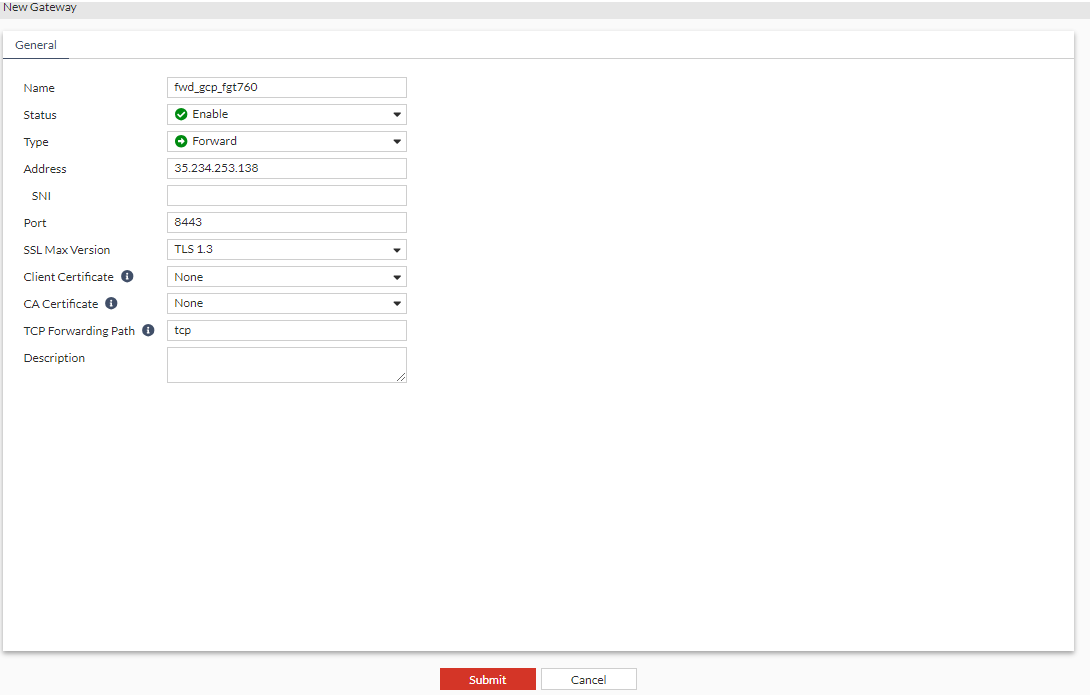
To configuring a gateway on the FortiPAM server:
- Go to Secrets > Gateway.
- In the Gateways list, select +Create.
The New Gateway window opens.
- In Name, enter a name for the gateway.
- Ensure that the Status is enabled.
- Ensure that Type is Forward.
- In Address, enter the IP address of the forward proxy.
This was set up on
port1in Configuring forward gateway on FortiGate. - In Port, enter the gateway port number.
In this example, it is
8443.This was set up in Configuring a gateway on the FortiPAM server.
- Ensure that the SSL Max Version is TLS 1.3 (default).
- Ensure that the TCP Forwarding Path is tcp (default). This tells the gateway how to internally process the request from FortiPAM.
- Optionally, enter a description.
- Click Submit.

|
Client Certificate is required only when |
|
|
CA Certificate is the CA for the FortiGate certificate configured in Configuring forward gateway on FortiGate ( If it is not configured, FortiPAM server does not check the FortiGate certificate during the TLS handshake. |