
Fortinet white logo
Fortinet white logo

Administration Guide

Trigger

Trigger

Go to Log & Report > Automation and select the Trigger tab to see the triggers.
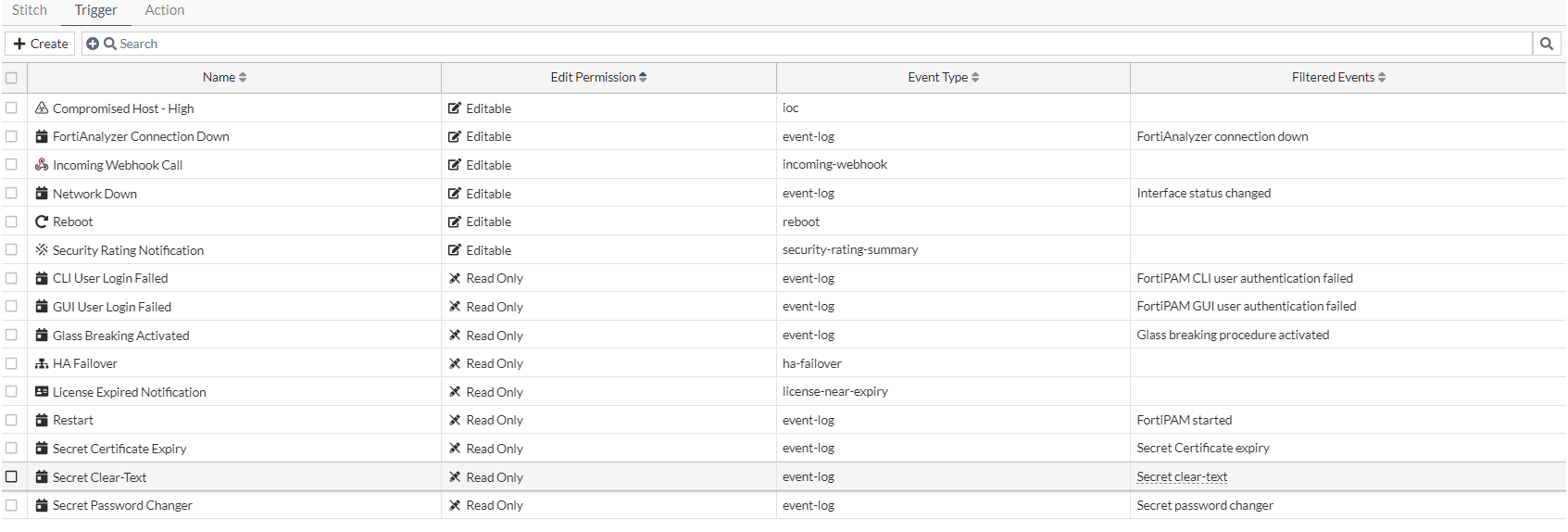
For each trigger, the following columns are displayed by default:

  • Name

  • Edit Permission

  • Event Type

  • Filtered Events

The following describes the default triggers:

Trigger

Description

Compromised Host

An indicator of compromise (IoC) is detected on a host endpoint.

The threat level must be selected and can be Medium or High. If Medium is selected, both medium and high level threats are included.

Additional actions are available only for Compromised Host triggers:

  • Access Layer Quarantine

  • FortiClient Quarantine

  • VMware NSX Security Tag

  • IP Ban

FortiAnalyzer Connection Down

An event has occurred on a specific Fabric connector.

Incoming Webhook Call

An incoming webhook has been triggered.

Network Down

A network connection is down.

Reboot

FortiPAM rebooting.

Security Rating Notification

Security rating report available.

CLI User Login Failed

SSH login failed event trigger.

GUI User Login Failed

GUI login failed event trigger.

Glass Breaking Activated

When a user activates the glass breaking mode.

HA Failover

An HA failover has occurred.

License Expired Notification

When a license is near expiration.

Restart

System restarts.

Secret Certificate Expiry

The secret certificate expiry event trigger.

Secret Clear-Text

The secret credential clear text event trigger.

Secret Password Changer

The secret password changing event trigger.

The Trigger tab contains the following options:

Create

Select to create a new trigger.

See Creating a trigger.

Search

Enter a search term in the search field, then hit Enterto search triggers list. To narrow down your search, see Column filter.

The following column filters are available:

  • Name

  • Edit Permission

  • Event Type

  • Filtered Events

  • Description

  • References

  • Trigger Type

Edit

Select to edit the selected trigger.

Clone

Select to clone the selected trigger.

Delete

Select to delete the selected trigger.

Trigger

Trigger

Go to Log & Report > Automation and select the Trigger tab to see the triggers.

For each trigger, the following columns are displayed by default:

  • Name

  • Edit Permission

  • Event Type

  • Filtered Events

The following describes the default triggers:

Trigger

Description

Compromised Host

An indicator of compromise (IoC) is detected on a host endpoint.

The threat level must be selected and can be Medium or High. If Medium is selected, both medium and high level threats are included.

Additional actions are available only for Compromised Host triggers:

  • Access Layer Quarantine

  • FortiClient Quarantine

  • VMware NSX Security Tag

  • IP Ban

FortiAnalyzer Connection Down

An event has occurred on a specific Fabric connector.

Incoming Webhook Call

An incoming webhook has been triggered.

Network Down

A network connection is down.

Reboot

FortiPAM rebooting.

Security Rating Notification

Security rating report available.

CLI User Login Failed

SSH login failed event trigger.

GUI User Login Failed

GUI login failed event trigger.

Glass Breaking Activated

When a user activates the glass breaking mode.

HA Failover

An HA failover has occurred.

License Expired Notification

When a license is near expiration.

Restart

System restarts.

Secret Certificate Expiry

The secret certificate expiry event trigger.

Secret Clear-Text

The secret credential clear text event trigger.

Secret Password Changer

The secret password changing event trigger.

The Trigger tab contains the following options:

Create

Select to create a new trigger.

See Creating a trigger.

Search

Enter a search term in the search field, then hit Enterto search triggers list. To narrow down your search, see Column filter.

The following column filters are available:

  • Name

  • Edit Permission

  • Event Type

  • Filtered Events

  • Description

  • References

  • Trigger Type

Edit

Select to edit the selected trigger.

Clone

Select to clone the selected trigger.

Delete

Select to delete the selected trigger.