DOCUMENT LIBRARY
23.2.0
DOCUMENT LIBRARY
Products
Best Practices
Hardware Guides
Products A-Z
Summary
By Solution
By 4D Pillars
By Cloud
All Products
Secure Networking
Unified SASE
Security Operations
Secure SD-WAN
Secure Access Service Edge (SASE)
ZTNA
LAN Edge
Identity and Access Management
Next Generation Firewall
Web Application Firewall
Public Cloud
Private Cloud
FortiCloud
Secure Networking
Hybrid Mesh Firewall
FortiGate/FortiOS
FortiGate-5000
|
6000
|
7000
NOC Management
FortiManager
|
FortiManager Cloud
Managed Fortigate Service
LAN
FortiSwitch
FortiAP/FortiWiFi
FortiEdge Cloud
FortiNAC-F
WAN
Secure SD-WAN
FortiExtender
More >>
Unified SASE
Single Vendor SASE
FortiSASE
Secure SD-WAN
Zero Trust Network Access (ZTNA)
FortiProxy
FortiMonitor
Cloud Network Security
FortiGate Public Cloud
FortiGate Private Cloud
FortiGate CNF
FortiFlex
Lacework FortiCNAPP
Secure Endpoint Connectivity
FortiClient
|
FortiClient Cloud
Web Application / API Protection
FortiWeb
FortiADC
FortiAppSec Cloud
FortiDAST
More >>
Security Operations
Security Operations Automation
FortiAnalyzer
|
FortiAnalyzer Cloud
FortiSIEM
|
FortiSIEM Cloud
FortiSOAR
SOC-as-a-Service (SOCaaS)
Identity
FortiAuthenticator
FortiAuthenticator Cloud
FortiPAM
Early Detection & Prevention
FortiSandbox
|
FortiSandbox Cloud
FortiNDR
|
FortiNDR Cloud
FortiDeceptor
FortiRecon
More >>
Secure Networking
Hybrid Mesh Firewall
FortiGate/FortiOS
FortiGate-5000
|
6000
|
7000
NOC Management
FortiManager
|
FortiManager Cloud
Managed Fortigate Service
FortiAIOps
LAN
FortiSwitch
FortiAP/FortiWiFi
FortiAP-U Series
FortiEdge Cloud
FortiNAC-F
WAN
Secure SD-WAN
FortiExtender
Communication & Surveillance
FortiVoice
|
FortiVoice Cloud
FortiFone
FortiCamera
FortiRecorder
FortiCentral
Unified SASE
Single Vendor SASE
FortiSASE
Secure SD-WAN
Zero Trust Network Access (ZTNA)
FortiProxy
FortiMonitor
Secure Endpoint Connectivity
FortiClient
|
FortiClient Cloud
Cloud Network Security
FortiGate Public Cloud
FortiGate Private Cloud
FortiGate CNF
FortiFlex
Cloud-Native Security
Lacework FortiCNAPP
FortiDevSec
Web Application / API Protection
FortiWeb
FortiADC
FortiAppSec Cloud
FortiDAST
Security Operations
Security Operations Automation
FortiAnalyzer
|
FortiAnalyzer Cloud
FortiSIEM
|
FortiSIEM Cloud
FortiSOAR
Endpoint
FortiClient
|
FortiClient Cloud
FortiEDR/XDR
Data Protection
FortiDLP
FortiDLP Agent
FortiDLP Policies
Identity
FortiAuthenticator
FortiAuthenticator Cloud
FortiToken
|
FortiIdentity Cloud
FortiPAM
Email
FortiMail
FortiPhish
Early Detection & Prevention
FortiSandbox
|
FortiSandbox Cloud
FortiNDR
|
FortiNDR Cloud
FortiDeceptor
FortiRecon
Expert Services
SOC-as-a-Service (SOCaaS)
Edge Firewall
FortiGate/FortiOS
FortiGate-5000
|
6000
|
7000
FortiGate Public Cloud
FortiGate Private Cloud
Orchestration & management
FortiManager
|
FortiManager Cloud
FortiAnalyzer
|
FortiAnalyzer Cloud
Overlay-as-a-Service
SD Branch
FortiSwitch
FortiAP/FortiWiFi
FortiExtender
|
FortiExtender Cloud
Application Delivery
FortiADC
|
FortiGSLB
Single Vendor SASE
FortiSASE
Secure Endpoint Connectivity
FortiClient
|
FortiClient Cloud
Secure Private Access
Secure SD-WAN
Zero Trust Network Access (ZTNA)
Thin Edge
FortiGate/FortiOS
FortiAP/FortiWiFi
FortiExtender
|
FortiExtender Cloud
Identity
FortiAuthenticator
FortiAuthenticator Cloud
FortiIdentity Cloud
FortiToken
Application Gateway
FortiGate/FortiOS
FortiProxy
FortiADC
|
FortiGSLB
Enterprise Asset Management
FortiClient EMS
Endpoint Agent
FortiClient
|
FortiClient Cloud
Agentless Security Posture
FortiNAC-F
FortiSIEM
|
FortiSIEM Cloud
Identity
FortiAuthenticator
FortiAuthenticator Cloud
FortiIdentity Cloud
FortiToken
Wireless
FortiAP/FortiWiFi
FortiAP-U Series
FortiGate Cloud
Switching
FortiSwitch
FortiEdge Cloud
FortiNAC-F
Identity
FortiAuthenticator
FortiAuthenticator Cloud
FortiIdentity Cloud
FortiToken
Privilege Acccess Management
FortiPAM
Next Generation Firewall
FortiGate/FortiOS
FortiGate-5000
/
6000
/
7000
FortiGate Public Cloud
FortiGate Private Cloud
Orchestration & management
FortiManager
|
FortiManager Cloud
FortiAnalyzer
|
FortiAnalyzer Cloud
Expert Services
SOC-as-a-Service (SOCaaS)
Managed Fortigate Service
Web Application / API Protection
FortiWeb
FortiAppSec Cloud
All
FortiADC Public Cloud
FortiAnalyzer Public Cloud
FortiAuthenticator Public Cloud
FortiDeceptor Public Cloud
FortiGate Public Cloud
FortiIsolator Public Cloud
FortiManager Public Cloud
FortiNDR Public Cloud
FortiPAM Public Cloud
FortiPortal Public Cloud
FortiProxy Public Cloud
FortiSandbox Public Cloud
FortiTester Public Cloud
FortiVoice Public Cloud
FortiWeb Manager Public Cloud
FortiWeb Public Cloud
All
FortiADC Private Cloud
FortiAnalyzer BigData Private Cloud
FortiAnalyzer Private Cloud
FortiAuthenticator Private Cloud
FortiDeceptor Private Cloud
FortiGate Private Cloud
FortiManager Private Cloud
FortiNDR Private Cloud
FortiPAM Private Cloud
FortiProxy Private Cloud
FortiSandbox Private Cloud
FortiTester Private Cloud
FortiVoice Private Cloud
FortiWeb Manager Private Cloud
FortiWeb Private Cloud
Account Management
FortiCloud Services
SAAS Management
FortiGate Cloud
FortiClient Cloud
FortiEdge Cloud
FortiExtender Cloud
FortiPresence Cloud
FortiIdentity Cloud
FortiAuthenticator Cloud
FortiZTP
FortiCamera Cloud
SAAS Application Security
FortiWeb Cloud
FortiGSLB
FortiCASB
FortiCNP
FortiInsight
FortiPhish
FortiGate CNF
Managed Services
SOC-as-a-Service (SOCaaS)
Managed Fortigate Service
Platform as a service (PAAS)
FortiSASE
FortiAnalyzer Cloud
FortiManager Cloud
FortiClient Cloud
FortiSandbox Cloud
FortiMail Cloud
FortiSOAR Cloud
Other SAAS Services
Overlay-as-a-Service
FortiRecon
FortiConverter
ForiIPAM
FortiFlex
FortiCare Elite
FortiTIP Cloud
4D Resources
Solution Hubs
Define, design, deploy, demo
4D Pillars
Secure SD-WAN
Zero Trust Access
Wireless
Switching
Secure Access Service Edge
Identity and Access Management
Next Generation Firewall
Web Application Firewall
Curated Links by Solution
Cloud
FortiCloud
Public & Private Cloud
Popular Solutions
Secure SD-WAN
Zero Trust Network Access
Secure Access
Security Fabric
Tele-Working
Multi-Factor Authentication
FortiASIC
Operational Technology
MSSP
Next Generation Firewall
FortiAIOps
FortiAnalyzer
FortiAnalyzer Big-Data
FortiADC
FortiAP/FortiWiFi
FortiAP U-Series
FortiAuthenticator
FortiBranchSASE
FortiCache
FortiCamera
FortiCarrier
FortiController
FortiDDoS
FortiDDoS-F
FortiDeceptor
FortiExtender
FortiFone
FortiGate
FortiGate-5000
FortiGate-6000
FortiGate-7000
FortiHypervisor
FortiIsolator
FortiMail
FortiManager
FortiNAC
FortiNDR
FortiNDR Cloud
FortiProxy
FortiRecorder
FortiRPS
FortiSandbox
FortiSIEM
FortiSwitch
FortiTester
FortiToken
FortiVoice
FortiWAN
FortiWeb
FortiWLC
FortiWLM
AV Engine
AWS Firewall Rules
AscenLink
CTAP Cloud
Container FortiOS
FortiADC
FortiADC E Series
FortiADC Kubernetes Controller
FortiADC Manager
FortiADC Private Cloud
FortiADC Public Cloud
FortiAIGate
FortiAIOps
FortiAP / FortiWiFi
FortiAP-U Series
FortiAnalyzer
FortiAnalyzer BigData
FortiAnalyzer Cloud
FortiAnalyzer Private Cloud
FortiAnalyzer Public Cloud
FortiAppSec Cloud
FortiAuthenticator
FortiAuthenticator Cloud
FortiAuthenticator Private Cloud
FortiAuthenticator Public Cloud
FortiBalancer
FortiBranchSASE
FortiBridge
FortiCASB
FortiCNAPP
FortiCNP
FortiCWP
FortiCache
FortiCamera
FortiCamera Cloud
FortiCare Elite
FortiCarrier
FortiCentral
FortiClient
FortiClient Cloud
FortiCloud Services
FortiController
FortiConverter Service
FortiConverter Tool
FortiCore
FortiDAST
FortiDB
FortiDDoS
FortiDDoS-F
FortiDLP
FortiDLP Agent
FortiDLP Policies
FortiDNS
FortiData
FortiData Private Cloud
FortiDeceptor
FortiDeceptor DaaS
FortiDeceptor Private Cloud
FortiDeceptor Public Cloud
FortiDevSec
FortiDevice
FortiEDR/XDR
FortiEdge Cloud
FortiEndpoint
FortiExplorer
FortiExplorer Go
FortiExtender
FortiFlex
FortiFone
FortiGate / FortiOS
FortiGate CNF
FortiGate Cloud
FortiGate Private Cloud
FortiGate Public Cloud
FortiGate-5000
FortiGate-6000
FortiGate-7000
FortiGate-as-a-Service
FortiGuest
FortiHypervisor
FortiIPAM
FortiIdentity Cloud
FortiInsight
FortiInsight Cloud
FortiIsolator
FortiIsolator Public Cloud
FortiLAN Cloud
FortiMail Appliance and VM
FortiMail Cloud - Hosted
FortiMail Workspace Security
FortiManager
FortiManager Cloud
FortiManager Private Cloud
FortiManager Public Cloud
FortiMonitor
FortiNAC
FortiNAC-F
FortiNDR
FortiNDR (on-premise) Private Cloud
FortiNDR (on-premise) Public Cloud
FortiNDR Cloud
FortiNDR Cloud Sensors
FortiPAM
FortiPAM Private Cloud
FortiPAM Public Cloud
FortiPhish
FortiPlanner
FortiPolicy
FortiPortal
FortiPortal Public Cloud
FortiPresence
FortiPresence VM
FortiProxy
FortiProxy Private Cloud
FortiProxy Public Cloud
FortiRPS
FortiRecon
FortiRecorder
FortiSASE
FortiSASE-Sovereign
FortiSAT
FortiSIEM
FortiSIEM Cloud
FortiSOAR
FortiSOAR Cloud
FortiSRA
FortiSRA Private Cloud
FortiSRA Public Cloud
FortiSandbox
FortiSandbox PaaS
FortiSandbox Private Cloud
FortiSandbox Public Cloud
FortiSwitch
FortiSwitch Manager
FortiSwitch-AX Chassis
FortiSwitchNMS
FortiTIP Cloud
FortiTap
FortiTelemetry
FortiTester
FortiTester Private Cloud
FortiTester Public Cloud
FortiToken
FortiVoice
FortiVoice Cloud
FortiVoice Private Cloud
FortiVoice Public Cloud
FortiWAN
FortiWAN Controller
FortiWLM
FortiWeb
FortiWeb Manager
FortiWeb Manager Private Cloud
FortiWeb Manager Public Cloud
FortiWeb Private Cloud
FortiWeb Public Cloud
FortiZTP
IPS Engine
Managed FortiGate Service
Overlay-as-a-Service
SOCaaS
Security Awareness and Training
Wireless Controller
Ordering Guides
AV Engine
AWS Firewall Rules
CTAP Cloud
Container FortiOS
FortiADC
FortiADC E Series
FortiADC Kubernetes Controller
FortiADC Manager
FortiAIOps
FortiAP / FortiWiFi
FortiAP-U Series
FortiAnalyzer
FortiAnalyzer BigData
FortiAppSec Cloud
FortiAuthenticator
FortiBranchSASE
FortiCASB
FortiCNAPP
FortiCWP
FortiCamera
FortiCare Elite
FortiCarrier
FortiCentral
FortiClient
FortiCloud Services
FortiController
FortiConverter Service
FortiConverter Tool
FortiDAST
FortiDDoS-F
FortiDLP
FortiDLP Agent
FortiDLP Policies
FortiData
FortiDeceptor
FortiDeceptor DaaS
FortiDevSec
FortiDevice
FortiEDR/XDR
FortiEdge Cloud
FortiEndpoint
FortiExplorer Go
FortiExtender
FortiFlex
FortiFone
FortiGate / FortiOS
FortiGate CNF
FortiGate Cloud
FortiGate-5000
FortiGate-6000
FortiGate-7000
FortiGate-as-a-Service
FortiGuest
FortiHypervisor
FortiIPAM
FortiIdentity Cloud
FortiInsight
FortiIsolator
FortiMail Appliance and VM
FortiMail Workspace Security
FortiManager
FortiMonitor
FortiNAC
FortiNAC-F
FortiNDR
FortiNDR Cloud
FortiPAM
FortiPhish
FortiPolicy
FortiPortal
FortiPresence
FortiProxy
FortiRecon
FortiRecorder
FortiSASE
FortiSASE-Sovereign
FortiSIEM
FortiSOAR
FortiSRA
FortiSandbox
FortiSwitch
FortiSwitch Manager
FortiSwitch-AX Chassis
FortiSwitchNMS
FortiTIP Cloud
FortiTelemetry
FortiTester
FortiToken
FortiVoice
FortiWeb
FortiWeb Manager
FortiZTP
IPS Engine
Managed FortiGate Service
SOCaaS
Security Awareness and Training
Wireless Controller
Ordering Guides
All Products
AV Engine
AWS Firewall Rules
AscenLink
CTAP Cloud
Container FortiOS
FortiADC
FortiADC E Series
FortiADC Kubernetes Controller
FortiADC Manager
FortiADC Private Cloud
FortiADC Public Cloud
FortiAIGate
FortiAIOps
FortiAP / FortiWiFi
FortiAP-U Series
FortiAnalyzer
FortiAnalyzer BigData
FortiAnalyzer Cloud
FortiAnalyzer Private Cloud
FortiAnalyzer Public Cloud
FortiAppSec Cloud
FortiAuthenticator
FortiAuthenticator Cloud
FortiAuthenticator Private Cloud
FortiAuthenticator Public Cloud
FortiBalancer
FortiBranchSASE
FortiBridge
FortiCASB
FortiCNAPP
FortiCNP
FortiCWP
FortiCache
FortiCamera
FortiCamera Cloud
FortiCare Elite
FortiCarrier
FortiCentral
FortiClient
FortiClient Cloud
FortiCloud Services
FortiController
FortiConverter Service
FortiConverter Tool
FortiCore
FortiDAST
FortiDB
FortiDDoS
FortiDDoS-F
FortiDLP
FortiDLP Agent
FortiDLP Policies
FortiDNS
FortiData
FortiData Private Cloud
FortiDeceptor
FortiDeceptor DaaS
FortiDeceptor Private Cloud
FortiDeceptor Public Cloud
FortiDevSec
FortiDevice
FortiEDR/XDR
FortiEdge Cloud
FortiEndpoint
FortiExplorer
FortiExplorer Go
FortiExtender
FortiFlex
FortiFone
FortiGate / FortiOS
FortiGate CNF
FortiGate Cloud
FortiGate Private Cloud
FortiGate Public Cloud
FortiGate-5000
FortiGate-6000
FortiGate-7000
FortiGate-as-a-Service
FortiGuest
FortiHypervisor
FortiIPAM
FortiIdentity Cloud
FortiInsight
FortiInsight Cloud
FortiIsolator
FortiIsolator Public Cloud
FortiLAN Cloud
FortiMail Appliance and VM
FortiMail Cloud - Hosted
FortiMail Workspace Security
FortiManager
FortiManager Cloud
FortiManager Private Cloud
FortiManager Public Cloud
FortiMonitor
FortiNAC
FortiNAC-F
FortiNDR
FortiNDR (on-premise) Private Cloud
FortiNDR (on-premise) Public Cloud
FortiNDR Cloud
FortiNDR Cloud Sensors
FortiPAM
FortiPAM Private Cloud
FortiPAM Public Cloud
FortiPhish
FortiPlanner
FortiPolicy
FortiPortal
FortiPortal Public Cloud
FortiPresence
FortiPresence VM
FortiProxy
FortiProxy Private Cloud
FortiProxy Public Cloud
FortiRPS
FortiRecon
FortiRecorder
FortiSASE
FortiSASE-Sovereign
FortiSAT
FortiSIEM
FortiSIEM Cloud
FortiSOAR
FortiSOAR Cloud
FortiSRA
FortiSRA Private Cloud
FortiSRA Public Cloud
FortiSandbox
FortiSandbox PaaS
FortiSandbox Private Cloud
FortiSandbox Public Cloud
FortiSwitch
FortiSwitch Manager
FortiSwitch-AX Chassis
FortiSwitchNMS
FortiTIP Cloud
FortiTap
FortiTelemetry
FortiTester
FortiTester Private Cloud
FortiTester Public Cloud
FortiToken
FortiVoice
FortiVoice Cloud
FortiVoice Private Cloud
FortiVoice Public Cloud
FortiWAN
FortiWAN Controller
FortiWLM
FortiWeb
FortiWeb Manager
FortiWeb Manager Private Cloud
FortiWeb Manager Public Cloud
FortiWeb Private Cloud
FortiWeb Public Cloud
FortiZTP
IPS Engine
Managed FortiGate Service
Overlay-as-a-Service
SOCaaS
Security Awareness and Training
Wireless Controller
Ordering Guides
FortiGate / FortiOS
FortiManager
FortiAnalyzer
Administration Guide
Introduction
FortiPhish portal
Accessing the FortiPhish portal
Notifications
User Management
Getting started
Dashboard
Monitoring
Executive Report
Recipients
Group List
LDAP server
Azure AD Server
Risk Grade History
Domains
Adding domains
Campaigns
Creating campaigns
Template variables
Viewing campaign statistics
Retrying a campaign
Completing a campaign
Exporting campaign statistics
Deleting archived campaigns
Custom
Templates
Landing page
Settings
Enable Auto Delete
FortiPhish alert buttons
Creating a FortiPhish alert button
Adding alert buttons in Outlook
Adding alert buttons in Thunderbird
FortiPhish alert button compatibility matrix
SMTP
Change Log
Home
FortiPhish 23.2.0
Administration Guide
23.2.0
25.4.a
25.4.0
25.3.0
25.2.0
25.1.0
24.4.0
24.3.0
24.2.0
24.1.0
23.4.0
23.3.0
23.2.a
23.2.0
23.1.a
Enable Auto Delete
Enable Auto Delete
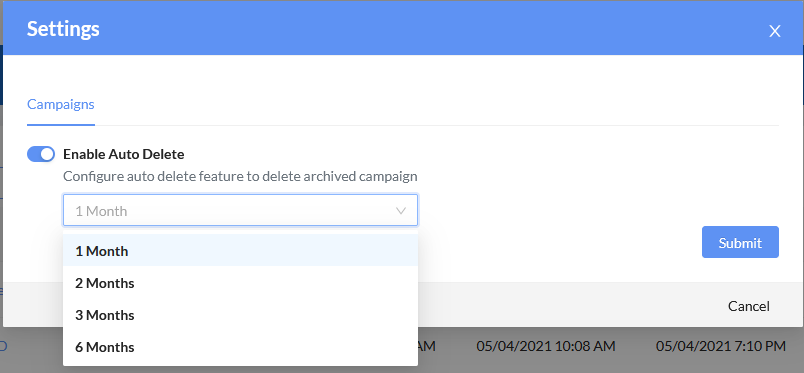
Schedule archived campaigns to be automatically deleted at monthly intervals.
To enable auto delete:
In the banner, click the gear icon.
Click the
Enable Auto Delete
toggle.
From the dropdown menu, select
1 Month
,
2 Months
,
3 Months
, or
6 Months
.
Click
Submit
.
Previous
Next
Enable Auto Delete
Enable Auto Delete
Schedule archived campaigns to be automatically deleted at monthly intervals.
To enable auto delete:
In the banner, click the gear icon.
Click the
Enable Auto Delete
toggle.
From the dropdown menu, select
1 Month
,
2 Months
,
3 Months
, or
6 Months
.
Click
Submit
.
Previous
Next
Home
Products
Summary
Secure Networking
Hybrid Mesh Firewall
FortiGate/FortiOS
FortiGate-5000
FortiGate-6000
FortiGate-7000
NOC Management
FortiManager
FortiManager Cloud
Managed Fortigate Service
LAN
FortiSwitch
FortiAP/FortiWiFi
FortiEdge Cloud
FortiNAC-F
WAN
Secure SD-WAN
FortiExtender
More >>
Hybrid Mesh Firewall
FortiGate/FortiOS
FortiGate-5000
FortiGate-6000
FortiGate-7000
NOC Management
FortiManager
FortiManager Cloud
Managed Fortigate Service
FortiAIOps
LAN
FortiSwitch
FortiAP/FortiWiFi
FortiAP-U Series
FortiEdge Cloud
FortiNAC-F
WAN
Secure SD-WAN
FortiExtender
Communication & Surveillance
FortiVoice
FortiVoice Cloud
FortiFone
FortiCamera
FortiRecorder
FortiCentral
Unified SASE
Single Vendor SASE
FortiSASE
Secure SD-WAN
Zero Trust Network Access (ZTNA)
FortiProxy
FortiMonitor
Cloud Network Security
FortiGate Public Cloud
FortiGate Private Cloud
FortiGate CNF
FortiFlex
Lacework FortiCNAPP
Secure Endpoint Connectivity
FortiClient
FortiClient Cloud
Web Application / API Protection
FortiWeb
FortiADC
FortiAppSec Cloud
FortiDAST
More >>
Single Vendor SASE
FortiSASE
Secure SD-WAN
Zero Trust Network Access (ZTNA)
FortiProxy
FortiMonitor
Secure Endpoint Connectivity
FortiClient
FortiClient Cloud
Cloud Network Security
FortiGate Public Cloud
FortiGate Private Cloud
FortiGate CNF
FortiFlex
Cloud-Native Security
Lacework FortiCNAPP
FortiDevSec
Web Application / API Protection
FortiWeb
FortiADC
FortiAppSec Cloud
FortiDAST
Security Operations
Security Operations Automation
FortiAnalyzer
FortiAnalyzer Cloud
FortiSIEM
FortiSIEM Cloud
FortiSOAR
SOC-as-a-Service (SOCaaS)
Identity
FortiAuthenticator
FortiAuthenticator Cloud
FortiPAM
Early Detection & Prevention
FortiSandbox
FortiSandbox Cloud
FortiNDR
FortiNDR Cloud
FortiDeceptor
FortiRecon
More >>
Security Operations Automation
FortiAnalyzer
FortiAnalyzer Cloud
FortiSIEM
FortiSIEM Cloud
FortiSOAR
Endpoint
FortiClient
FortiClient Cloud
FortiEDR/XDR
Data Protection
FortiDLP
FortiDLP Agent
FortiDLP Policies
Identity
FortiAuthenticator
FortiAuthenticator Cloud
FortiToken
FortiIdentity Cloud
FortiPAM
Email
FortiMail
FortiPhish
Early Detection & Prevention
FortiSandbox
FortiSandbox Cloud
FortiNDR
FortiNDR Cloud
FortiDeceptor
FortiRecon
Expert Services
SOC-as-a-Service (SOCaaS)
By Solution
Secure Networking
Hybrid Mesh Firewall
FortiGate/FortiOS
FortiGate-5000
FortiGate-6000
FortiGate-7000
NOC Management
FortiManager
FortiManager Cloud
Managed Fortigate Service
FortiAIOps
LAN
FortiSwitch
FortiAP/FortiWiFi
FortiAP-U Series
FortiEdge Cloud
FortiNAC-F
WAN
Secure SD-WAN
FortiExtender
Communication & Surveillance
FortiVoice
FortiVoice Cloud
FortiFone
FortiCamera
FortiRecorder
FortiCentral
Unified SASE
Single Vendor SASE
FortiSASE
Secure SD-WAN
Zero Trust Network Access (ZTNA)
FortiProxy
FortiMonitor
Secure Endpoint Connectivity
FortiClient
FortiClient Cloud
Cloud Network Security
FortiGate Public Cloud
FortiGate Private Cloud
FortiGate CNF
FortiFlex
Cloud-Native Security
Lacework FortiCNAPP
FortiDevSec
Web Application / API Protection
FortiWeb
FortiADC
FortiAppSec Cloud
FortiDAST
Security Operations
Security Operations Automation
FortiAnalyzer
FortiAnalyzer Cloud
FortiSIEM
FortiSIEM Cloud
FortiSOAR
Endpoint
FortiClient
FortiClient Cloud
FortiEDR/XDR
Data Protection
FortiDLP
FortiDLP Agent
FortiDLP Policies
Identity
FortiAuthenticator
FortiAuthenticator Cloud
FortiToken
FortiIdentity Cloud
FortiPAM
Email
FortiMail
FortiPhish
Early Detection & Prevention
FortiSandbox
FortiSandbox Cloud
FortiNDR
FortiNDR Cloud
FortiDeceptor
FortiRecon
Expert Services
SOC-as-a-Service (SOCaaS)
By 4D Pillars
Secure SD-WAN
Edge Firewall
FortiGate/FortiOS
FortiGate-5000
FortiGate-6000
FortiGate-7000
FortiGate Public Cloud
FortiGate Private Cloud
Orchestration & management
FortiManager
FortiManager Cloud
FortiAnalyzer
FortiAnalyzer Cloud
Overlay-as-a-Service
SD Branch
FortiSwitch
FortiAP/FortiWiFi
FortiExtender
FortiExtender Cloud
Application Delivery
FortiADC
FortiGSLB
Secure Access Service Edge(SASE)
Single Vendor SASE
FortiSASE
Secure Endpoint Connectivity
FortiClient
FortiClient Cloud
Secure Private Access
Secure SD-WAN
Zero Trust Network Access (ZTNA)
Thin Edge
FortiGate/FortiOS
FortiAP/FortiWiFi
FortiExtender
FortiExtender Cloud
Identity
FortiAuthenticator
FortiAuthenticator Cloud
FortiIdentity Cloud
FortiToken
ZTNA
Application Gateway
FortiGate/FortiOS
FortiProxy
FortiADC
FortiGSLB
Enterprise Asset Management
FortiClient EMS
Endpoint Agent
FortiClient
FortiClient Cloud
Agentless Security Posture
FortiNAC-F
FortiSIEM
FortiSIEM Cloud
Identity
FortiAuthenticator
FortiAuthenticator Cloud
FortiIdentity Cloud
FortiToken
LAN Edge
Wireless
FortiAP/FortiWiFi
FortiAP-U Series
FortiGate Cloud
Switching
FortiSwitch
FortiEdge Cloud
FortiNAC-F
Identity and Access Management
Identity
FortiAuthenticator
FortiAuthenticator Cloud
FortiIdentity Cloud
FortiToken
Privilege Acccess Management
FortiPAM
Next Generation Firewall
Next Generation Firewall
FortiGate/FortiOS
FortiGate-5000
FortiGate-6000
FortiGate-7000
FortiGate Public Cloud
FortiGate Private Cloud
Orchestration & management
FortiManager
FortiManager Cloud
FortiAnalyzer
FortiAnalyzer Cloud
Expert Services
SOC-as-a-Service (SOCaaS)
Managed Fortigate Service
Web Application Firewall
Web Application / API Protection
FortiWeb
FortiAppSec Cloud
By Cloud
Public Cloud
All
FortiADC Public Cloud
FortiAnalyzer Public Cloud
FortiAuthenticator Public Cloud
FortiDeceptor Public Cloud
FortiGate Public Cloud
FortiIsolator Public Cloud
FortiManager Public Cloud
FortiNDR Public Cloud
FortiPAM Public Cloud
FortiPortal Public Cloud
FortiProxy Public Cloud
FortiSandbox Public Cloud
FortiTester Public Cloud
FortiVoice Public Cloud
FortiWeb Manager Public Cloud
FortiWeb Public Cloud
Private Cloud
All
FortiADC Private Cloud
FortiAnalyzer BigData Private Cloud
FortiAnalyzer Private Cloud
FortiAuthenticator Private Cloud
FortiDeceptor Private Cloud
FortiGate Private Cloud
FortiManager Private Cloud
FortiNDR Private Cloud
FortiPAM Private Cloud
FortiProxy Private Cloud
FortiSandbox Private Cloud
FortiTester Private Cloud
FortiVoice Private Cloud
FortiWeb Manager Private Cloud
FortiWeb Private Cloud
FortiCloud
Account Management
FortiCloud Services
SAAS Management
FortiGate Cloud
FortiClient Cloud
FortiEdge Cloud
FortiExtender Cloud
FortiPresence Cloud
FortiIdentity Cloud
FortiAuthenticator Cloud
FortiZTP
FortiCamera Cloud
SAAS Application Security
FortiWeb Cloud
FortiGSLB
FortiCASB
FortiCNP
FortiInsight
FortiPhish
FortiGate CNF
Best Practices
4D Resources
Define, Design, Deploy, Demo
Define, design, deploy, demo
4D Pillars
Secure SD-WAN
Zero Trust Access
Wireless
Switching
Secure Access Service Edge
Identity and Access Management
Next Generation Firewall
Web Application Firewall
Solution Hubs
Curated Links by Solution
Curated Links by Solution
Cloud
FortiCloud
Public & Private Cloud
Popular Solutions
Secure SD-WAN
Zero Trust Network Access
Secure Access
Security Fabric
Tele-Working
Multi-Factor Authentication
FortiASIC
Operational Technology
MSSP
Next Generation Firewall
Hardware Guides
FortiAIOps
FortiAnalyzer
FortiAnalyzer Big-Data
FortiADC
FortiAP/FortiWiFi
FortiAP U-Series
FortiAuthenticator
FortiBranchSASE
FortiCache
FortiCamera
FortiCarrier
FortiController
FortiDDoS
FortiDDoS-F
FortiDeceptor
FortiExtender
FortiFone
FortiGate
FortiGate-5000
FortiGate-6000
FortiGate-7000
FortiHypervisor
FortiIsolator
FortiMail
FortiManager
FortiNAC
FortiNDR
FortiNDR Cloud
FortiProxy
FortiRecorder
FortiRPS
FortiSandbox
FortiSIEM
FortiSwitch
FortiTester
FortiToken
FortiVoice
FortiWAN
FortiWeb
FortiWLC
FortiWLM
Products A-Z
AV Engine
AWS Firewall Rules
AscenLink
CTAP Cloud
Container FortiOS
FortiADC
FortiADC E Series
FortiADC Kubernetes Controller
FortiADC Manager
FortiADC Private Cloud
FortiADC Public Cloud
FortiAIGate
FortiAIOps
FortiAP / FortiWiFi
FortiAP-U Series
FortiAnalyzer
FortiAnalyzer BigData
FortiAnalyzer Cloud
FortiAnalyzer Private Cloud
FortiAnalyzer Public Cloud
FortiAppSec Cloud
FortiAuthenticator
FortiAuthenticator Cloud
FortiAuthenticator Private Cloud
FortiAuthenticator Public Cloud
FortiBalancer
FortiBranchSASE
FortiBridge
FortiCASB
FortiCNAPP
FortiCNP
FortiCWP
FortiCache
FortiCamera
FortiCamera Cloud
FortiCare Elite
FortiCarrier
FortiCentral
FortiClient
FortiClient Cloud
FortiCloud Services
FortiController
FortiConverter Service
FortiConverter Tool
FortiCore
FortiDAST
FortiDB
FortiDDoS
FortiDDoS-F
FortiDLP
FortiDLP Agent
FortiDLP Policies
FortiDNS
FortiData
FortiData Private Cloud
FortiDeceptor
FortiDeceptor DaaS
FortiDeceptor Private Cloud
FortiDeceptor Public Cloud
FortiDevSec
FortiDevice
FortiEDR/XDR
FortiEdge Cloud
FortiEndpoint
FortiExplorer
FortiExplorer Go
FortiExtender
FortiFlex
FortiFone
FortiGate / FortiOS
FortiGate CNF
FortiGate Cloud
FortiGate Private Cloud
FortiGate Public Cloud
FortiGate-5000
FortiGate-6000
FortiGate-7000
FortiGate-as-a-Service
FortiGuest
FortiHypervisor
FortiIPAM
FortiIdentity Cloud
FortiInsight
FortiInsight Cloud
FortiIsolator
FortiIsolator Public Cloud
FortiLAN Cloud
FortiMail Appliance and VM
FortiMail Cloud - Hosted
FortiMail Workspace Security
FortiManager
FortiManager Cloud
FortiManager Private Cloud
FortiManager Public Cloud
FortiMonitor
FortiNAC
FortiNAC-F
FortiNDR
FortiNDR (on-premise) Private Cloud
FortiNDR (on-premise) Public Cloud
FortiNDR Cloud
FortiNDR Cloud Sensors
FortiPAM
FortiPAM Private Cloud
FortiPAM Public Cloud
FortiPhish
FortiPlanner
FortiPolicy
FortiPortal
FortiPortal Public Cloud
FortiPresence
FortiPresence VM
FortiProxy
FortiProxy Private Cloud
FortiProxy Public Cloud
FortiRPS
FortiRecon
FortiRecorder
FortiSASE
FortiSASE-Sovereign
FortiSAT
FortiSIEM
FortiSIEM Cloud
FortiSOAR
FortiSOAR Cloud
FortiSRA
FortiSRA Private Cloud
FortiSRA Public Cloud
FortiSandbox
FortiSandbox PaaS
FortiSandbox Private Cloud
FortiSandbox Public Cloud
FortiSwitch
FortiSwitch Manager
FortiSwitch-AX Chassis
FortiSwitchNMS
FortiTIP Cloud
FortiTap
FortiTelemetry
FortiTester
FortiTester Private Cloud
FortiTester Public Cloud
FortiToken
FortiVoice
FortiVoice Cloud
FortiVoice Private Cloud
FortiVoice Public Cloud
FortiWAN
FortiWAN Controller
FortiWLM
FortiWeb
FortiWeb Manager
FortiWeb Manager Private Cloud
FortiWeb Manager Public Cloud
FortiWeb Private Cloud
FortiWeb Public Cloud
FortiZTP
IPS Engine
Managed FortiGate Service
Overlay-as-a-Service
SOCaaS
Security Awareness and Training
Wireless Controller
Ordering Guides
AV Engine
AWS Firewall Rules
CTAP Cloud
Container FortiOS
FortiADC
FortiADC E Series
FortiADC Kubernetes Controller
FortiADC Manager
FortiAIOps
FortiAP / FortiWiFi
FortiAP-U Series
FortiAnalyzer
FortiAnalyzer BigData
FortiAppSec Cloud
FortiAuthenticator
FortiBranchSASE
FortiCASB
FortiCNAPP
FortiCWP
FortiCamera
FortiCare Elite
FortiCarrier
FortiCentral
FortiClient
FortiCloud Services
FortiController
FortiConverter Service
FortiConverter Tool
FortiDAST
FortiDDoS-F
FortiDLP
FortiDLP Agent
FortiDLP Policies
FortiData
FortiDeceptor
FortiDeceptor DaaS
FortiDevSec
FortiDevice
FortiEDR/XDR
FortiEdge Cloud
FortiEndpoint
FortiExplorer Go
FortiExtender
FortiFlex
FortiFone
FortiGate / FortiOS
FortiGate CNF
FortiGate Cloud
FortiGate-5000
FortiGate-6000
FortiGate-7000
FortiGate-as-a-Service
FortiGuest
FortiHypervisor
FortiIPAM
FortiIdentity Cloud
FortiInsight
FortiIsolator
FortiMail Appliance and VM
FortiMail Workspace Security
FortiManager
FortiMonitor
FortiNAC
FortiNAC-F
FortiNDR
FortiNDR Cloud
FortiPAM
FortiPhish
FortiPolicy
FortiPortal
FortiPresence
FortiProxy
FortiRecon
FortiRecorder
FortiSASE
FortiSASE-Sovereign
FortiSIEM
FortiSOAR
FortiSRA
FortiSandbox
FortiSwitch
FortiSwitch Manager
FortiSwitch-AX Chassis
FortiSwitchNMS
FortiTIP Cloud
FortiTelemetry
FortiTester
FortiToken
FortiVoice
FortiWeb
FortiWeb Manager
FortiZTP
IPS Engine
Managed FortiGate Service
SOCaaS
Security Awareness and Training
Wireless Controller
Ordering Guides
Download PDF
Table of Contents
Select Other Version
Introduction
FortiPhish portal
Accessing the FortiPhish portal
Notifications
User Management
Getting started
Dashboard
Monitoring
Executive Report
Recipients
Group List
LDAP server
Azure AD Server
Risk Grade History
Domains
Adding domains
Campaigns
Creating campaigns
Template variables
Viewing campaign statistics
Retrying a campaign
Completing a campaign
Exporting campaign statistics
Deleting archived campaigns
Custom
Templates
Landing page
Settings
Enable Auto Delete
FortiPhish alert buttons
Creating a FortiPhish alert button
Adding alert buttons in Outlook
Adding alert buttons in Thunderbird
FortiPhish alert button compatibility matrix
SMTP
Change Log
25.4.a
25.4.0
25.3.0
25.2.0
25.1.0
24.4.0
24.3.0
24.2.0
24.1.0
23.4.0
23.3.0
23.2.a
23.2.0
23.1.a

 DOCUMENT LIBRARY
23.2.0
DOCUMENT LIBRARY
23.2.0
DOCUMENT LIBRARY
23.2.0
DOCUMENT LIBRARY
23.2.0