
Fortinet white logo
Fortinet white logo

SMTP

SMTP

Go to the SMTP section of the Configuration > Setup > Servers page to configure an SMTP server.
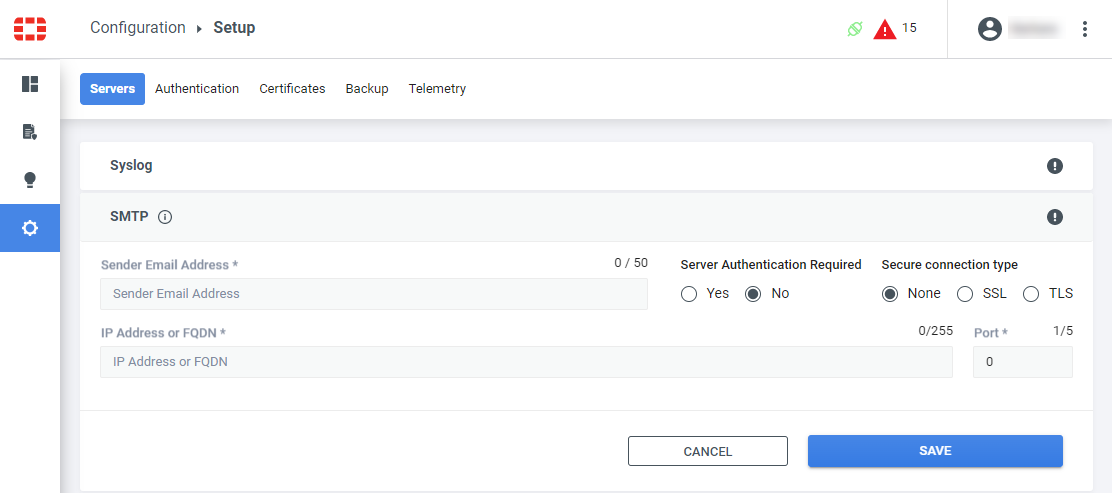
  1. Enter the email address for the sender.

  2. Enter the IP address or fully qualified domain name for the SMTP server.

  3. If server authentication is required, click Yes and enter the user name and password for the SMTP server.

  4. Select whether the connection to the server will be with SSL, TLS, or neither.

  5. Enter the port number that the SMTP server will use.

  6. Click Save to save the configuration.

SMTP

SMTP

Go to the SMTP section of the Configuration > Setup > Servers page to configure an SMTP server.

  1. Enter the email address for the sender.

  2. Enter the IP address or fully qualified domain name for the SMTP server.

  3. If server authentication is required, click Yes and enter the user name and password for the SMTP server.

  4. Select whether the connection to the server will be with SSL, TLS, or neither.

  5. Enter the port number that the SMTP server will use.

  6. Click Save to save the configuration.