
Fortinet white logo
Fortinet white logo

Browser Isolation (FortiNBI) enhancements

Browser Isolation (FortiNBI) enhancements

FortiProxy 7.4.0 includes the following Browser Isolation (FortiNBI) enhancements:

  • DNS WPAD and PAC URL support—For DNS WPAD and PAC URL, FortiNBI can now identify the correct proxy address and port for each domain.

    You must set direct access to system.fortinbi.fortinet.com and proxy https://pacdetectproxy.fortinbi.fortinet.com to the FortiProxy with the configured FortiNBI profile.

  • Manual configuration enhancement—When using manual detection configuration, you can now specify a FortiProxy IP address without configuring any proxy on the client machine.

  • Default isolator profile—Under Policy & Objects > Isolator Setting > Setting, you can now configure the default isolator profile and/or configure the action to perform on isolator sessions that do not match any existing policies (unmatched-session) or have missing information (defective-session).
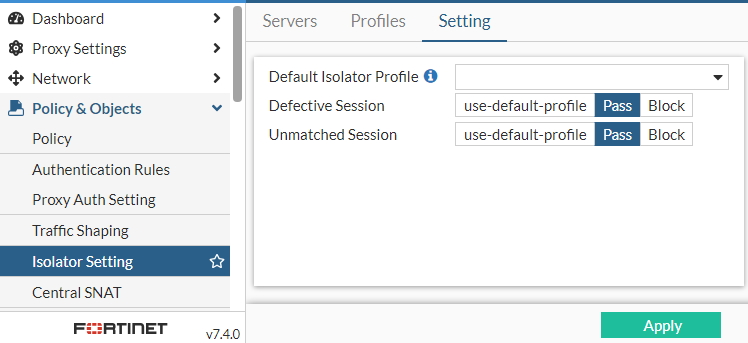
    Alternatively, use the new configure isolator setting command to configure these options.

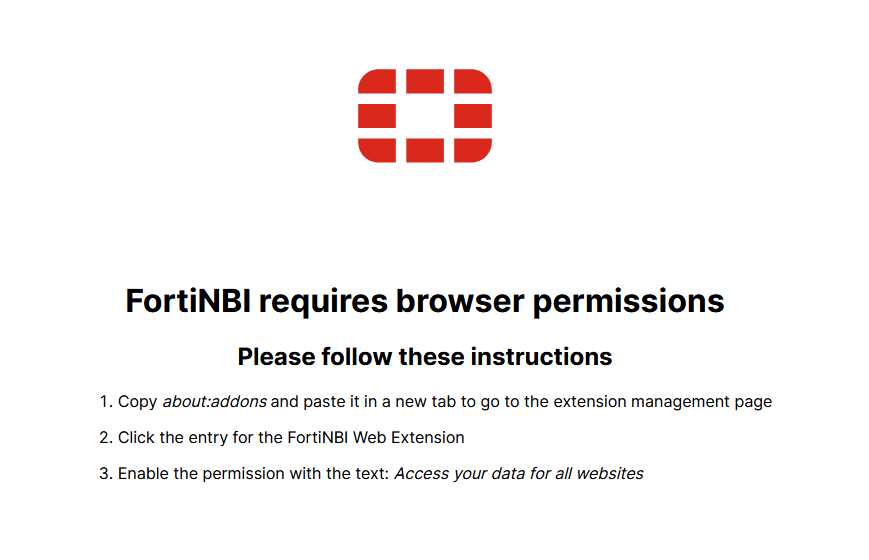
  • Firefox support—You can now use the FortiNBI in Firefox. When you use the FortiNBI in Firefox for the first time, you will see a prompt page with instructions to enable browser permissions to access site data.
Refer to the FortiProxy 7.4.0 Browser Isolation Deployment Guide for more detailed information about deploying and using the FortiNBI.

Browser Isolation (FortiNBI) enhancements

Browser Isolation (FortiNBI) enhancements

FortiProxy 7.4.0 includes the following Browser Isolation (FortiNBI) enhancements:

  • DNS WPAD and PAC URL support—For DNS WPAD and PAC URL, FortiNBI can now identify the correct proxy address and port for each domain.

    You must set direct access to system.fortinbi.fortinet.com and proxy https://pacdetectproxy.fortinbi.fortinet.com to the FortiProxy with the configured FortiNBI profile.

  • Manual configuration enhancement—When using manual detection configuration, you can now specify a FortiProxy IP address without configuring any proxy on the client machine.

  • Default isolator profile—Under Policy & Objects > Isolator Setting > Setting, you can now configure the default isolator profile and/or configure the action to perform on isolator sessions that do not match any existing policies (unmatched-session) or have missing information (defective-session).

    Alternatively, use the new configure isolator setting command to configure these options.

  • Firefox support—You can now use the FortiNBI in Firefox. When you use the FortiNBI in Firefox for the first time, you will see a prompt page with instructions to enable browser permissions to access site data.

Refer to the FortiProxy 7.4.0 Browser Isolation Deployment Guide for more detailed information about deploying and using the FortiNBI.