
Fortinet white logo
Fortinet white logo

Administration Guide

Create or edit a SAML server

Create or edit a SAML server

To add a new SAML server in the GUI:
  1. In the SAML server list, click Create New from the toolbar. The Create SAML window opens.
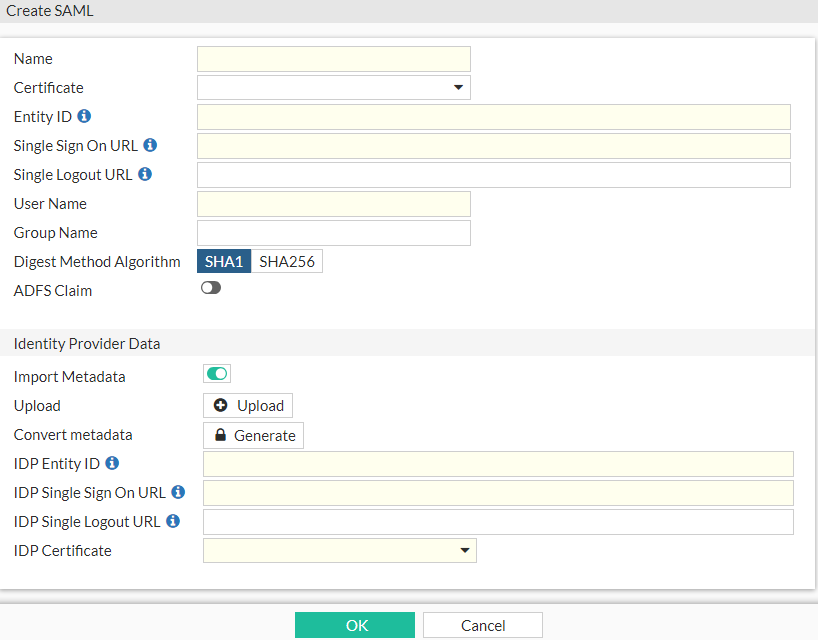
  2. Configure the following:

    Name

    Enter the name that identifies the SAML server on the FortiProxy unit.

    Certificate

    Select the certificate to sign SAML messages.

    Entity ID

    Enter the service provider entity identifier. The URL must start with http:// or https://.

    Single Sign On URL

    Enter the service provider single sign-on URL. The URL must start with http:// or https://.

    Single Logout URL

    Enter the service provider single logout URL. The URL must start with http:// or https://.

    User Name

    Enter the user name in the assertion statement.

    Group Name

    Enter the group name in the assertion statement.

    Digest Method Algorithm

    Select the algorithm used for the digest method.

    ADFS Claim

    Enable or disable the ADFS claim for the user and group attributes in the assertion statement.

    Identity Provider Data

    Import Metadata

    Enable or disable importing metadata. When enabled, use the Upload or Convert metadata fields to import an IdP metadata file or convert the metadata to a user SAML CLI configuration.

    Upload

    Click Upload to import an IdP metadata file.

    Convert metadata

    Click Generate to convert the metadata to a user SAML CLI configuration.

    IDP Entity ID

    Enter t he identity provider entity identifier. The URL must start with http:// or https://.

    IDP Single Sign On URL

    Enter the identity provider single sign-on UR. The URL must start with http:// or https://.

    IDP Single Logout URL

    Enter the identity provider single logout URL. The URL must start with http:// or https://.

    IDP Certificate

    Enter the identity provider certificate name.

  3. Click OK to create the new SAML server.

To edit a SAML server in the GUI:
  1. Select the SAML server you want to edit and then click Edit from the toolbar. The Edit SAML window opens.

  2. Edit the server information as required and click OK to apply your changes.

To add a new SAML server or edit an existing SAML server in the CLI:

Use the config user saml command.

Create or edit a SAML server

Create or edit a SAML server

To add a new SAML server in the GUI:
  1. In the SAML server list, click Create New from the toolbar. The Create SAML window opens.

  2. Configure the following:

    Name

    Enter the name that identifies the SAML server on the FortiProxy unit.

    Certificate

    Select the certificate to sign SAML messages.

    Entity ID

    Enter the service provider entity identifier. The URL must start with http:// or https://.

    Single Sign On URL

    Enter the service provider single sign-on URL. The URL must start with http:// or https://.

    Single Logout URL

    Enter the service provider single logout URL. The URL must start with http:// or https://.

    User Name

    Enter the user name in the assertion statement.

    Group Name

    Enter the group name in the assertion statement.

    Digest Method Algorithm

    Select the algorithm used for the digest method.

    ADFS Claim

    Enable or disable the ADFS claim for the user and group attributes in the assertion statement.

    Identity Provider Data

    Import Metadata

    Enable or disable importing metadata. When enabled, use the Upload or Convert metadata fields to import an IdP metadata file or convert the metadata to a user SAML CLI configuration.

    Upload

    Click Upload to import an IdP metadata file.

    Convert metadata

    Click Generate to convert the metadata to a user SAML CLI configuration.

    IDP Entity ID

    Enter t he identity provider entity identifier. The URL must start with http:// or https://.

    IDP Single Sign On URL

    Enter the identity provider single sign-on UR. The URL must start with http:// or https://.

    IDP Single Logout URL

    Enter the identity provider single logout URL. The URL must start with http:// or https://.

    IDP Certificate

    Enter the identity provider certificate name.

  3. Click OK to create the new SAML server.

To edit a SAML server in the GUI:
  1. Select the SAML server you want to edit and then click Edit from the toolbar. The Edit SAML window opens.

  2. Edit the server information as required and click OK to apply your changes.

To add a new SAML server or edit an existing SAML server in the CLI:

Use the config user saml command.