Fortinet white logo
Fortinet white logo

Administration Guide

Traffic shaping based on HTTP response NEW

Traffic shaping based on HTTP response NEW

You can configure traffic shaping based on HTTP response by configuring a proxy address of the Response Header type, enabling Http Response Match in the traffic shaping policy, and then creating a response shaping policy that defines the overriding shaping behavior (for matching traffic) and references the proxy address.

Example

The following configuration example assigns high priority to traffic with the HTTP header "content-type" field set to "text/html":

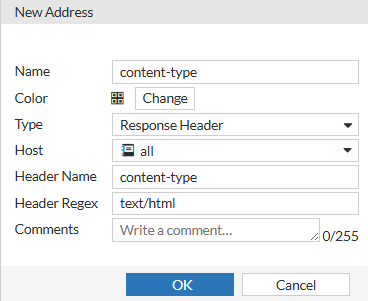
  1. Create a proxy address of the Response Header type with the header set to "text/html":

    1. Go to Policy & Objects > Addresses.

    2. In the Proxy tab, click Create New > Address.

    3. Set the following:

      • Name to content-type,

      • Type to Response Header,

      • Host to all,

      • Header Name to content-type

      • Header Regex to text/html.

    4. Click OK.

    Alternatively, use the following command in the CLI:

    config firewall proxy-address

    edit "content-type"

    set uuid adcb49a0-05aa-51f0-f432-5740ef86a4a4

    set type response-header

    set host "all"

    set header-name "content-type"

    set header "text/html"

    next

    end

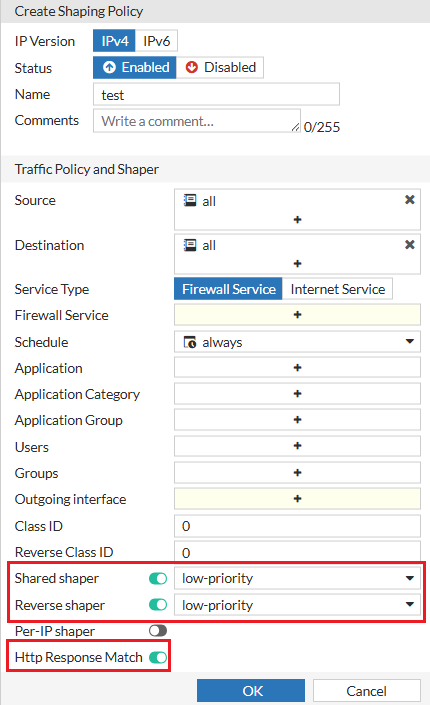
  2. Enable the new Http Response Match option in your traffic shaping policy to enable matching HTTP response shaping policies. Note that the traffic shaping policy uses the low priority shapers.

    1. Go to Policy & Objects > Traffic Shaping.

    2. In the Traffic Shaping Policies tab, click Create New .

    3. Set the following:

      • Name to test,

      • Source to all,

      • Destination to all

      • Shared shaper to low priority.

      • Reverse shaper to low priority.

      • Http Response Match to Enable.

    4. Click OK.

    Alternatively, use the following command option in the CLI:

    config firewall shaping-policy

    edit 2

    set uuid 8c299866-04e6-51f0-a1e2-8f76f7856ab0

    set dstaddr "all"

    set service "all"

    set http-response-match enable

    set dstintf "any"

    set traffic-shaper "low-priority"

    set per-ip-shaper "low-priority"

    set srcaddr "all"

    next

    end

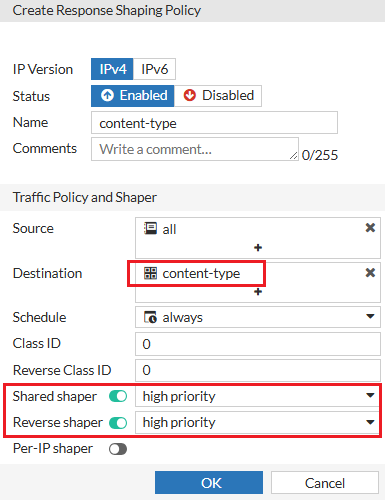
  3. Create a response shaping policy to define the shaping behavior and reference the response header address (you created in step 1) in destination address. Note that the response shaping policy uses the high priority shapers.

    1. Go to Policy & Objects > Traffic Shaping.

    2. In the Response Shaping Policies tab, click Create New .

    3. Set the following:

      • Name to content-type,

      • Source to all,

      • Destination to content-type

      • Shared shaper to high priority.

      • Reverse shaper to high priority.

    4. Click OK.

    Alternatively, use the following new command in the CLI:

    config firewall response-shaping-policy

    edit content-type

    set uuid a0edf572-0378-51f0-f0f6-8f924dccfd53

    set dstaddr "content-type"

    set traffic-shaper "high-priority"

    set traffic-shaper-reverse "high_priority"

    set srcaddr "all"

    next

    end

Sample debug output for a successful match:

HTTP/1.1 204 No Content

Date: Thu, 10 Apr 2025 18:36:56 GMT

Content-Type: text/html

Server: HTTP server (unknown)

X-XSS-Protection: 0

[V][p:1240][s:2][r:3] __wad_hauth_user_node_hold :2741 wad_http_resp_shaping_policy_init (12818): holding node 0x7f93ebc3a310

[I][p:1240][s:2][r:3] wad_http_policy_match_one :538 fw_pol_id=1(pol_ctx:th|Ad|7|=p) pflag:H|W|U|A asyn_info=1

[I][p:1240][s:2][r:3] wad_fw_policy_async_match :6820 pol_ctx:th|Ad|7|=d

[V][p:1240][s:2][r:3] wad_http_resp_setup_shaping_policy:12567 Newly matched response shaping policy 1

[V][p:1240][s:2][r:3] __wad_hauth_user_node_put :2752 wad_fw_pol_async_ctx_close (6030): putting node(ref=4) 0x7f93ebc3a310

[V][p:1240][s:2][r:3] wad_shaper_results__update :260 applying response shaping policy=1 priority=0 uuid=16557

[I][p:1240][s:2][r:3] wad_apply_shared_shaper :740 apply shared shaper high-priority(forward) and <none> (reverse) uuid 16557

[I][p:1240][s:2][r:3] wad_redirect_init_tuple :621 init tuple: 10.120.1.1:54947 -> 10.120.1.209:8080

[I][p:1240][s:2][r:3] wad_apply_shared_shaper :740 apply shared shaper high-priority(forward) and <none> (reverse) uuid 16557

[I][p:1240][s:2][r:3] wad_redirect_init_tuple :621 init tuple: 10.120.1.209:52250 -> 142.251.33.110:80

[I][p:1240][s:2][r:3] wad_http_fwd_non_cacheable_resp :2867 resp(0x7f93ec3937f0) starts processing.

Sample event log

date=2025-04-10 time=11:51:54 eventtime=1744311114101621457 tz="-0700" logid="0000000010" type="traffic" subtype="forward" level="notice" vd="root" srcip=10.120.1.1 srcport=55458 srcintf="port1" srcintfrole="undefined" dstcountry="United States" srccountry="Reserved" dstip=142.251.33.110 dstport=80 dstintf="port1" dstintfrole="undefined" sessionid=6 service="HTTP" proxyapptype="web-proxy" proto=6 action="accept" policyid=14 policytype="proxy-policy" poluuid="af600584-13de-51f0-c3a4-da80c372aaac" trandisp="snat" transip=10.120.1.209 transport=56226 clientip=10.120.1.1 appcat="unscanned" duration=1 wanin=141 rcvdbyte=141 wanout=98 lanin=121 sentbyte=121 lanout=141 shapersentname="high-priority" shaperdropsentbyte=0 shaperrcvdname="high-priority" shaperdroprcvdbyte=0

Traffic shaping based on HTTP response NEW

Traffic shaping based on HTTP response NEW

You can configure traffic shaping based on HTTP response by configuring a proxy address of the Response Header type, enabling Http Response Match in the traffic shaping policy, and then creating a response shaping policy that defines the overriding shaping behavior (for matching traffic) and references the proxy address.

Example

The following configuration example assigns high priority to traffic with the HTTP header "content-type" field set to "text/html":

  1. Create a proxy address of the Response Header type with the header set to "text/html":

    1. Go to Policy & Objects > Addresses.

    2. In the Proxy tab, click Create New > Address.

    3. Set the following:

      • Name to content-type,

      • Type to Response Header,

      • Host to all,

      • Header Name to content-type

      • Header Regex to text/html.

    4. Click OK.

    Alternatively, use the following command in the CLI:

    config firewall proxy-address

    edit "content-type"

    set uuid adcb49a0-05aa-51f0-f432-5740ef86a4a4

    set type response-header

    set host "all"

    set header-name "content-type"

    set header "text/html"

    next

    end

  2. Enable the new Http Response Match option in your traffic shaping policy to enable matching HTTP response shaping policies. Note that the traffic shaping policy uses the low priority shapers.

    1. Go to Policy & Objects > Traffic Shaping.

    2. In the Traffic Shaping Policies tab, click Create New .

    3. Set the following:

      • Name to test,

      • Source to all,

      • Destination to all

      • Shared shaper to low priority.

      • Reverse shaper to low priority.

      • Http Response Match to Enable.

    4. Click OK.

    Alternatively, use the following command option in the CLI:

    config firewall shaping-policy

    edit 2

    set uuid 8c299866-04e6-51f0-a1e2-8f76f7856ab0

    set dstaddr "all"

    set service "all"

    set http-response-match enable

    set dstintf "any"

    set traffic-shaper "low-priority"

    set per-ip-shaper "low-priority"

    set srcaddr "all"

    next

    end

  3. Create a response shaping policy to define the shaping behavior and reference the response header address (you created in step 1) in destination address. Note that the response shaping policy uses the high priority shapers.

    1. Go to Policy & Objects > Traffic Shaping.

    2. In the Response Shaping Policies tab, click Create New .

    3. Set the following:

      • Name to content-type,

      • Source to all,

      • Destination to content-type

      • Shared shaper to high priority.

      • Reverse shaper to high priority.

    4. Click OK.

    Alternatively, use the following new command in the CLI:

    config firewall response-shaping-policy

    edit content-type

    set uuid a0edf572-0378-51f0-f0f6-8f924dccfd53

    set dstaddr "content-type"

    set traffic-shaper "high-priority"

    set traffic-shaper-reverse "high_priority"

    set srcaddr "all"

    next

    end

Sample debug output for a successful match:

HTTP/1.1 204 No Content

Date: Thu, 10 Apr 2025 18:36:56 GMT

Content-Type: text/html

Server: HTTP server (unknown)

X-XSS-Protection: 0

[V][p:1240][s:2][r:3] __wad_hauth_user_node_hold :2741 wad_http_resp_shaping_policy_init (12818): holding node 0x7f93ebc3a310

[I][p:1240][s:2][r:3] wad_http_policy_match_one :538 fw_pol_id=1(pol_ctx:th|Ad|7|=p) pflag:H|W|U|A asyn_info=1

[I][p:1240][s:2][r:3] wad_fw_policy_async_match :6820 pol_ctx:th|Ad|7|=d

[V][p:1240][s:2][r:3] wad_http_resp_setup_shaping_policy:12567 Newly matched response shaping policy 1

[V][p:1240][s:2][r:3] __wad_hauth_user_node_put :2752 wad_fw_pol_async_ctx_close (6030): putting node(ref=4) 0x7f93ebc3a310

[V][p:1240][s:2][r:3] wad_shaper_results__update :260 applying response shaping policy=1 priority=0 uuid=16557

[I][p:1240][s:2][r:3] wad_apply_shared_shaper :740 apply shared shaper high-priority(forward) and <none> (reverse) uuid 16557

[I][p:1240][s:2][r:3] wad_redirect_init_tuple :621 init tuple: 10.120.1.1:54947 -> 10.120.1.209:8080

[I][p:1240][s:2][r:3] wad_apply_shared_shaper :740 apply shared shaper high-priority(forward) and <none> (reverse) uuid 16557

[I][p:1240][s:2][r:3] wad_redirect_init_tuple :621 init tuple: 10.120.1.209:52250 -> 142.251.33.110:80

[I][p:1240][s:2][r:3] wad_http_fwd_non_cacheable_resp :2867 resp(0x7f93ec3937f0) starts processing.

Sample event log

date=2025-04-10 time=11:51:54 eventtime=1744311114101621457 tz="-0700" logid="0000000010" type="traffic" subtype="forward" level="notice" vd="root" srcip=10.120.1.1 srcport=55458 srcintf="port1" srcintfrole="undefined" dstcountry="United States" srccountry="Reserved" dstip=142.251.33.110 dstport=80 dstintf="port1" dstintfrole="undefined" sessionid=6 service="HTTP" proxyapptype="web-proxy" proto=6 action="accept" policyid=14 policytype="proxy-policy" poluuid="af600584-13de-51f0-c3a4-da80c372aaac" trandisp="snat" transip=10.120.1.209 transport=56226 clientip=10.120.1.1 appcat="unscanned" duration=1 wanin=141 rcvdbyte=141 wanout=98 lanin=121 sentbyte=121 lanout=141 shapersentname="high-priority" shaperdropsentbyte=0 shaperrcvdname="high-priority" shaperdroprcvdbyte=0