
Fortinet white logo
Fortinet white logo

Administration Guide

Policy matching

Policy matching

In FortiProxy, traffic is matched against the list of configured policies sequentially from top down by comparing the policy with the session source address, destination address, and the destination port. If a policy successfully matches the traffic, the policy is applied. If not, FortiProxy continues to the next policy in the list until a match is found, in which case all subsequent policies will be ignored. If no policy match is found, the traffic is handled by the implicit policy (policy ID 0), which always denies all traffic.

By default, the implicit policy log is disabled. You can enable it using the following command:

config log setting

set fwpolicy-implicit-log enable

end

As a general rule, order the policy list from most specific to most general to prevent policies that match a wide range of traffic from superseding and effectively masking policies that match exceptions.

Transparent and explicit policy matching

  • Transparent proxy traffic is initially handled by the kernel, where policies are evaluated sequentially from top down based on Layer 4 (L4) information. A packet may be redirected to the WAD engine for further processing if the matched policy (based on L4 information) requires Layer 7 (L7) information to further determine the full policy matching status or if the match policy involves WAD features, such as UTM scanning.

  • Explicit proxy traffic is directly handled by the WAD engine, which performs sequential policy matching from top down.

The following diagram illustrates the policy matching process for transparent policy and explicit policy:
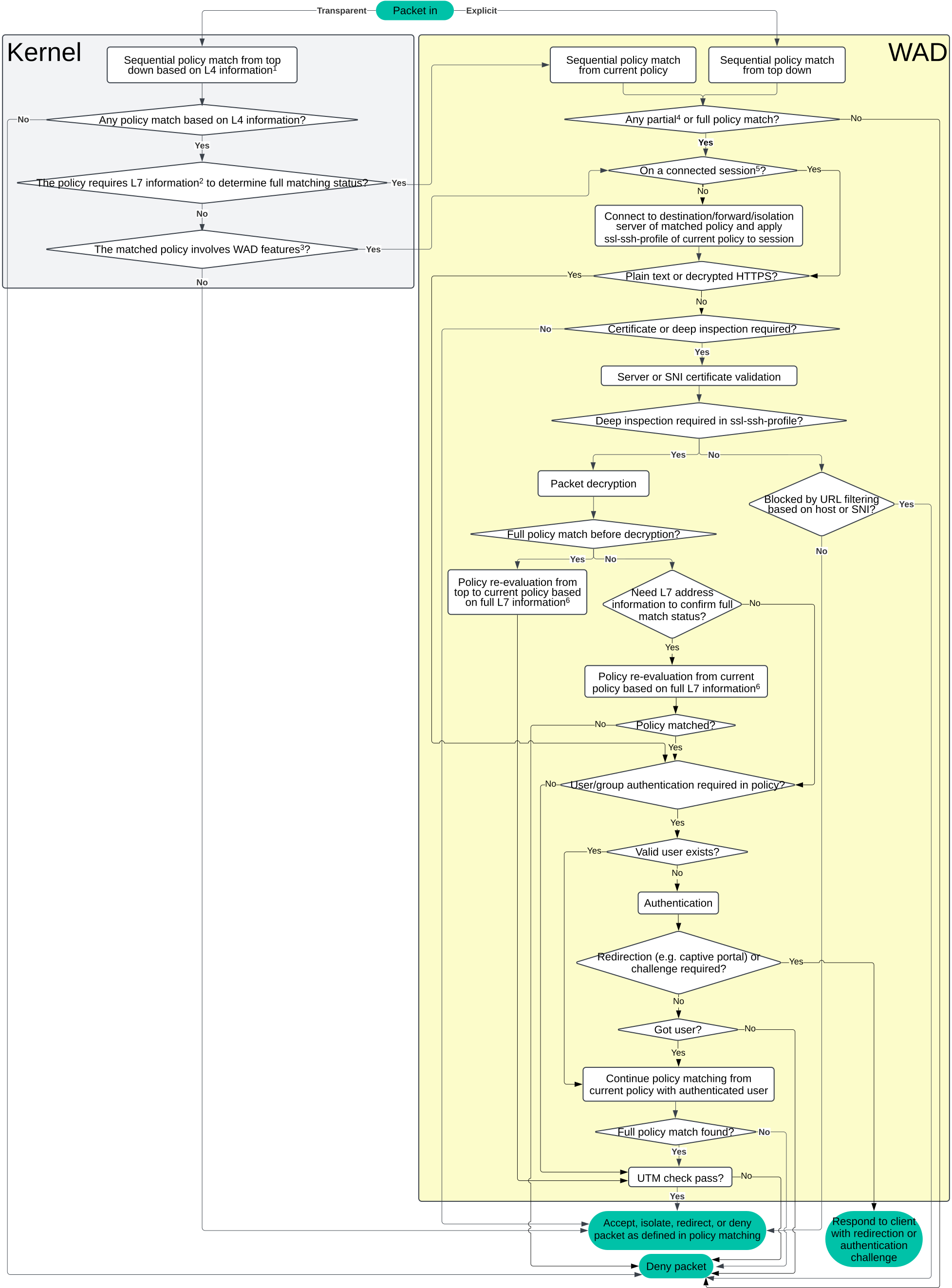
  1. L4 information includes interface, IP addresses, protocols, and ports.

  2. L7 information includes proxy-address, inline application, authentication, URL category, etc.

  3. WAD features include UTM, forward server, isolated action, deep inspection, certificate inspection, log-http-transaction, webproxy-profile, webcache, etc.

  4. Partial match is an intermediate state for HTTPS packets when a policy matches a proxy-address host (SNI) but requires deep inspection to extract information from the HTTP headers to further determine the policy matching status or needs user information to match users or groups in the policy.

  5. Packets on a connected session always reuse the existing connection to the server without user or group re-authentication.

  6. For HTTPS packets that require deep inspection, the final matched policy from re-evaluation from top or current policy (based on full L7 information) might be different from the initial fully matched policy (based on limited information before decryption).

For more information about the overall packet flow, see Packet flow ingress and egress.

HTTPS traffic with deep inspection

For HTTPS traffic, if FortiProxy encounters a policy that matches a proxy-address host (SNI) but requires deep inspection to extract information from the HTTP headers to further determine the policy matching status, the policy is considered a partial match with an intermediate state if all of the following conditions are met:

  • The traffic is HTTPS and has not yet undergone deep inspection.

  • The policy involves proxy-address matching that requires extracting information from the HTTP headers.

    Exceptions:

    • Proxy-address host match is not required for saas-type proxy-address.

    • Extracting information from the HTTP headers is not required in the following cases:

      • Hostname that corresponds to no sub-category.

      • The proxy type is method or ua in explicit mode.

  • The traffic does not match any entries in the policy’s SSL exemption list (firewall.ssl-sshprofile.ssl-exempt).

In partial match state, FortiProxy performs deep inspection on the traffic using the established SSL connection based on the settings (forward server, isolation server, or destination server) of the partial match policy and re-evaluates whether it is a full match. Based on the evaluation result, the partial match state transitions to either a successful match or a failed match.

In case of failed match, FortiProxy resumes the full policy matching process starting from the next policy in the list until a full policy match is found. If the full match policy requires deep inspection, FortiProxy attempts the policy match again from top down in the policy list as the decrypted content may change the final policy matching result.

  • Traffic that goes through partial match state is considered deeply inspected even if subsequent policies do not require deep inspection as the packet has already been decrypted and inspected.

  • Since SSL decryption occurs at the SSL handshake stage, once the decryption process has started, it cannot be reversed within the same session.

  • Regardless of the full policy matching result, the forward server, isolator action, and SSL SSH profile settings of all subsequent policies will be overridden by those of the partial match policy as the SSL tunnel is already established at this stage and subsequent policies modifying the forward server or isolator settings will not take effect for this session.

    Exceptions:

    • The policy’s dstaddr contains only category-type proxy-address entries.
    • The category in dstaddr does not match the category of the traffic.
To enable/disable HTTPS sub-category policy matching when the policy uses URL category to match traffic:

config firewall policy

edit <id>

set https-sub-category [enable | disable]

next

end

enable

Enable HTTPS sub-category policy matching.

The policy attempts deep inspection to determine the subcategory based on both hostname and path.

disable (default)

Disable HTTPS sub-category policy matching.

The policy only uses the FQDN to determine the category, even if the traffic is already deeply inspected by partial match.

To enable/disable logging for sessions in the partial match state in traffic log:

config web-proxy global

set log-policy-pending [enable | disable]

end

To view debug logs for partial match and deep inspection:
  1. Enable full debug logging: diag wad debug enable all.

  2. Run wad_http_req_policy_set to verify when traffic fully matches (or partial match triggers) a policy and whether deep inspection is enabled. See example log below:

    wad_http_req_policy_set

    10430 match policy-id=3(pol_ctx:xhcf|Ad|7?oO|=7) vd=0(ses_ctx:x|P)

    wad_http_req_policy_set

    :10430 match policy-id=4(pol_ctx:xhf|Ad|7|=d) vd=0(ses_ctx:cx|Phx|)

    The policy-id after match policy-id= indicates the policy matched while the matching states at the end of pol_ctx show "=7" for a partial match triggered, requiring deep inspection, and "=d" for a full match without deep inspection.

Policy matching

Policy matching

In FortiProxy, traffic is matched against the list of configured policies sequentially from top down by comparing the policy with the session source address, destination address, and the destination port. If a policy successfully matches the traffic, the policy is applied. If not, FortiProxy continues to the next policy in the list until a match is found, in which case all subsequent policies will be ignored. If no policy match is found, the traffic is handled by the implicit policy (policy ID 0), which always denies all traffic.

By default, the implicit policy log is disabled. You can enable it using the following command:

config log setting

set fwpolicy-implicit-log enable

end

As a general rule, order the policy list from most specific to most general to prevent policies that match a wide range of traffic from superseding and effectively masking policies that match exceptions.

Transparent and explicit policy matching

  • Transparent proxy traffic is initially handled by the kernel, where policies are evaluated sequentially from top down based on Layer 4 (L4) information. A packet may be redirected to the WAD engine for further processing if the matched policy (based on L4 information) requires Layer 7 (L7) information to further determine the full policy matching status or if the match policy involves WAD features, such as UTM scanning.

  • Explicit proxy traffic is directly handled by the WAD engine, which performs sequential policy matching from top down.

The following diagram illustrates the policy matching process for transparent policy and explicit policy:

  1. L4 information includes interface, IP addresses, protocols, and ports.

  2. L7 information includes proxy-address, inline application, authentication, URL category, etc.

  3. WAD features include UTM, forward server, isolated action, deep inspection, certificate inspection, log-http-transaction, webproxy-profile, webcache, etc.

  4. Partial match is an intermediate state for HTTPS packets when a policy matches a proxy-address host (SNI) but requires deep inspection to extract information from the HTTP headers to further determine the policy matching status or needs user information to match users or groups in the policy.

  5. Packets on a connected session always reuse the existing connection to the server without user or group re-authentication.

  6. For HTTPS packets that require deep inspection, the final matched policy from re-evaluation from top or current policy (based on full L7 information) might be different from the initial fully matched policy (based on limited information before decryption).

For more information about the overall packet flow, see Packet flow ingress and egress.

HTTPS traffic with deep inspection

For HTTPS traffic, if FortiProxy encounters a policy that matches a proxy-address host (SNI) but requires deep inspection to extract information from the HTTP headers to further determine the policy matching status, the policy is considered a partial match with an intermediate state if all of the following conditions are met:

  • The traffic is HTTPS and has not yet undergone deep inspection.

  • The policy involves proxy-address matching that requires extracting information from the HTTP headers.

    Exceptions:

    • Proxy-address host match is not required for saas-type proxy-address.

    • Extracting information from the HTTP headers is not required in the following cases:

      • Hostname that corresponds to no sub-category.

      • The proxy type is method or ua in explicit mode.

  • The traffic does not match any entries in the policy’s SSL exemption list (firewall.ssl-sshprofile.ssl-exempt).

In partial match state, FortiProxy performs deep inspection on the traffic using the established SSL connection based on the settings (forward server, isolation server, or destination server) of the partial match policy and re-evaluates whether it is a full match. Based on the evaluation result, the partial match state transitions to either a successful match or a failed match.

In case of failed match, FortiProxy resumes the full policy matching process starting from the next policy in the list until a full policy match is found. If the full match policy requires deep inspection, FortiProxy attempts the policy match again from top down in the policy list as the decrypted content may change the final policy matching result.

  • Traffic that goes through partial match state is considered deeply inspected even if subsequent policies do not require deep inspection as the packet has already been decrypted and inspected.

  • Since SSL decryption occurs at the SSL handshake stage, once the decryption process has started, it cannot be reversed within the same session.

  • Regardless of the full policy matching result, the forward server, isolator action, and SSL SSH profile settings of all subsequent policies will be overridden by those of the partial match policy as the SSL tunnel is already established at this stage and subsequent policies modifying the forward server or isolator settings will not take effect for this session.

    Exceptions:

    • The policy’s dstaddr contains only category-type proxy-address entries.
    • The category in dstaddr does not match the category of the traffic.
To enable/disable HTTPS sub-category policy matching when the policy uses URL category to match traffic:

config firewall policy

edit <id>

set https-sub-category [enable | disable]

next

end

enable

Enable HTTPS sub-category policy matching.

The policy attempts deep inspection to determine the subcategory based on both hostname and path.

disable (default)

Disable HTTPS sub-category policy matching.

The policy only uses the FQDN to determine the category, even if the traffic is already deeply inspected by partial match.

To enable/disable logging for sessions in the partial match state in traffic log:

config web-proxy global

set log-policy-pending [enable | disable]

end

To view debug logs for partial match and deep inspection:
  1. Enable full debug logging: diag wad debug enable all.

  2. Run wad_http_req_policy_set to verify when traffic fully matches (or partial match triggers) a policy and whether deep inspection is enabled. See example log below:

    wad_http_req_policy_set

    10430 match policy-id=3(pol_ctx:xhcf|Ad|7?oO|=7) vd=0(ses_ctx:x|P)

    wad_http_req_policy_set

    :10430 match policy-id=4(pol_ctx:xhf|Ad|7|=d) vd=0(ses_ctx:cx|Phx|)

    The policy-id after match policy-id= indicates the policy matched while the matching states at the end of pol_ctx show "=7" for a partial match triggered, requiring deep inspection, and "=d" for a full match without deep inspection.