
Fortinet white logo
Fortinet white logo

Administration Guide

STIX format for external threat feeds

STIX format for external threat feeds

The FortiProxy supports external threat feeds that use the STIX/TAXII format. Use the stix:// prefix in the URI to denote the protocol.

All external threat feeds support the STIX format. In this example, a FortiGuard Category threat feed in the STIX format is configured.

To configure a FortiGuard Category threat feed in the STIX format in the GUI:
  1. Go to Security Fabric > External Connectors and click Create New.

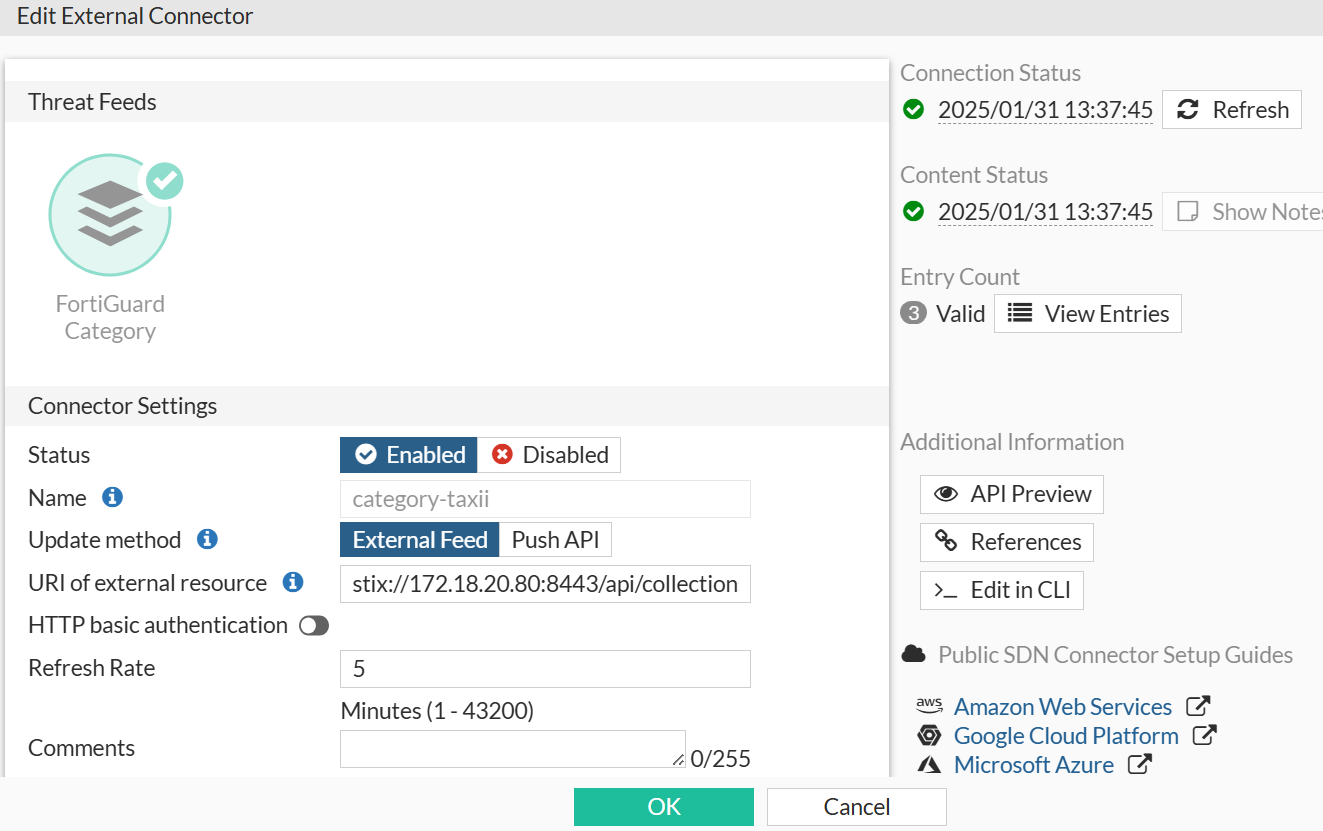
  2. Select FortiGuard Category from the Threat Feeds section.

  3. Configure the connector:

    • Name: category-taxii

    • Update method: External Feed

    • URL of external resource: stix://172.18.20.80:8443/api/collections/

    • HTTP basic authentication: Enable and enter the username and password, such as guest and guest.
  4. Click OK.

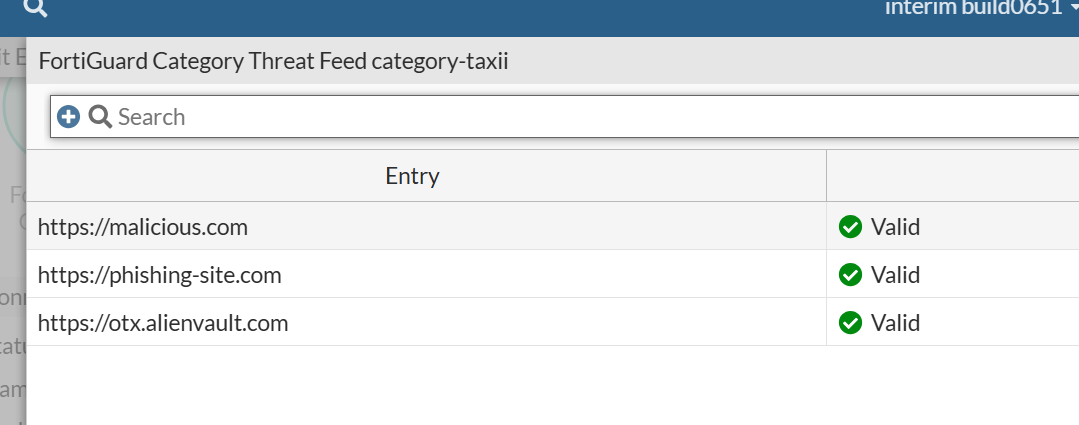
  5. Edit the connector, and click View Entries in the right side bar to view the retrieved entries.
To configure a FortiGuard Category threat feed in the STIX format in the CLI:
config system external-resource
    edit "category-taxii"
        set uuid afb6111c-e00e-51ef-5ea4-ed01d4143c21
        set category 194
        set resource "stix://172.18.20.80:8443/api/collections/"
    next
end

To improve the security of the connection, it is recommended to enable server certificate validation (server-identity-check) either in basic or full mode. By default, server-identity-check is set to none.

  • none: No certificate validation.

  • basic: Validates certificate against a CA but does not verify hostname.

  • full: Full validation, including CA and hostname check (Recommended for security).

If the connector is used in webfilter that blocks category 194, the traffic that matches the retrieved URLs is blocked.

Example log:

date=2025-01-31 time=13:46:42 eventtime=1738360002401548826 tz="-0800" logid="0316013056" type="utm" subtype="webfilter" eventtype="ftgd_blk" level="warning" vd="root" policyid=4 poluuid="13930d7e-ddb3-51ef-9d0f-ca3105dfd757" policytype="policy" sessionid=492580641 transid=16778026 srcip=10.100.1.1 srcport=61116 srccountry="Reserved" srcintf="port1" srcintfrole="undefined" srcuuid="5d6e5070-5d80-51ee-053f-cc6d87753d9d" dstip=18.172.185.2 dstport=80 dstcountry="Canada" dstintf="port1" dstintfrole="undefined" proto=6 httpmethod="GET" service="HTTP" hostname="otx.alienvault.com" agent="Mozilla/5.0 (Windows NT 10.0; Win64; x64; rv:134.0) Gecko/20100101 Firefox/134.0" profile="test-web-prof" action="blocked" reqtype="referral" url="http://otx.alienvault.com/favicon.ico" referralurl="http://otx.alienvault.com/" sentbyte=394 rcvdbyte=0 direction="outgoing" msg="URL belongs to a denied category in policy" ratemethod="domain" cat=194 catdesc="category-taxii"

STIX format for external threat feeds

STIX format for external threat feeds

The FortiProxy supports external threat feeds that use the STIX/TAXII format. Use the stix:// prefix in the URI to denote the protocol.

All external threat feeds support the STIX format. In this example, a FortiGuard Category threat feed in the STIX format is configured.

To configure a FortiGuard Category threat feed in the STIX format in the GUI:
  1. Go to Security Fabric > External Connectors and click Create New.

  2. Select FortiGuard Category from the Threat Feeds section.

  3. Configure the connector:

    • Name: category-taxii

    • Update method: External Feed

    • URL of external resource: stix://172.18.20.80:8443/api/collections/

    • HTTP basic authentication: Enable and enter the username and password, such as guest and guest.

  4. Click OK.

  5. Edit the connector, and click View Entries in the right side bar to view the retrieved entries.

To configure a FortiGuard Category threat feed in the STIX format in the CLI:
config system external-resource
    edit "category-taxii"
        set uuid afb6111c-e00e-51ef-5ea4-ed01d4143c21
        set category 194
        set resource "stix://172.18.20.80:8443/api/collections/"
    next
end

To improve the security of the connection, it is recommended to enable server certificate validation (server-identity-check) either in basic or full mode. By default, server-identity-check is set to none.

  • none: No certificate validation.

  • basic: Validates certificate against a CA but does not verify hostname.

  • full: Full validation, including CA and hostname check (Recommended for security).

If the connector is used in webfilter that blocks category 194, the traffic that matches the retrieved URLs is blocked.

Example log:

date=2025-01-31 time=13:46:42 eventtime=1738360002401548826 tz="-0800" logid="0316013056" type="utm" subtype="webfilter" eventtype="ftgd_blk" level="warning" vd="root" policyid=4 poluuid="13930d7e-ddb3-51ef-9d0f-ca3105dfd757" policytype="policy" sessionid=492580641 transid=16778026 srcip=10.100.1.1 srcport=61116 srccountry="Reserved" srcintf="port1" srcintfrole="undefined" srcuuid="5d6e5070-5d80-51ee-053f-cc6d87753d9d" dstip=18.172.185.2 dstport=80 dstcountry="Canada" dstintf="port1" dstintfrole="undefined" proto=6 httpmethod="GET" service="HTTP" hostname="otx.alienvault.com" agent="Mozilla/5.0 (Windows NT 10.0; Win64; x64; rv:134.0) Gecko/20100101 Firefox/134.0" profile="test-web-prof" action="blocked" reqtype="referral" url="http://otx.alienvault.com/favicon.ico" referralurl="http://otx.alienvault.com/" sentbyte=394 rcvdbyte=0 direction="outgoing" msg="URL belongs to a denied category in policy" ratemethod="domain" cat=194 catdesc="category-taxii"