
Fortinet white logo
Fortinet white logo

Administration Guide

Secure explicit proxy with client certificates

Secure explicit proxy with client certificates

The explicit web proxy policy can use client certificates for validation. In this example, a CA signs a client certificate. The client certificate is installed on an endpoint, and the root CA is imported to FortiGate. A web proxy policy is configured to require the client certificate.

When the user accesses a web site, the explicit web proxy policy uses the client certificate from the endpoint device to authenticate the user and grant access to the web site.

To configure client certificates with explicit proxies:
  1. Prepare the certificate:

    1. Use a CA to sign the client certificate.

    2. Import the root CA certificate that signed the client certificate to FortiProxy. In this scenario, the certificate is Fortinet_SSL.

    3. Install the client certificate on an endpoint.

  2. Configure the explicit web-proxy policy to request the client certificate from the endpoint.

    config web-proxy explicit-proxy
    					       edit "web-proxy"
    					set status enable
    					set interface "any"
    					set secure-web-proxy enable
    					set http-incoming-port 8080
    					set secure-web-proxy-cert "Fortinet_SSL"
    					next
    				end
    config firewall access-proxy
    					edit "httpsvip"
    					set vip "httpsvip"
    					set client-cert enable 
    					set empty-cert-action block
    					config api-gateway
    					edit 1
    					config realservers
    					edit 1
    					set ip 10.100.1.78
    					next
    					end
    					next
    					end
    					next
    					end
    				
  3. Configure verification of the client certificate with the Fortinet_SSL CA.

    config authentication setting
    					    set user-cert-ca "Fortinet_CA_SSL"
    				end

When the user accesses a web site:

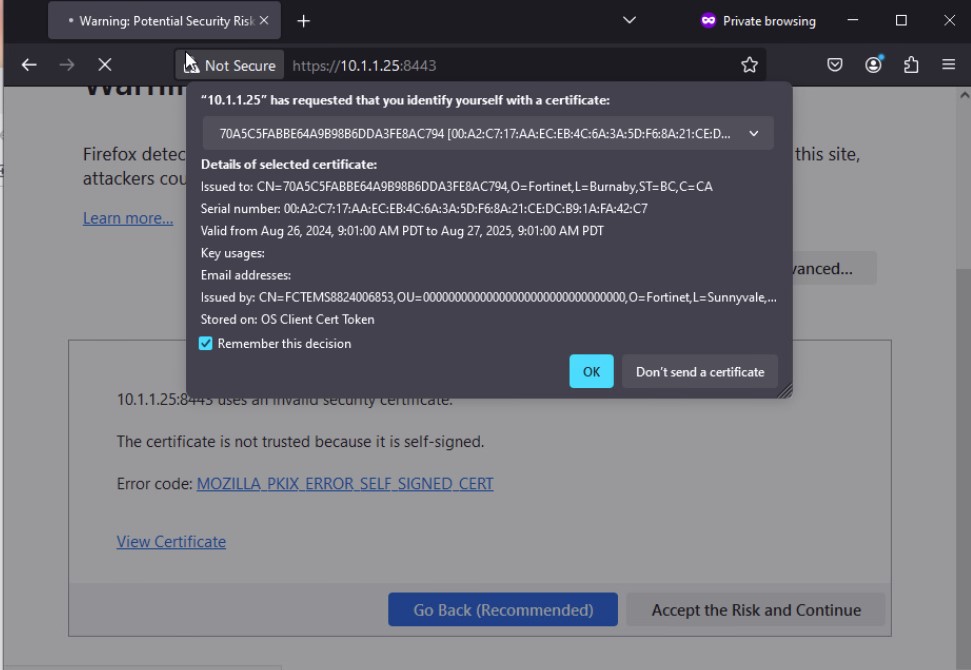
  1. FortiProxy requests client certificate authentication, and the web browser displays the available certificates. The user selects a client certificate and clicks OK.
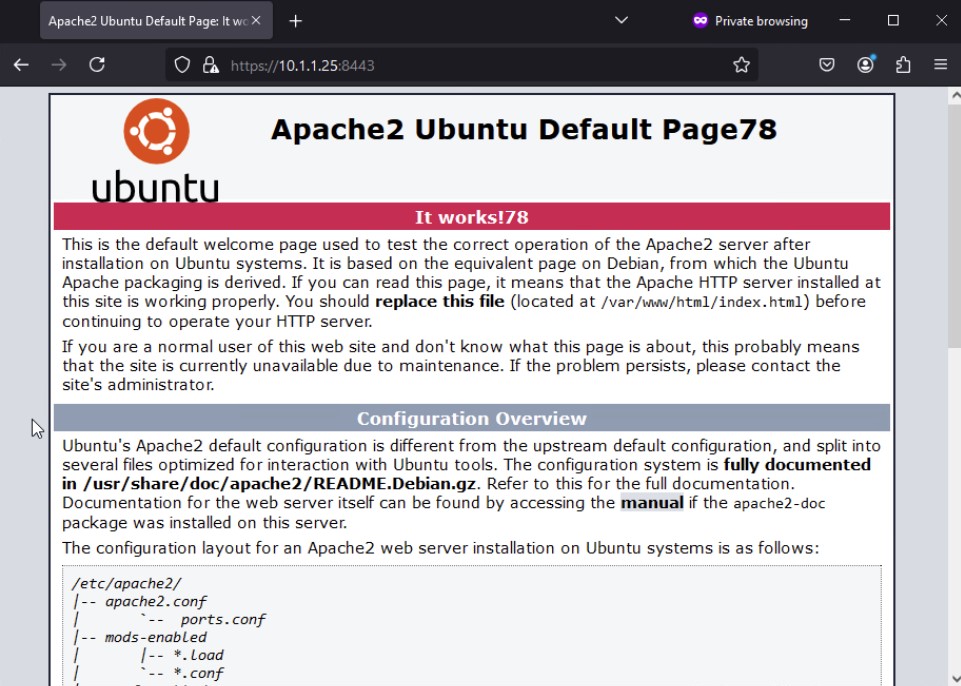
  2. Once the client certificate is successfully verified against the root CA certificate imported on the FortiProxy, access to the web site is granted.
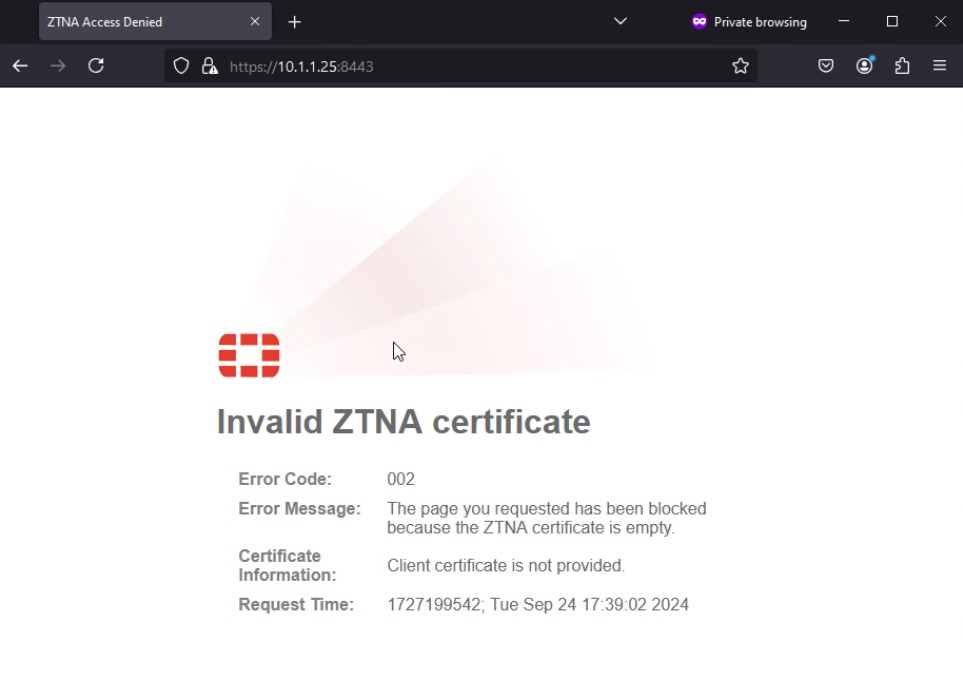
    When the endpoint device fails to present a client certificate, a message is displayed, and access to the web site is blocked.
Secure explicit proxy with client certificates

Secure explicit proxy with client certificates

The explicit web proxy policy can use client certificates for validation. In this example, a CA signs a client certificate. The client certificate is installed on an endpoint, and the root CA is imported to FortiGate. A web proxy policy is configured to require the client certificate.

When the user accesses a web site, the explicit web proxy policy uses the client certificate from the endpoint device to authenticate the user and grant access to the web site.

To configure client certificates with explicit proxies:
  1. Prepare the certificate:

    1. Use a CA to sign the client certificate.

    2. Import the root CA certificate that signed the client certificate to FortiProxy. In this scenario, the certificate is Fortinet_SSL.

    3. Install the client certificate on an endpoint.

  2. Configure the explicit web-proxy policy to request the client certificate from the endpoint.

    config web-proxy explicit-proxy
    					       edit "web-proxy"
    					set status enable
    					set interface "any"
    					set secure-web-proxy enable
    					set http-incoming-port 8080
    					set secure-web-proxy-cert "Fortinet_SSL"
    					next
    				end
    config firewall access-proxy
    					edit "httpsvip"
    					set vip "httpsvip"
    					set client-cert enable 
    					set empty-cert-action block
    					config api-gateway
    					edit 1
    					config realservers
    					edit 1
    					set ip 10.100.1.78
    					next
    					end
    					next
    					end
    					next
    					end
    				
  3. Configure verification of the client certificate with the Fortinet_SSL CA.

    config authentication setting
    					    set user-cert-ca "Fortinet_CA_SSL"
    				end

When the user accesses a web site:

  1. FortiProxy requests client certificate authentication, and the web browser displays the available certificates. The user selects a client certificate and clicks OK.

  2. Once the client certificate is successfully verified against the root CA certificate imported on the FortiProxy, access to the web site is granted.

    When the endpoint device fails to present a client certificate, a message is displayed, and access to the web site is blocked.