

ZTNA agentless web-based application access
A ZTNA web portal is an agentless ZTNA solution that provide end-user access to applications without FortiClient or client certificate checks. The ZTNA portal handles authentication and authorization of traffic destined for the protected resources. It is implemented entirely in WAD (Web Application and Database) and provides a convenient way for users to access internal resources securely.
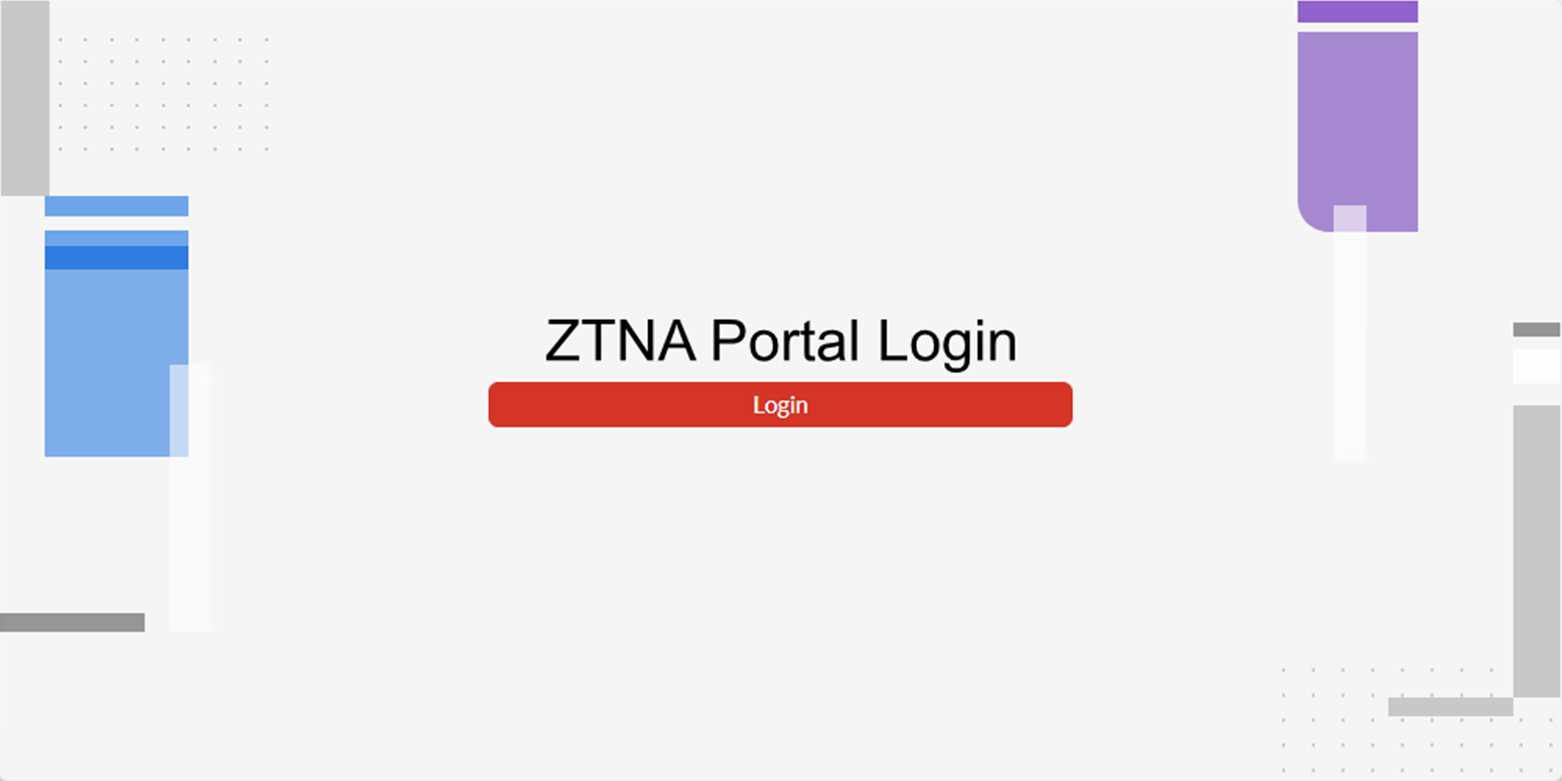
When end-users connect to the ZTNA web portal, they are directed to a login page:
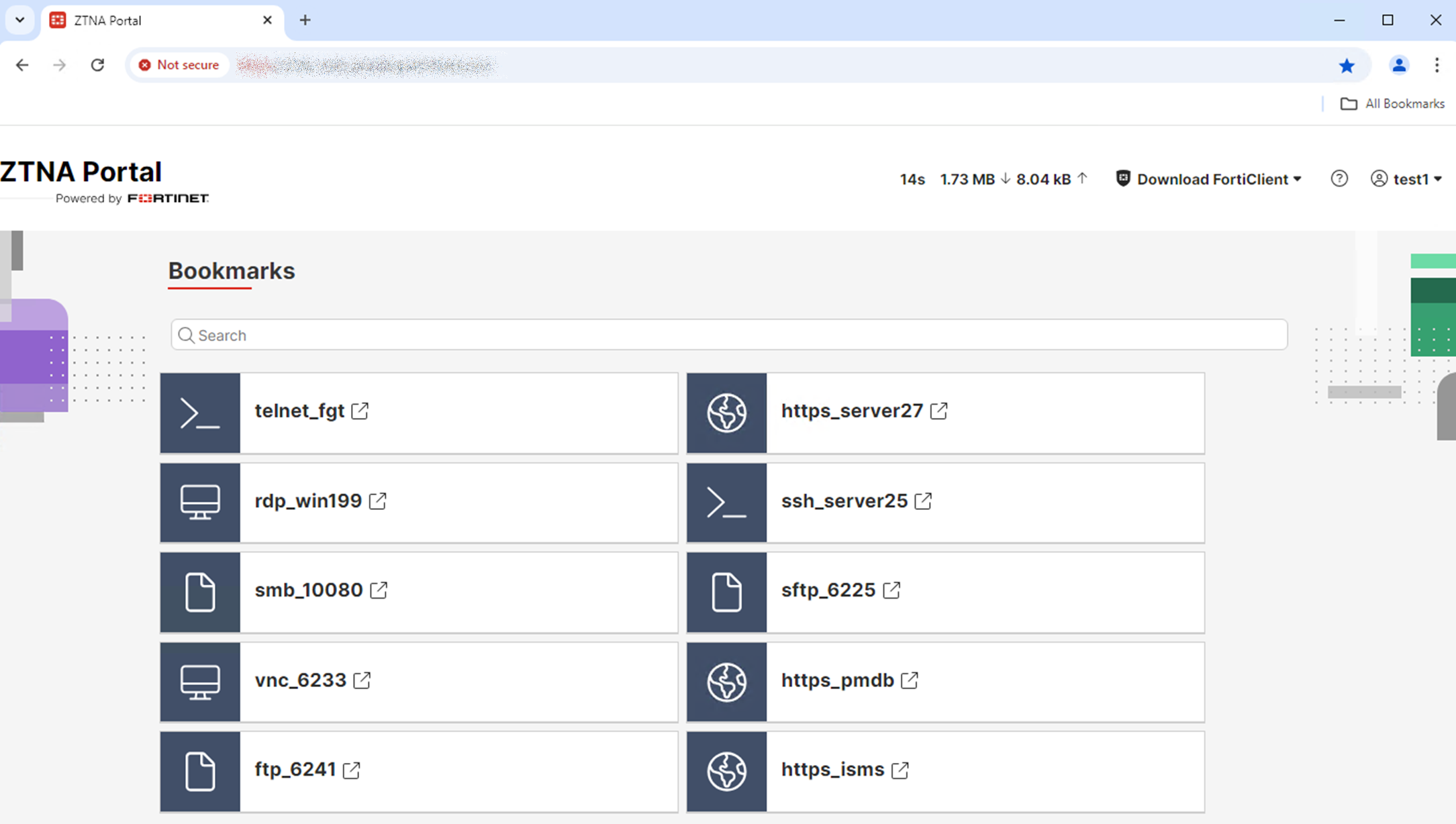
Once logged in, end-users can access bookmarks defined by the administrator:

|
Dynamic bookmarks can be defined using an LDAP or SAML attribute within the user's LDAP or SAML account so that bookmarks are auto-populated with the values defined in that attribute instead of static pre-defined IP or hostnames. Dynamic bookmarks are useful in the following cases:
|
Prerequisites
Before configuring the ZTNA web portal, ensure the following:
-
Network connectivity between the following:
-
Client devices and the FortiProxy external interface
-
FortiProxy and the internal protected resources
-
-
For web applications, the client must resolve the FQDN to the ZTNA portal VIP.
-
SSL certificate for the ZTNA web portal—When accessing the web application, end users are presented with the certificate configured on the ZTNA portal VIP instead of the certificate on the end web server. Hence, the certificate requires the correct Subject Alternate Name(s) to avoid browser certificate errors. You must also ensure the certificate includes the web portal FQDN as well as any application FQDNs to avoid browser certificate errors.
CLI syntax
Configure an access-proxy type of VIP. Disable client-cert so that it is not checked when an agentless client connects.
config firewall vip
    edit <name>
        set type access-proxy
        set server-type https
        set extip <ip address>
        set extintf <interface>
        set client-cert disable
        set extport <port>
        set ssl-certificate <certificate>
    next
end
Configure an access-proxy virtual host. End-users will connect to this destination to access the ZTNA web portal. Disable client-cert for this virtual host.
config firewall access-proxy-virtual-host
    edit "ztna-web-portal-fqdn"
        set host < web portal host name or ip >
        set client-cert disable
    next
end
Configure an authentication scheme. Then configure an authentication rule with the new protocol ztna-portal.
config authentication rule
    edit <rule>
        set protocol ztna-portal
        set active-auth-method < auth scheme >
    next
end
New syntax for configuring the ZTNA web portal:
config ztna web-portal
    edit <name>
	set vip <vip name>
        set host <virtual host name>
        set auth-portal {enable | disable}
        set vip6 <virtual IPv6 name>
        set auth-rule <rule>
    next
end
|
set vip <vip name> |
The access-proxy VIP associated with this portal. |
|
set host <virtual host name> |
The access-proxy virtual host object and FQDN defined for accessing this portal. This setting must be configured. |
|
set auth-portal {enable | disable} |
Enable/disable the authentication portal. |
|
set vip6 <virtual IPv6 name> |
The access-proxy VIP6 associated with the ZTNA server and applications that this portal is allowing. |
New syntax for creating the web portal bookmarks:
config ztna web-portal-bookmark
    edit <name>
     set type {user|ldap-dynamic|saml-dynamic}
     config bookmarks
	edit <name>
	 set apptype {ftp | rdp | sftp | smb | ssh | telnet | vnc | web}
        set folder "10.100.1.111"
	 set url <string>
        set host <name or IP>
        set description <description>
        set port <remote port>
        set sso {enable | disable}
    next
end
|
set type |
Bookmark type. You can use static bookmarks for users/groups or dynamic bookmarks using LDAP or SAML attributes. |
|
set apptype {ftp | rdp | sftp | smb | ssh | telnet | vnc | web} |
Supported types of bookmarks: ftp, rdp, sftp, smb, ssh, telnet, vnc, web (default). |
|
set folder <ip> |
The IP for the destination folder. |
|
set url <url> |
For different types of applications, the URL used to define the destination. |
|
set host <name or ip> |
For different types of applications, the host name or IP used to define the destination. |
|
set port <remote port> |
Where applicable, define the port for the service. |
|
set sso {enable | disable} |
Enable/disable the SSO user login and credentials to connect to the application, where applicable. |
|
|
Not all options are listed. Some options are available only for certain types of applications. |
Within the proxy-policy (full ZTNA policy), a new proxy type is added called ztna-proxy. Configure your proxy-policy to map to your web-portal.
config firewall policy
    edit <id>
        set type ztna-proxy
        set active-auth-method <authentication rule>
        set ztna-proxy <web-portal>
        …
    next
end
Example
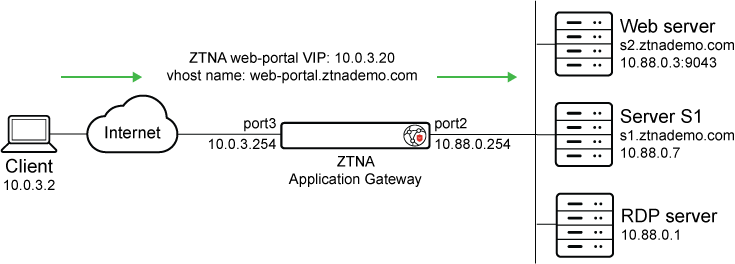
This example demonstrates connecting to a ZTNA web portal to gain access to protected resources. Authentication is performed with LDAP.
Prerequisites:
-
The Client can resolve:
-
The hostname web-portal.ztnademo.com to the VIP address 10.0.3.20
-
The server s1.ztnademo.com to the VIP address 10.0.3.20
-
The server s2.ztnademo.com to the VIP address 10.0.3.20
-
-
The FortiProxy resolves:
-
s1.ztnademo.com to the real server IP of 10.88.0.7
-
s2.ztnademo.com to the real server IP of 10.88.0.3
-
-
The FortiProxy has an LDAP connection and user group already created.
To configure from the CLI:
-
Configure a firewall VIP with external IP 10.0.3.20:
config firewall vip edit "ZTNA-web-proxy" set type access-proxy set server-type https set extip 10.0.3.20 set extintf "port3" set client-cert disable set extport 443 set ssl-certificate "ztna-wildcard" next end -
Configure an access-proxy virtual host:
The configuration here defines the virtual host used to access the ZTNA web portal, as well as the server certificate for the portal. It overrides the settings in the VIP. Ensure that
client-certis disabled.config firewall access-proxy-virtual-host edit "ztna-web-portal-fqdn" set host "web-portal.ztnademo.com" set client-cert disable next end -
Configure the authentication scheme and rule:
config authentication scheme edit "ztna-web-portal-ldap" set method basic set user-database "LDAP-fortiad" next end config authentication rule edit "ztna-web-portal-rule" set protocol ztna-portal set ip-based disable set active-auth-method "ztna-web-portal-ldap" set web-auth-cookie enable next end -
Configure the ZTNA web-portal:
Map the portal to the VIP, virtual host, and authentication rule that were previously created.
config ztna web-portal edit "ztna-web-portal-ldap" set vip "ZTNA-web-proxy" set host "ztna-web-portal-fqdn" set auth-rule "ztna-web-portal-rule" next end -
Create web-portal bookmarks that will point to your internal resources:
config ztna web-portal-bookmark
    edit "bookmark"
        config bookmarks
            edit "Webserver"
                set url "https://s2.ztnademo.com:9043"
            next
            edit "Server-S1-Web"
                set sso enable
                set url "https://s1.ztnademo.com"
            next
            edit "Server-S1-SSh"
                set apptype ssh
                set sso enabled
                set host "10.88.0.7"
                set logon-user "admin"
                set logon-password <password>
            next
            edit "FortiProxy-Internal-SSH"
                set apptype ssh
                set host "10.88.0.254"
            next
            edit "RDP"
                set apptype rdp
                set host "10.88.0.1"
                set port 3389
            next
        end
    next
end
Alternatively, you can define dynamic bookmarks using an LDAP or SAML attribute within the user's LDAP or SAML account to generate personalized application shortcuts:
-
For LDAP users, the attributes can be built-in or user-defined attributes stored in the LDAP directory.
-
NEW For SAML users, the attributes are received in SAML assertions during authentication.
See configuration examples below:
LDAP:
config ztna web-portal-bookmark
edit "bookmark"
set type ldap-dynamic
config bookmarks
edit "ssh"
set apptype ssh
set host "|remoteHost|"
next
edit "ftp"
set apptype ftp
set folder "|remoteHost|"
next
end
next
end
SAML NEW:
config ztna web-portal-bookmark
edit "bookmark"
set type saml-dynamic
config bookmarks
edit "ssh"
set apptype ssh
set host "|remoteHost|"
next
edit "tel78"
set apptype telnet
set host "|remoteHost|"
next
end
next
end
-
-
Create a full ZTNA policy to allow access to the new VIP:
config firewall policy
    edit 13
        set type ztna-proxy
        set name "ZTNA-web-portal"
        set uuid fe696a38-a851-51ef-dc62-9d7c7f91352a
        set srcintf "any"
        set dstintf "any"
        set srcaddr "all"
        set dstaddr "all"
        set action accept
        set schedule "always"
        set ztna-proxy "ztna-web-portal-ldap"
        set logtraffic all
        set comments " (Copy of 9) (Copy of )"
        set ssl-ssh-profile "deep-inspection"
    next
end
Verification:
-
On the Client 10.0.3.2, access the portal on https://web-portal.ztnademo.com.
-
When prompted, enter the LDAP user credentials.
-
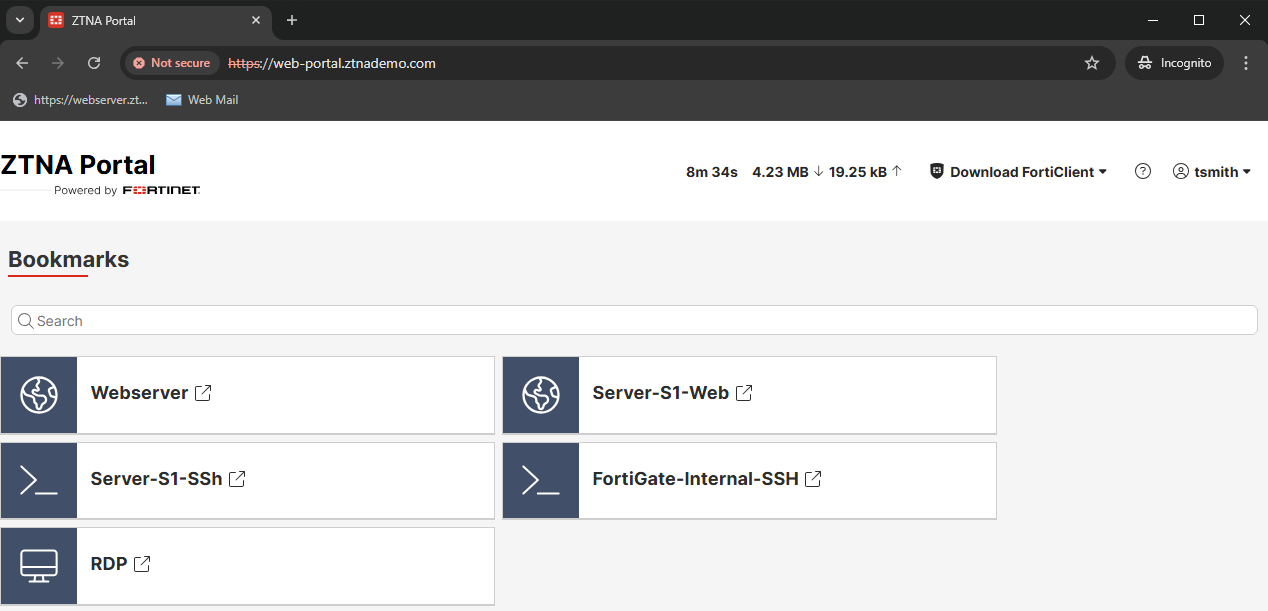
Once logged into the ZTNA Portal, choose the application bookmark to connect to.
-
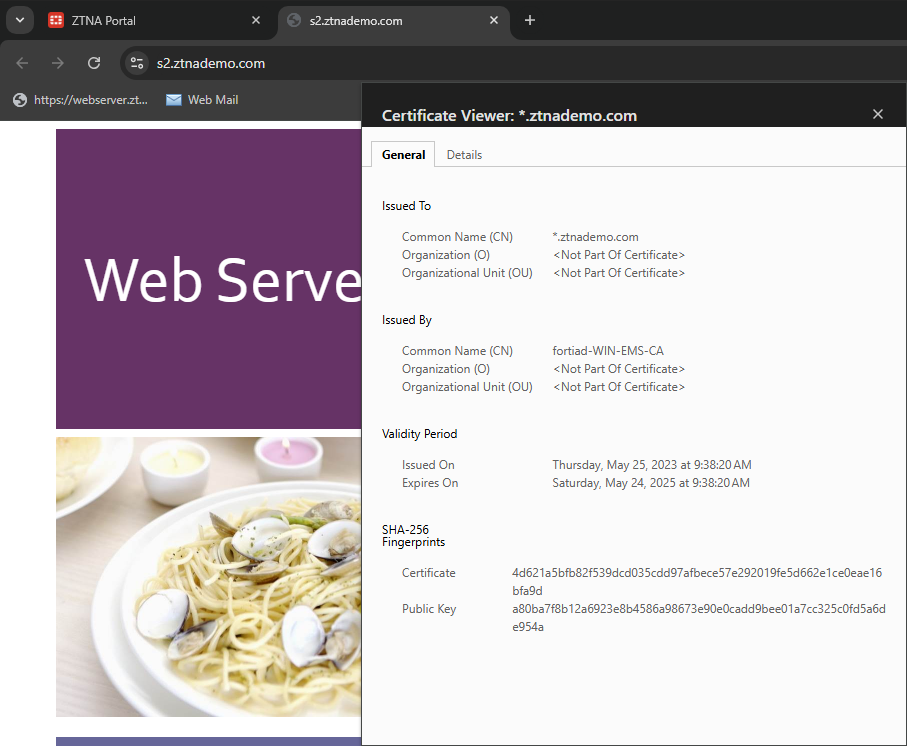
Click Webserver to access s2.ztnademo.com. A new tab opens up to the web page.
-
Check the certificate to confirm it is signed by the CA certificate used in the VIP configurations.
-
On the FortiProxy, go to Log & Report > ZTNA Traffic to view the latest traffic log. Alternatively, use these commands to view the logs from CLI:
# execute log filter field subtype ztna

# execute log display
32 logs found.
10 logs returned.

1: 1: date=2025-01-21 time=12:24:56 eventtime=1737491095186981906 tz="-0800" logid="0005000024" type="traffic" subtype="ztna" level="notice" vd="root" srcip=10.0.3.2 srcport=1629 srcintf="port3" srcintfrole="wan" dstcountry="Reserved" srccountry="Reserved" dstip=10.0.3.20 dstport=443 dstintf="port2" dstintfrole="dmz" sessionid=6761 service="HTTPS" proxyapptype="http" proto=6 action="accept" policyid=2 policytype="proxy-policy" poluuid="fe696a38-a851-51ef-dc62-9d7c7f91352a" policyname="ZTNA-web-portal" trandisp="snat" transip=10.88.0.3 transport=9043 clientip=10.120.1.41 appcat="unscanned" duration=159 gatewayid=1 vip="ZTNA-web-proxy" clientdevicemanageable="unknown" clientcert="no" wanin=303011 rcvdbyte=303011 wanout=5460 lanin=3202 sentbyte=3202 lanout=306669 fctuid="6F6248B158C74FF98905ADCE528DB1E7" unauthuser="userb" unauthusersource="forticlient" srcremote=207.102.138.19 utmaction="allow"
-
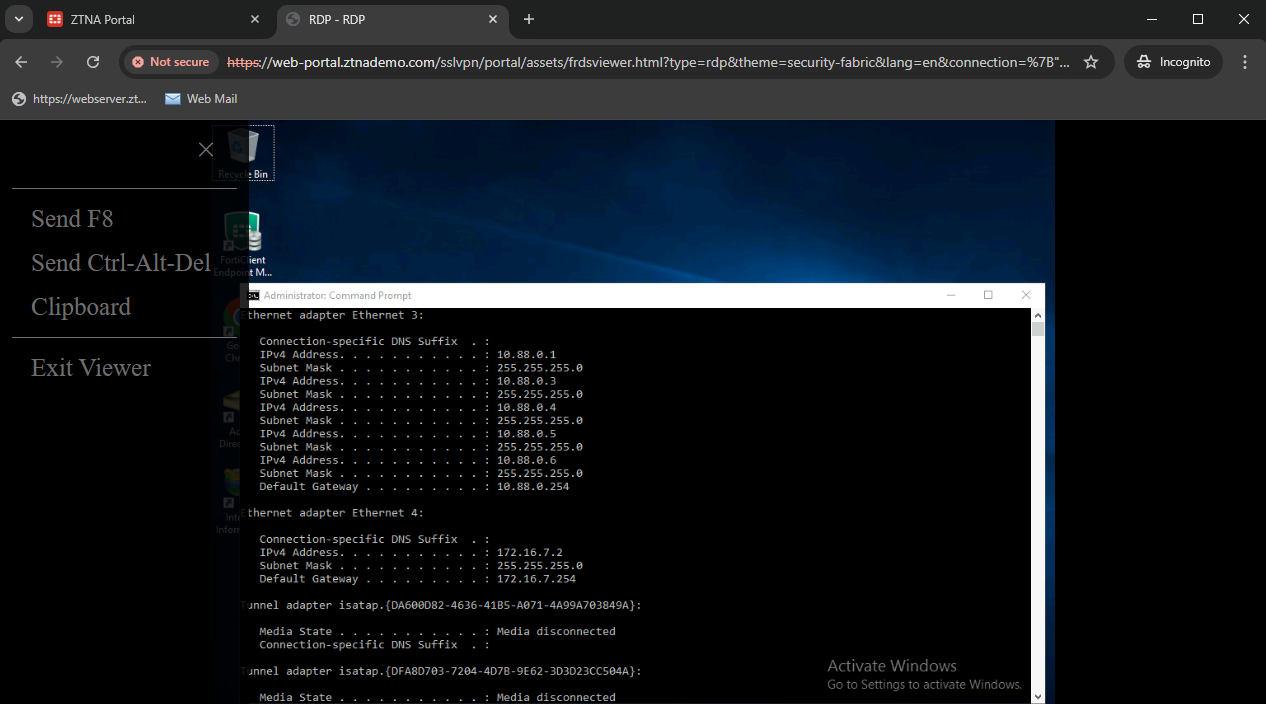
On the ZTNA Portal, connect to RDP. When prompted enter the credentials.
-
Once successfully connected, users can press F8 for additional controls.
-
Review the logs:
# execute log filter field subtype ztna

# execute log display
35 logs found.
10 logs returned.
9: date=2025-01-20 time=15:29:54 eventtime=1737415793573037679 tz="-0800" logid="0005000024" type="traffic" subtype="ztna" level="notice" vd="root" srcip=10.0.3.2 srcport=2540 srcintf="port3" srcintfrole="wan" dstcountry="Reserved" srccountry="Reserved" dstip=10.0.3.20 dstport=443 dstintf="port2" dstintfrole="dmz" sessionid=8146 service="HTTPS" proxyapptype="ztna-proxy" proto=6 action="accept" policyid=2 policytype="proxy-policy" poluuid="fe696a38-a851-51ef-dc62-9d7c7f91352a" policyname="ZTNA-web-portal" trandisp="snat" tranip=10.88.0.1 tranport=3389 clientip=10.120.1.41 appcat="unscanned" duration=0 gatewayid=1 vip="ZTNA-web-proxy" clientdevicemanageable="unknown" clientcert="no" wanin=0 rcvdbyte=0 wanout=0 lanin=3242 sentbyte=3242 lanout=1726 fctuid="6F6248B158C74FF98905ADCE528DB1E7" unauthuser="userb" unauthusersource="forticlient" srcremote=207.102.138.19
Additional troubleshooting and debugs:
If an issue occurs, you can troubleshoot by running these commands:
# diagnose wad debug enable category all
# diagnose wad debug enable level verbose
# diagnose debug enable
A working connection will output the debugs indicating the web-portal matched the proper gateway. Then accessing the bookmark will output debugs for matching the bookmark.
GET /XX/YY/ZZ/webservice?bmgroup=hidden_bookmarks_for_lu1&bmname=url78&cookie=5572CCD473670123931EC262F4AF1C8A HTTP/1.1
Host: s2.ztnademo.com
user-agent: Mozilla/5.0 (X11; Ubuntu; Linux x86_64; rv:133.0) Gecko/20100101 Firefox/133.0
accept: text/html,application/xhtml+xml,application/xml;q=0.9,*/*;q=0.8
accept-language: en-CA,en-US;q=0.7,en;q=0.3
accept-encoding: gzip, deflate, br, zstd
referer: https://10.20.20.220.devqa.wang/
dnt: 1
sec-gpc: 1
cookie: ZTNAWebPortal=5572CCD673670123931EC262F4AF1C8A
cookie: ZTNAWEB=bmgroup=hidden_bookmarks_for_lu1&bmname=url78
upgrade-insecure-requests: 1
sec-fetch-dest: document
sec-fetch-mode: navigate
sec-fetch-site: cross-site
sec-fetch-user: ?1
priority: u=0, i
te: trailers

[V][p:1238][s:1432116668][r:120] wad_http_marker_uri               :1269  path=/XX/YY/ZZ/webservice len=20
[V][p:1238][s:1432116668][r:120] wad_http_parse_host               :1660  host_len=16
[I][p:1238][s:1432116668][r:120] wad_http_parse_host               :1692  host=[16]s2.ztnademo.com
[I][p:1238][s:1432116668][r:120] wad_http_str_canonicalize         :2211  enc=0 path=/XX/YY/ZZ/webservice len=20 changes=0
[I][p:1238][s:1432116668][r:120] wad_http_str_canonicalize         :2213  end=5 path=bmgroup=hidden_bookmarks_for_lu1&bmname=url78&cookie=5572CCD473670123931EC262F4AF1C8A len=85 changes=0
[V][p:1238][s:1432116668][r:120] wad_http_normalize_uri            :2652  host_len=16 path_len=20 query_len=85
[I][p:1238][s:1432116668][r:120] wad_vs_proxy_match_gwy            :4631  16339:ztna_portal_fqdn: matching gwy with vhost(_def_virtual_host_)
[V][p:1238][s:1432116668][r:120] wad_vs_proxy_match_vhost          :4750  16339:ztna_portal_fqdn: matching vhost by: s2.ztnademo.com
[V][p:1238][s:1432116668][r:120] wad_vs_proxy_match_vhost          :4753  16339:ztna_portal_fqdn: no host matched.
[V][p:1238][s:1432116668][r:120] wad_vs_web_portal_cookie_lookup   :9136  decode cookie_str=5572CCD473670123931EC262F4AF1C8A as cookie_val=1325877068, vd_id=0, vs_id=16339, gwy_id=1
[I][p:1238][s:1432116668][r:120] wad_vs_proxy_match_gwy            :4675  16339:ztna_portal_fqdn: Matched gwy(1) type(ztna-portal) via cookie in query 0x7f0dec4b9f48.
[I][p:1238][s:1432116668][r:120] wad_vs_gwy_ztna_portal_get_wp     :4350  16339:ztna_portal_fqdn:1: trace
[I][p:1238][s:1432116668][r:120] wad_http_str_canonicalize         :2211  enc=3 path=/XX/YY/ZZ/webservice len=20 changes=0
[I][p:1238][s:1432116668][r:120] wad_http_str_canonicalize         :2213  end=4 path=bmgroup=hidden_bookmarks_for_lu1&bmname=url78&cookie=5572CCD473670123931EC262F4AF1C8A len=85 changes=0
[V][p:1238][s:1432116668][r:120] __wad_http_build_redir_resp2      :1281  Recieved req method=0, exp_get=1
[I][p:1238][s:1432116668][r:120] wad_vs_gwy_ztna_portal_get_wp     :4350  16339:ztna_portal_fqdn:1: trace
[I][p:1238][s:1432116668][r:120] wad_vs_gwy_get_wp_nop             :2877  16339:ztna_portal_fqdn:1: trace
[V][p:1238][s:1432116668][r:120] __wad_vs_web_portal_cookie_hdr_make:9189  cookie_val=1325877071, vd_id=0, vs_id=16339, gwy_id=1, cookie=ZTNAWebPortal=5572CCD773670123931EC262F4AF1C8A; Max-Age=3600; Path=/; HTTPOnly; Secure
[V][p:1238][s:1432116668][r:120] wad_http_req_exec_act             :14274 response is ready!
[V][p:1238][s:1432116668][r:120] wad_http_msg_start_setup_proc     :2298  msg(0x7f0dea5f1890) proc-setup started from: req_resp_ready.
[V][p:1238][s:1432116668][r:120] wad_http_def_proc_msg_plan        :2260  msg(0x7f0dea5f1890) setting up processor(req_resp_ready)
[V][p:1238][s:1432116668][r:120] wad_http_msg_start_setup_proc     :2298  msg(0x7f0deb9fdb20) proc-setup started from: resp_forward.
[V][p:1238][s:1432116668][r:120] wad_http_def_proc_msg_plan        :2260  msg(0x7f0deb9fdb20) setting up processor(resp_forward)
[I][p:1238][s:1432116668][r:120] wad_dump_fwd_http_resp            :3086  hreq=0x7f0dea5f1890 Forward response from Internal:

HTTP/1.1 303 See Other
X-Content-Type-Options: nosniff
X-Frame-Options: SAMEORIGIN
X-XSS-Protection: 1; mode=block
Strict-Transport-Security: max-age=31536000
Content-Security-Policy: frame-ancestors 'self'; object-src 'self'; script-src 'self' https: 'unsafe-eval' 'unsafe-inline' blob:;
Connection: close
Content-Type: text/html
Cache-Control: no-cache
Location: https://s2.ztnademo.com:443
Content-Length: 134
Set-Cookie: ZTNAWebPortal=5572CCD773670123931EC262F4AF1C8A; Max-Age=3600; Path=/; HTTPOnly; Secure
Set-Cookie: ZTNAWEB=bmgroup=hidden_bookmarks_for_lu1&bmname=url78; Path=/; HTTPOnly; Secure