

Virtual IPs with port forwarding
If you need to hide the internal server port number or map several internal servers to the same public IP address, enable port-forwarding for Virtual IP.
This topic shows how to use virtual IPs to configure port forwarding on a FortiProxy unit. This example has one public external IP address. We map TCP ports 8080, 8081, and 8082 to different internal WebServers' TCP port 80. This allows remote connections to communicate with a server behind the firewall.
Sample configuration
To create a virtual IP with port forwarding in the GUI:
-
Go to Policy & Objects > Virtual IPs.
-
Click Create New > Virtual IP.
-
Enter a unique name for the virtual IP.
-
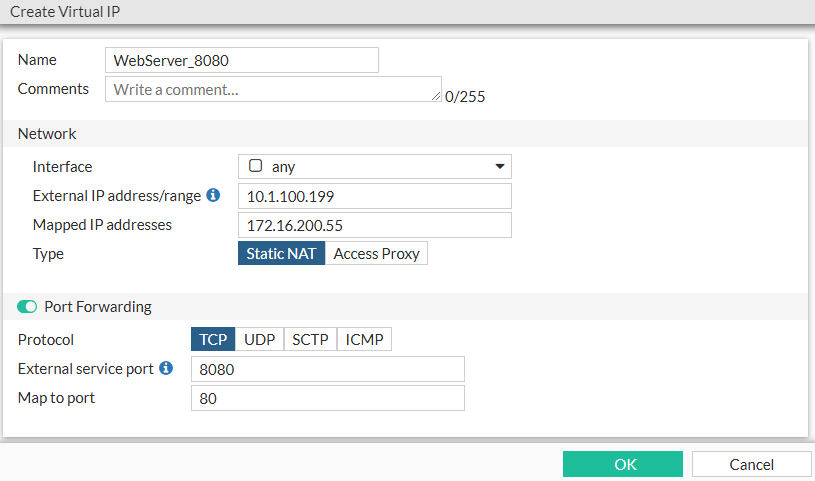
Configure the fields in the Network section. For example:
-
Set Interface to any.
-
Set External IP address/range to 10.1.100.199.
-
Set Mapped IP addresses to 172.16.200.55.
-
Set Type to Static NAT.
-
-
Enable Port Forwarding and configure the fields. For example:
-
Set Protocol to TCP.
-
Set External service port to 8080.
-
Set Map to port to 80.
-
-
Click OK.
-
Follow the above steps to create two additional virtual IPs.
-
For one virtual IP:
-
Use a different Mapped IP address/range, for example 172.16.200.56.
-
Set External service port to 8081.
-
Use the same Map to port number: 80.
-
-
For the other virtual IP:
-
Use a different Mapped IP address/range, for example 172.16.200.57.
-
Set External service port to 8082.
-
Use the same Map to port number: 80.
-
-
-
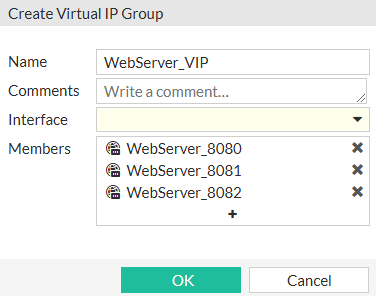
Create a Virtual IP Group and put the above three virtual IPs into that group:
-
Go to Policy & Objects > Virtual IPs.
-
Click Create New > Virtual IP Group.
-
Enter a name for the group.
-
Add the three previously created virtual IPs as members.
-
Click OK.
-
To see the results:
-
Apply the above virtual IP to the policy.
-
The results are:
-
Access 10.1.100.199:8080 from external network and FortiProxy maps to 172.16.200.55:80 in internal network.
-
Access 10.1.100.199:8081 from external network and FortiProxy maps to 172.16.200.56:80 in internal network.
-
Access 10.1.100.199:8082 from external network and FortiProxy maps to 172.16.200.57:80 in internal network
-