
Fortinet white logo
Fortinet white logo

User Guide

Managing groups

Managing groups

Asset tags can be managed from the Group Management tab. You can remove assets from a group, edit a group, or delete a group.

To remove an asset from a group:
  1. Go to EASM > Asset Management.

  2. Select the Group Management tab.

  3. Locate the group you want to remove assets from and click Manage Assets. A dropdown menu is displayed.
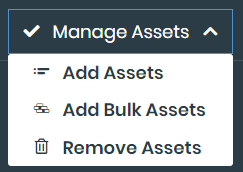
  4. Select Remove Assets.

  5. Select the assets you want to remove or click Select All.

  6. Click Remove Selected.

To edit a group:
  1. Go to EASM > Asset Management.

  2. Select the Group Management tab.

  3. Locate the group you want to edit and click the Edit icon.

  4. Edit the fields.

  5. Click Submit.

To delete a group:
  1. Go to EASM > Asset Management.

  2. Select the Group Management tab.

  3. Locate the group you want to delete and click the Delete icon. A confirmation message is displayed.

  4. Click Yes.

Managing groups

Managing groups

Asset tags can be managed from the Group Management tab. You can remove assets from a group, edit a group, or delete a group.

To remove an asset from a group:
  1. Go to EASM > Asset Management.

  2. Select the Group Management tab.

  3. Locate the group you want to remove assets from and click Manage Assets. A dropdown menu is displayed.

  4. Select Remove Assets.

  5. Select the assets you want to remove or click Select All.

  6. Click Remove Selected.

To edit a group:
  1. Go to EASM > Asset Management.

  2. Select the Group Management tab.

  3. Locate the group you want to edit and click the Edit icon.

  4. Edit the fields.

  5. Click Submit.

To delete a group:
  1. Go to EASM > Asset Management.

  2. Select the Group Management tab.

  3. Locate the group you want to delete and click the Delete icon. A confirmation message is displayed.

  4. Click Yes.