
Fortinet white logo
Fortinet white logo
7.2.0

Special notices

Special notices

Mature to Feature migrations

For selected customer Mature instances, migration to Feature is being incrementally deployed. These customers will receive a notification upon login in the FortiSASE portal in advance.

If no action is taken by the week of July 20, 2026, remaining Mature instances will be automatically migrated during a maintenance window to be scheduled shortly thereafter.

For details on migrating earlier, see Mature to Feature migration and New major features available.

On-shore Dubai customers

The DXB-F2 Fortinet Cloud datacenter location in Dubai, United Arab Emirates (UAE) uses an on-shore local internet service provider, ensuring compliance with local UAE regulations. To comply with UAE regulations and to avoid latency issues, all on-shore (domestic) customers must use this location. See Global data centers.

Removable media access

The Profile > Removable Media Access Control option only works if you enable Malware Protection, an optional feature, when installing FortiClient on the endpoint.

Activating the FortiClientNetwork extension

After you connect FortiClient (macOS) to FortiSASE, attempts to connect to SSL VPN may fail unless you enable the FortiClientNetwork extension. The FortiSASE team ID is AH4XFXJ7DK. See the FortiClient (macOS) 7.0.13 Release Notes.

To enable the FortiClientNetwork extension:
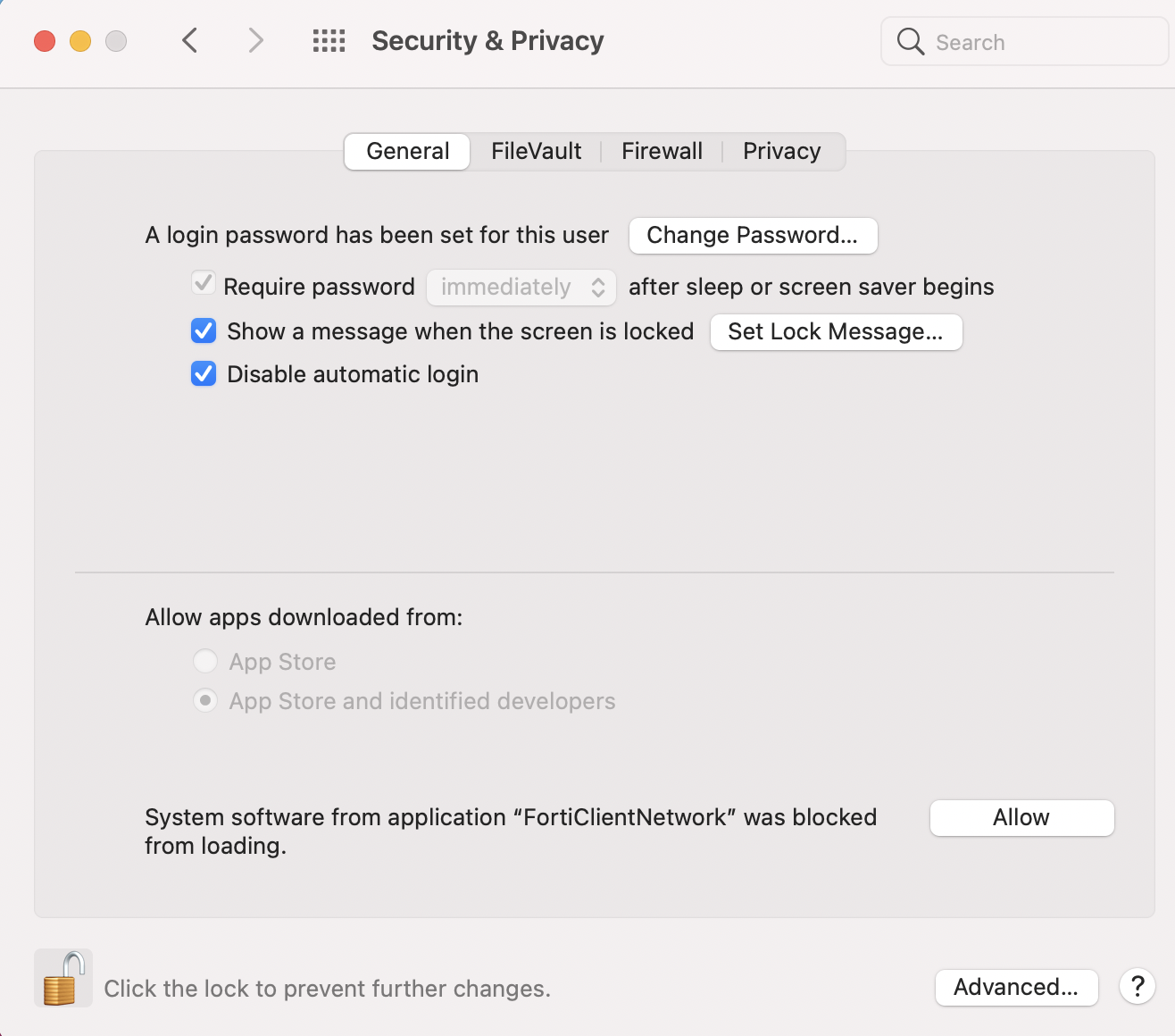
  1. Go to System Preferences > Security & Privacy.
  2. Click the Allow button beside System software from application "FortiClientNetwork" was blocked from loading.
  3. Verify the status of the extension by running the systemextensionsctl list command in the macOS terminal. The following provides example output when the extension is enabled:

Entra ID integration support limitation

FortiSASE supports Entra ID integration with Azure commercial subscription only. Azure Government (e.g. GCC, GCC High, GCC DoD) is not supported.

Special notices

Special notices

Mature to Feature migrations

For selected customer Mature instances, migration to Feature is being incrementally deployed. These customers will receive a notification upon login in the FortiSASE portal in advance.

If no action is taken by the week of July 20, 2026, remaining Mature instances will be automatically migrated during a maintenance window to be scheduled shortly thereafter.

For details on migrating earlier, see Mature to Feature migration and New major features available.

On-shore Dubai customers

The DXB-F2 Fortinet Cloud datacenter location in Dubai, United Arab Emirates (UAE) uses an on-shore local internet service provider, ensuring compliance with local UAE regulations. To comply with UAE regulations and to avoid latency issues, all on-shore (domestic) customers must use this location. See Global data centers.

Removable media access

The Profile > Removable Media Access Control option only works if you enable Malware Protection, an optional feature, when installing FortiClient on the endpoint.

Activating the FortiClientNetwork extension

After you connect FortiClient (macOS) to FortiSASE, attempts to connect to SSL VPN may fail unless you enable the FortiClientNetwork extension. The FortiSASE team ID is AH4XFXJ7DK. See the FortiClient (macOS) 7.0.13 Release Notes.

To enable the FortiClientNetwork extension:
  1. Go to System Preferences > Security & Privacy.
  2. Click the Allow button beside System software from application "FortiClientNetwork" was blocked from loading.

  3. Verify the status of the extension by running the systemextensionsctl list command in the macOS terminal. The following provides example output when the extension is enabled:

Entra ID integration support limitation

FortiSASE supports Entra ID integration with Azure commercial subscription only. Azure Government (e.g. GCC, GCC High, GCC DoD) is not supported.