

Services
This topic provides information about the various services that are available for developing widgets.
$scope
Overview
In AngularJS, Scope is the glue between the application controller and the view. During the template linking phase, the directives set up $watch expressions on the scope. These $watch expressions enable the directives to receive notifications of property changes, allowing the directive to render the updated value in the DOM.
Both controllers and directives have reference to the scope but not to each other. This arrangement isolates the controller from the directive and the DOM. This is crucial because it makes the controllers view-agnostic, significantly enhancing the application's testing capabilities.
Reference: Angular JS/Scopes
Example-
View:
<input type="text" ng-model="message">
Controller:
app.controller('myController', function ($scope)
	{
		$scope.message = "Hello, AngularJS!";
	}
);
$rootScope
Overview
In AngularJS, rootScope is the parent scope object for an AngularJS application, and there is always one unique $rootScope for an application. The data and methods of the $rootScope object are available to all the controllers. All scope objects are child objects of the $rootScope object.
Reference: Angular JS/rootScope
Example-
<!DOCTYPE html>
<html ng-app="myApp">
<head>
    <script src="https://ajax.googleapis.com/ajax/libs/angularjs/1.8.2/angular.min.js"></script>
</head>
<body ng-controller="Controller1">
    <p>Controller 1: {{ dataFromController1 }} </p>
    <button ng-click="broadcastEvent()">Broadcast Event from Controller 1</button>
    <div ng-controller="Controller2">
        <p>Controller 2: {{ dataFromController2 }} </p>
        <button ng-click="emitEvent()">Emit Event from Controller 2</button>
    </div>
    <script>
        var app = angular.module('myApp', []);

        app.controller('Controller1', function ($scope, $rootScope) {
            $scope.dataFromController1 = "Hello from Controller 1";

            $scope.broadcastEvent = function () {
                $rootScope.$broadcast('customEvent', { message: 'Broadcasted from Controller 1'  });
            };
        });

        app.controller('Controller2', function ($scope, $rootScope) {
            $scope.dataFromController2 = "Hello from Controller 2";

            $scope.emitEvent = function () {
                $rootScope.$emit('customEvent', { message: 'Emitted from Controller 2' });
            };

            // Listen for the broadcasted event
            $scope.$on('customEvent', function (event, data) {
                console.log(data.message);
            });
        });
    </script>
</body>
</html>
Config
Overview
A "config" object in the context of widget configuration serves as a structured set of parameters and settings required to define and render a specific widget within a web application. This object encapsulates details, such as the widget type, input parameters, and optional filters necessary to tailor the widget's appearance and behavior.
Example-
Chart Widget Configuration: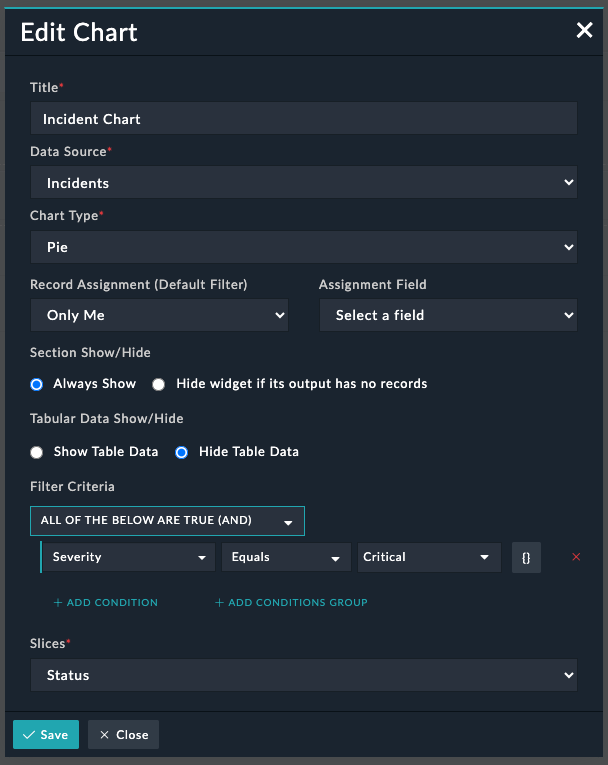
Config Details:
{
      "type": "chart",
      "config": {
        "wid": "283e52eb-8a88-4e89-974b-12ee6a39d3d2",
        "widgetAlwaysDisplay": true,
        "showTabularData": false,
        "query": {
          "sort": [
            {
              "field": "status.orderIndex",
              "direction": "ASC"
            }
          ],
          "limit": 2147483647,
          "logic": "AND",
          "filters": [
            {
              "field": "severity",
              "operator": "eq",
              "value": "/api/3/picklists/7efa2220-39bb-44e4-961f-ac368776e3b0",
              "_value": {
                "display": "Critical",
                "itemValue": "Critical",
                "@id": "/api/3/picklists/7efa2220-39bb-44e4-961f-ac368776e3b0"
              },
              "type": "object"
            }
          ],
          "aggregates": [
            {
              "operator": "countdistinct",
              "field": "*",
              "alias": "total"
            },
            {
              "operator": "groupby",
              "alias": "status",
              "field": "status.itemValue"
            },
            {
              "operator": "groupby",
              "alias": "color",
              "field": "status.color"
            },
            {
              "operator": "groupby",
              "alias": "orderIndex",
              "field": "status.orderIndex"
            }
          ]
        },
        "mapping": {
          "fieldName": "status"
        },
        "assignedToSetting": "onlyMe",
        "aggregate": true,
        "title": "Incident Chart",
        "resource": "incidents",
        "chart": "pie"
      }
}
$http
Overview
In AngularJS, the $http service is a core component that facilitates communication with remote HTTP servers. It provides methods for making HTTP requests and handling the responses.
Reference: Angular JS/services/$http
Example-
$http.get(url).then(function(response) {
	deferred.resolve(response.data);
}, function() {
	deferred.reject('could not load template');
	}
);
$resource
Overview
In AngularJS, the $resource service is an extension of the core $http service, which makes working with RESTful APIs simpler. It is designed to provide a higher-level, resource-based abstraction, making it easier to interact with RESTful web services.
-
Similar to
$http,$resourceis injected into controllers, services, or other AngularJS components where interaction with RESTful APIs is needed. -
The
$resourceservice is used to create a resource object by providing the URL template and optional default parameters.
Reference: Angular JS/services/$resource
Example-
$resource simplifies API interactions by providing predefined methods and actions corresponding to common HTTP methods, GET, POST, PUT, and DELETE:
app.controller('MyController', ['$resource', function($resource) {
var MyResource = $resource('/api/data/:id', { id: '@id' });
var myResourceInstance = new MyResource();
	// GET request
	myResourceInstance = MyResource.get({ id: 1 });

	// POST request
	myResourceInstance.$save();

	// PUT request
	myResourceInstance.$update();

	// DELETE request
	myResourceInstance.$delete();

}]);
Similar to $http, $resource returns promises for handling asynchronous operations, allowing developers to use the .then() method.
MyResource.get({ id: 1 }).$promise.then(function(response) {
    // Handle successful response
}, function(error) {
    // Handle error response
});
$q
Overview
In AngularJS, the $q service is a promise library that allows for the management of asynchronous operations. It is used to create and manage promises, handle their resolution or rejection, and perform operations when multiple promises need to be coordinated.
Reference: Angular JS/services/$q
Example-
var promise = $q.defer().promise;
promise.then(
    function (result) {
        // Promise resolved
    },
    function (error) {
        // Promise rejected
    }
);
$uibModalInstance
Overview
In AngularJS, the $uibModalInstance service provided by the Angular UI Bootstrap library represents an instance of a modal window. It is used to interact with and control the state of a modal dialog, which is a common UI component for displaying content or capturing user input in a separate overlay.
Reference: Angular UI Bootstrap/modal
Toaster
Overview
In AngularJS, a "toaster" is a UI component used to display notifications or alerts in a user-friendly way. Although the AngularJS core does not include a specific "toaster" module, developers often use third-party libraries to implement toast notifications.
Example-
Success Message -
toaster.success({
	body: 'Configuration updated successfully.'
});
Error Message -
toaster.error({
	body: 'Configuration Failed to save.'
});
Info Message -
toaster.info({
	body: 'Live sync is now active.'
});
$timeout
Overview
In AngularJS, the $timeout service is a wrapper around the native 'setTimeout' function in JavaScript. It allows you to to execute a function or evaluate an expression after a specified delay. Here are some important details about the $timeout service:
-
Service Injection: Similar to other AngularJS services, you need to inject the '
$timeout' service into controllers, services, or other AngularJS components where you need the asynchronous timing functionality.angular.module('myApp').controller('MyController', ['$timeout', function($timeout) { // Controller logic with $timeout usage }]); -
Usage: '
$timeout' is commonly used to introduce delays in code execution, especially when you want to wait for a specific event or update the UI after a certain time.$timeout(function() { // Code to be executed after a delay console.log('Delayed execution'); }, 1000); // 1000 milliseconds (1 second) delay -
Promise-Based API: '
$timeout' returns a promise that is resolved when the delay has passed and the provided function or expression has been executed.var delayPromise = $timeout(function () { // Code to be executed after a delay console.log('Delayed execution'); }, 1000); delayPromise.then(function() { console.log('Delay completed'); }); -
Canceling the Timeout: '
$timeout' returns a promise that can be used to cancel the timeout before it occurs using the 'cancel' method.var delayPromise = $timeout(function() { // Code to be executed after a delay console.log('Delayed execution'); }, 1000); // Cancel the timeout before it occurs $timeout.cancel(delayPromise);
Reference: Angular JS/services/$timeout
$filter
Overview
In AngularJS, the $filter service provides a set of built-in filters that can be used to filter arrays or objects. These filters allow you to display data in the desired format on the user interface. Additionally, you can create custom filters. Here are some important details about the $filter service:
-
Service Injection: Similar to other AngularJS services, you need to inject the '
$filter' service into controllers, services, or other AngularJS where data filtering is needed.angular.module('myApp').controller('MyController', ['$filter', function($filter) { // Controller logic with $filter usage } ]); -
Usage: '
$filter' is used to apply filters to data in templates using the '{{ expression | filter:arguments }}' syntax. You can also use filters programmatically in controllers and services. For example, the 'uppercase' filter can convert a string in the 'data' variable to uppercase as follows:<$div>{{ data | uppercase }}</div> - Built-in Filters: AngularJS provides a set of built-in filters for common filtering and formatting tasks. Some examples include:
uppercase: Converts a string to uppercase.<div>{{ name | uppercase }}</div>lowercase: Converts a string to lowercase.- currency: Formats a number as currency.
<div>{{ amount | currency }}</div> date: Formats a date.<div>{{ currentDate | date:'yyyy-MM-dd' }}</div>number: Formats a number.
- Chaining Filters: You can chain filters together to perform multiple transformations on the data. For example, to convert text to uppercase and then limit the result set to 10, use the following:
<div>{{ text | uppercase | limitTo:10 }}</div> -
Custom Filters: You can define custom filters to perform specific formatting or filtering tasks. Custom filters are created using the
filtermethod of the$filterservice.angular.module('myApp').filter('customFilter', function() { return function(input) { // Custom filtering logic return filteredOutput; }; }); <div>{{ data | customFilter }}</div> -
Using Filters Programmatically: You can apply filters programmatically in controllers or services using the
$filterservice. For example, theuppercasefilter can be applied to the text 'Hello' using$filter('uppercase'):angular.module('myApp').controller('MyController', ['$filter', function($filter) { var uppercaseFilter = $filter('uppercase'); $scope.uppercasedText = uppercaseFilter('Hello'); }]); - Filtering Arrays: You can use the
filtermethod of the$filterservice to filter arrays based on certain criteria. For example, to display only items with the category 'Electronics' from a given item list, use the following:<div ng-repeat="item in items | filter: { category: 'Electronics' }">{{ item.name }}</div> -
Filtering with Functions: You can use the
filtermethod of the$filterservice to accept functionsa s arguments. This allows for more complex filtering logic to be applied:<div ng-repeat="item in items | filter: filterFunction">{{ item.name }}</div> $scope.filterFunction = function(item) { // Custom filtering logic return item.price > 100; };
Reference: Angular JS/filter/filter
_(Underscore Library)
Overview
Underscore.js is a utility library that provides functional programming helpers without extending any built-in objects. It includes functions for working with arrays, objects, collections, and functions.
Reference: Underscore.js
Example-
var _ = require('underscore');

var numbers = [1, 2, 3, 4, 5];
var sum = _.reduce(numbers, function (memo, num) {
    return memo + num;
}, 0);

console.log(sum); // Output: 15
$window
Overview
In AngularJS, the $window service is a wrapper for the global window object in JavaScript. It allows interaction with the browser's window object within an AngularJS application.
Reference: Angular JS/services/$window
$state
Overview
In AngularJS, the $state refers to the UI-Router's $state service. UI-Router is a flexible and powerful alternative to AngularJS's built-in routing mechanism. It enables developers to define states, views, and transitions within their AngularJS applications. The $state service is used for state management and navigation.
WizardHandler
Overview
In AngularJS, a wizard or multi-step form is a common UI pattern that breaks down a complex form into a series of steps or sections to enhance user-friendliness.
Reference: Angular Wizard
LocalStorageService
Overview
LocalStorageService is a custom service or library that provides methods or functions for interacting with the browser's local storage. Local storage is a key-value storage mechanism available in web browsers, commonly used for persisting small amounts of data on the client-side. Here is a general outline of such a service:
-
Service Injection: The
LocalStorageServiceservice needs to be injected into AngularJS components where local storage operations are required.angular.module('myApp').controller('MyController', ['LocalStorageService', function(LocalStorageService) { // Controller logic with LocalStorageService usage }]); -
Methods for Local Storage Operations: Such services typically offer methods for common local storage operations, such as getting, setting, and removing items.
// Example methods in a LocalStorageService
LocalStorageService.setItem('key', 'value');
var storedValue = LocalStorageService.getItem('key');
LocalStorageService.removeItem('key');
PromiseQueue
Overview
In a generic sense, a 'Promise Queue' is a mechanism for managing a series of asynchronous tasks, where each task returns a promise. This ensures that tasks are executed in a specific order, with the next task only starting once the previous one has been completed.
Constants
Overview
The list of constants used in an application can vary based on the application's architecture, design patterns, and requirements. To use API constants in a component or controller, inject the 'API constant' and then use them in your application.
API Constants
('API',
	{
	BASE: 'api/3/',
	API_3_BASE: '/api/3/',
	TEMPLATE: 'api/3/template/',
	WORKFLOW: 'api/wf/',
	WORKFLOW_HEALTH: 'api/wf/workflow/healthcheck/job/',
	INTEGRATIONS: 'api/integration/',
	SEALAB: 'wf/',
	ETL: 'gateway/etl/',
	AUDIT: 'api/gateway/audit/',
	AUTH: 'api/auth/',
	PUBLIC: 'api/public/',
	QUERY: 'api/query/',
	QUERIES: 'api/3/queries',
	REPORTS: 'gateway/report/',
	DAS: 'auth/',
	POSTMAN: 'api/postman/',
	SAML: 'api/saml/',
	SEARCH: 'api/search/',
	ARCHIVAL: 'api/archival/',
	PUBLISH: 'api/publish',
	MANUAL_TRIGGER: 'api/triggers/1/notrigger/',
	WORKFLOW_STEPS: 'workflow_steps/',
	WORKFLOW_GROUPS: 'workflow_groups/',
	WORKFLOW_BLOCKS: 'workflow_blocks/',
	WORKFLOWS: 'workflows/',
	WORKFLOW_ACTION: 'api/workflows/actions',
	REVERT: 'api/publish/revert',
	PUBLISH_ERROR: 'api/publish/error',
	ACTION_TRIGGER: 'api/triggers/1/action/',
	CURRENT_AVATAR: 'avatars/current',
	CURRENT_ACTOR: 'actors/current',
	AUTHENTICATION: 'authentication',
	ROLES_TEAM_READ_ONLY: 'api/userteam',
	USER_PREF_PREFIX: 'user/view/',
	REMOTE_ACTION_EXECUTION:'api/integration/remote-action-execution/',
	API_HMAC_TRIGGER_URL: 'api/triggers/1/',
	IMPORT: 'api/import/',
	EXPORT: 'api/export/',
	SYSLOG_CONFIG: 'api/gateway/config/syslog',
	API: 'api',
	WEBSOCKET: 'websocket/cyops-websocket',
	SYSTEM_MODULES: 'api/system/fixtures',
	RULE: 'api/rule/',
	DELETE_WITH_QUERY: 'api/3/delete-with-query/',
	EXPORT_TEMPLATES: 'api/3/export_templates/',
	SOLUTION_PACKS: 'api/3/solutionpacks/'
	}
)
Example-
URL - API.SAML + 'metadata';
Playbook Step Types
('PLAYBOOK_STEP_TYPES',
	{
	API_TRIGGER: 'cybersponse.api_call',
	ACTION_TRIGGER: 'cybersponse.action',
	ABSTRACT_TRIGGER: 'cybersponse.abstract_trigger',
	DECISION: 'Decision',
	MANUAL_DECISION: 'ManualDecision',
	MANUAL_INPUT: 'ManualInput',
	APPROVAL_MANUAL_INPUT: 'ApprovalManualInput',
	SET_VARIABLE:'SetVariable',
	INSERT_DATA:'InsertData',
	UPDATE_DATA:'UpdateRecord',
	REFERENCE_BLOCK: 'ReferenceBlock',
	TRIGGER_REFERENCE_BLOCK: 'action.reference.block',
	POST_DELETE_TRIGGER: 'cybersponse.post_delete',
	PRE_DELETE_TRIGGER: 'cybersponse.pre_delete',
	POST_CREATE_TRIGGER: 'cybersponse.post_create',
	PRE_CREATE_TRIGGER: 'cybersponse.pre_create',
	POST_UPDATE_TRIGGER: 'cybersponse.post_update',
	PRE_UPDATE_TRIGGER: 'cybersponse.pre_update',
	MANUAL_DECISION_STEP_TYPE: '/api/3/workflow_step_types/dc61b68b-4967-4e82-b4ed-a1315aa81998',
	MANUAL_INPUT_STEP_TYPE: '/api/3/workflow_step_types/fc04082a-d7dc-4299-96fb-6837b1baa0fe'
	}
)
appModulesService
Overview
The appModulesService loads application modules and provides state information based on the given module names.
Function
getListState- Returns the list view state for a given module name.
Example-let stateName = appModulesService.getListState(module.type);
Common Utils
Overview
The CommonUtils API provides commonly used functions that can be utilized across different parts of your application.
Functions
copyToClipboard- Used to copy content to the clipboard.generateUUID- Used to create and return UUIDs.isBase64Image- Used to check whether the provided value is in the Base64 image format.isJinja- Used to check whether the provided value is in the jinja format.isNumber- Used to check whether the provided value is a number.isObject- Used to check whether the provided value is in the object format.isUUID- Used to check whether the provided value is a valid UUID.isUndefined- Used to check whether the provided value is undefined or null.isValidURL- Used to check whether the provided value is a valid URL.parseJSON- Used to convert the provided input data into the JSON format.searchInJSON- Used to search whether the provided value exists in the specified JSON object.
Example-
let uuid = CommonUtils.generateUUID();
let isJinja = CommonUtils.isJinja(scope.value);
let isNumber = CommonUtils.isNumber(scope.value);
let isUUID = CommonUtils.isUUID(scope.value);
let isUndefined = CommonUtils.isUndefined(scope.value);
connectorService
Overview
The connectorService API provides operations for managing connectors and agents, facilitating seamless integration between different software systems.
Functions
deleteConnector- Deletes a specified connector.executeConnectorAction- Explicitly executes a specified connector action.getConnector- Returns the health status of a specified connector.getDevelopedConnector- Returns details of a custom created connector. These connectors are in the 'Draft' state and have not been published.updateConnectorConfig- Creates, updates, or deletes a connector configuration.
Example-
connectorService.deleteConnector(conn.id).then(function() {
	toaster.success({
		body: 'Connector removed successfully.'
	});
modalInstance.close();
});

connectorService.getConnector(connector.name, connector.version).then(function (connectorData) {
		defer.resolve(connectorData);
	}, function (error) {
		defer.resolve(error);
});
currentPermissionsService
Overview
The currentPermissionsService API retrieves permissions for modules within the application.
Functions
availablePermission- Retrieves permissions for specific actions such as, 'read/write/update/delete' permissions for a provided module.$scope.rulesCanView = currentPermissionsService.availablePermission('rules', 'read');availablePermissions- Retrieves permissions for specific actions such as, 'read/write/update/delete' permissions for a provided list of modules.availableFieldPermission- Retrieves permissions for specific actions such as, 'read/write/update/delete' permissions for a specific field of a provided module.get- Retrieves all module permissions for the currently logged-in user.getPermission- Retrieves all permissions of a specific module.getPermissions- Retrieves all permissions for multiple modules.var permission = currentPermissionsService.getPermission(module.type)isAdmin- Retrieves the status of the currently logged-in user's 'Security Update' permission.$scope.isAdmin = currentPermissionsService.isAdmin();
Entity
Overview
The Entity Service API provides functionalities for managing modules, handling metadata and fields, loading and populating data based on permissions, module names, and IDs. It also takes care of adding and removing relationships and transforming form data.
Functions
applyDefaultValues- Sets default values for all fields.delete- Deletes an entityevaluate- Evaluates query filters.evaluateAllFields- Evaluates visibility and required filters for all entity fields.get- Returns properties of all the fields.getFormFields- Returns an object of the form fields including system fields of the entity.scope.fields = scope.entity.getFormFields();getFormFieldsArrayWithoutSystem- Returns an array of form fields excluding system fields of the entity.getRelationship- Retrieves relationship data for a provided field.-
loadFields- Loads fields of a provided module.entity.loadFields().then(function() { entityDefer.resolve(); }, function(error) { entityDefer.reject(error); }); save- Saves the entity.
exportService
Overview
The exportService API provides functionalities for copying, exporting, and downloading playbooks.
Functions
changePlaybookAndStepsUuid- Replaces the UUID of an existing playbook with the UUID of an exported playbook.copyEntities- Copies 'entities' of type 'entityName' (workflows) and returns the result. 'workflows' need their UUIDs to be updated and their associated steps and routes to be copied.downloadJsonFile- Forces the download of a JSON file with given data object and filename.exportGridRecords- Exports a selected playbook collection from a provided grid.scope.exportGridRecords(true, 'Export selected rows as CSV', true);getMacrosFromPlaybook- Returns the macros from a provided playbook.var macros = exportService.getMacrosFromPlaybook(workflow, globalVariables);getReferencePlaybookForExport- Loads the reference playbooks associated with the playbook being exported.scope.fields = scope.entity.getFormFields();loadCollectionNames- Loads the names of all playbook collections.loadCollectionPlaybooks- Fetches all playbooks from a provided collection.loadRowsForExport- Loads exported versions of given rows from 'crudhub'.saveNewMacrosFromPlaybook- Saves the macros in the database.
Field
Overview
The Field Service API provides functionalities for representing the model of a field.
Functions
evaluateRequired- Evaluates the required constraints of a given field.scope.field.evaluateRequired(entity);evaluateVisible- Evaluates the visible constraints of a given field.getFormValue- Converts the stored value of a given field into its raw value, which can be of various types.var fieldValue = field.getFormValue();
FormEntityService
Overview
The FormEntityService API provides functionalities for handling entity-related operations, including setting, getting, and submitting fields in a form.
Functions
get- Retrieves a provided entity.set- Saves a provided entity.FormEntityService.set(entity);
licenseService
Overview
The licenseService API provides functionalities for retrieving and updating license details.
Functions
-
getBrandingDetails- Retrieves the branding details of the instance.licenseService.getLicenseDetails().then(function(license) { $scope.licenseDetails = license; if(license.details.is_distributed){ columns.push('remoteExecutableFlag'); } }); -
set- Retrieves the license details of the instance.
modelMetadatasService
Overview
The modelMetadatasService API provides functionalities for loading and retrieving the model metadata information.
Functions
getIriByType- Retrieves the model metadata IRI for a given module type.getMetadataByModuleType- Retrieves the model metadata type for a given module type.-
getModuleList- Checks local storage for model metadata. If the module list is not in the storage, it falls back to checking whether another promise to get them has already been set. If one has not been set, then an API request is made to retrieve the module list and then store them in local storage.modelMetadatasService.getModuleList().then(function(modules) { scope.modules = modules; }); -
getModuleNameByType- Retrieves the model name in the singular or plural form from the local storage for a given module type.scope.modules = modelMetadatasService.getModuleNameByType(triggerStep.arguments.resources, true);
getTenantModuleList- Returns the module metadata for a specific tenant based on its UUID.getTenantStaggingModule- Returns the staging module metadata for a specific tenant based on its UUID and module ID.loadAllModules- Loads all modules including system modules.publishTenant- Initiates the 'Publish' process for a specific tenant based on its UUID.loadRowsForExport- Loads exported versions of the given rows from 'crudhub'.saveNewMacrosFromPlaybook- Saves macros in the database.
Modules
Overview
The Modules API Service API is a wrapper for ng.$resource. This API extends ng.$resource with additional 'update' functionality, and the optional acceptance of parameters, such as module, id, and fieldname.
Functions
-
save- Updates or saves a given module.promise = Modules.save({ module: module, $relationships: true }, queryToSave).$promise;
picklistsService
Overview
The picklistsService API facilitates actions for retrieving and manipulating picklists.
Functions
-
getPicklistByIri- Returns the top-level picklist item and its child picklists, or the child picklist itself, based on the given IRI.picklistsService.getPicklistByIri(value).then(function(data) { interpolateObject[key] = data.itemValue; }); getPicklistByItemValue- Retrieves the picklist for a given field, based on the given itemValue.-
loadAllPicklists- Returns all picklist values.picklistsService.loadAllPicklists().then(function (data) { scope.picklistNames = data; }); loadPicklistsByParams- Returns the top-level picklist item and its child picklists, or the child picklist itself, based on the given picklist name.
playbookService
Overview
The playbookService API provides operations related to playbooks, such as retrieving playbook details, creating playbooks, and accessing playbook execution log details.
Functions
-
getPlaybookExecutionCount- Returns the total playbook execution count.playbookService.getPlaybookExecutionCount($scope.params.query).then(function(result) { Console.log(data); }); getRunningPlaybookDetails- Returns details of a specific running playbook.-
getRunningPlaybooks- Retrieves a list of running playbooks from the playbook execution history.playbookService.getRunningPlaybooks(query).then(function(result) { scope.childRecords.reference = result['hydra:member']; }); getStepRunningDetails- Returns the of a specific step in a specific playbook.
PromiseQueue
Overview
The PromiseQueue Service API provides functionalities for storing, retrieving, and clearing promises, which helps optimize resource usage when making API calls in quick succession.
Functions
clear- Reinitializes the queue.-
get- Retrieves a promise from a given queue.var promise = PromiseQueue.get('picklists'); -
set- Sets a promise into a given queue for later retrieval.PromiseQueue.set('picklists', promise);
Query
Overview
The Query Service API provides an object for API query parameters and filters, exposing methods for retrieving and manipulating data.
Functions
-
getFlatQuery- Returns a properly evaluated query.var flatQuery = self.query.getFlatQuery();
getQuery- Forms a query object with all required parameters. Query object parameters includesort,limit,logic,search,showDeleted,filters,$relationships,aggregates, and__selectFields.getQueryModifiers- Modifies query modifiers, such as 'limit' to '$limit', 'page' to '$page'.updateFilter- Updates a specific filter object.updateFilters- Updates a specific filter array.
queryCollectionService
Overview
The queryCollectionService API provides functionalities for loading, saving, manipulating, and deleting query collections.
Functions
-
load- Loads the queries for a specific module and stores a promise for all future requests.queryCollectionService.load(scope.entity.name).then(function(collection) { scope.queries = collection; }); -
loadQueryFilterValues- Updates the values of a provided query's filters with either a picklist object or a display value.var promise = queryCollectionService.loadQueryFilterValues(scope.selectedQuery);
-
loadResource- Loads a specific object using its IRI, and applies the display value once the object is loaded.
PagedCollection
Overview
The PagedCollection Service API creates objects that work against the paged 'crudhub' API. It serves as the base class for other PagedCollection child classes.
Functions
-
buildSortQuery- Builds a query to sort results. -
convertToKeyPairs- Converts 'hydra:member' records to key pairs. -
extendFilter- Extends a filter condition, i.e., merges multiple filter conditions and then applies the merged filter.
For example, one filter is name = alert and another is severity = high,extendFiltermerges both these filters into a single filter and then applies the same to the grid. -
gotoPage- Navigates to a specific page within the data. -
load- Loads all records with customQuery, customColumns, and relationships. -
loadByPost- Loads the grid data using the 'POST' call. -
loadDefaultColumns- Loads the default columns of a given grid.pagedCollection.loadDefaultColumns().finally(function() { promise = pagedCollection.loadGridRecord(_config, true); checkPromise(promise, pagedCollection); }); -
loadGridRecord- Loads the records of a given grid.pagedCollection.loadGridRecord().then(function() { scope.gridApi.grid.options.columnDefs = scope.pagedCollection.columns; }, dataError); -
pageFirst- Navigates to the first page of the data. -
pageLast- Navigates to the last page of the data. -
pageNext- Navigates to the next page within the data. -
pagePrevious- Navigates to the previous page within the data. -
setPage- Sets records according to the specified pagination. -
sortColumnsByFieldName- Sorts columns by a given 'field name'.
settingsService
Overview
The settingsService API provides functionalities for getting and setting user and system settings.
Functions
-
get- Gets value of a setting for the provided key.$scope.countryId = settingsService.get('user/phone/countryId'); -
getSystem- Checks the local storage for system settings. If the system settings are not in the storage, it falls back to checking whether another promise to get them has already been set. If one has not been set, then an API request is made to retrieve the system settings and store them in local storage.settingsService.getSystem().then(function (response) { scope.systemSettings = response; });
tokenService
Overview
The tokenService API manages idle and session timers, offering methods for manipulating and retrieving information from JWT web tokens.
Functions
-
get- Gets the authentication token.var token = tokenService.get();
-
set- Sets the encrypted token and user information in local storage. It also create timers to validate tokens for refreshing and adding listeners.tokenService.set(response.token);
usersService
Overview
The usersService is an auxiliary service for user-related actions. It includes methods for interacting with the current user and updating DAS (Data Access System) users.
Functions
getAvatar- Gets the avatar img src with base64 encoded image data for the given IRI. If the avatar IRI is empty, it will return the default avatar URI.getCurrentAvatar- Gets the avatar of the current user from local storage if it exists; otherwise, loads it using thegetAvatarfunction and saves it in local storage.-
getCurrentUser- Gets the current user that was loaded using theloadCurrentUserfunction.var user = usersService.getCurrentUser();
-
getUserByIri- Gets the user details based on the given IRI.usersService.getUserByIri(CommonUtils.getIriApiPath(userIri)).then(function(result){ if(result.data['@type']==='Person'){ scope.executionDetail.userDisplayName = result.data.firstname + ' ' + result.data.lastname; } }); loadCurrentUser- Loads the current user object from 'crudhub' and stores it in local storage, or retrieves it from the local storage cache if already loaded.
ViewTemplateService
Overview
The ViewTemplateService provides functionalities for loading and saving view templates.
Functions
changeStructure- Updates the structure of a row/column-based view template widget. Used when the layout or number of columns is changed.-
get- Checks local storage for the requested page and returns the page. If the page is not found in the storage, it falls back to checking whether another promise to get them has already been set. If one has not been set, then an API request is made to retrieve the requested page and stores it in local storage.var appTemplatePromise = ViewTemplateService.get('app').then(angular.noop,$q.reject).finally(function () { console.log('App View Template'); }); getConditionalVisibilityFilteredData- Fetches records for an entity based on a provided visibility filter. Used to handle widget and tab visibility settings on the Dashboard, Reports, and View Panels.populateConditionalFields- Populates an array with fields used in the conditional filter. Used to handle widget and tab visibility settings on the View Panels.
widgetTemplateService
Overview
The widgetTemplateService API provides functionalities for loading widget definitions.
Functions
-
generateWidgetDefinition- Creates widget data in a generic format that can be used to render the widget in different layouts, such as popup, half widget, or full widget.var widgetDefinition = widgetTemplateService.generateWidgetDefinition(widget);