waf dlp dictionary
Use this command to configure the DLP (Data Loss Prevention) dictionary to define the patterns of data. The term "pattern" denotes a set of attributes specific to a given data type. For example, credit card numbers constitute numeric data that follow either the 14-digit or 16-digit patterns associated with credit cards. If the data adheres to these patterns, FortiWeb will identify it as a match.
Syntax
config waf dlp dictionary
edit <name>
set match-type {any | all}
set comment <comment_string>
config entries
edit <entry_index>
set type {keyword | regex | hex | credit-card | ssn-us}
set pattern <pattern_string>
set case-sensitive {enable | disable}
set repeat {enable | disable}
set status {enable | disable}
next
end
next
end
| <name> |
Enter a unique name that can be referenced by other parts of the configuration. The maximum length is 63 characters. |
No default |
| match-type {any | all} |
Select Match type:
- all: Data meeting the criteria specified by all dictionary entries will be identified as a match.
- any: Data meeting the criteria specified by any one of the dictionary entries will be identified as a match.
|
any |
| comment <comment_string> |
Optionally, enter a comment for the dictionary. |
No default |
| config entries
|
| <entry_index> |
Enter the index number of the individual entry in the table. The valid range is 1–9,223,372,036,854,775,807. |
No default |
| type {keyword | regex | hex | credit-card | ssn-us} |
There are several basic types, including keyword, regex, hex, credit-card, and ssn-us.
-
keyword/regex/hex: Choose either keyword, regex, or hex to define the data pattern. This is beneficial when you are already familiar with the data patterns you wish to match.
-
credit-card/ssn-us: Use the pre-defined patterns to identify credit card numbers or Social Security Number of US.
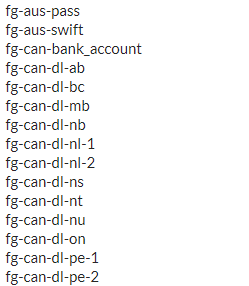
If you have the FortiGuard DLP service enabled, you will see additional types prefixed with "fg-", as illustrated below (please note that the screenshot is merely an example and may not include all "fg-xx" types).
The "fg-xx" dictionaries are provided by the FortiGuard DLP service database, which undergoes continuous maintenance and updates to align with the latest developments in network security intelligence.
If you find acronyms such as "fg-can-dl-bc" not easy to understand, you can refer to the Comment column in the Predefined table on the DLP Dictionary page for a detailed description of the dictionaries.
|
No default |
| pattern <pattern_string> |
The term "pattern" denotes a set of attributes specific to a given data type. For example, credit card numbers constitute numeric data that follow either the 14-digit or 16-digit patterns associated with credit cards. If the data adheres to these patterns, FortiWeb will identify it as a match.
You can specify a keyword value, regular expression, or hexadecimal value to match data.
For instance, use the regular expression demo(regex){1,5} to match data such as demoregex123.
|
No default |
| case-sensitive {enable | disable} |
Switch on to differentiate between upper case and lower case letters. |
disable |
| repeat {enable | disable} |
Enable this option if you want to match data exclusively when it appears multiple times.
With this option enabled, you can specify the times of occurrence in the DLP Sensor settings.
|
disable |
| status {enable | disable} |
Switch on to enable the dictionary. |
enable |
Example
config waf dlp dictionary
  edit "fg-can-natl_id-sin-dict"
    set match-type all
    set comment "Canadian SIN Card Number Dictionary"
    config  entries
      edit 1
        set type fg-can-natl_id-sin
        set case-sensitive enable
        set repeat enable
      next
      edit 2
        set type fg-can-natl_id-prox
        set case-sensitive enable
        set repeat enable
      next
      edit 3
        set type fg-luhn-algo
        set pattern "\\b\\d{3}[- ]?\\d{3}[- ]?\\d{3}\\b"
        set case-sensitive enable
        set repeat enable
      next
    end
  next
end
Related topics:

