

Enhanced Mobile Token Verification in Web Protection Profile (8.0.0)
FortiWeb 8.0.0 enhances support for mobile token authentication by expanding verification methods, streamlining configuration, and improving token parsing logic. These enhancements improve usability and increase compatibility with modern mobile application architectures.
Streamlined Configuration and Expanded Token Verification Methods
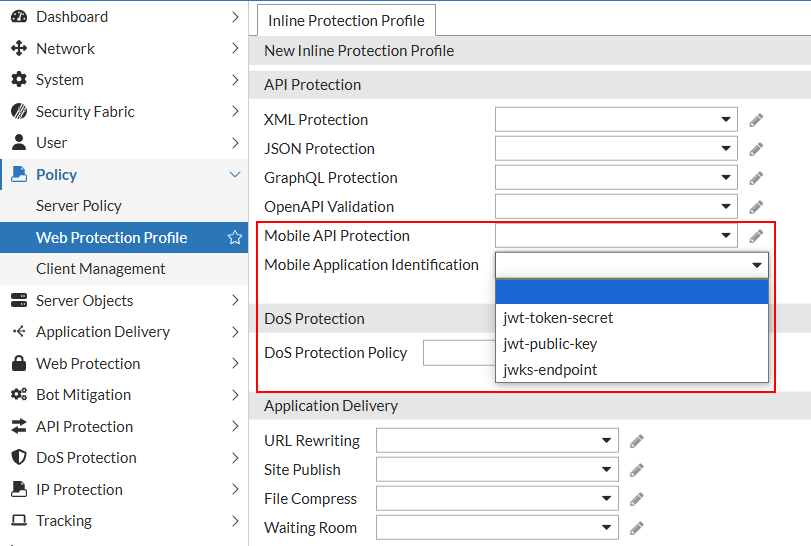
The Mobile Application Identification settings have been relocated from the Mobile section to the API Protection section of the Web Protection Profile. This reorganization aligns the configuration with its role in token-based client authentication and consolidates related controls for improved usability.
FortiWeb now supports three verification methods for mobile tokens, selectable from the Mobile Application Identification field:
-
jwt-token-secret: Verifies tokens using a pre-shared secret (existing method).
-
jwt-public-key: Verifies tokens using a user-provided RSA public key.
-
jwks-endpoint: Retrieves verification keys from a remote JWKS (JSON Web Key Set) endpoint.
Parameter Requirements for Each Method
FortiWeb now supports three verification methods for mobile tokens.
|
Method |
Parameter |
Description |
|---|---|---|
| jwt-token-secret |
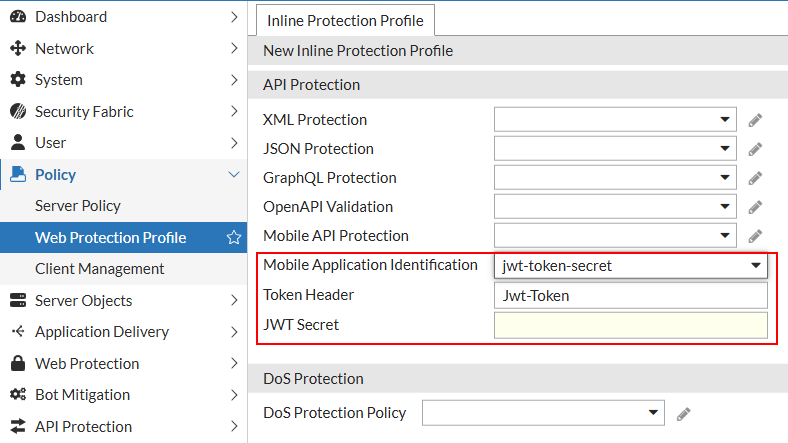
JWT Secret |
Accepts a symmetric signing key (HMAC). Used to verify the signature of the JWT using a shared secret. |
| jwt-public-key |
JWT Public Key |
Accepts an RSA public key in PEM format. Enables asymmetric signature verification of incoming JWTs. |
| jwks-endpoint |
JWKS Endpoint |
Accepts a URI pointing to a JSON Web Key Set (JWKS). FortiWeb retrieves and caches public keys for validating JWTs signed with asymmetric algorithms. |
These options enable integration with identity providers that use standards such as OAuth 2.0 and OpenID Connect.
Improved Token Parsing
FortiWeb now automatically ignores the "Bearer:" prefix when extracting tokens from HTTP request headers. If a valid JWT follows the prefix, FortiWeb proceeds with verification using the configured method. If the token is not a JWT, verification fails—preserving the original security posture.
JWKS Certificate Caching
When using JWKS-based verification, FortiWeb caches certificates locally to reduce lookup overhead:
-
Certificates are cached for 24 hours and checked every 5 minutes.
-
The cache supports up to 64 JWKS endpoints.
-
If a certificate retrieval attempt fails, the failure is cached to prevent repeated requests. FortiWeb will retry the retrieval after 5 minutes.
Diagnostic CLI Tools
Use the diagnose policy jwks-cache command to inspect or manage the local cache of public keys retrieved from JWKS (JSON Web Key Set) endpoints. This cache improves performance and reliability when verifying JWTs signed with asymmetric algorithms.
-
list– Displays the current JWKS certificate cache. Shows JWKS URIs, their status and referenced number. Useful for verifying which keys FortiWeb is using for JWT validation. -
delete– Deletes a JWKS endpoint that is not referenced, to reduce repeated checks and updates. Useful for troubleshooting or testing key rotation.