

system certificate ocsp-responder
Use this command to configure the OCSP Responder.
In SSL/TLS connections between the clients (like browsers or apps) and FortiWeb, clients by default check the server certificate presented by FortiWeb, verifying it against a trusted CA store, and ensure it is not revoked or expired.
For high-security scenarios it's essential to validate identity of the clients as well. A common use case for client certificates is in online banking systems, where a bank may issue customers a hardware device, like a smart card or USB token, storing a digital certificate. To access the banking system, the customer connects the device to their computer and configures their browser to use the stored certificate for identity verification.
To maintain security, FortiWeb must verify the client certificate's status (whether they are valid, revoked, or expired) to block access attempts with a invalid client certificate. FortiWeb supports the following two methods of client certificate revocation check:
-
CRL file-based verification: A Certificate Revocation List (CRL) that is stored locally on FortiWeb. It is a file containing a list of revoked certificates.
-
OCSP checks: Real-time checks with the OCSP (Online Certificate Status Protocol) Responder, which provides the current revocation status of client certificates. Configuration details for this method are introduced in the following section.
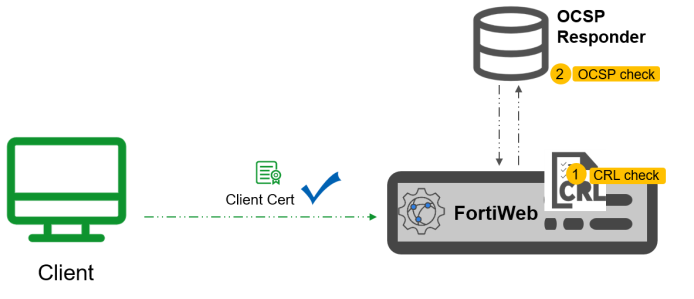
The OCSP Responder configuration in FortiWeb involves two steps:
- Import an OCSP signing certificate.
- Configure OCSP Responder information for FortiWeb to request client certificate status from the specified OCSP URL.
Syntax
config system certificate ocsp-responder
edit <name>
set ocsp-signing-certs-grp <datasource>
set caching {enable | disable}
set comment <string>
next
end